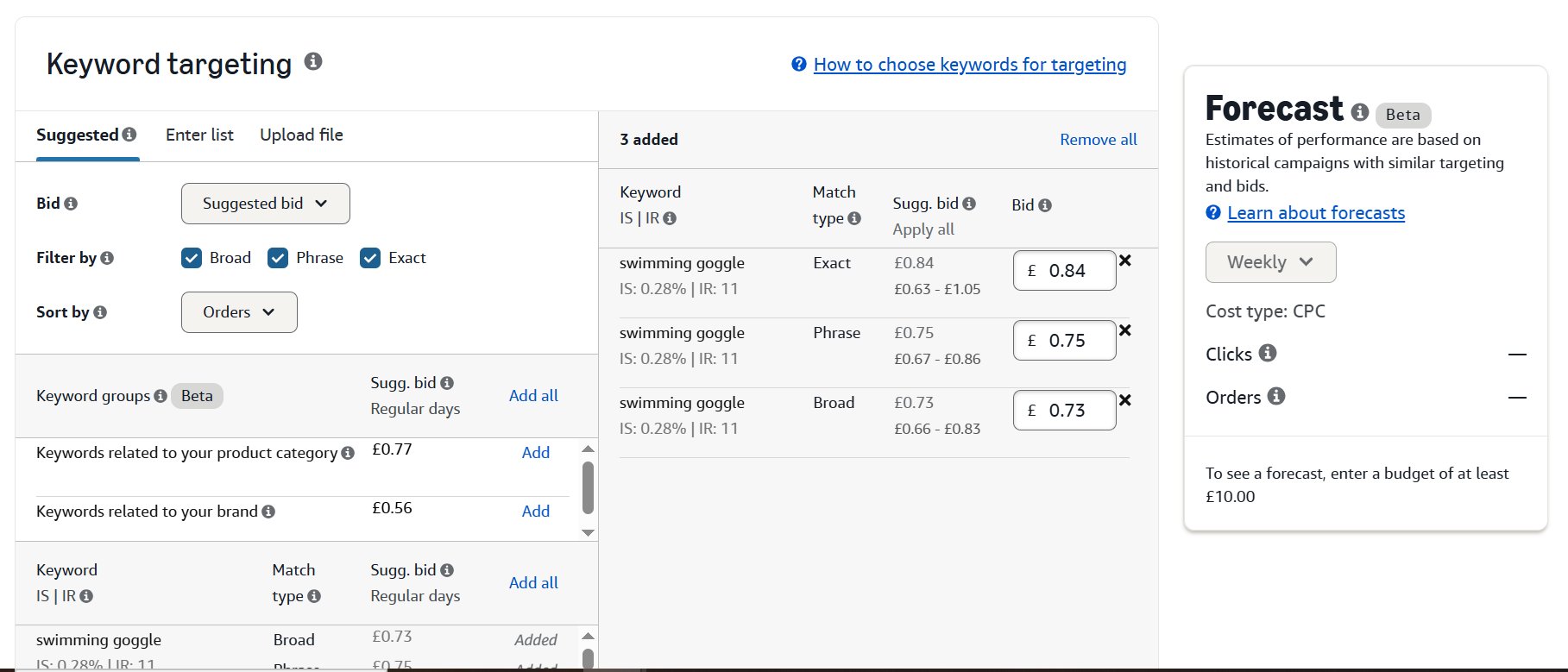
When you create a Sponsored Products or Sponsored Brands campaign with manual keyword targeting, Amazon asks you to assign a match type to each keyword. That match type acts as a filter. It tells Amazon’s algorithm which customer search queries should trigger your ad and which should not.
Amazon currently offers three keyword match types: broad match (with an optional broad match modifier), phrase match, and exact match. Each one gives you a different level of control over when your ads appear. There is also auto-targeting, which removes keyword selection entirely and lets Amazon’s algorithm decide. But auto campaigns are not a match type. They are a targeting type.
Keywords vs. Search Terms
Your keyword is what you bid on inside Campaign Manager. The search term is what an actual shopper types into Amazon’s search bar. Match types sit between these two, acting as a gate. A broad match keyword like “yoga mat” might trigger your ad for the search term “thick blue yoga mat for home.” An exact match keyword “yoga mat” would only trigger for “yoga mat”.
Match Type Hierarchy
Think of the three match types as concentric circles. Broad match is the widest circle, catching the most search queries. Phrase match is a medium circle, requiring your keyword to appear in order within a longer query. Exact match is the tightest circle, only triggering for the keyword itself or extremely close variations. Wider reach brings more impressions but lower relevance. Tighter reach brings fewer impressions but higher conversion rates.
Algorithm Update on Match Types
Amazon updated its match type logic significantly over the past two years. Broad match now includes more aggressive synonym matching and can trigger for words that are semantically related but not contained in your keyword at all. Phrase match now allows words to appear between the terms of your phrase keyword, which it did not do before 2022. Exact match allows close variants including plural forms, misspellings, and some abbreviations.
Broad Match Explained
Broad match gives Amazon the most freedom to decide which search terms trigger your ad. When you set a keyword to broad match, your ad can appear for searches that contain your keyword terms in any order, plus synonyms, related terms, and variations that Amazon’s algorithm considers relevant.
If you bid on “stainless steel water bottle” with broad match, your ad could show for “insulated metal bottle for water,” “steel flask for gym,” or even “BPA free drinking bottle” if Amazon determines semantic relevance. The algorithm has gotten more aggressive with these associations since Amazon’s 2024 broad match expansion update.
When Broad Match Works Best
Broad match is best for keyword research during a product launch. In the early stages, you often do not know every term shoppers use to find products like yours, and broad match campaigns paired with regular search term report analysis will surface new keywords
Broad match also comes with lower CPCs compared to phrase and exact match, which makes it a cost-efficient way to stay active across your most important keywords. With Amazon’s updated broad match logic, the algorithm has gotten significantly better at filtering out irrelevant queries on its own, so the concern of broad match attracting completely unrelated traffic is far less of an issue than it used to be.
Keep well-structured broad match campaigns running on your top 10-15 keywords. Sellers who maintain active broad match campaigns on their primary keywords alongside phrase and exact match consistently report 20% to 30% lower ACoS compared to running exact match alone, because the lower CPCs from broad match bring the blended average down.
As you can see in the screenshot below, the broad match keyword “swimming goggles” on broad match is triggering a wide range of related searches including “huub swimming goggles,” “mens swimming goggles,” and even the single word “goggles.”

Broad Match Modifier Explained
Broad match modifier (BMM) adds a layer of control on top of standard broad match. By placing a “+” symbol before specific words in your keyword, you tell Amazon that those particular words must appear in the customer’s search query for your ad to show. The remaining words without the “+” symbol still follow standard broad match behavior, allowing synonyms and related terms.
For example, if your keyword is “+organic dog treats,” Amazon must include the word “organic” in the matched search query. The search term could be “organic puppy treats,” “best organic dog snacks,” or “healthy organic treats for dogs.” But it would not match to “natural dog treats” because “organic” is required and “natural” is not the same word, even though standard broad match might consider them related.
How to Use the “+” Symbol
You can place the “+” symbol before one word, multiple words, or every word in your keyword. Each “+” locks that individual word as a required term. If your keyword is “+stainless +steel water bottle,” both “stainless” and “steel” must appear in the search query, but “water” and “bottle” can be replaced by synonyms or related terms. If you place “+” before every word like “+stainless +steel +water +bottle,” you effectively create a tight broad match where all four words are mandatory but order and additional words are flexible.
BMM vs. Phrase Match
The difference between BMM and phrase match comes down to word order. Phrase match requires your keyword terms to appear in the order you specified (though other words can appear between them). BMM requires the modified words to appear but in any order. A BMM keyword “+leather +wallet” would match “wallet made from leather,” which phrase match would not, because “wallet” appears before “leather.”
When to Choose BMM Over Standard Broad
Use BMM instead of standard broad match when you have already identified that certain words in your keyword are non-negotiable for relevance. If you sell “ceramic coffee mugs” and you know that “ceramic” is the differentiator (because you do not sell glass or metal mugs), running “+ceramic coffee mugs” prevents Amazon from matching your ad to “glass coffee cup” or “metal travel mug.” Standard broad match would allow those associations.
Phrase Match Explained
Phrase match is more restrictive than broad match but less restrictive than exact match. On Amazon, your ad can show when a shopper’s search contains all parts of your keyword in the same order. Extra words can appear before or after the phrase, and plural forms can still match. For example, if your keyword is “wireless earbuds,” your ad may appear for searches like “best wireless earbuds” or “wireless earbuds for gym,” but not “earbuds wireless.
2. The 2026 Phrase Match Update
Phrase match for Sponsored Brands now uses meaning-based matching, where intent, not just word order, can trigger your ad. This makes phrase match even more powerful as a mid-funnel targeting tool. This is a meaningful shift. Previously, phrase match was strictly order-dependent. Now, within Sponsored Brands, Amazon’s algorithm considers implied meaning, which broadens coverage while maintaining stronger relevance than standard broad match.
3. When to Use It
14 Phrase match is a good choice for those who want to control their PPC campaigns with some level of flexibility. It lets you anticipate what users might type when searching for your product, removing unrelated keywords and focusing on the ones that matter most. It also lets you capture essential details that customers may search for, whether that is material, color, size, or anything else.
Practically, phrase match works well for scaling keywords that broad match discovered. Once a search term consistently converts in your broad or auto campaign, promoting it to phrase match gives you tighter control without sacrificing reach entirely.
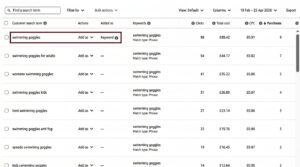
As shown in the image below, the phrase match keyword “swimming goggles” is capturing relevant variations such as “swimming goggles for adults,” “womens swimming goggles,” and “swimming goggles kids”, all searches that contain the core phrase within them.
Exact Match Explained
Exact match is the most restrictive match type. Your ad only triggers when a customer’s search term matches your keyword precisely or is a close variant. Close variants on Amazon include plural and singular forms, minor misspellings, abbreviations, and accents. Amazon does not officially count reordered words as close variants for exact match, though some sellers have reported occasional reordering in search term reports.
If your exact match keyword is “bamboo cutting board,” your ad will show for “bamboo cutting board,” “bamboo cutting boards,” and potentially “bamboo cuttin board” (misspelling). It will not show for “large bamboo cutting board” or “cutting board bamboo wood.”
Highest Conversion, Lowest Volume
Exact match keywords consistently deliver the highest conversion rates of any match type because every impression goes to a shopper whose query directly matches your targeted term. The limitation is volume. You only get impressions from that one specific query and its close variants. For competitive niches, a single exact match keyword might deliver hundreds of clicks per day. For long-tail keywords, it might deliver ten.
When to Use Exact Match
Run exact match on keywords where you already know the conversion rate and profitability. These are terms you have validated through broad, BMM, or phrase match campaigns using the search term report. Exact match is where you concentrate budget on proven winners. Allocate 50% to 60% of their total PPC budget toward exact match campaigns on keywords with a history of profitable conversions.
Exact Match Bid Competition
Because exact match keywords are so targeted, competition on high-volume exact match terms can be intense. Top-of-search placement bids for competitive exact match keywords in categories like supplements, electronics accessories, and beauty often exceed $5.00 per click. The average cost per click across all Amazon Sponsored Products campaigns is approximately $1.14 in 2026, but exact match on competitive keywords can run three to five times higher than that average.
Close Variant Expansion Risk
Amazon has gradually expanded what counts as a “close variant” over the past two years. Some sellers have noticed exact match keywords triggering for search terms that feel closer to phrase match territory. Monitor your search term report for exact match campaigns on regular basis. If Amazon is matching your exact keyword to queries that are not truly close variants, add those as negative exact match keywords immediately.
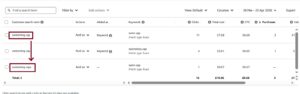
As you can see in the screenshot below, for the exact match keyword “swimming cap,” the search term “swimming caps” is also being triggered, showing that Amazon’s exact match includes close variants such as plurals.
Negative Match Types
Negative keywords are a targeting control layer that sits on top of your keyword match types. They explicitly prevent your ads from appearing for search queries that are irrelevant, low-intent, or misaligned with your product. Without a negative keyword strategy in place, broad and phrase match campaigns will continuously pull in traffic that clicks but does not convert, inflating spend and distorting ACoS data across the account.
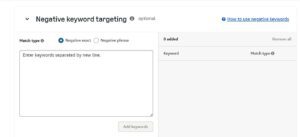
Amazon offers two negative match types: negative exact and negative phrase.
1. Negative Exact
Negative exact suppresses your ad only when a shopper’s search query matches your excluded term precisely, same words, same order, with no additional terms present. Adding “cheap protein powder” as a negative exact blocks that specific query. A search for “cheap protein powder for women” remains eligible because the query does not match the excluded term exactly.
Apply negative exact at the ad group level for precise, query-specific exclusions. This is the correct approach when a single high-volume, non-converting term needs to be removed from one ad group without affecting performance elsewhere in the campaign.
2. Negative Phrase
Negative phrase suppresses your ad for any search query that contains your excluded phrase in the correct word order, regardless of what appears before or after it. Adding “cheap” as a negative phrase blocks “buy cheap protein powder,” “cheap protein powder for women,” and “cheap protein powder in bulk” simultaneously.
Apply negative phrase at the campaign level when an entire category of queries, a price-signal term, or an irrelevant audience type needs to be excluded across all ad groups at once.
3. Campaign Level vs Ad Group Level
The placement of a negative keyword determines its scope and should be a deliberate decision, not a default.
- Campaign-level negatives apply across every ad group within that campaign. Use these for broad irrelevant categories, unintended competitor brand names, or intent signals that are consistently misaligned with your product.
- Ad group-level negatives apply only within a specific ad group. Use these when one ad group covers a specific variation or subcategory and requires isolated filtering without affecting the rest of the campaign.
4. Cross-Negative Structure
Negative keywords also function as a campaign isolation tool within a multi-match-type account structure. When the same keyword runs across separate broad, phrase, and exact match campaigns simultaneously, Amazon can enter all three into the same auction for a single search query.
A cross-negative structure resolves this. Add phrase match keywords as negative exact in your broad match campaign. Add exact match keywords as negative phrase in your phrase match campaign. This routes each search query to the single most targeted campaign in the hierarchy.
Accounts running a consistent cross-negative structure typically see CPC reductions of 15 to 25% on overlapping keyword sets, purely from removing internal competition.
Campaign Structure by Match Type
How you organize match types into campaigns and ad groups directly affects your ability to control bids, read data cleanly, and scale spending on what works.
Single Match Type Campaigns
Always run one campaign per match type per product or product group. You would have a “Product A – Broad” campaign, a “Product A – BMM” campaign, a “Product A – Phrase” campaign, and a “Product A – Exact” campaign. This gives you independent budget control, independent bid adjustments, and clean performance data for each match type without cross-contamination.
Keyword Migration Into Exact Match
Auto, broad, and phrase campaigns all run simultaneously. Auto and broad are the primary discovery sources, surfacing converting search terms from real shopper data.
When a search term shows consistent conversions across these campaigns, it gets pulled and added as an exact match keyword. From that point, the keyword needs time to build traction in exact. Some keywords perform immediately after migration. Others take weeks. That timeline is not predictable.
You only add negative exact targeting to auto, broad, or phrase once the keyword is actively performing in exact match. If exact match is not delivering yet, pulling traffic from the broader campaigns removes coverage you still need.
Not every keyword that converts in broad, phrase, or auto will replicate that performance in exact match. The search context changes, the query pool narrows, and shopper intent does not always behave the same way under exact restrictions. Some keywords stay in broad or phrase permanently.
Budget Allocation Across Match Types
A general starting allocation for a product with an established keyword list is 15% of ad budget to broad match and BMM combined (discovery), 25% to phrase match (validation), and 60% to exact match (organic ranking).
As you identify more profitable exact match terms, the percentage flowing to exact should increase. Mature campaigns from sellers in competitive categories often run 65% to 70% of budget on exact match keywords alone.
Search Term Reports and Optimization
The search term report is the single most important data source for match type optimization. It shows you the actual customer search queries that triggered your ads, along with impressions, clicks, spend, orders, and sales for each query.
How to Access the Report
In Amazon Campaign Manager, go to Measurement and Reporting, then select Search Term Report under Sponsored Products or Sponsored Brands. You can generate reports for custom date ranges. Weekly or biweekly pulls give you enough data to make decisions without waiting so long that you waste significant budget on underperforming terms.
Mining for Exact Match Graduates
Filter the search term report for queries with ACoS below your target with 5+ orders. These are your promotion candidates. Add them as exact match keywords in your exact match campaign with bids set to capture top-of-search placement. Simultaneously negate them in the broad, BMM, or phrase campaign where they were originally discovered.
Identifying Negative Keyword Candidates
Filter for queries with more than ten clicks and zero orders. Calculate the spend on each. Any term where you have spent more than 50% of your product price and no orders is costing you money. Add it as a negative keyword using the appropriate negative match type. If only the exact term is irrelevant, use negative exact. If any query containing that phrase is irrelevant, use negative phrase.
Search Term Isolation
Search term isolation is the practice of making sure each search term only triggers ads through one match type and one campaign. Without isolation, the same search term might match to your broad, BMM, phrase, and exact campaigns simultaneously, and Amazon decides which campaign wins the auction. That removes your control over which bid and budget apply. Systematic negative keyword layering across campaigns achieves search term isolation.
Common Match Type Mistakes
Certain errors show up repeatedly in Amazon PPC accounts, and most of them relate to match type mismanagement. Correcting these issues often produces immediate ACoS improvements.
Running Only Exact Match
Sellers who only run exact match miss search terms they have not thought of. Amazon shoppers use an enormous variety of search queries. On average, 30% to 40% of search queries in any given category are terms that appear fewer than three times per month. Exact match alone cannot capture this long-tail demand.
Ignoring Negative Keywords
Failing to add negative keywords is the most expensive match type mistake. A broad match campaign without negatives will inevitably match to dozens of irrelevant queries. Without regular negative keyword additions, these irrelevant matches accumulate spend week after week. Sellers who implement weekly negative keyword updates from their search term report typically reduce wasted spend by 15% to 25% within the first month.
Duplicate Keywords Without Negation
Running “wireless earbuds” on broad, BMM, phrase, and exact match across four campaigns is a valid strategy, but only if you negate appropriately across campaigns. Without negation, you compete against yourself in Amazon’s auction. Amazon does not charge you twice, but it decides which campaign serves the ad, and it may not choose the one with the optimal bid.
Identical Bids Across Match Types
Broad, BMM, phrase, and exact match have different conversion rates and different levels of traffic quality. Bidding $2.00 on all of them ignores this reality. Your exact match keywords deserve higher bids because they convert better. Your broad match keywords should carry lower bids to compensate for waste. Flat bidding across match types results in overspending on broad and underspending on exact.
Frequently Asked Questions
What is the difference between broad match and phrase match on Amazon?
Broad match allows your keyword terms to appear in any order in the search query and includes synonyms and related terms. Phrase match requires your keyword terms to appear in the order you specified, though Amazon now allows other words between them. Broad match gives more reach with less relevance. Phrase match gives moderate reach with better relevance.
How do broad match modifiers work on Amazon?
Place a “+” symbol before any word in your broad match keyword to require that specific word in the customer’s search query. Words without the “+” symbol still follow standard broad match rules, allowing synonyms and reordering. This gives you more control than standard broad match without the word order restriction of phrase match.
Can I use broad match modifiers with Sponsored Brands?
Yes. Broad match modifiers using the “+” symbol are available in both Sponsored Products and Sponsored Brands manual keyword targeting campaigns.
How many negative keywords should I add per campaign?
There is no fixed number. Add negative keywords based on your search term report data. Most active campaigns accumulate between 50 and 200 negative keywords over their lifetime. High-spend broad match campaigns may need 300 or more negatives to stay efficient.
Should I run all match types for every keyword?
Not necessarily. Run broad match or BMM on keywords where you want to discover related search terms. Run phrase match on keywords where you know the word order matters. Run exact match only on keywords with proven conversion history. Some keywords do not justify four separate match type entries if their search volume is too low.
What match types work with Sponsored Display campaigns?
Sponsored Display does not use keyword match types. It uses product targeting (ASIN or category) and audience targeting (views, purchases, interests). Match types only apply to Sponsored Products and Sponsored Brands campaigns.
How often should I review my search term report?
Review search term reports every seven to fourteen days for active campaigns. High-spend campaigns with daily budgets above $50 benefit from weekly reviews. Lower-spend campaigns can be reviewed biweekly without significant waste accumulation.
Is there a limit to how many keywords I can add per campaign?
Amazon allows up to 1,000 keywords per ad group. You can have multiple ad groups per campaign, but keeping keyword counts manageable (5 to 10 per ad group) with one ad group per campaign makes reporting and optimization practical.