Every Amazon product page has two sides. There’s the visible listing buyers scroll through. Then there’s the backend, where sellers put keywords that never appear on front end of the listing but directly influence search rankings. Amazon’s search algorithm reads them when deciding which products match a buyer’s query.
Think of backend search terms as bonus indexing opportunities. Backend fields exist to capture every relevant search term that couldn’t fit naturally into visible content.
Where Backend Keywords Live in Seller Central
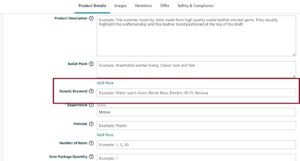
Amazon stores backend keywords in the “Generic keyword” field under “Product Details” tab. To access it, go to Inventory > Manage All Inventory > Edit on your product > Product Details tab. The Generic keyword field accepts up to 500 bytes of text.
The byte limit trips up many sellers. Bytes aren’t the same as characters. Standard letters and numbers use 1 byte each. Accented characters like é or ñ use 2 bytes. Some Asian characters use 3 bytes. A seller targeting international buyers with accented terms needs to count carefully.
How Amazon’s Algorithm Processes Backend Terms
Amazon’s search system treats backend keywords as part of your listing’s total indexing profile. When the algorithm scans a search query, it checks your title, bullet points, description, A+ content, and backend fields for matching terms.
Backend keywords don’t carry more weight than title keywords. A term in your title will rank stronger than the same term in your backend. But backend keywords let you capture searches for terms you couldn’t include naturally elsewhere.
Backend Keywords vs Search Terms
Some sellers confuse backend keywords with all the search terms their product indexes for. Backend keywords are one input. Amazon also indexes words from your title, bullets, description, brand name, and even some A+ content text.
When sellers ask “what search terms am I ranking for,” they’re asking about indexing. When they ask about backend keywords specifically, they’re asking about that one 500-byte field in Seller Central. The distinction matters because optimization strategies differ.
Why Backend Keywords Still Matter in 2026
Amazon’s algorithm has evolved. Some sellers claim backend keywords lost importance as Amazon got better at reading visible listing content. The data says otherwise.
Current Ranking Impact
Backend keywords continue influencing search placement in 2026. Sellers adding relevant terms to empty backend fields report indexing for those terms within 24-48 hours. Removing terms typically causes deindexing within the same timeframe.
A 2024 study by Jungle Scout across 3,000 products found that listings with optimized backend keywords indexed for 40% more search terms than listings relying on title and bullets alone. That gap persists because visible content can only hold so many keywords naturally.
Capturing Long-Tail Search Traffic
The primary value of backend keywords is long-tail capture. Your title needs to be readable, so you include your most important keywords there. Your bullets need to convince buyers, so you focus on benefits and features.
Backend fields let you add every reasonable variation, misspelling, and alternate phrasing without cluttering visible content. “Earbuds” in your title but “ear buds” “ear-buds” and “earphones” in your backend captures all those searches.
Competitive Edge Through Completeness
Most Amazon sellers handle backend keywords poorly. They leave fields empty, stuff them with repeated phrases, or paste in content that violates Amazon’s guidelines. Sellers who optimize properly gain an edge simply by doing what competitors skip.
In competitive categories like supplements or electronics, that edge matters. If two products have similar titles and bullets, the one indexing for more relevant search terms will appear in more searches.
Amazon’s Official Backend Keyword Rules
Amazon publishes specific guidelines for backend keywords. Violating them can prevent indexing or trigger listing suppression. Understanding these rules separates informed optimization from guesswork.
The 500-Byte Limit
Amazon caps Search Terms at 500 bytes and you cannot add more search terms beyond this limit.
Sellers used to have 250 bytes. Amazon reduced it to 249 in late 2018, then expanded the limit to 500 bytes in 2025. Some category-specific guidance may still reference older limits, but 500 is the enforced limit across all marketplaces.
The practical approach is targeting around 450-480 bytes. This leaves buffer room for byte-counting errors and future limit changes.
Prohibited Content in Backend Fields
Amazon explicitly bans certain content types from backend keywords:
- Brand names (your own or competitors)
- ASINs or product identifiers
- Promotional phrases like “best seller” or “on sale”
- Subjective claims like “amazing” or “highest quality”
- Temporary statements like “new” or “available now”
- Offensive or vulgar terms
Adding competitor brand names to your backend used to be common practice. Amazon now actively filters and penalizes this. Products caught using competitor brands in backend fields face listing suppression and account warnings.
Formatting Requirements
Amazon recommends separating keywords with spaces, not commas or semicolons. The algorithm treats punctuation as clutter that wastes bytes without adding value.
Singular versus plural doesn’t matter. Amazon’s algorithm treats “shoe” and “shoes” as functionally equivalent. Including both wastes space.
Capitalization doesn’t affect indexing. “RUNNING SHOES” and “running shoes” index identically. Lowercase everything to maintain byte efficiency.
What Gets Automatically Excluded
Amazon’s indexing system automatically strips certain elements:
- Stop words (the, a, an, for, by, with, etc.)
- Punctuation
- Duplicate words already in your listing
If your title contains “wireless bluetooth earbuds,” adding those exact words to your backend provides zero additional indexing. The algorithm already reads them from your title.
How to Find Effective Backend Keywords
Keyword research for backend fields follows different principles than title or PPC research. You’re looking for terms that matter but couldn’t fit naturally elsewhere.
Helium 10’s Listing Builder helps you transfer your master keyword list into your live Amazon listing while tracking which terms are already used in the title, bullets, and description.
It’s an efficient way to fill your backend search terms and increase the number of Amazon search terms your listing and automatic PPC campaigns can match without affecting visible listing copy.
Here is step by step process to find the backend search terms for your product listing.
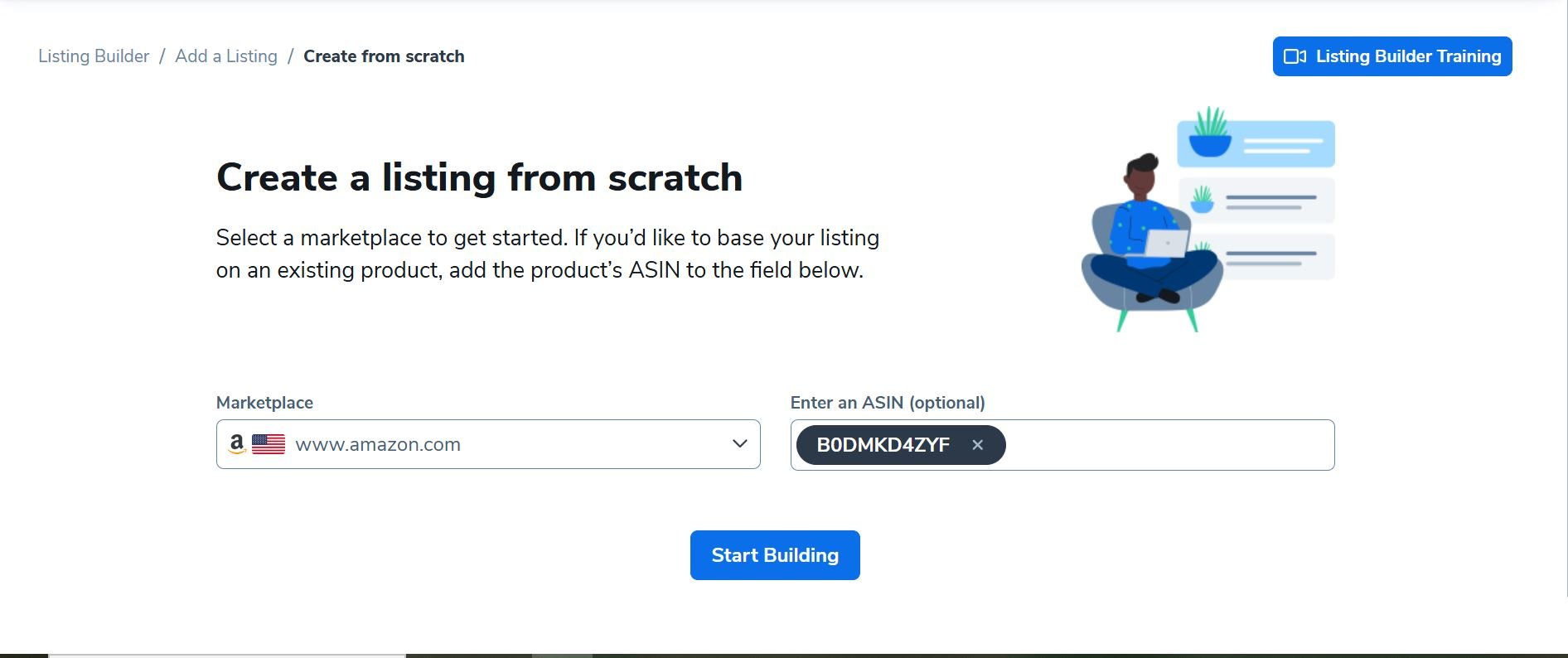
Start with ASIN and Marketplace
Enter the ASIN and select the marketplace where you want to optimize your listing.
If you don’t have an existing ASIN, just choose the marketplace and click Start Building to create a new listing setup.
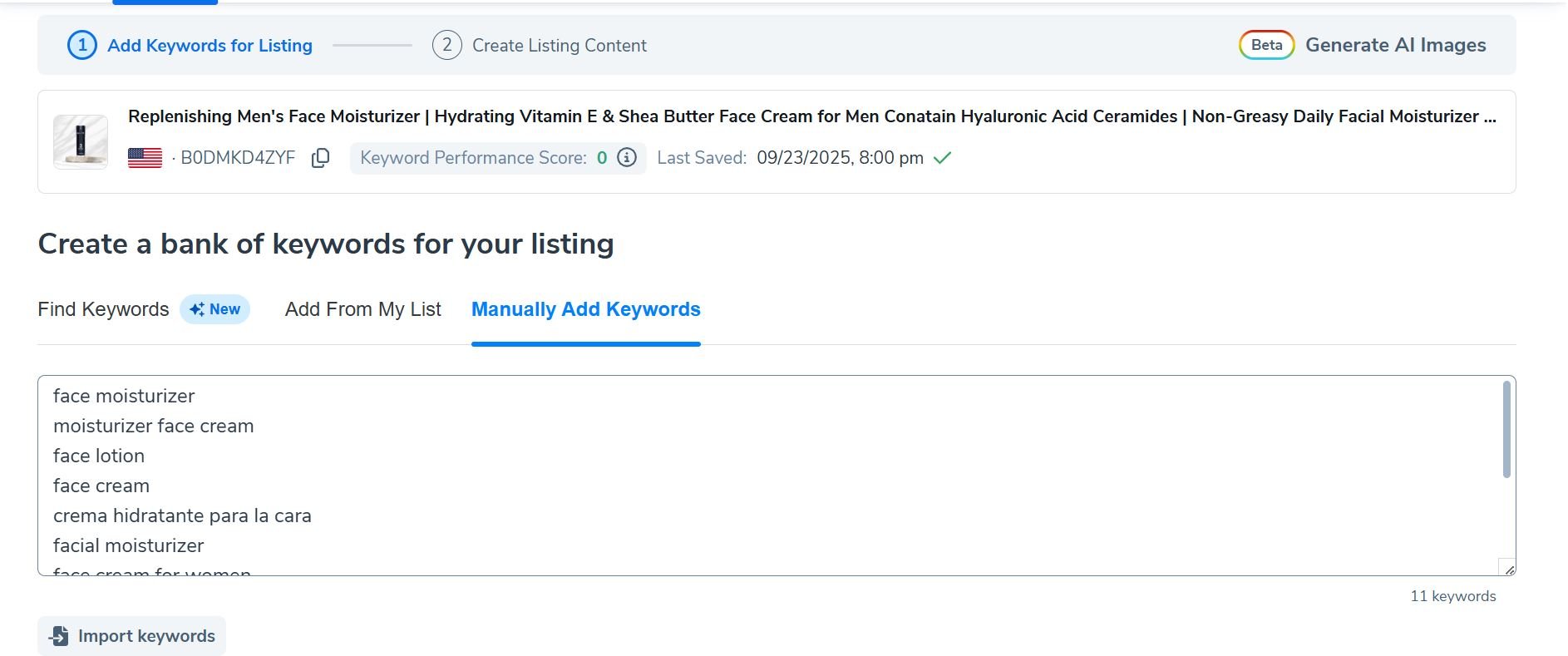
Import Your Master Keyword List
Perform a proper Amazon keyword research and pull keywords directly from Magnet or Cerebro into Listing Builder so everything stays in one central source.
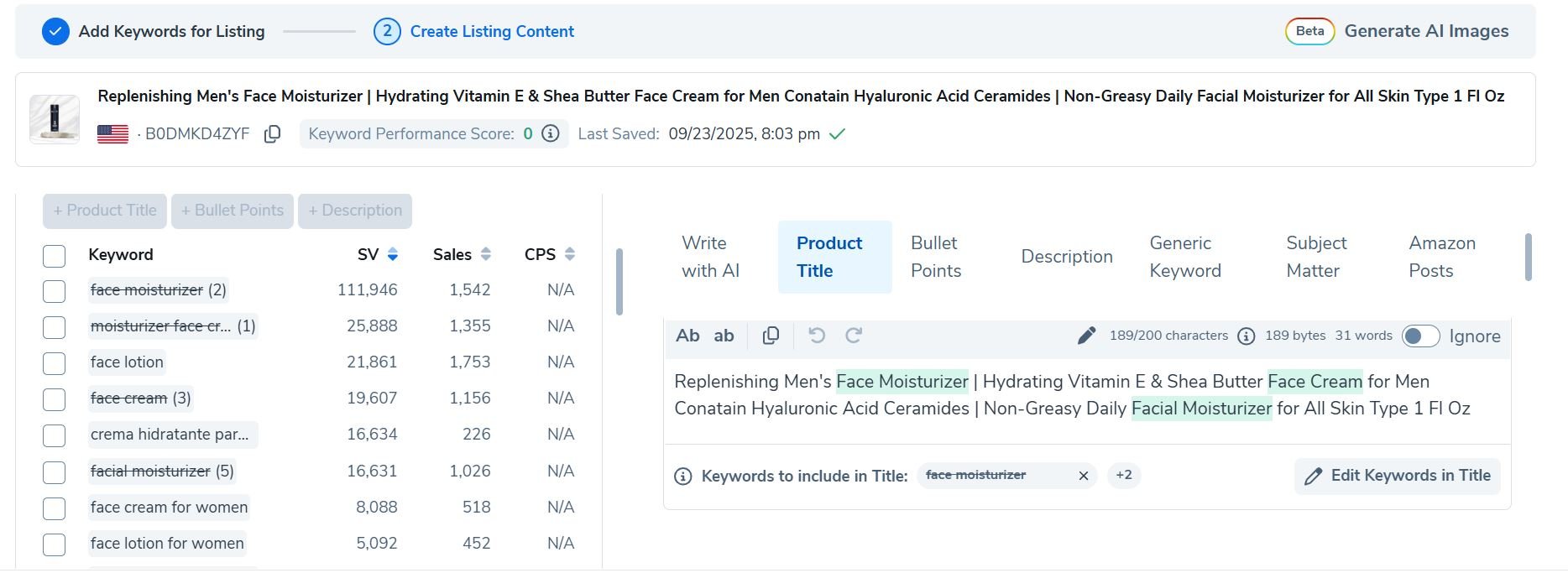
Write or Optimize the Front-End Copy First
Start with your title, bullets, and description. Listing Builder automatically highlights keywords already used so you don’t repeat them.
Fill the Search Terms Field (Generic Keyword)
After you are done with front end copy, use the backend space (500 bytes) for words that didn’t fit naturally in front-end content, such as:
- Misspellings and plurals
- Synonyms and abbreviations
- Regional or foreign language terms
- Long-tail phrases with buying intent
The interface gives you a complete view, showing which keywords from your list have been used in the title, bullets, description, and the generic keyword field.
Helium10 listing builder immediately shows you where your keyword gaps are, so you can strategically use every last byte of your amazon generic keywords field to plug them.
From there, you can copy your optimized listing along with backend search terms and paste it straight into Seller Central.
Structuring Your Backend Keywords for Maximum Impact
Finding keywords is half the work. Structuring them properly within the 500-byte limit determines whether they actually improve your indexing.
Prioritization Framework
Not all keywords deserve backend space. Your backend should contain terms that:
- Don’t appear in your title, bullets, or description
- Have search volume (people actually search them)
- Relate genuinely to your product
- Couldn’t fit naturally in visible content
A keyword already in your bullet points provides zero additional value in your backend. Amazon already indexed it from the visible content.
The highest-value backend keywords are relevant long-tail phrases that would sound awkward in customer-facing copy. “Headphones for mowing lawn” might not fit your title but could capture searches from people wanting noise protection during yardwork.
Space-Efficient Formatting
Every byte counts in a 500-byte field. Efficient formatting maximizes keyword inclusion:
Skip commas entirely. Separate terms with single spaces. “Running shoes athletic sneakers” not “running, shoes, athletic, sneakers.”
Use root words over variations. “Run” covers running, runs, runner in Amazon’s algorithm. Including all variations wastes bytes.
Avoid repeating words across phrases. “Running shoes running sneakers running footwear” wastes “running” twice. “Running shoes sneakers footwear” captures the same searches more efficiently.
Phrase Order Considerations
Amazon indexes keywords regardless of order. “Leather wallet brown” indexes the same as “brown leather wallet.” But exact phrase matches may receive slight preference in some ranking scenarios.
Place your most important multi-word phrases early in the backend field. If you believe “genuine leather wallet” is a high-value phrase, put it near the beginning rather than splitting those words across your backend.
Byte truncation happens at the end. Critical keywords should appear early to ensure they’re captured even if you miscalculate the limit.
What to Exclude Despite Relevance
Some keywords seem relevant but should stay out of backend fields:
Terms already indexed from visible content waste space. Run an indexing check before adding any keyword to confirm you don’t already rank for it.
Extremely broad terms rarely help. “Product” or “item” might technically relate to your listing but don’t capture qualified search traffic.
Terms with misleading implications violate Amazon policies. If your product is a wallet that happens to hold phones, adding “phone case” could trigger policy review and misrepresent your product.
Testing Whether Your Backend Keywords Work
Adding keywords accomplishes nothing if Amazon doesn’t index them. Verification separates assumption from certainty.
Manual Indexing Checks
The most reliable indexing test uses Amazon’s search bar directly. Search your ASIN plus the keyword you’re testing. “B08XYZ12345 wireless earbuds” returns your product if you’re indexed for “wireless earbuds.”
This method works for any term. Run it for every keyword you add to confirm Amazon’s algorithm registered the addition. Lack of appearance means the keyword isn’t indexed, either because it didn’t save properly or Amazon filtered it out.
Indexing checks should happen 24-48 hours after changes. Amazon’s system needs time to reprocess listing data.
Using Seller Tools for Bulk Verification
Manual checking works for a handful of keywords. Testing 200 terms manually takes hours. Tools like Helium 10’s Index Checker or Jungle Scout automate bulk verification.
These tools run the same ASIN plus keyword search Amazon uses but process hundreds of terms in minutes. Monthly verification catches deindexing before it damages sales.
Deindexing happens. Amazon’s algorithm periodically reevaluates listings. Keywords that indexed initially can drop off later if Amazon determines they’re not relevant based on sales data and buyer behavior.
Tracking Ranking Impact Over Time
Indexing and ranking differ. Indexing means appearing somewhere in search results. Ranking means appearing on page one or two where shoppers actually look.
Keyword tracking tools monitor your position for specific terms over weeks and months. Position improvements after backend changes suggest those keywords contributed to ranking. No movement suggests other factors limited impact.
Attribution is imperfect because many variables affect ranking simultaneously. A product might gain ranking from improved backend keywords, recent sales velocity, better conversion rates, or competitor stockouts. Backend optimization is one input among many.
Advanced Backend Keyword Techniques
Beyond basic optimization, use sophisticated approaches to maximize backend value.
Seasonal and Trending Term Rotation
Backend keywords can change. Sellers in seasonal categories rotate terms to match shopping patterns. A gift seller might add “Father’s Day gift” in late May, “Christmas present” in November, and “birthday gift for him” year-round.
Trending terms appear suddenly and fade. Products that relate to viral moments, new movies, or emerging trends can capture that traffic temporarily through backend updates.
The challenge is timing. Adding trending terms too late misses the wave. Removing them after relevance fades prevents wasting space on dead searches.
Regional and Dialect Variations
Sellers on international marketplaces face language complexity. British, Australian, and American English use different terms for identical items. “Trainers” versus “sneakers.” “Nappies” versus “diapers.”
Backend fields should include regional variations even when selling primarily in one marketplace. International shoppers search on US Amazon. American expats search on UK Amazon. Capturing these cross-regional searches expands your potential audience.
Spanish-language keywords matter for US sellers. Amazon.com serves Spanish-speaking shoppers in the United States. Backend inclusion of Spanish translations captures this significant buyer segment without cluttering English-language visible content.
Use-Case and Occasion Targeting
Products serve purposes. A kitchen knife might be used for cooking, camping, or woodworking. Each use-case implies different keywords.
Backend fields let you capture use-case variations that would clutter bullet points. “Camping knife,” “outdoor cooking,” “bushcraft tool,” and “survival gear” might all describe the same product for different buyers.
Occasion keywords expand reach further. “Gift for chef,” “housewarming present,” “wedding registry,” or “culinary school supplies” capture shoppers by occasion rather than product type.
Common Backend Keyword Mistakes
Certain errors appear repeatedly across seller accounts. Avoiding them protects your listing and saves optimization time.
Stuffing Competitor Brand Names
Adding competitor brands to backend fields seems logical. People searching “Nike shoes” might accept alternatives. But Amazon prohibits this practice and actively enforces the policy.
Violations trigger automated detection. Products using competitor brands in backend fields face listing suppression, account warnings, and potential suspension for repeat offenders. The risk vastly exceeds any potential benefit.
Amazon’s brand protection systems have improved significantly since 2022. Tactics that worked years ago now trigger enforcement within days or weeks.
Repeating Title and Bullet Keywords
Every word in your title already indexes. Every word in your bullets already indexes. Adding these same words to your backend wastes precious bytes on redundancy.
This mistake stems from misunderstanding how indexing works. Sellers worry that important keywords need reinforcement. Amazon’s algorithm doesn’t work that way. A word in your title or a word in your backend indexes equally well. You don’t need both.
Before finalizing backend keywords, check each term against your visible content. Remove anything that already appears elsewhere.
Using Punctuation and Special Characters
Commas, semicolons, colons, and hyphens waste bytes. Amazon strips them during processing anyway. A backend reading “shoes, running, athletic” performs identically to “shoes running athletic” while using more bytes.
Quotation marks, ampersands, and other special characters potentially cause processing errors. Stick to letters, numbers, and single spaces between words.
Some sellers add plus signs or pipe characters thinking they create phrase groupings. They don’t. Amazon ignores them. Simplicity works better than creative formatting.
Including Subjective or Promotional Language
“Best quality” doesn’t index usefully. “Amazing product” wastes space on non-searchable terms. Amazon explicitly prohibits promotional language in backend fields, and even if allowed, nobody searches these phrases when shopping.
Every word in your 500 bytes should represent an actual search query. Descriptive adjectives that buyers don’t search provide zero value. Delete them and add terms people actually type into Amazon’s search bar.
Ignoring the Byte Count
Character count and byte count differ. Sellers assuming 500 characters sometimes exceed the limit, causing truncation of their most carefully chosen keywords.
A backend field reading “Café style coffee maker brewing” contains special characters that consume extra bytes. The “é” uses 2 bytes instead of 1. A field appearing short on characters might actually hit the limit.
Use byte-counting tools rather than character counters. Several free options exist online. Paste your backend content and verify the actual byte total before saving.
Frequently Asked Questions
How do I find the backend keywords field in Seller Central?
Navigate to Inventory, then Manage All Inventory, then click Edit on your product. Select the Keywords tab. The Search Terms field is where backend keywords go. Amazon renamed tabs occasionally, so look for anything labeled Keywords or Search Terms.
Can I see what backend keywords competitors are using?
Not directly. Backend keywords are hidden from public view. However, reverse ASIN tools from Helium 10, Jungle Scout, and similar providers estimate competitor keyword indexing based on search position data. These estimates reveal what terms competitors likely include in their backends.
How long does it take for backend keyword changes to index?
Most changes index within 24-48 hours. Some sellers report faster indexing within hours. Complex or suspicious changes might take longer as Amazon’s system reviews them. Run indexing checks two days after changes to confirm they took effect.
Should I include misspellings in my backend keywords?
Yes, for common misspellings that receive search volume. Amazon catches many typos through autocorrect, but not all. “Recieve,” “seperate,” and similar frequently misspelled words still get searched directly. Including them captures traffic other sellers miss.
Do backend keywords affect my ranking directly or just indexing?
Primarily indexing. Backend keywords determine what searches your product appears for. Your actual position within those search results depends on sales velocity, conversion rate, reviews, relevance, and numerous other ranking factors. Backend optimization gets you into the race; other metrics determine your finishing position.
Can I use backend keywords in languages other than English on Amazon.com?
Yes. Spanish backend keywords on Amazon.com capture Spanish-speaking US shoppers. Amazon’s search algorithm handles multiple languages. Include translations of your main keywords when relevant to your product and target audience.
How often should I update backend keywords?
Review quarterly at minimum. Update immediately when you identify new relevant keywords from PPC data, competitor research, or customer feedback. Seasonal products need updates before each relevant season. Trending products need updates when relevant trends emerge.
Will adding irrelevant keywords to get more traffic hurt my listing?
Yes. Amazon measures relevance through buyer behavior. If shoppers click your listing from certain searches but immediately leave or fail to purchase, Amazon interprets this as poor relevance. Your ranking for that term drops, and excessive irrelevance signals can affect your listing’s overall search standing.
Are there separate backend keyword fields for different variations of my product?
Each child ASIN in a variation family has its own backend field. A shirt listing with multiple colors and sizes has separate backend space for each color and size combination. This lets you add color-specific keywords to each variation rather than trying to include every color term in one field.