
Amazon Sponsored Products are the keyword-targeted ads appear prominently in Amazon’s shopping results and on product detail pages, giving products high ranking when customers search or browse.
Well-optimized Sponsored Products campaigns can significantly improve a product’s ranking, click-through rate (CTR), and conversion rate, all of which feed back into organic ranking
How Sponsored Products Work
Sponsored Products use a cost-per-click (CPC) model. You bid on keywords (or products) and pay only when shoppers click your ad. Each auction is a second-price auction, meaning you pay just above the next highest bid, not your maximum bid.
For example, if you bid $1.00 on a keyword and the next highest bid is $0.95, you’d pay $0.96 when you win the click.
When a shopper enters a search query, Amazon runs a real-time auction. To determine which ad to show (and in which position), Amazon considers three main factors: bid amount, relevance, and expected performance. Your bid sets the maximum you’re willing to pay per click.
Relevance is based on how well your product and keywords match the shopper’s query, which Amazon assesses through product titles, descriptions, historical CTRs, etc.
Finally, Amazon predicts how likely a click will convert into a sale using signals like past conversion rates and product detail page quality.
Where Sponsored Products Ads Appear
Sponsored Products act as the primary revenue driver for most Amazon sellers. These ads look identical to organic listings, allowing your product to blend in while sitting in premium positions. Since they target customers based on keywords or competitor products, they get high-intent traffic.
Here are the three specific placements where these ads appear:
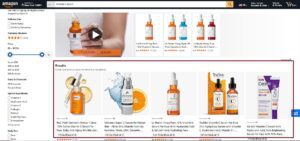
1. Top of Search (First Page)
This is the most converted placement on Amazon. Your ads appear in the first row of search results, immediately seen by the shopper. These spots typically have the highest click-through rates but also require aggressive bids.
2. Rest of Search
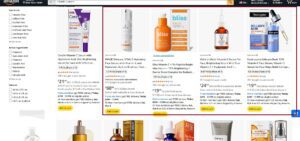
These ads appear in the middle of search results, at the bottom of the first page, or on subsequent search pages. While they do not command the same attention as the top row, the cost per click is usually lower. This placement provides a cost-effective way to accumulate sales volume without exhausting your budget on premium bids.
3. Product Detail Pages
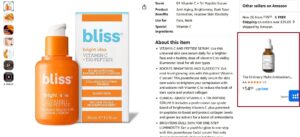
Your ads display directly on a competitor’s listing or your own. They sit in the carousel labeled “Sponsored products related to this item.” This is a tactical placement used to steal traffic from competitors or to cross-sell your own portfolio by occupying the ad space on your own pages.
Sponsored Products vs Other Amazon Ads
While Amazon Sponsored Products focus primarily on promoting individual product listings, Amazon also offers other advertising options like Sponsored Brands and Sponsored Display.
Sponsored Products are unique in their ability to target specific products and directly link to the product’s detail page, making them an ideal choice for driving direct sales.
In contrast, Sponsored Brands and Sponsored Display ads are more about brand awareness and reaching a broader audience.
Types of Amazon Sponsored Ads
Amazon’s advertising platform offers a variety of ad types to cater to different marketing needs and objectives. Understanding these options is crucial for sellers to choose the most effective way to promote their products and enhance brand visibility.
1. Sponsored Products Ads
Sponsored Product Ads are the most direct way to promote individual products on Amazon. These ads appear in prominent locations such as the top of search results, on the side, and within individual product pages.
The primary goal of sponsored product ads is to increase the visibility of specific products and drive traffic directly to the product pages.
2. Sponsored Brands Ads
Sponsored Brand Ads go beyond individual products and focus on promoting a brand as a whole.
These ads are more extensive and usually feature a brand logo linking to the Amazon storefront, sometimes accompanied by a selection of products from the brand’s range.
The objective of sponsored brand ads is to introduce new shoppers to your business and build brand awareness.
3. Sponsored Display Ads
Sponsored Display Ads represent a newer addition to Amazon’s advertising options. These ads allow sellers to extend their reach beyond Amazon to third-party apps and websites.
Unlike sponsored product ads and sponsored brand ads, which use keywords for targeting, sponsored display ads target based on customer behavior, such as viewing specific product pages or showing interest in a particular niche.
This type of ad is excellent for retargeting shoppers who have previously shown interest in your products.
Sponsored Products Basics Explained
1. Campaign Structuring and Naming
Success with Sponsored Products often comes down to how well you organize your campaigns. When you lump too many keywords together, you lose the ability to direct your spend where it matters most.
Focused Ad Groups: Stick to a “single-ad group, single-match-type” system. Limit each group to 5–10 closely related keywords. This keeps your performance data clean and easy to interpret.
Single-Keyword Campaigns: Move your top 5 high-volume search terms into their own dedicated campaigns. This isolates your best performers and its easy to analyze the performance.
You also need a naming convention that makes sense at a glance. Standardizing your campaign names helps you identify the goal and target without opening the settings. A solid formula usually looks like Product | Type | Target | Objective.
For example, a ranking campaign might look like this:
B0XXXXXX | SP | Keyword | Match Type | Keyword Source | Ranking |
This immediately tells you the ASIN, the ad type, keyword, the match type, the goal, and the keyword source.
2. Sites Setting
When creating a Sponsored Products campaign, the Sites setting controls exactly where your ads appear. You have two primary options to choose from.
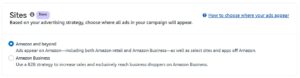
Amazon and Beyond: This is the default setting and offers the widest reach. It displays your ads on the standard Amazon retail site, the Amazon Business portal, and select third-party websites or apps.
Amazon Business: This option restricts your campaign strictly to the Amazon Business marketplace. It excludes the consumer retail site entirely, focusing on corporate buyers only.
2. Targeting Options
Amazon offers several targeting modes to reach customers:
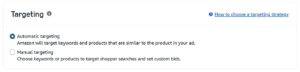
2.1 Automatic Targeting
In automatic campaigns, Amazon’s algorithms determine when to show your ads based on your listing details. You do not select specific keywords. You choose from four targeting sub-types that control how closely Amazon matches your product to customer searches or competitor pages.
You can start with automatic targeting to harvest converting search terms, then move into manual campaigns later. Here is how each match type works:
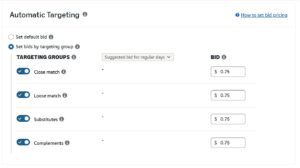
| Match Type | What It Targets | Example (Product: Cotton Sheets) |
| Close Match | Search terms directly related to your product. | “400-count cotton sheets” or “bamboo cotton sheets” |
| Loose Match | Search terms broadly related to your category and branded search terms | “[Brand Name] cotton sheets” or “queen sheets” |
| Substitutes | Detail pages of similar competitor products. | Shopper viewing a rival brand’s cotton sheet set |
| Complements | Detail pages of products that go well with yours. | Shopper viewing “comforters” or “feather pillows” |
2.2. Manual Targeting
With manual targeting, you take full control of your ad spend by selecting the specific keywords and products you want to bid on. This approach allows you to dictate exactly when your ad appears, rather than relying on Amazon’s judgment.
Here is a breakdown of how each match type treats your target keywords:
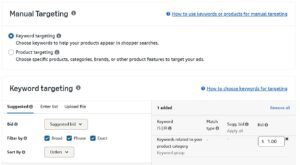
| Match Type | Strategy | Example (Keyword: Running Shoes) |
| Exact Match | Your ad appears only when the search is identical to your keyword. | Triggers for: running shoes (Will not trigger for: best running shoes) |
| Phrase Match | The phrase must appear in the correct order, but words can be added before or after. | Triggers for: best running shoes for men (Will not trigger for: shoes for running) |
| Broad Match | Your keywords can appear in any order, including synonyms and misspellings. | Triggers for: rugged shoes for trail running |
Product & Category Targeting
This strategy moves you away from keywords and places your ads directly on specific product detail pages or within entire browsing categories. It is a powerful tool for both offense and defense. You can use it to cross-sell your own complementary items (e.g., showing your ear tips on your earbud listing) or to aggressively target competitor listings to steal market share. Here is how to use both options effectively:
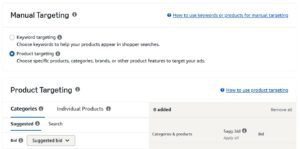
| Targeting Type | How It Works | Strategic Use Case |
| ASIN Targeting | Select individual products (ASINs) where your ad will appear | Target competitor ASINs that have higher prices or lower ratings than yours |
| Category Targeting | Select a whole product group (e.g., “Electronics > Headphones”). | Target the whole category and use filters. For example, target “Women’s Running Shoes” but refine it to only show on listings priced between $50–$100 or specific brands |
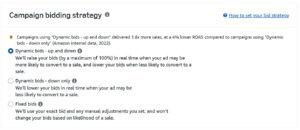
3. Campaign Bidding Strategy
Your bidding strategy dictates how much freedom you give Amazon’s algorithm to deviate from your set bid during an auction.
Dynamic bids – Up and Down: It gives Amazon permission to raise your bid by up to 100% if a sale is highly likely. It can drain your budget quickly if your conversion rate is not stable.
Dynamic bids – Down Only: Amazon will lower your bid if a click looks unlikely to convert, but it will never pay more than your limit. This strategy protects your ACoS while still cutting out wasteful spend.
Fixed bids: Remove the algorithm entirely. If you bid $1.00, you pay $1.00. This offers predictability but often results in missed opportunities because you cannot flex up for high-value shoppers.
4. Bid Adjustments and Placements
While your base bid sets the baseline, Placement Adjustments allow you to pay a premium to force your ads into specific locations. You can boost your bids by up to 900% for the placements that matter most to your strategy.
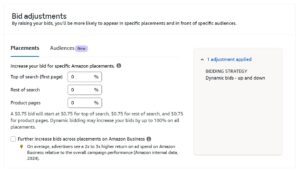
Top of Search (First Page) is the most valuable placement. These are the sponsored results at the very top of page 1. Because these spots have high click-through rates, sellers often use multipliers here to dominate.
Rest of Search covers the middle or bottom of page 1 and all subsequent pages. You can use this adjustment to deprioritize lower quality traffic or boost visibility if you are struggling to get impressions.
Product Pages appear on competitor listings or complementary items. This is ideal for conquesting, where you try to steal sales from rivals by showing your product directly on their page.
The table below with assumed base bid of $1.00 shows exactly how Amazon calculates your final bid. It demonstrates how a placement boost stacks with your bidding strategy.
If you combine a placement boost with “Dynamic Up and Down,” Amazon applies the placement boost first, and then doubles that amount for the final potential bid.
| Placement Location | Placement Boost % | Bidding Strategy | Exact Calculation | Final Max Bid |
| Top of Search | 50% | Fixed Bids | $1.00 + 50% | $1.50 |
| Top of Search | 50% | Dynamic Up & Down | ($1.00 + 50%) × 2 | $3.00 |
| Product Pages | 20% | Dynamic Down Only | $1.00 + 20% | $1.20 |
| Rest of Search | 0% | Dynamic Up & Down | $1.00 × 2 | $2.00 |
Additionally, when Amazon Business targeting is on, there’s a special Amazon Business bid adjustment. This lets you boost bids by up to +900% exclusively for placements on the Amazon Business store.
Amazon Sponsored Products Strategy
Building a winning Sponsored Products strategy involves prioritization and ongoing optimization. Below are key strategic principles and tactics for sellers:
1. Focus Budget on High-Conversion Campaigns
Allocate roughly 60-70% of your budget to your campaigns with high conversion rate. By pouring the bulk of budget into these proven winners, you ensure your top keywords always have enough spend to sales.
2. Drive Organic Ranking
Use Sponsored Products Exact campaigns to boost your organic search rank. Amazon itself advises to “use advertising to steadily improve organic ranking”. In other words, let ads generate consistent sales on your target keywords so that Amazon’s organic algorithm sees your product as relevant. Segregate the near ranked keywords where the organic rank is on page 1 above 40 and target them and rank them higher among top 10 positions.
3. Aggressive Negative Management
Continuously add negative keywords and ASINs to eliminate wasted spend. Review your Search Term Reports and add any irrelevant or unprofitable terms as negatives. Also remove poor-performing ASIN targets. This keeps your campaigns efficient.
4. Use Long-Tail Keywords
Don’t ignore long-tail terms. These longer, more specific search phrases often have lower competition, lower CPC, and higher conversion rates because they indicate strong purchase intent. In fact, long-tail keywords can “help lower your ACOS by offering less competition, leading to lower CPCs, higher conversion rates, and better targeting. Run separate campaigns for long-tail keywords.
5. Branded vs. Non-Branded Balance
Run both branded and non-branded keyword campaigns. Branded keywords (your product or brand name) typically have less competition and very high conversion rates, so they are efficient and defend your brand.
Non-branded (generic) keywords have broader reach but usually higher CPC. Focus the majority of your energies on non-branded campaigns” to capture new customers. In practice, you might spend less budget on brand terms (since they convert reliably) and more on generic terms to grow market share, while still maintaining a defensive brand campaign.
6. Target Competitors
Use ASIN/product targeting against competitors. You can target competitor ASINs that are weaker (lower price or rating) to lure customers away. You can also target strong competitors (higher traffic) to test if you can capture some of their buyers. Use Helium10 Black Box and use filters like keywords in title, sales, and price to find competitors with good sales volume and higher price or lower rating than your products and target in ASIN targeting campaigns.
7. Auto Campaigns For Keyword Research
Avoid excessive reliance on Auto Campaigns. While they are valuable for initial data gathering, they should not dominate your advertising strategy.
A balanced approach with a focus on Sponsored Products Exact match keyword campaigns is often more effective, particularly for direct keyword ranking influence.
8. Continuous Testing & Optimization
Treat every campaign as experimental. Always be testing new keywords, ASIN targets, and match types, and eliminate underperformers quickly. Add new high-performing search terms into Exact campaigns, pause or lower bids on poor performers, use negative keyword lists on an ongoing basis.
Use Amazon’s search term and placement reports to find winning terms. For example, if a search term is delivering strong sales, move it to an exact-match ad group and increase its bid. Conversely, if a term or ASIN gets clicks but no sales after a couple of weeks, exclude it. Regularly reviewing and pruning your campaigns keeps ACOS low and ROI high.
9. Monitor Performance Metrics
Track key metrics like Impressions, Clicks, CTR, CPC, and Sales (and derived metrics like ACoS and ROAS) closely. Amazon advertising console provides placement-level and term-level reports. Use these to identify where your ads are most effective.
For example, if Top-of-Search (TOS) CVR is high but Rest-of-Search CVR is low, you may shift budget to TOS. Always compare spend vs. sales: if an ad group or keyword has a consistently high ACoS, consider lowering bids or pausing it.
10. Optimize Based on Data
Don’t rely on one strategy or set-it-and-forget-it. Amazon’s algorithms and shopper behavior change over time. If a certain campaign consistently underperforms, don’t just let it run; move its budget to better campaigns. If a new keyword starts converting well, invest more in it.
For example, one strategy is to start with a higher PPC: organic spend ratio (e.g. 80% PPC, 20% organic focus) and gradually tilt it as organic rank improves. Keep your campaigns lean by stopping bleeders, cutting off anything that drains budget without sales.
How to Set Up Sponsored Products Campaigns
Setting up Amazon Sponsored Products is a crucial step for sellers aiming to enhance their product visibility and sales on Amazon. This process involves several key steps, each designed to optimize the effectiveness of your sponsored product ads.
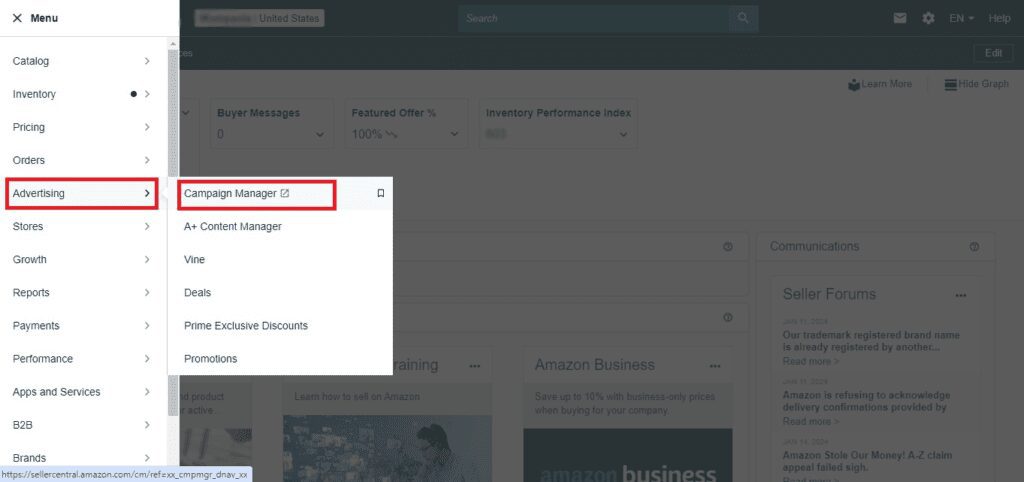
1. Accessing Sponsored Products
Log into your Seller Central account, navigate to the Advertising tab, and select Campaign Manager.
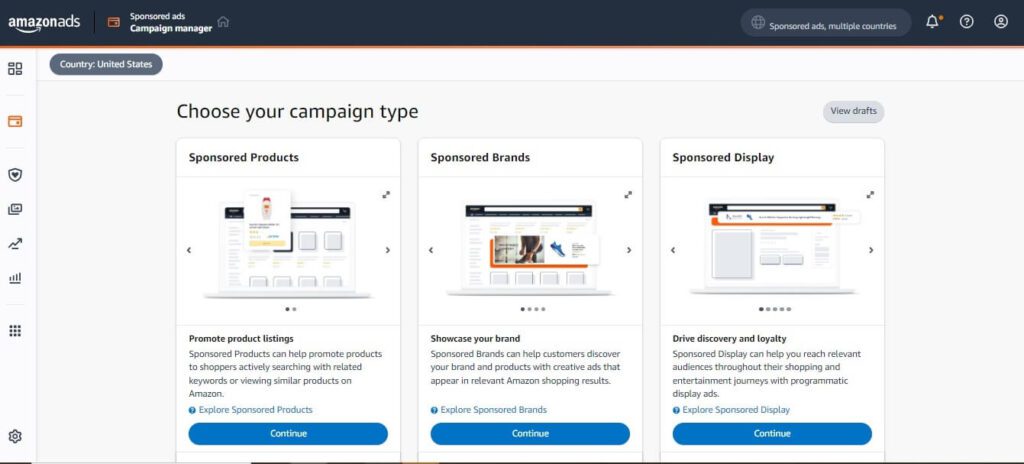
2. Campaign Creation
Click on the ‘Create Campaign’ button. Here, you will be prompted to choose a campaign type, and choose “Sponsored Products”.
3. Campaign Setup
Go through these steps to finalize the campaign creation.
- Setup the ad group name.
- Choose Targeting Type either Automatic targeting or Manual targeting.
- Setup bid amount if you are going for Automatic targeting.
- Choose Keyword targeting or Product targeting if you are going with manual targeting.
- Entre keyword list or ASINS if you are going to create manual campaign and setup the bid amount. Select the match type: Phrase or Exact.
- Choose bidding strategy for your sponsored products campaign.
- Select the start date, end date, and daily budget and click on “launch campaign”.
Question and Answer Section
1. What are Sponsored Products ads and how do they work
Sponsored Products are pay-per-click (PPC) ads that promote individual listings on Amazon. They appear in top of the search results, mid and bottom of the search results and on product detail pages. These ads target specific keywords or products, and you pay only when a customers clicks. They are widely used because they give instant sales to new products or old products that otherwise would never get consistent sales.
2. Which products are eligible for Sponsored Products ads
Most products that are Buy Box eligible and in Amazon’s categories can run Sponsored Products ads. Your listings must be active, in stock, and comply with Amazon’s policies. Products in restricted categories may not qualify for Amazon ads.
3. How does the bid and cost‑per‑click (CPC) model work
You set a maximum bid per click. Amazon runs a second-price auction, so you usually pay slightly less than your max. You pay only when someone clicks. For example, if your maximum bid is $2.00 for a keyword and the next highest bidder is $1.50, you may only pay $1.51–$1.60 per click.
4. What is a good or target ACoS (Advertising Cost of Sale)
There is no single target ACoS. It depends on your product margin, business goals, and lifecycle stage. For example if you sell a blender for $100, and your profit after costs is $40 per unit. If your ad spend per sale is $12, the ACoS is 30%, leaving you with $28 profit per sale. This is acceptable because you are still profitable. On the other hand, a $10 water bottle with only $2 profit per unit cannot afford a 30% ACoS, because spending $1.20 per sale would cut profit too much.
5. Do I need a large budget to start PPC, or can I start small
Your budget depends on the competition in your category. Competitive categories like Pet, Beauty, and Supplements often have higher CPCs, which can lead to higher ad spend requirements. You can technically start with any budget, but for an average product on Amazon, $50 to $100 per day is a solid starting point. This provides enough data to understand keyword performance, optimize campaigns, and make informed decisions before scaling further.