Winning the Amazon ad auction starts with choosing the right bidding strategy and understanding how bids interact with ad placements. Every Sponsored Products campaign on Amazon lets you pick from Dynamic Bids (Down Only), Dynamic Bids (Up and Down), or Fixed Bids, and also apply placement modifiers. Choosing the wrong setting here is an easy way to unintentionally waste money, so in-depth audits in Amazon PPC services typically check these rules first to stop any bleeding budget.
Each strategy affects how Amazon enters the real-time CPC auction, which uses an enhanced second-price model (the winner pays just above the second-highest bid) that also considers ad relevancy. In practice, a highly relevant ad can win top placements at a lower cost than its full bid.
Your base bid sets your maximum willingness to pay, but the actual cost-per-click (CPC) is usually lower, depending on competition and relevance .
In this guide, we’ll go deep into each bidding strategy, explain Amazon’s ad placements, and show exactly how placement multipliers and dynamic rules affect your final bid.
How the Amazon Ad Auction Works
Amazon runs a live CPC auction for every search. In a simplified view, the highest bidder wins, but Amazon’s auction is not a simple “highest bid wins” system. It uses a modified second-price auction: the winning bidder pays just above the next-highest bid, and ads are also ranked by relevance (expected CTR and conversion likelihood). In practice, this means:
- Bid ≠ CPC. Your bid only sets a ceiling; you often pay less. If you win an auction with a highly relevant ad, you may pay far below your maximum bid.
- Relevance matters. Amazon’s algorithm factors in keyword relevance and historical performance (expected click-through and conversion rates) to score ads. A lower bid can still win if the ad is very relevant .
- Second-price rule. Typically, the winner pays $0.01 more than the second-highest bidder, unless relevance discounts apply.
Amazon PPC Bidding Strategies

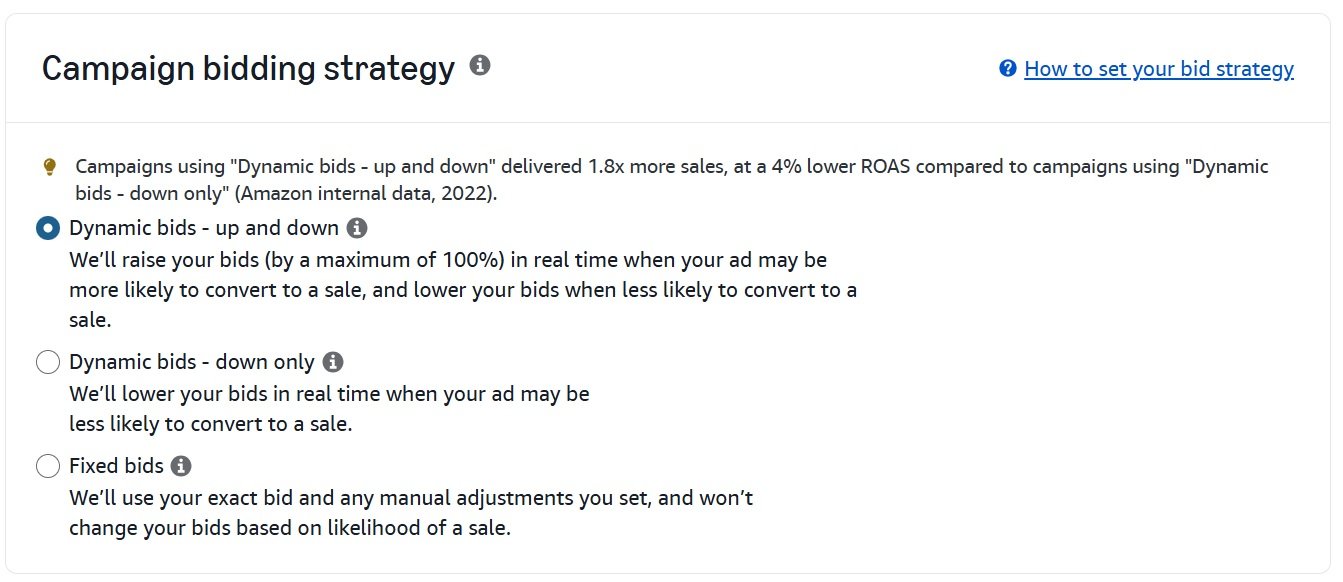
Amazon Sponsored Products offers three core bidding strategies (plus a newer rule-based bidding option). Each tells Amazon’s system how to adjust bids during the auction:
1. Dynamic Bids (Down Only)
With Down Only, you set a maximum bid, and Amazon’s algorithm will only lower it if a click seems less likely to lead to a sale. It will never go above your set bid. It’s the ideal approach for evergreen campaigns where your main goal is consistent, profitable sales without taking on too much risk.
- Best for cost control: Since bids only go down, this strategy minimizes wasted spend on low quality clicks.
- Default for new campaigns: It’s often safest to launch with Down Only to gather data inexpensively.
- Behavior: Amazon will not raise the bid above your set amount. In auctions where conversion seems likely, Amazon bids your full amount; if not, it bids less.
- When to use: If your main goal is to hit a target ACoS or ROAS and you want to avoid surprise overspending. Good for established campaigns with stable data.
Example: You set a base bid of $1.00 and a placement multiplier of +50% for top-of-search (adjusted bid $1.50). With Down Only, Amazon may bid up to $1.50 on top-of-search if it expects a sale, but it could also bid lower if it thinks the click isn’t a great fit . It will never exceed $1.50 (no upward bump).
2. Dynamic Bids (Up and Down)
Amazon may raise or lower your bid based on conversion likelihood. It can increase bids up to +100% (double) when a conversion looks likely, or decrease bids (up to -100%) when a click seems unlikely to convert. Use Up-and-Down when you’re focused on maximizing ranking and conversions, especially for new campaigns or highly competitive keywords. Once you have data, you may switch back to Down Only to cap costs.
- Maximizes volume: By potentially doubling your bid on high-intent impressions, this strategy helps you “win” more auctions when it matters.
- Pay more for higher chance clicks: For example, if your base bid is $1.00, Amazon might bid up to $2.00 if the chance of conversion is high. (Later, if data shows the bid is working, you might reduce the base bid or switch strategies.)
- When to use: On new or data-light campaigns where impressions are low. Once you find a profitable bid, many sellers switch back to Down Only to lock in costs.
- Points to note: It can lead to higher CPCs (since bids can double), so monitor ACoS closely. Amazon’s algorithm uses a lot of signals (search terms, device, time of day, past behavior) to decide when to up-bid.
Example: Suppose your base bid is $1.00 with a +50% top-of-search adjustment (adjusted $1.50). Under Up-and-Down, Amazon could bid the full $1.50 normally, but it might also raise it to $3.00 on especially valuable clicks (the system can bid up to twice the adjusted $1.50). It could also drop to $0 if the click seems wasteful.
3. Fixed Bids
This option gives you full control. With Fixed Bids, what you bid is what you get. If you set a bid of $2.00, Amazon bids $2.00 in the auction. There are no algorithmic adjustments.
- Full control: You know exactly your max CPC; Amazon won’t bid more or less.
- Consistent bidding: Useful if you want a consistent presence on a keyword without Amazon’s algorithm altering it.
- When to use: In highly competitive campaigns where you need a stable ad rank (e.g. brand defensive campaigns), or when you’re certain your bid is optimal. Also useful if you have budget constraints and want to guarantee you won’t exceed your bid.
- Limitation: You might lose some high-value clicks because Amazon won’t raise the bid automatically. If competitors outbid you on a given query, your ads might not show even if that click would have converted.
Even with Fixed Bids, placement multipliers still apply. For instance, if you bid $1.00 and set a +50% modifier for Top-of-Search, the bid for Top-of-Search is $1.50 , and Amazon will use exactly $1.50 (unless you change it manually).
4. Rule-based Bidding
A new option where Amazon automatically adjusts base bids to meet your performance goals or “guardrails.” You define an average target (like a target ACoS or ROAS) and Amazon will raise or lower your bids across impressions to try to achieve that outcome.
For example, you might set a rule to maintain a 300% ROAS; Amazon then dynamically adjusts bids each click to hit that target over time. Rule-based bidding requires campaign eligibility (at least 30 days live, 30 conversions in 30 days, etc.) and consumes your historical data. It can free you from manual bid tweaking, but you still need to monitor performance.
Rule-based bidding can save time and target your profitability directly. However, it requires sufficient historical data to function, and Amazon does not guarantee the guardrail will be met. Use it if you have stable conversion history and want automated bid management guided by a clear goal.
Aligning Bids With Business Goals
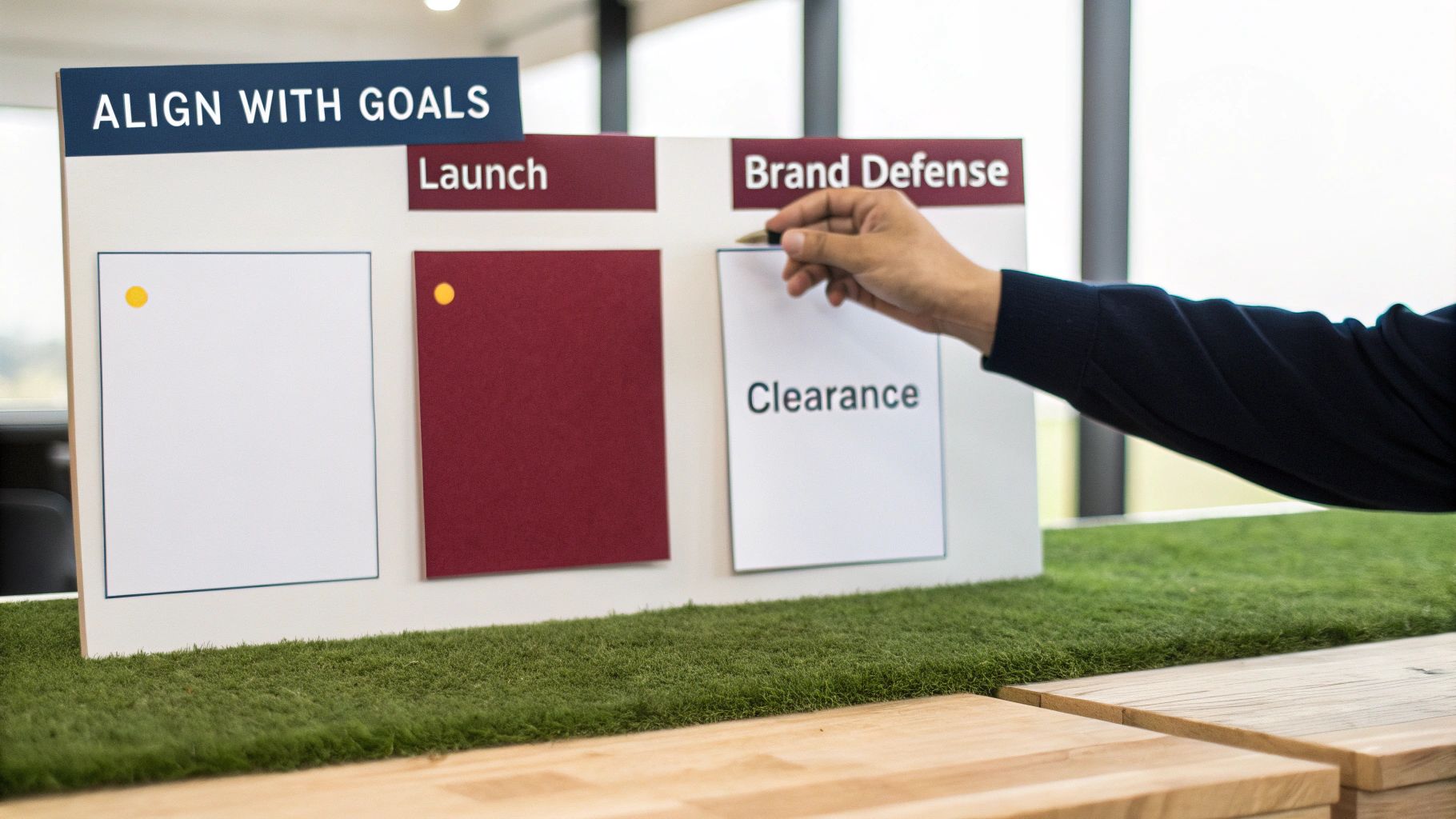
The most expensive mistake in Amazon PPC is choosing a bidding strategy that conflicts with your business goals. A strategy that’s perfect for a new product launch will burn through your budget if applied to a mature, profitable ASIN.
Your approach must be intentional and directly tied to what you want to achieve for a specific product at a specific time.
You need to be clear about your product’s lifecycle stage and its immediate objective. Are you trying to get your first ten reviews, protect market share, or liquidate slow-moving inventory before long-term storage fees hit?
Each of these goals requires a different bidding playbook.
1. Launch Phase: Visibility and Data
When launching a new product, profitability isn’t the primary goal. Your mission is to get as much visibility and data as quickly as possible. This requires an aggressive approach.
- Strategy to Use: Dynamic Bids (Up and Down).
- Why it Works: This strategy allows Amazon to increase your bids by up to 100% for top-of-search placements, putting your new product in front of many relevant shoppers. The higher spend is an investment. It speeds up data collection on which keywords convert, helping you optimize faster.
Don’t panic over a high initial ACoS during a launch. An ACoS of 50-80% is common and should be seen as the cost of acquiring data and building sales velocity, both of which are essential for climbing organic rankings.
2. Profitability Phase: Maximize Margin
Once a product is established with steady sales and good reviews, the focus shifts to maximizing profit. Every advertising dollar needs to work harder. For better profitability tracking, our guide on ACoS vs. ROAS can help.
- Strategy to Use: Dynamic Bids (Down Only).
- Why it Works: This is a conservative, profit-protecting approach. It prevents Amazon from bidding more than your set amount and only lowers bids on clicks less likely to convert, helping you avoid overspending.
3. Brand Defense Phase: Own Your Space
When competitors start bidding on your branded keywords, it’s time to defend your territory. Losing these clicks means giving away customers who were specifically looking for you. The goal is to be the #1 result for your brand terms, every time.
- Strategy to Use: Fixed Bids.
- Why it Works: Fixed Bids give you absolute control. You set the bid, and Amazon doesn’t change it. This predictability is perfect for dominating the top-of-search position for your brand name, blocking competitors trying to take your traffic. To make sure your ads convert, look at these examples of effective e-commerce ads.
4. Liquidation Phase: Clear Inventory Fast
If you need to move excess inventory, the goal is to generate sales quickly, even at a lower profit. Your bidding should focus on maximizing impressions and clicks, often using broad, high-traffic keywords to reach a wider audience.
The Amazon marketplace is more competitive than ever, making these goal-aligned strategies essential. Third-party sellers accounted for 62% of total sales by Q3 2025, intensifying bidding wars. Sellers who dynamically shift their bids based on clear objectives can see up to a 1.8x increase in sales conversions.
Using Amazon Ad Placement Modifiers

Apart from bidding strategy, you can add another layer of control with placement modifiers and rule-based bidding.
Placement modifiers let you tell Amazon that a specific ad spot is more valuable to you, and you’re willing to pay more for it. Instead of one flat bid for a keyword, you can increase that bid by a percentage for certain placements.
1. Top of The Search Placement
These are the ads in the very first row of search results (often called “Top-of-Search ads”). This placement is prime real estate. Top-of-Search ads enjoy the highest ranking and typically the best conversion rate.
Over 70% of clicks go to first-row ads ). However, they are also the most expensive bids. Sellers often target Top of-Search when maximizing sales or launch visibility, using higher bids or modifiers to ensure placement.
2. Rest of Search Placement
This covers all other ad slots on page 1 (middle/bottom rows) and every slot on subsequent search result pages. It’s the default placement for your base bid (the bid you enter applies here unless modified).
Rest-of-Search generally has lower CPCs but also lower CTR and conversion compared to Top-of-Search. Because it covers so much real estate (including all pages beyond page 1), it accounts for the bulk of ad impressions. Sellers use it for efficient visibility on broad terms.
In many campaigns, Rest-of-Search has the highest spend, but Top-of-Search delivers more conversions. It’s important to monitor ACOS by placement – it’s common for Rest-of-Search to have worse ACOS than Top-of-Search.
3. Product Pages Placement
These are ads on product detail pages (ASIN pages) and other non-search pages, such as the “add to cart” confirmation page.
They show up typically below the “Buy Box” or on the “Also Viewed” or “Sponsored Products related to this item” sections. Product Page ads have variable performance: CTR is often much lower (sometimes 10x less than Top-of-Search ), but they can capture shoppers deeper in the funnel or poach competitor traffic.
Interestingly, many campaigns find that Product Page placements yield a surprisingly high share of actual sales, sometimes even more than Rest-of-Search. This is because people browsing product pages often have higher intent. Product Pages are great for cross-selling or targeting competitor ASINs.
Amazon’s Placements tab in Seller Central breaks out performance for these three groups. Use it to adjust strategy – for example, if Top-of-Search has low ACOS relative to Rest-of-Search, consider increasing bids there with placement modifiers.
Bid Adjustments by Bidding Strategies & Placements
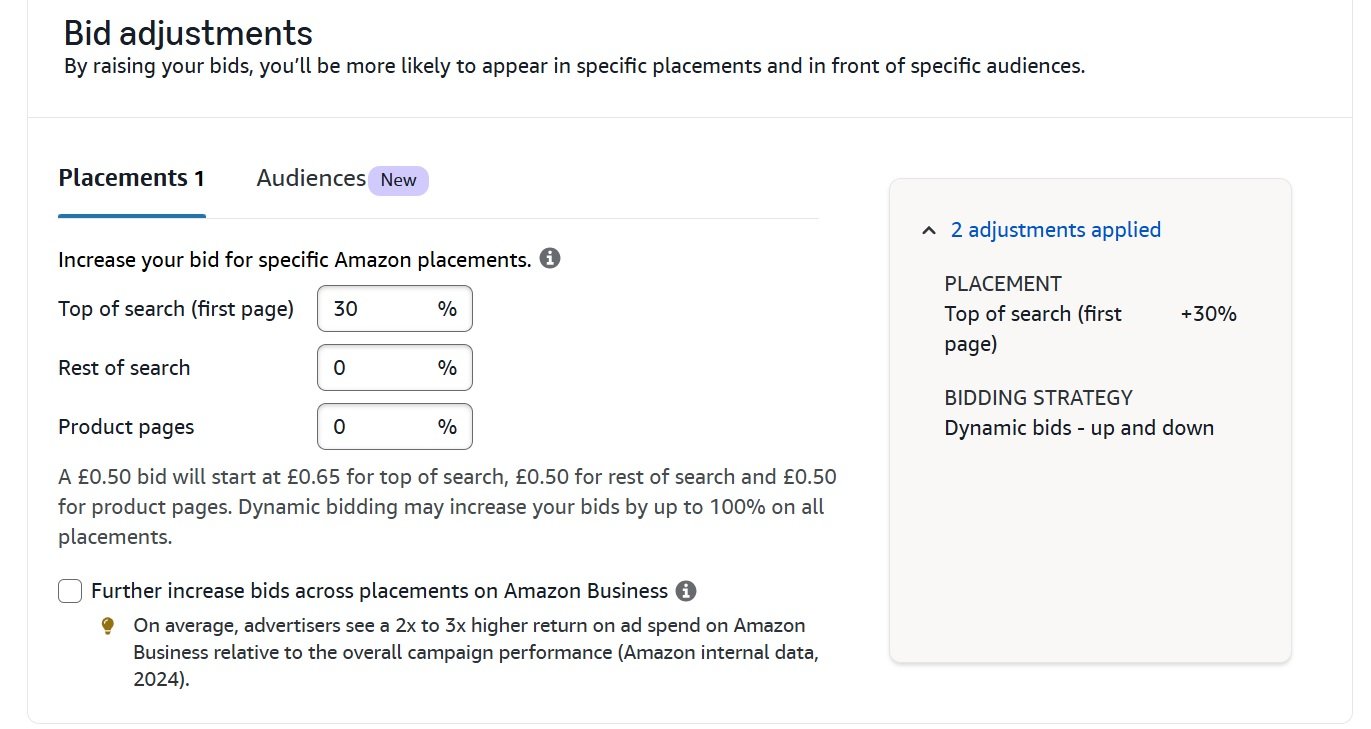
Amazon allows you to adjust bids by placement (also called placement multipliers) to bid more aggressively in valuable slots. You can set a percentage increase for Top-of-Search and Product Page placements and, since 2023, also for Rest-of-Search. The adjustment is additive: a 100%
adjustment doubles your bid, 200% triples it, and so on (up to +900%, i.e. 10×).
1. How it works
First, Amazon applies the placement modifier to your base bid. For example, a $1.00 base bid with a +50% Top-of-Search modifier becomes a $1.50 placement bid. Next, Amazon applies the dynamic bidding strategy on the adjusted bid. In a fixed-bid campaign this $1.50 is your final CPC. In dynamic campaigns, Amazon may raise or lower that $1.50 further.
For example If you bid $1.00 and set a 50% adjustment for Top of Search, then here how your final bid shall be calculated.
- With fixed bidding your final bid would be $1.50.
- With Dynamic (Down Only), the bid could range from $0 to $1.50.
- With Dynamic (Up and Down), it could range from $0 to $3.00. In other words, Up-and-Down could double the adjusted bid (to $3.00) in high-conversion cases.
Use placement modifiers to tilt your budget toward higher-performing slots.
For instance, if Top-of-Search traffic converts at a much better ROAS than Rest-of-Search, you might raise Top-of-Search bids (e.g. +50% or more). Keep in mind Amazon caps each placement increase at +900%.
As we saw, placement adjustments happen before dynamic up/down. For example, Seller metrics shows that with a $0.75 base bid, a +900% Top-of-Search yields $7.50, which dynamic Up-and-Down could then raise to $15.00.
Importantly, Amazon’s algorithm then evaluates relevance on that $7.50 bid (i.e. would it pay up to $15), not on the original $0.75. Conversely, if conversion seems unlikely, dynamic Down-only can drop the $7.50 all the way to $0, even with the modifier applied.
The table below illustrates how base bids, placement modifiers, and bidding strategy combine to produce the final bid (max CPC) in auction:
| Base Bid | Placement Adjustment | Adjusted Bid | Fixed (Final Bid) | Dynamic (Down Only) | Dynamic (Up & Down) |
|---|---|---|---|---|---|
| $1.00 | None (0%) | $1.00 | $1.00 | $0 – $1.00 | $0 – $2.00 |
| $1.00 | +50% (Top of Search) | $1.50 | $1.50 | $0 – $1.50 | $0 – $3.00 |
| $1.00 | +100% (Top of Search) | $2.00 | $2.00 | $0 – $2.00 | $0 – $4.00 |
| $0.75 | +900% (Top of Search) | $7.50 | $7.50 | $0 – $7.50 | $0 – $15.00 |
| $2.00 | +300% (Product Page) | $8.00 | $8.00 | $0 – $8.00 | $0 – $16.00 |
Always calculate your effective bid after modifiers. If you raise Top-of-Search by +100% and your base bid was $1, you’re actually bidding $2 for those spots. Then remember dynamic strategies can multiply that again. Use bid adjustments sparingly and based on data (ACoS or conversion rate by
placement) to avoid overspending.
How To Calculate Your Starting Bid
Determining what to bid is a common challenge in Amazon PPC. Bidding too high may get you high CPC, while bidding too low results in no impressions.
Relying on Amazon’s “suggested bid” is often not the best approach, as it’s designed to encourage spending rather than protect your profit margins.
Fortunately, you don’t have to guess. A simple formula uses your own product data to set a logical starting bid, ensuring every click aligns with your profit goals from the start.
The Starting Bid Formula
This calculation removes the guesswork from bidding by tying your cost per click directly to your key business metrics. It tells you what a click is worth to your business.
Starting Bid = (Average Order Value x Conversion Rate) x Target ACoS
Here’s where to find these numbers in your Seller Central account:
- Average Order Value (AOV): Go to your Business Reports and look for “Detail Page Sales and Traffic.” AOV is your total sales divided by the total number of orders.
- Conversion Rate (CVR): You’ll find this in the same Business Report, listed as “Unit Session Percentage.” It shows the percentage of visits that result in a sale.
- Target ACoS: This is up to you. It’s the maximum you’re willing to spend on ads for a sale. For a new product launch, you might set a high target ACoS (like 50-70%). For a mature product, you might aim for a lower ACoS (like 25%) to maximize margins.
Let’s use an example. Imagine you’re selling a product for $50. Your historical conversion rate is 10%, and your target ACoS for this campaign is 30%.
Let’s plug those numbers into the formula:
($50 AOV x 0.10 CVR) x 0.30 Target ACoS = $1.50 Starting Bid
This $1.50 is a calculated risk based on your actual business performance. It means you can afford to pay up to $1.50 for a click and still hit your 30% ACoS goal. It’s a much more reliable starting point than Amazon’s suggestions.
Setting a Maximum CPC
Your starting bid is the launchpad, but you also need a hard limit to protect your profits, especially with dynamic bidding. This is your Maximum Cost Per Click (Max CPC), a number based purely on your product’s profit margin.
To find this, you first need your breakeven ACoS, the ACoS at which you make zero profit and zero loss.
Max CPC = (Average Order Value x Conversion Rate) x Breakeven ACoS
Let’s say your $50 product costs you $15 to source, ship, and prep, leaving you with $35 in profit. Your breakeven ACoS is 70% ($35 profit / $50 price).
Now, let’s calculate the Max CPC:
($50 AOV x 0.10 CVR) x 0.70 Breakeven ACoS = $3.50 Max CPC
This $3.50 is your profitability limit. It’s the absolute most you should ever pay for a click on this product. Any higher, and you’re losing money on each sale. For a deeper look at how your bid relates to what you pay, you can learn more about Amazon CPC.
Common Mistakes to Avoid
Even with solid strategies, a few common slip-ups can drain an ad budget quickly. Avoiding these pitfalls is as important as choosing the right bidding strategy.
A frequent error is setting bids too low from the start due to a fear of overspending. This results in no impressions and no data. The fix is to use a data-backed starting bid formula, not a gut feeling.
1. The “One-Size-Fits-All” Bid
Applying the same bid to every keyword in a campaign doesn’t work because not all keywords have the same value.
A broad keyword like “running shoes” is worth less than a specific, high-intent keyword like “men’s size 11 trail running shoes for wide feet.” They represent different stages of the buying journey.
Instead, segment your keywords and bid according to their performance and intent.
- Winners: Bid more aggressively on keywords with a proven sales track record.
- Discovery Keywords: Use lower bids for broader terms used in initial research.
- Brand Terms: Bid high enough on your brand terms to secure the top spot and defend your branded traffic.
2. Letting Automated Campaigns Run Unchecked
Amazon’s automated bidding strategies are powerful, but they aren’t a “set it and forget it” campaigns. A common mistake is turning on automation and walking away. This can lead to runaway ad spend, especially if the algorithm gets aggressive on keywords that don’t convert.
3. Ignoring Sales Events and Seasonal Trends
Many sellers forget to adjust their bidding for events like Prime Day, Black Friday, or seasonal demand. During these high-traffic periods, competition increases, and CPCs can easily double or triple.
If you stick with your standard “Dynamic bids – down only” strategy, you’ll miss out on major sales days because your ads won’t be competitive enough.
Get ahead of it. At least two weeks before a major event, switch key campaigns to a more aggressive strategy like “Dynamic bids – up and down” and increase your bids and budgets. Afterward, remember to switch them back to protect your profitability.
Frequently Asked Questions
Here are answers to some of the most common questions we hear from sellers about Amazon bidding.
How often should I adjust my PPC bids?
When launching a new campaign, avoid daily tinkering. You need to let the data mature. I recommend monitoring performance daily but making bid adjustments only every 7-14 days.
For mature, stable campaigns, a quick weekly check-up is usually sufficient.
A big mistake is making knee-jerk changes based on one bad day. Amazon’s sales attribution can have a delay of up to 72 hours. Making decisions too quickly means you’re working with incomplete information.
What is a good starting ACoS for a new product?
When launching a new product, your goal is momentum, not profit. Your initial ACoS will likely be higher than your break-even point. You’re buying data and sales velocity.
A good guideline is to aim for a 40-60% ACoS for the first few weeks. This is what it takes to drive initial sales and get your product noticed.
Once you have sales history and your organic rank improves, you can start optimizing. Gradually reduce bids to bring your ACoS down to a sustainable target, like 25-30%. Understanding the basics of what PPC is on Amazon helps put this initial investment into perspective.
Should I use Portfolio bidding for my campaigns?
Portfolios are excellent for organization and budget control, especially if you manage multiple product lines or many campaigns. They let you set one budget cap for a group of campaigns, and Amazon will shift the spend to the top performers within that group.
Portfolios are most effective when you’re managing 10 or more campaigns. They simplify oversight and are great for ensuring your total ad spend stays within your monthly or seasonal budget.
When should I use Fixed bids?
Fixed Bids are your manual override. Use them when you need absolute control and can’t risk Amazon adjusting your bid.
This strategy is perfect for brand defense campaigns where a competitor bidding on your brand name is a threat. It’s also useful for a specific, high-conversion keyword where you must maintain top visibility.
Be aware that this strategy has the highest risk of overpaying for clicks. Use it selectively for strategic plays where impression share is more important than efficiency.