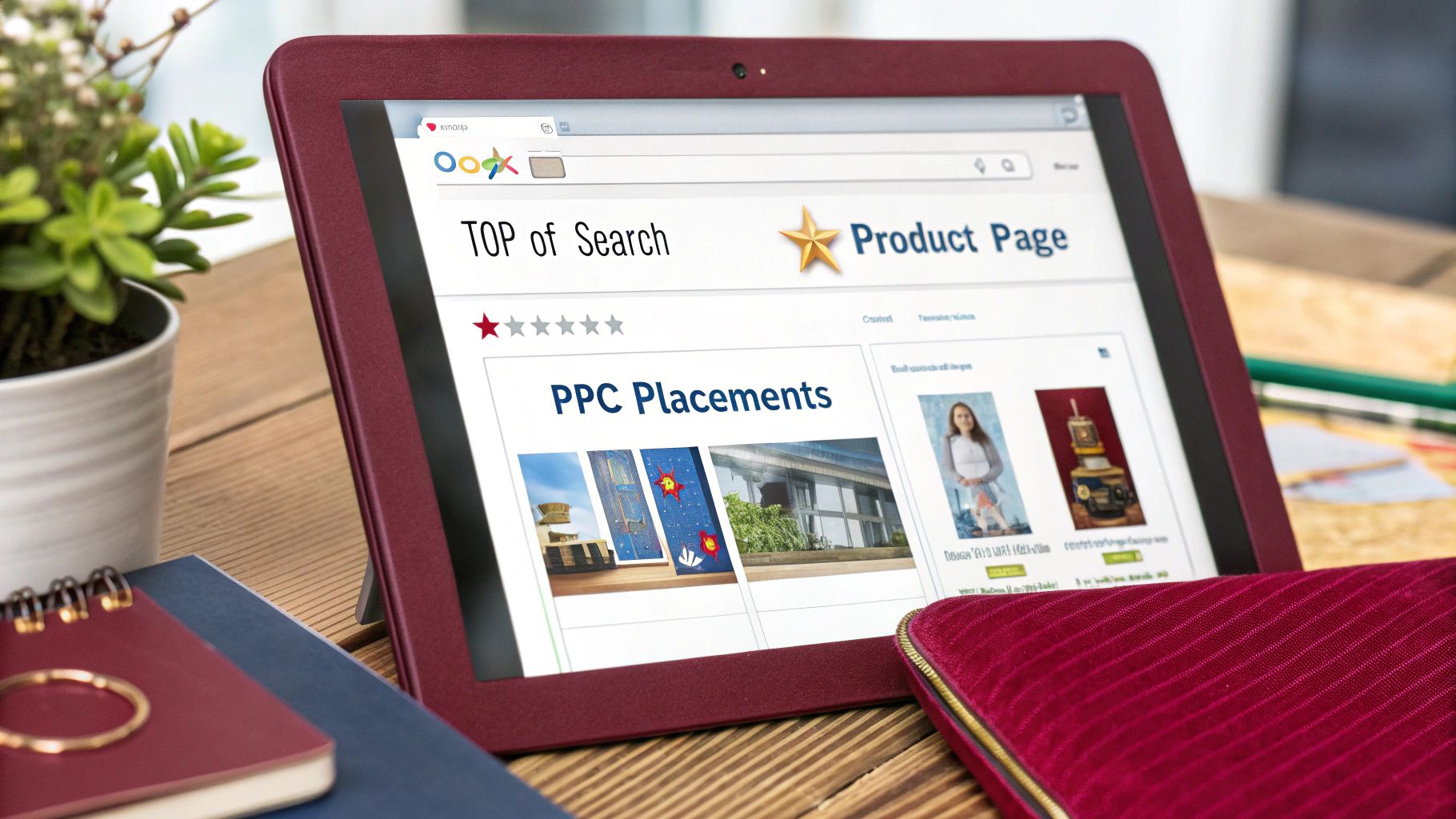
In Sponsored Products campaigns, ads can appear in three main locations: Top-of-Search (first page of search results, usually the first row), Rest-of-Search (other positions on search results pages), and Product Detail Pages (on individual product pages).
Each placement has unique visibility and performance characteristics. Understanding and controlling these placements allows sellers to use right bidding strategies, prioritize high-value impressions, and drive more conversion rate.
In this guide we’ll explore each placement type, how placement settings influence ad delivery, bidding strategies tailored for each placement, the math behind bid modifiers, and related strategies (campaign structure, reporting, conversion impact, etc.) to build an authoritative Amazon PPC placement strategy.
Types of Amazon Ad Placements
Amazon Sponsored Products ads can appear in several prominent locations, each capturing shoppers at different stages of their buying journey. The three primary Sponsored Products placements are:
1. Top of the Search (TOS)
Ads in this placement show at the very top of the first page of Amazon search results, typically in the first one or two slots. This is the most visible placement, capturing the attention of shoppers immediately when they search.
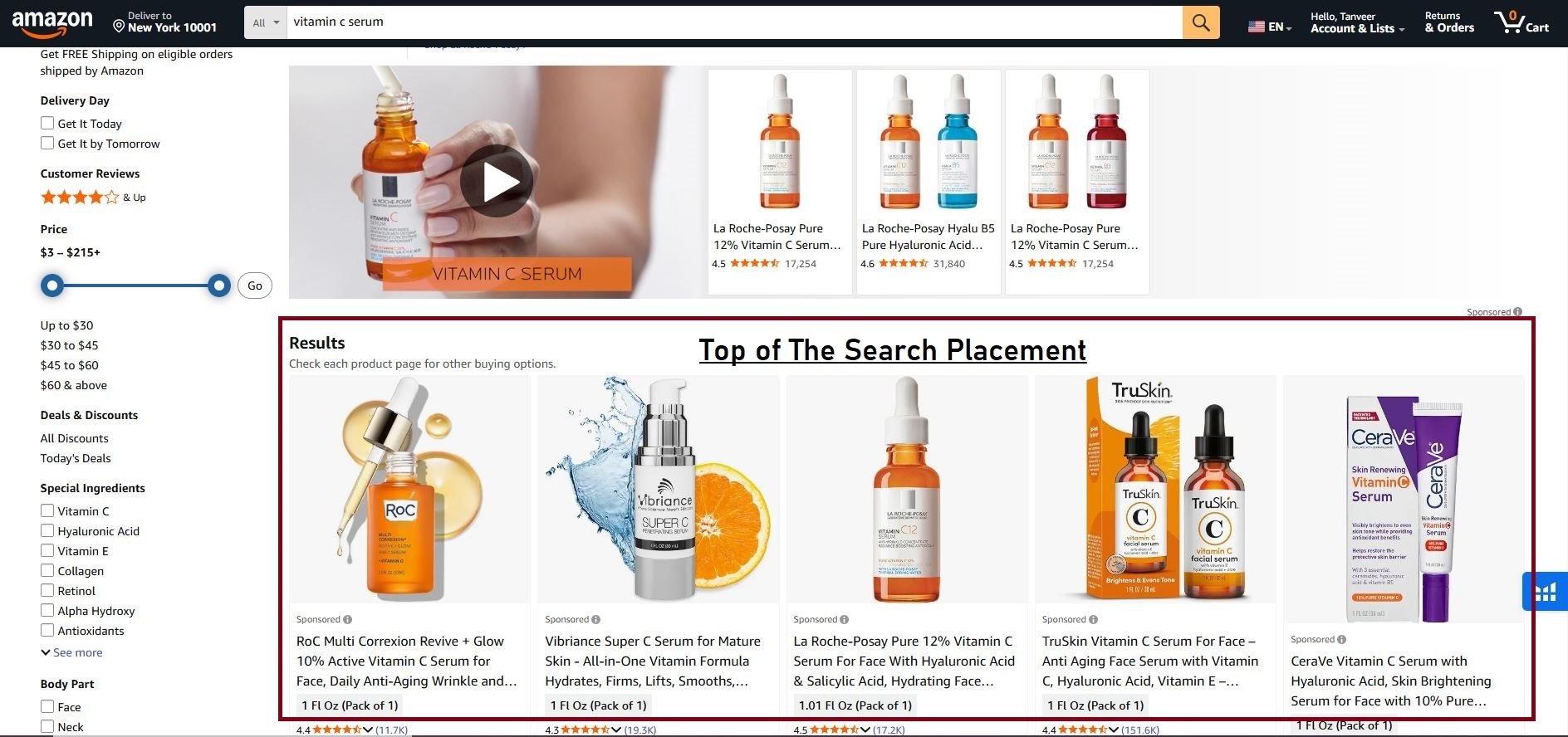
Top-of-Search placements usually command the highest conversion rate and click-through rate (CTR), as buyers see these ads first. However, this premium placement also tends to have higher cost-per-click (CPC).
2. Rest of Search (ROS)
This includes all other search results not at the very top. Ads here may appear in lower positions on the first page or on subsequent pages of results.
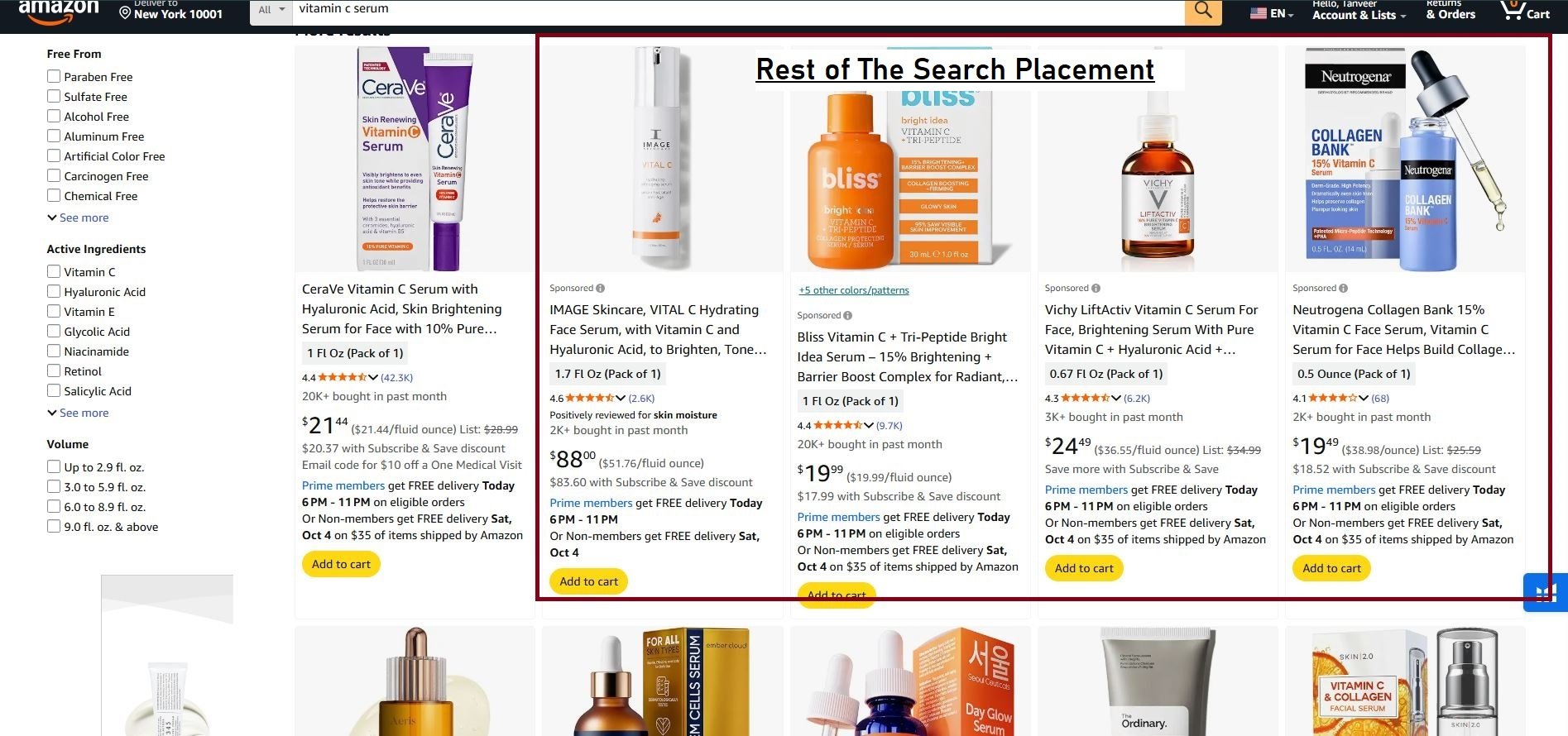
Rest-of-Search is the bulk of Amazon’s search impressions. CPCs here are typically lower than Top-of-Search, but CTR is often lower too.
Rest-of-Search provides broad reach for discovery and keyword testing, making up a large volume of impressions and clicks across campaigns.
3. Product Detail Pages (PDPs)
These ads appear on individual product detail pages (often at the bottom or in side panels) or on related product sections, including “Customers who viewed this also viewed” or the Buy Box area.
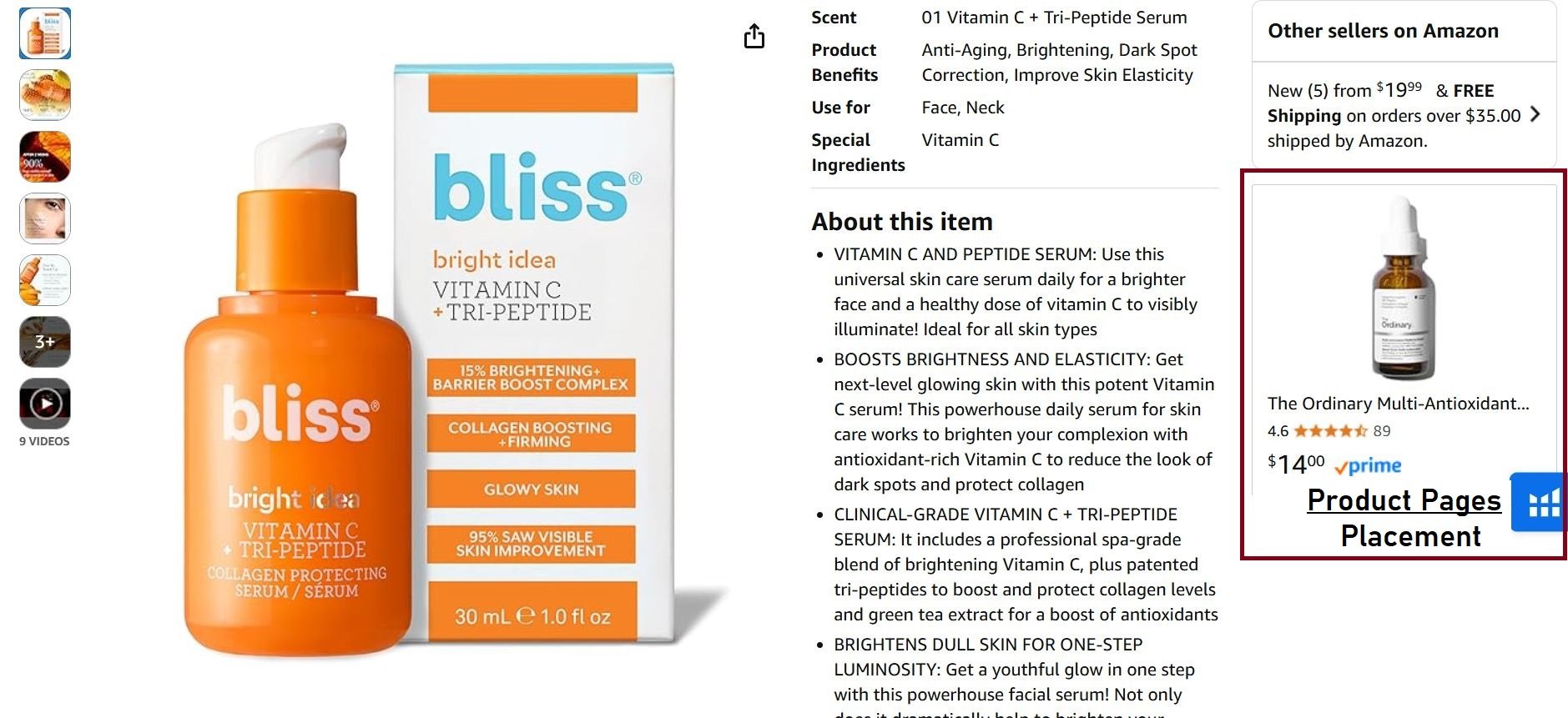
Product Page placements reach shoppers who are already viewing specific items often high-intent shoppers.
CTR on PDP ads is usually lower (since fewer shoppers see them), but conversion rates (CVR) tend to be high because a shopper on a product page is close to purchase decision. This placement is useful for competitor conquest or retargeting similar products.
Every placement reaches customers at different points in their shopping journey. Top-of-Search captures broad visibility and impulse buyers, Rest-of-Search casts a wide net at lower cost, and Product Page placements target shoppers who are deep in the funnel, often yielding higher conversion rates.
Amazon calculates placement bids by increasing your base keyword bid according to the percentage set for each placement. The base bid never changes; only the final bid used in the auction changes based on placement.
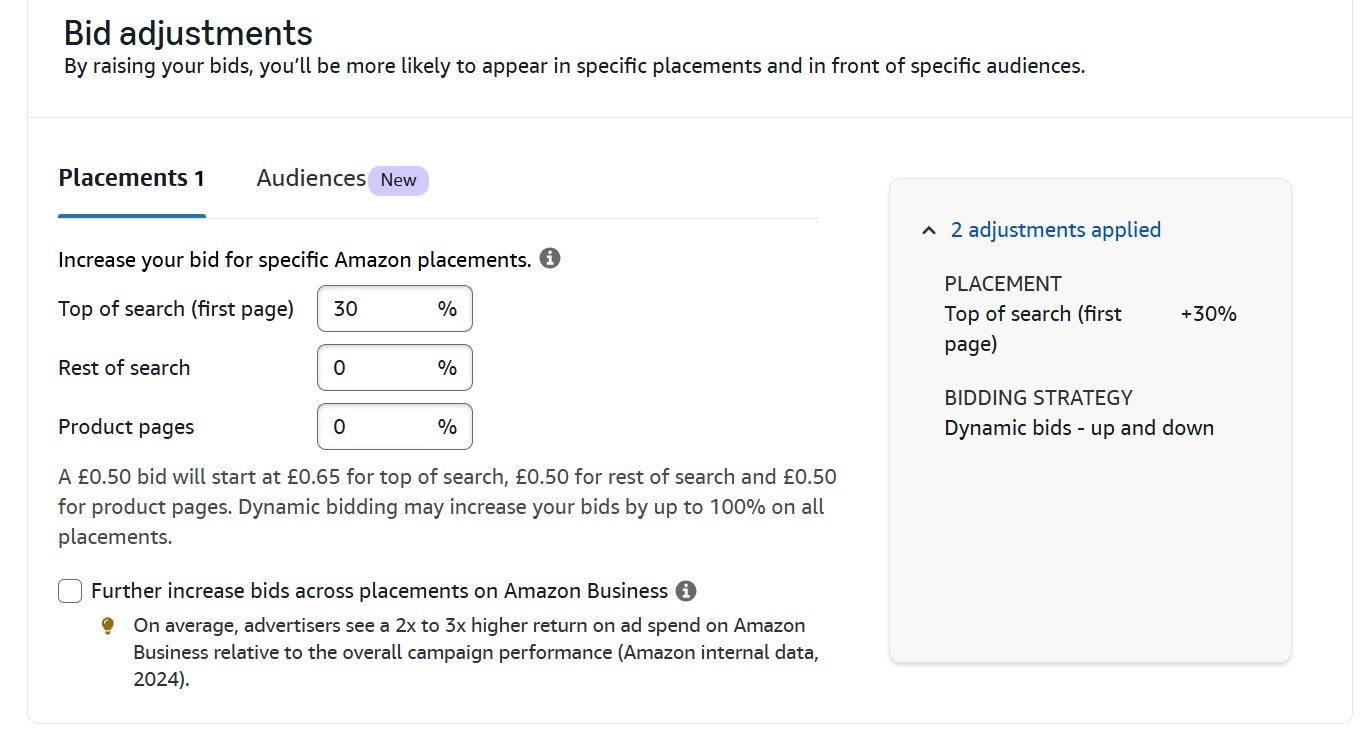
For example, assume a base keyword bid of $1.00 with the following placement adjustments:
- Top of Search: $1.00 × 50% = $0.50 → Final bid $1.50
- Product Pages: $1.00 × 30% = $0.30 → Final bid $1.30
- Rest of Search: $1.00 × 0% = $0.00 → Final bid $1.00
Each placement applies its percentage independently, and Amazon increases the bid only when the ad is eligible for that specific placement.
Here’s a simple comparison of the three primary Sponsored Products placements and their key characteristics.
| Placement | Location | Typical Customer Intent | Competition Level |
|---|---|---|---|
| Top of Search (TOS) | The first few sponsored slots on a search results page. | High. Shoppers are actively searching and ready to buy. | Very High |
| Rest of Search (ROS) | Middle, bottom, or subsequent search results pages. | Medium. Shoppers may be browsing or comparing options. | Medium |
| Product Pages | On the detail pages of other products (competitors, complementary items). | High. Shoppers are in the final stages of consideration. | High |
How Placement Impacts Your Ad Spend
Not all spots are created equal, and they don’t carry the same price tag. The same is true for your Amazon PPC placements. A click at the Top of Search will cost you something different, and deliver a different result, than a click on a Product Page.
Metrics like Cost Per Click (CPC), Conversion Rate (CVR), and Advertising Cost of Sale (ACoS) are almost never the same across the board. If you’re just looking at a campaign’s overall average ACoS, you’re getting a misleading picture of what’s actually going on.
A high CPC at the Top of Search might feel expensive, but it can be profitable if those shoppers convert at a high rate. On the other hand, that cheap CPC you’re getting on a competitor’s Product Page might just be burning cash if it never leads to a sale. You can’t know without checking your placement data.
Segmenting your performance by placement is the only way to see where your ad budget is working and where it’s being wasted. It lets you shift your spend to the most profitable spots. To get a handle on this, it’s essential to understand how to calculate Return On Ad Spend (ROAS).
1. Why Placement Data Matters
Ignoring placement data is like driving with a blindfold on. The cost and performance differences between placements are often dramatic and have a direct line to your profitability.
For instance, your ACoS is a direct result of your CPC and conversion rate, both of which change depending on the placement. Industry guides often quote average Amazon PPC conversion rates around 9-11% for well-optimized listings, but these are just averages.
Recent data pegs the overall Amazon advertising conversion rate between 9.96% and 11.1%. But look closer: products under $25 convert at higher rates (around 12.5%), while items over $100 convert much lower (around 6.4%). This is because Product Page placements typically have lower CPCs but also lower conversion rates compared to the prime real estate at the Top of Search.
Let’s understand it with simple example. If the average CPC in your category is $1.12. If your Top of Search placement converts at 12% while your Product Page placement converts at 6%, your effective cost per sale is $9.33 for Top of Search versus $18.67 for Product Pages. That’s a 2x difference in profitability that should shape how you build your campaigns.
2. Practical Financial Differences
Let’s break this down with a real-world example. Imagine you’re selling a $50 product.
- Top of Search: Here, you might pay a premium $2.50 CPC. But because shoppers here are ready to buy, you see a strong 15% conversion rate. This means it takes you about 7 clicks to land a sale, costing you $17.50. Your ACoS is 35% ($17.50 / $50).
- Product Pages: The clicks are much cheaper, maybe just $0.80. But the shopper is still browsing, so your conversion rate is only 5%. Now it takes 20 clicks to secure a sale, for a total cost of $16.00. This gives you a 32% ACoS ($16.00 / $50).
In this scenario, the Product Page placement is more profitable despite its lower conversion rate, all thanks to those cheaper clicks. Without looking at the placement data, you might have incorrectly assumed the high-converting Top of Search spot was your best performer.
You can learn more about how they impact ad performance in our detailed guide on Amazon bidding strategies. It’s also worth exploring guides on mastering different PPC bidding strategies that apply across various platforms.
Placements and Bidding Strategies Impact on Final Bid
Amazon allows sellers to adjust bids for specific placements by up to 900%, giving control over how aggressively ads compete in different positions. However, the placement percentage alone does not determine the final bid. The bidding strategy chosen at the campaign level further modifies the placement-adjusted bid in real time, based on conversion likelihood.
There are three main bidding strategies:
- Fixed Bids: Amazon does not alter your bid. The placement-adjusted bid is used as-is.
- Dynamic Bidding – Down Only: Amazon can reduce your bid when the likelihood of conversion is low but never increase it.
- Dynamic Bidding – Up & Down: Amazon can increase the bid by up to 100% when conversion probability is high or reduce it when low.
Placement adjustments set the baseline bid for each position, while the bidding strategy controls whether that bid can rise or fall in the auction.
For example, if the base keyword bid is $1.00, Top of Search (TOS) placement adjustment is +200%, and Product Pages (PP) placement adjustment is +100%, here is how the final bid comes out with the combination of both bidding strategies and placement:
| Placement | Bidding Strategy | Placement Adjustment | Final Possible Bid |
|---|---|---|---|
| Top of Search | Fixed Bids | $1 + 200% = $3.00 | $3.00 |
| Top of Search | Dynamic – Down Only | $1 + 200% = $3.00 | Up to $3.00, can be reduced if conversion likelihood is low |
| Top of Search | Dynamic – Up & Down | $1 + 200% = $3.00 | Up to $6.00 Maximum if conversion likelihood is high |
| Product Pages | Fixed Bids | $1 + 100% = $2.00 | $2.00 |
| Product Pages | Dynamic – Down Only | $1 + 100% = $2.00 | Up to $2.00, can be reduced based on conversion signals |
| Product Pages | Dynamic – Up & Down | $1 + 100% = $2.00 | Up to $4.00 Maximum if conversion likelihood is high |
| Rest of Search | Fixed Bids | $1 + 0% = $1.00 | $1.00 |
| Rest of Search | Dynamic – Down Only | $1 + 0% = $1.00 | Up to $1.00, can be reduced by conversion likelihood |
| Rest of Search | Dynamic – Up & Down | $1 + 0% = $1.00 | Up to $2.00 Maximum if conversion likelihood is high |
How to Structure Your Campaigns for Placement Control
Knowing which Amazon PPC placement is your money-maker is half the battle. The other half is structuring your campaigns to act on that knowledge. A disorganized account forces you to make broad, inefficient decisions.
The fix is to create dedicated campaigns, each with a single objective. This approach gives you precise control over your budget and bidding, letting you invest in what’s working.

1. Segment Campaigns by Goal
Stop lumping all your keywords into one giant campaign. Instead, break them out based on their purpose. This segmentation is the foundation of effective placement management. It prevents a poorly performing placement in one area from dragging down the averages of another.
Here are a few real-world examples of how to set up goal-based campaigns:
- Ranking Campaigns: These are focused on your most important, high-volume keywords. The goal here is aggressive visibility, so you’ll want to use a high Top of Search bid modifier (think +100-150%) to dominate that valuable real estate and improve your organic rank.
- Competitor Defense Campaigns: The mission is simple: protect your own listings. You’ll use Product Targeting to run ads directly on your own ASINs. This campaign should funnel its budget almost entirely into Product Page placements, effectively building a wall to block rivals.
- Discovery Campaigns: These are your research and development department. They use broad match or automatic targeting with lower bids, so the goal isn’t immediate sales. It’s about finding new, profitable keywords, which makes the low-cost Rest of Search placement the perfect environment for this job.
2. Why This Structure Works
When you separate campaigns like this, your performance data becomes clean and actionable. You can look at your “Ranking Campaign” and see exactly how your Top of Search strategy is performing without its metrics being diluted by lower-converting clicks from Product Pages.
This clarity lets you make sharp, data-driven decisions instead of just guessing. You can allocate your budget with confidence, knowing exactly which placement strategy every dollar is funding. For a deeper look at building out your account, check out our guide on structuring an Amazon advertising campaign.
Sponsored Products Placement Strategies
Apart from pure bidding mechanics, consider these strategic approaches that tie placements into overall Sponsored Products tactics:
1. Budgeting by Placement
If Top-of-Search is crucial (e.g., for a new product launch), set a higher campaign budget or front-load budget on that campaign. Similarly, if Product Page ads are historically most profitable, ensure budget sufficiency there. You can effectively allocate budget by creating separate campaigns focusing on different placements.
2. Keyword and Placement Synergy
Certain keywords perform better on different placements. Brand or high-intent keywords often shine at Top-of-Search, while broad category terms may do well in Rest-of-Search. Non-brand generic keywords might benefit from Product Page ads, capturing competitor product searches. Analyze keywords by placement performance and adjust match types and modifiers in tandem.
3. Creative and Listing Quality
Conversions depend on how compelling your listing is. If you’re bidding heavily on Top-of-Search but your ad content (title, image, price) doesn’t match user intent, your CVR might suffer. Ensure listings are optimized for the keywords and placements you target. A great strategy is wasted without a strong landing page experience.
4. Full-Funnel Marketing
Use placements to reach shoppers at different funnel stages:
- Awareness Stage: Use Top-of-Search and Sponsored Brands get your brand in front of broad audiences.
- Consideration Stage: Use Rest-of-Search to maintain presence as shoppers compare options.
- Decision Stage: Use Product Page ads and possibly Sponsored Display retargeting catch customers ready to buy or compare specific items.
5. A/B Testing Placements
Test placement strategies by creating variations of campaigns. For example, run an AB test where one ad group targets placements evenly and another boosts Product Page only. Compare metrics like ACoS and ROAS. This empirical approach takes the guesswork out of allocation.
6. Dynamic Price and Seasonality
In peak seasons or promotions, Top-of-Search demand can spike (and CPC rise). Be prepared to adjust modifiers lower if margins tighten. Conversely, in a slow season, Product Page ads might become more cost-effective as competition for search slots falls.
7. Rescue Strategy for Struggling Products
If a product isn’t selling via search ads, try boosting Product Page bids on similar or complementary products. This can pull in targeted shoppers who may not have been reached via search.
Your PPC Placement Questions, Answered
Let’s tackle some of the most common questions sellers have about their placement data.
1. What should my bid adjustments be for a new campaign?
When you’re launching something new, you don’t want to go all-in before you have any data. Keep it simple.
A smart starting point is a +25% bid adjustment for Top of Search on campaigns where visibility is the main goal. For Product Pages, you can usually leave it at 0% to start.
This approach lets you collect real-world data without burning your budget on day one. You can always get more aggressive later once the performance proves it’s worth it.
2. How long should I wait before making changes?
It’s tempting to check your campaign performance every five minutes, but you have to resist. Meaningful data doesn’t appear overnight.
As a general rule, give your campaigns at least 7 to 14 days to run before you make any big decisions based on placement performance.
This window is long enough to smooth out random daily fluctuations, giving you a clearer picture of your results. If you act any sooner, you’re probably just reacting to statistical noise, not a real trend.
3. When is it a bad idea to bid high for Top of Search?
Chasing that top spot isn’t always the right move, especially if your product isn’t “retail-ready.” Paying a premium for the best ad spot is a bad idea if your product listing has flaws, like:
- Few or no reviews: Shoppers get nervous without social proof.
- Poor photos: Your main image is your first impression. If it doesn’t stand out or clearly show your product, people will scroll right past.
- Weak copy: A confusing title or boring bullet points won’t help. You have seconds to convince a shopper your product is the one they need.
Investing in premium clicks only to send shoppers to a listing that can’t close the deal is one of the fastest ways to burn through your ad budget. Fix the listing first.