Every product listed on Amazon needs a product identifier. That is the rule. A GTIN (Global Trade Item Number), typically in the form of a UPC or EAN, is how Amazon matches your product to its catalog and prevents duplicate listings.
But here is the problem: not every product has one.
If you sell private label goods, handmade items, generic products, or anything manufactured without a barcode, you hit a wall the moment you try to create your listing. Amazon asks for a GTIN, and you do not have one.
That is exactly what the GTIN exemption solves. It lets you list products on Amazon without purchasing or providing a barcode, and it costs nothing to apply.
This guide covers the full process, from eligibility to application to approval, based on the current Seller Central workflow and actual seller experience. No outdated screenshots. No guesswork.
What Is a GTIN?
A GTIN is a standardized numeric code used to identify products in retail. On Amazon, the most common types include:
| GTIN Type | Digits | Where It Is Used |
|---|---|---|
| UPC | 12 | United States, Canada |
| EAN | 13 | Europe, Asia, most international markets |
| ISBN | 13 | Books only |
| JAN | 13 | Japan |
These codes are issued by GS1, the global standards organization that manages barcode allocation. When you scan a barcode at any retail store, you are scanning a GTIN.
Amazon uses GTINs to build its product catalog. When you enter a UPC while creating a listing, Amazon checks it against its database to confirm the product exists, verify the brand, and prevent counterfeit or duplicate listings.
What Is a GTIN Exemption?
A GTIN exemption is Amazon’s formal approval that allows you to create product listings without entering a UPC, EAN, or any other product identifier.
It does not mean Amazon is waiving a rule for no reason. It means Amazon recognizes that your specific product, under your specific brand, in a specific category, does not have (and does not need) a barcode to be listed accurately.
The exemption is granted per brand, per category. If you sell under the brand name “PeakTrail” in the Outdoor Recreation category, your approval covers only that brand in that category. If you later want to list under the same brand in Kitchen, you submit a separate application.
Who Should Apply?
Not every seller needs a GTIN exemption. Here is a breakdown of who actually benefits from it:
You need a GTIN exemption if:
- You manufacture your own products and have not purchased GS1 barcodes
- You sell handmade or custom products with no retail packaging
- You sell generic or unbranded items (store brands, white label goods)
- You are a private label seller launching a new brand
- You sell parts, components, or accessories that were never assigned barcodes
- You source products from manufacturers who do not provide UPC codes
You do not need a GTIN exemption if:
- Your products already have valid UPC or EAN codes on their packaging
- You are doing retail arbitrage with branded products (those products already have GTINs)
- You are reselling wholesale goods from major brands (use the existing barcode)
- You are enrolled in Amazon Brand Registry, which often grants automatic GTIN exemption for your registered brand
GTIN Exemption vs. Buying UPC Codes
This is the first real decision most new sellers face. Should you pay for barcodes or apply for the free exemption?
Here is what GS1 US charges for legitimate barcodes:
| Number of Barcodes | Initial Fee | Annual Renewal | Year 1 Total |
|---|---|---|---|
| 1 (Single GTIN) | $30 | $0 | $30 |
| 10 (Company Prefix) | $250 | $50 | $250 |
| 100 | $750 | $150 | $750 |
| 1,000 | $2,500 | $500 | $2,500 |
| 10,000 | $6,500 | $1,300 | $6,500 |
GTIN exemption cost: $0. No initial fee. No annual renewal.
For a seller launching a single private label product, the math is simple. A GS1 Single GTIN costs $30 one time. That is not painful. But if you plan to launch 15 to 20 products, you are looking at the $250 Company Prefix tier plus $50 every year after that.
For sellers testing a new brand with limited capital, the GTIN exemption eliminates an unnecessary expense before you have even made your first sale.
One important note: do not buy UPC codes from third-party resellers like Nationwide Barcode or SpeedyBarcodes. Amazon’s policy, updated and enforced repeatedly since 2016, requires that UPCs come directly from GS1. Barcodes from resellers are recycled codes originally issued to other companies. Amazon’s catalog verification system (which cross-references GS1’s GEPIR database) flags and suppresses listings using these codes. It happens regularly.
Eligibility Requirements
Amazon does not publish a rigid checklist for GTIN exemption eligibility, but based on the application process and approval patterns, here is what you need:
1. An active Amazon Seller Central account. You can have either an Individual or Professional selling plan.
2. A product category that supports GTIN exemption. Most categories do. Some restricted categories (like certain subcategories within Media, Music, or Video Games) may not allow exemptions because those products inherently have ISBNs or ASINs.
3. A brand name or “Generic” designation. You must specify the brand your product will be listed under. If your product is truly unbranded, you enter “Generic” as the brand name.
4. Product images that meet Amazon’s requirements. This is where most applications succeed or fail, so the next section covers it in detail.
How to Apply: Step-by-Step Process
Amazon’s Seller Central interface updates periodically, and the GTIN exemption application path has shifted over time. As of the current Seller Central layout, here is the process:
Step 1: Log into Seller Central.
Go to sellercentral.amazon.com and sign into your seller account.
Step 2: Open List Your Products section. Go to Catalog, then select Add Products. Enter product title, or keyword and click on Search.
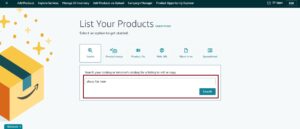
Step 3. Click on “Create a new listing“.
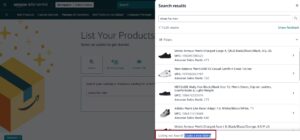
Step 4. Begin selecting your category that fits your product like Home & Kitchen > Kitchen & Dining > Coffee, Tea & Espresso > Coffee Filters. The more specific your category selection, the smoother the approval process. After selecting category click on “Confirm“.
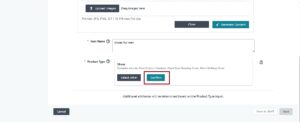
Now select “This product does not have a Product ID“, complete the listing with brand name, product attributes, images and submit your listing.
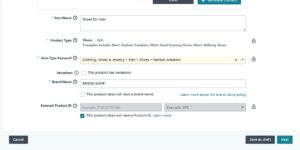
Many applications receive an instant automated approval. Others take anywhere from a few hours to 48 hours. You will receive the approval or denial notification via email and in your Seller Central case log.
Product Image Requirements
This is the part that trips sellers up the most. Amazon uses your uploaded images to verify that your product exists, that it matches the brand name you entered, and that it genuinely does not have a barcode.
Here is what to include:
Image 1: The product itself. A clear photo of the actual physical product. Not a mockup. Not a 3D render. A real photograph of the item you plan to sell. White background preferred but not always required at this stage.
Image 2: Product packaging (if applicable). If your product comes in a box, bag, or any retail packaging, photograph it. The packaging should show the brand name visible on the label or print.
Image 3: Close-up of the brand name on the product or packaging. This helps Amazon confirm the brand name you entered matches the product.
Image 4 (sometimes requested): The product from another angle. Depending on the category, Amazon may ask for an additional photo.
What to avoid in your images:
- Photographs showing a UPC barcode on the packaging (this contradicts your claim that the product does not have one)
- Stock photos or images downloaded from a supplier’s website
- Blurry, dark, or low-resolution images
- Images with visible watermarks or text overlays
- Screenshots from other marketplaces
Pro tip from experience: If your product is still in the prototyping stage and you have physical samples, photograph those. Amazon just needs proof that the product is real and matches your brand. Production-quality packaging is not required at this step.
How Long Does Approval Take?
For most sellers, GTIN exemption approval is instant or near-instant. Amazon’s system evaluates the application automatically, and if everything checks out (valid category, acceptable images, brand name that does not conflict with a registered trademark), the approval comes through within minutes.
In cases where the system flags something for manual review, expect a wait of 24 to 48 hours. If you have not heard back in 48 hours, open a support case in Seller Central referencing your GTIN exemption application.
Why Applications Get Rejected
Amazon does not always explain rejections in detail. The denial notification is often generic. But after going through this process across multiple brands and categories, these are the actual reasons applications fail:
1. Category is restricted.
Certain categories, particularly those tied to media products like books, music, and DVDs, require standard identifiers and do not allow exemptions.
2. Images are low quality.
Blurry photos, heavily cropped images, or dark shots get flagged. Use decent lighting and a clean background.
3. Brand name conflicts with an existing trademark.
If you enter a brand name that is already trademarked and registered on Amazon by another seller, your application gets denied. This is not a GTIN exemption issue specifically. It is Amazon protecting brand owners.
3. You selected too broad a category.
Applying at the top-level category (like “Clothing”) instead of drilling down to a specific subcategory can trigger a rejection. Always go as specific as possible.
What to do if your application is denied:
- Review the denial reason in your Seller Central notifications
- Fix the issue (retake images, correct brand name spelling, choose a different subcategory)
- Resubmit. There is no limit on how many times you can apply
Most denials are resolved on the second attempt once the seller corrects the specific issue.
GTIN Exemption and Brand Registry
These two programs are related but serve different purposes, and there is genuine confusion around how they interact.
| Feature | GTIN Exemption | Brand Registry |
|---|---|---|
| Purpose | List products without a barcode | Protect your brand, access enhanced tools |
| Cost | Free | Free (but requires a registered trademark) |
| Trademark required | No | Yes |
| Grants listing ability without GTIN | Yes (after approval) | Yes (often automatic for registered brands) |
| Access to A+ Content | No | Yes |
| Access to Brand Analytics | No | Yes |
| Protection from hijackers | No | Yes |
Here is the key relationship: if your brand is enrolled in Amazon Brand Registry, you typically receive automatic GTIN exemption for that brand across all categories. This means Brand Registry sellers often do not need to go through the GTIN exemption application at all.
However, Brand Registry requires a registered trademark (either with the USPTO or an equivalent international trademark office recognized by Amazon). If you do not have a trademark, you cannot enroll in Brand Registry, and the standalone GTIN exemption is your path forward.
For sellers who are just starting out, the recommended sequence is:
- Apply for GTIN exemption now so you can list products immediately
- File your trademark application (takes 8 to 12 months for USPTO approval in most cases)
- Enroll in Brand Registry once your trademark is registered
- At that point, GTIN exemption becomes automatic and you gain access to the full suite of brand tools
Categories Eligible for GTIN Exemption
Amazon allows GTIN exemptions in the vast majority of product categories. Rather than listing every single eligible category (there are hundreds of subcategories), here are the categories where sellers most commonly and successfully apply:
| Category | GTIN Exemption Available | Notes |
|---|---|---|
| Home & Kitchen | Yes | One of the most common approval categories |
| Clothing, Shoes & Jewelry | Yes | Must specify size, color, material attributes |
| Beauty & Personal Care | Yes | Image quality matters more here |
| Health & Household | Yes | Some subcategories require approval to sell |
| Sports & Outdoors | Yes | Works for private label gear |
| Tools & Home Improvement | Yes | Common for unbranded parts |
| Arts, Crafts & Sewing | Yes | Handmade sellers often apply here |
| Pet Supplies | Yes | Growing private label category |
| Grocery & Gourmet Food | Yes | Requires additional category approval |
| Books | No | ISBN required |
| Music | No | Standard identifier required |
| Video Games | No | GTIN required |
If your category is not listed here, the fastest way to check is to start the application process. Amazon will tell you during category selection if exemptions are not available for that subcategory.
Frequently Asked Questions
Is the Amazon GTIN exemption free?
Yes. There is no fee to apply, and no recurring charge after approval. It is entirely free.
How long does GTIN exemption approval take?
Most applications are approved instantly through Amazon’s automated system. If flagged for manual review, expect 24 to 48 hours.
Does a GTIN exemption expire?
No. Once approved, the exemption remains active on your account for that brand and category combination indefinitely, unless Amazon revokes it for a policy violation.
Can I apply for GTIN exemption in multiple categories?
Yes. You need to submit a separate application for each category, but you can hold exemptions across as many categories as you need.
Do I need a GTIN exemption if I have Brand Registry?
In most cases, no. Brand Registry typically grants automatic GTIN exemption for your registered brand. However, some sellers report still needing to apply for specific categories even with Brand Registry, so check your listing flow to confirm.
Can I use GTIN exemption for FBA products?
Yes. GTIN exemption and FBA are independent of each other. You can list a product using a GTIN exemption and fulfill it through FBA. Amazon will assign an FNSKU label for warehouse tracking.
What if my GTIN exemption application is denied?
Review the denial notification, fix the issue (usually images or brand name spelling), and reapply. There is no limit on resubmissions, and no penalty for a denied application.
Can I get a GTIN exemption for a generic or unbranded product?
Yes. Enter “Generic” as the brand name during the application. Amazon allows GTIN exemptions for unbranded products.
Will my listing look different without a GTIN?
No. Customers cannot tell whether your product was listed with a GTIN or through an exemption. The product page looks and functions identically.
Should I buy UPC codes or apply for the exemption?
If your product does not already have a legitimate GS1-issued barcode, apply for the exemption first. It is free, fast, and avoids the risk of listing suppression from invalid barcodes. If you plan to sell in brick-and-mortar retail in the future, purchasing a GS1 Company Prefix makes sense at that stage since physical retailers require scannable barcodes.