Running out of stock on Amazon does not just cost you sales. It hands your ranking, your Buy Box, and your customers directly to your competitors. Overstocking does the opposite damage: it bleeds your margins through storage fees, ties up capital you could use elsewhere, and tanks your IPI score until Amazon starts restricting how much you can even send in.
Amazon inventory management is the practice of controlling how much stock you hold, when you reorder it, how you store it, and how Amazon scores your performance based on all of the above.
It is not just logistics. It directly affects your search ranking, your storage costs, your access to FBA capacity, and ultimately your profit margin on every unit you sell.
What good inventory management actually involves:
- Knowing your reorder point before you need it, not when you are almost out
- Keeping your IPI score healthy so Amazon does not restrict your storage access
- Clearing slow-moving stock before aged inventory surcharges start stacking up
- Forecasting demand accurately enough that you are not constantly over or under
- Understanding what Amazon penalizes and building your operations around avoiding those penalties
Why Inventory Management Matters
Amazon’s algorithm is ruthless about availability. If your product goes out of stock, your listing gets suppressed. Your ranking drops. By the time you restock, competitors who stayed in stock have climbed past you organically, and you are now paying PPC to recover ground you already earned.
Customer expectations make this even less forgiving. According to research, 68% of U.S. consumers expect delivery within zero to three days of purchase, and 70% would be upset if an order arrived late. Out-of-stock products do not give customers a reason to wait around. They just buy from whoever else is available.
The two-sided damage of poor inventory control:
- Too little stock: Suppressed listing, ranking drops, lost Buy Box, competitors gain organic ground
- Too much stock: Tied-up capital, monthly storage fees, aged inventory surcharges, reduced IPI score, lower FBA capacity limits
Both problems compound over time. The solution is not to pick the lesser evil. It is to build a system that catches issues before they become expensive.
Before jumping into strategy, you need to know the exact figures Amazon uses to evaluate your inventory health and calculate what they charge you. These figures come directly from Amazon’s fee schedules and Seller Central policies.
| Metric | Current Figure | Impact If Missed |
|---|---|---|
| Minimum IPI Score | 400 | Storage capacity limits imposed |
| Healthy IPI Score | 550+ | Full FBA access, no restrictions |
| FBA Monthly Storage (Jan-Sep) | $0.78 per cubic foot | Charged to all standard-size FBA inventory |
| FBA Monthly Storage (Oct-Dec) | $2.40 per cubic foot | Q4 surcharge, nearly 3x the off-peak rate |
| Aged Inventory Surcharge (271-365 days) | $1.50 per cubic foot | Stacks on top of monthly storage |
| Long-Term Storage Fee (365+ days) | $6.90 per cubic foot or $0.15/unit | Whichever is greater |
| Low Inventory Level Fee Threshold | Below 28 days of historical supply | Added to FBA fulfillment fee per unit |
| Excess Inventory Threshold | 90+ days of supply | Flags your IPI and reduces capacity |
| Recommended Days of Supply | 30-60 days | The operational target for most FBA sellers |
Amazon typically announces fee changes in Q4 for the following year. Always confirm current rates in Seller Central under FBA > Fee Schedule before running margin calculations.
FBA Capacity Limits: How Amazon Controls Your Storage Access
Effective March 2023, Amazon replaced the old restock limits and quarterly storage volume limits with a single system called FBA Capacity Limits.
Each storage type in your account, standard-size, oversize, apparel, footwear, and so on, gets its own capacity limit measured in cubic feet. Amazon sets these limits during the third week of each month and gives sellers estimated limits up to three months ahead so you can plan restocks without guessing.
Key things most sellers do not realize about capacity limits:
- New professional sellers are exempt from limits initially because Amazon has no performance data on them yet
- Once your account hits 39 weeks old, your IPI score drives your capacity limits directly
- Higher IPI equals higher capacity. Lower IPI equals tighter restrictions
- Limits update monthly, not weekly, giving you a more stable planning window
What Happens When You Need More Capacity
Amazon built a tool called Capacity Manager for situations where your standard limit is not enough. Whether you are launching a new product or preparing for a seasonal spike, you can request additional cubic feet using a reservation fee bid.
The reservation fee works like an auction against other sellers. Higher bids get priority access to additional capacity. The good news is that if your new inventory sells through, Amazon offsets your reservation fee by up to 100%, meaning you may not pay anything extra.
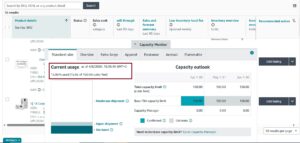
To access it, go to Seller Central, open the ‘Inventory’ from menu and ‘FBA Inventory’, and find your Capacity Monitor. It shows current usage by storage type, your limits for the next three months, and your IPI score alongside each one.
What is Low Inventory Level Fee and How to Avoid It
Starting April 2024 and continuing into 2026, Amazon charges a Low Inventory Level Fee on standard-size products that consistently have inventory levels below 28 days of supply relative to customer demand.
This fee is Amazon’s way of saying: if you keep running lean on inventory, we cannot distribute your products efficiently across our network, and that costs us money in expedited shipping.
The fee only applies when both your short-term historical days of supply (last 30 days) and long-term historical days of supply (last 90 days) are both below 28 days. If only one of the two is below the threshold, no fee is charged.
What this means practically:
- Maintaining even 29 days of supply on a consistent basis is enough to avoid the fee
- The fee adds directly to your FBA fulfillment fee per unit shipped
- It is calculated at the parent product level, not the variation level
- Sellers running intentionally lean inventory on slow movers need to recalculate whether that strategy still makes sense
The Inventory Performance Index (IPI)
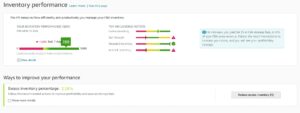
Your IPI score is Amazon’s weekly measure of how efficiently you are using their warehouse space. Think of it like a credit score for your FBA account. It determines your storage capacity access, and a low score does not just send you a warning. It immediately restricts how much inventory you can send in.
Scores below 400 trigger capacity restrictions. Scores of 550 and above signal healthy inventory management. It updates every week inside Seller Central under Inventory > Inventory Performance.
The four inputs that drive your IPI score:
- Excess inventory percentage: How much of your FBA stock Amazon considers overstock based on your current sell-through rate
- Sell-through rate: Units sold and shipped over the last 90 days divided by average inventory held over the same period
- Stranded inventory percentage: Units in Amazon’s warehouse with no active, buyable listing attached
- In-stock rate: How consistently your replenishable products stay available for purchase
Amazon does not publish exact weights for each factor, but excess inventory and sell-through rate consistently have the biggest visible impact based on real seller experience.
Ways to improve a low IPI score quickly:
- Create removal orders for inventory sitting past 150 days before aged fees escalate
- Run lightning deals or price promotions on slow movers to spike sell-through rate
- Fix stranded inventory immediately using the Fix Stranded Inventory tool in Seller Central
- Temporarily reduce reorder quantities to bring your days of supply down while your score recovers
- Do not send new inventory for an ASIN already sitting above 90 days of supply
You can view your Amazon Inventory Performance Index (IPI) score in Seller Central by navigating to the Inventory tab and selecting Inventory Performance.
Inventory Calculations Every Amazon Seller Needs
This section shows you exactly how to do it with real numbers so you can build these into your actual workflow.
Reorder Point
The reorder point is the inventory level that triggers a purchase order. Not “around this level” or “when it feels low.” A specific number you track daily.
Formula:
Reorder Point = (Average Daily Sales x Total Lead Time in Days) + Safety Stock
Total lead time includes supplier production time, international shipping, customs clearance, and FBA receiving. That last one often runs 7-14 business days and is consistently underestimated.
Worked example:
- Average daily sales: 18 units
- Supplier lead time: 22 days
- Shipping and customs: 10 days
- FBA receiving: 7 days
- Total lead time: 39 days
- Safety stock: 180 units (calculated below)
Reorder Point = (18 x 39) + 180 = 702 + 180 = 882 units
When FBA inventory drops to 882 units, the purchase order should already be in motion. Not placed. Already in motion.
Safety Stock
Safety stock is your buffer against two things: demand spikes you did not predict, and supplier delays you cannot control. Guessing this number or skipping it entirely is one of the most common reasons sellers go out of stock.
Formula:
Safety Stock = (Maximum Daily Sales – Average Daily Sales) x Maximum Lead Time
Worked example:
- Maximum daily sales in a spike period: 30 units
- Average daily sales: 18 units
- Maximum lead time you have actually experienced: 45 days
Safety Stock = (30 – 18) x 45 = 12 x 45 = 540 units
That number surprises most sellers. But if your supplier has ever been 15 days late and your demand has ever spiked 60% during a deal event, 540 units is what actually protects you.
Days of Supply
This tells you how many days your current inventory will last at your current sales rate. Amazon uses this metric directly in IPI scoring and for the Low Inventory Level Fee.
Formula:
Days of Supply = Current FBA Units / Average Daily Sales
Example:
- Current FBA inventory: 720 units
- Average daily sales: 18 units
Days of Supply = 720 / 18 = 40 days
Forty days sits comfortably in Amazon’s preferred range of 30-60 days. Under 28 days triggers the Low Inventory Level Fee. Over 90 days starts flagging excess inventory on your IPI.
Sell-Through Rate
Amazon calculates this for you in the FBA Inventory Tool, but understanding what the number means is important.
Formula:
Sell-Through Rate = Units Sold (Last 90 Days) / Average Inventory Units (Last 90 Days)
A sell-through rate above 7 is considered excellent by Amazon. This means you are selling seven times more units than you are holding on average. A rate below 1 means you are holding more inventory than you are selling, which directly signals overstock to the IPI algorithm.
Common Inventory Problems
Every seller hits inventory problems. The goal is not to avoid them forever but to resolve them fast and learn from them before they get expensive.
Running Out of Stock
Going out of stock is not just a missed sale. It is a ranking event. Amazon’s algorithm interprets zero sales as a signal that your product is less relevant, and your organic ranking drops accordingly. The longer the stockout, the harder the recovery.
What to do when you are running low and waiting on a restock:
- Pause off-Amazon advertising campaigns and reduce your PPC bids to slow inbound traffic
- Raise your price slightly to reduce purchase velocity without fully losing your Buy Box
- Switch your listing to FBM temporarily if you have stock stored anywhere else
- Do not go to zero. Even slowing sales at a higher price is better than a suppressed listing
Eva Hart, an Amazon expert at Jungle Scout, put it plainly: “Never go out of stock because it hurts your Best Seller Rank. A great way to stay in stock when running low is to slow things down on the demand side by pausing marketing and raising your price point.”
Overstocking FBA Inventory
Amazon considers any product with more than 90 days of supply or at least one unit aged beyond 90 days to be excess inventory. They are not a storage facility. They expect products to move. If yours are not moving at the rate they expect, your IPI score takes the hit and your capacity limits follow.
Options for moving excess inventory before fees compound:
- Run a coupon, lightning deal, or steep discount to accelerate sell-through
- Raise your keyword bids in Sponsored Products to get more visibility on slow movers
- Create a removal order and move inventory to your own warehouse or a 3PL
- Enroll in Amazon’s FBA Liquidations program to recover some value on units you cannot move
- Bundle the slow mover with a faster-selling product to improve combined velocity
Stranded Inventory
Stranded inventory is FBA stock with no active listing attached to it. It cannot be purchased by customers. Amazon still charges you monthly storage fees for every unit. And unless you go looking for it in Seller Central, you will not know it is happening.
Common causes include listing suppression from missing product attributes, a pricing error that triggered fair pricing policies, or an ASIN that was merged, deleted, or suspended for review.
How to fix it:
- Navigate to Inventory > Fix Stranded Inventory in Seller Central
- Amazon lists each affected ASIN and the specific reason for the strand
- Most can be resolved by editing the listing and reactivating it
- If the ASIN cannot be relisted, create a removal order immediately
- Check this report every single week without exception
Aged Inventory Surcharges
Amazon assesses inventory age around the 18th of each month, measuring from the day each unit arrived at an FBA warehouse. Here is exactly what gets charged when inventory sits too long:
Fee structure for aged inventory:
- Day 0-270: Standard monthly storage fee only
- Day 271-365: $1.50 per cubic foot added on top of monthly storage
- Day 365+: $6.90 per cubic foot or $0.15 per unit, whichever is greater
Real cost example for a standard-size product (0.5 cubic feet):
- Monthly storage (Jan-Sep): $0.39 per unit
- At day 271, surcharge adds: $0.75 per unit monthly
- At day 365+, long-term fee: $3.45 per unit
A product that cost $5 to manufacture can cost more than that in storage fees before it ever sells. Clearance pricing at a small loss is almost always the better financial decision compared to paying long-term storage on slow inventory.
6 Strategies for FBA Inventory Management
These are not theoretical best practices. They are the operational habits that show up consistently in well-run Amazon businesses.
1. Build a Real Relationship With Your Supplier
Your supplier determines your lead time, your product quality, and how quickly they prioritize your orders when demand spikes. A good relationship means your orders get moved up the queue. A bad one means you wait.
Large Amazon brands often have someone dedicated specifically to supplier relationship management, including regular visits to manufacturing facilities and structured communication schedules. Even as a small seller, consistent communication and paying on time earns you priority treatment that directly protects your in-stock rate.
What a strong supplier relationship looks like:
- You have their direct contact, not just a general inbox
- You know their production calendar and factory holiday schedule
- They flag raw material delays to you before they become your delay
- Lead times are reliable enough to use in your reorder calculations with confidence
2. Target 60 Days of Supply as Your Default
Sixty days of supply is the practical sweet spot for most FBA sellers. It gives you enough runway to absorb a supplier delay, avoids the excess inventory flag at 90 days, and keeps you comfortably above the Low Inventory Level Fee threshold of 28 days.
Review your inventory levels weekly, not monthly. Weekly review catches drift before it becomes a problem. Monthly review catches problems after they have already cost you money.
3. Plan for the Unexpected Every Single Time
Supply chains fail. COVID-19 showed that clearly, with 53% of U.S. consumers reporting difficulty finding products online in early 2020 as manufacturing and shipping disruptions cascaded globally. Disruptions on that scale are rare but smaller delays are not.
Build buffers into your supply chain:
- Order safety stock in advance for your top three to five ASINs
- Identify a 3PL that can hold overflow inventory and fulfill FBM orders if FBA runs low
- Know your supplier’s backup options in case their primary factory has capacity issues
- Factor in customs delays when calculating lead time, especially for products shipping from Asia
4. Slow Demand Down When You Are Running Low
This one feels counterintuitive but it is one of the most practical tools available to an FBA seller. If your inventory is running low and your next shipment is still weeks away, you can deliberately reduce how fast you are selling.
Pausing PPC campaigns, increasing your price by 10-20%, and stopping any off-platform promotion all reduce inbound traffic. You keep your listing active and your Buy Box position, but you buy yourself more time before hitting zero.
This is always a better outcome than going fully out of stock and having your listing suppressed entirely.
5. Use the FBA Inventory Tool to Stay Ahead of Fees
Amazon’s FBA Inventory Tool inside Seller Central now combines what used to be scattered across multiple reports into a single view. It shows restock needs, excess inventory, aged units, unfulfillable inventory, and stranded inventory all in one place.
Use this tool proactively, not reactively. Check it weekly and act on recommendations before the fees compound.
6. Diversify Storage Across FBA and a 3PL
Keeping all your inventory in FBA during Q4 when storage fees jump to $2.40 per cubic foot is an expensive mistake that is easy to avoid with some planning.
How the FBA plus 3PL model works in practice:
- Send 45-60 days of your fastest moving inventory to FBA
- Hold remaining stock at a 3PL where you control costs
- Top up FBA in smaller, more frequent shipments rather than large quarterly sends
- If FBA runs low, switch the listing to FBM using 3PL stock to bridge the gap
Per-unit 3PL costs typically run $1.50 to $3.50 for pick and pack, which is often less expensive than the FBA storage fees you would pay for holding the same inventory in Amazon’s warehouses during peak surcharge periods.
FBA vs FBM Inventory Management
Choosing between FBA and FBM changes your entire inventory management approach. This is not just a shipping decision. It affects where your stock lives, who manages returns, what fees you pay, and how your listing performs during stockouts.
| Factor | FBA | FBM |
|---|---|---|
| Storage Cost | Amazon charges monthly per cubic foot | You pay 3PL or own warehouse costs |
| Lead Time Buffer Needed | Add 7-14 days for FBA receiving | Ship direct to your warehouse |
| IPI Score Requirement | Must maintain 400+ | No IPI requirement applies |
| Aged Inventory Risk | High — Amazon charges at 271 and 365 days | Only if 3PL has its own aged fees |
| Stockout Impact on Ranking | Listing suppressed immediately | Less severe if Seller Fulfilled Prime enrolled |
| Peak Season Inventory Limits | Amazon may restrict inbound shipments | No capacity restrictions |
| Returns Management | Amazon handles automatically | You manage directly |
| Q4 Storage Cost | Jumps to $2.40 per cubic foot | Stable regardless of season |
Most experienced sellers use a hybrid model: FBA for top-performing ASINs with consistent velocity, FBM as a backup for the same ASINs to prevent full suppression during restock delays.
Inventory Management Tools Worth Knowing About
Amazon’s built-in tools get you started. Once you are managing more than 20 to 30 active ASINs or working with multiple suppliers, purpose-built software tends to pay for itself quickly in fees avoided and stockouts prevented.
Here is what sellers are actually using across different account sizes, with what each tool genuinely does well.
| Tool | Best Suited For | Standout Capability | Starting Cost |
|---|---|---|---|
| Amazon Seller Central (built-in) | All sellers | FBA Inventory Tool, restock recommendations, IPI tracking | Free |
| Jungle Scout Inventory Manager | FBA-focused sellers | Demand forecasting, reorder date alerts, cost and profit estimates | Included in Suite plan |
| SoStocked | FBA-first sellers scaling up | Seasonality adjustments, custom forecasting models | ~$79/month |
| RestockPro | FBA sellers wanting automation | Automated reorder alerts, shipment creation | ~$49/month |
| Helium 10 (Inventory module) | Growth-stage sellers | Multi-supplier management, reorder tracking | Included in Helium 10 plans |
| Extensiv (formerly Skubana) | Multi-channel high-volume sellers | Unified inventory across Amazon, Shopify, and more | Custom pricing |
| Linnworks | Enterprise-level multi-channel | Full warehouse management, 3PL integration | Custom pricing |
Inventory Management for New Amazon Sellers
New sellers start with a specific disadvantage: Amazon has no performance data on you, which means your initial capacity limits are conservative and you do not yet have the sales history needed to make accurate forecasts.
Your first 90 days require a different approach than what an established seller would use.
Inventory strategy for new sellers specifically:
- Send no more than 60-90 days of supply in your first FBA shipment
- Do not put your entire inventory in FBA from day one. Keep backup stock elsewhere
- Build sell-through rate from the start with targeted PPC rather than organic volume alone
- Do not reorder in large quantities until you have at least 30 days of real sales data
- Always check your restock limits before creating an inbound shipment to avoid surprises
New sellers also consistently underestimate FBA receiving time. A shipment that arrives at an Amazon fulfillment center can sit in “Receiving” status for 7 to 14 days, sometimes longer during peak periods. That time counts against your lead time and needs to be factored into your reorder point calculations from the start.
First shipment checklist:
- FNSKU labels applied correctly to every unit
- Preparation requirements checked in Seller Central (poly bag, bubble wrap, etc.)
- Shipment type selected correctly (individual items vs case-packed)
- No mixed ASINs in a case unless specifically permitted
- Shipment creation completed before inventory is ready to ship, not after
Frequently Asked Questions
What IPI score do I need to avoid FBA storage restrictions?
Amazon requires a minimum IPI score of 400 to avoid capacity restrictions. Scores of 550 and above are considered healthy and give you full access to FBA storage. Most experienced sellers aim to stay consistently above 500 as a working buffer.
How do I calculate my Amazon reorder point?
Reorder Point equals your average daily sales multiplied by your total lead time in days, plus your safety stock. Total lead time must include supplier production time, shipping, customs, and FBA receiving, which often adds 7 to 14 business days on top of everything else.
When does Amazon start charging aged inventory surcharges?
Amazon charges aged inventory surcharges starting at day 271. Units stored between 271 and 365 days are charged an additional $1.50 per cubic foot on top of regular monthly storage. Units stored beyond 365 days are charged $6.90 per cubic foot or $0.15 per unit, whichever is greater.
What is the Low Inventory Level Fee and how do I avoid it?
Amazon charges this fee when both your 30-day and 90-day historical days of supply fall below 28 days. To avoid it, maintain at least 28 days of inventory cover consistently. If only one of the two periods is below the threshold, the fee does not apply.
What is stranded inventory and why is it dangerous?
Stranded inventory is FBA stock with no active listing attached to it. Amazon charges you storage fees on it even though no customer can buy it. It hurts your IPI score and costs you money without generating any sales. Check the Fix Stranded Inventory report in Seller Central every week.
How much safety stock should I carry?
Safety stock equals your maximum daily sales minus your average daily sales, multiplied by your maximum experienced lead time. A seller whose daily sales can spike from 15 to 25 units with a supplier who has taken up to 40 days might need 400 units of safety stock. The number feels high until your supplier goes silent for two weeks.
Should I use FBA, FBM, or both?
Most sellers doing meaningful volume on Amazon use a hybrid model. FBA handles the majority of volume for fast-moving products. FBM acts as a backup to prevent full listing suppression during restock delays. FBM alone works for sellers with very large or irregular products where FBA fees would destroy margin.
Does going out of stock hurt my Amazon ranking permanently?
Not permanently, but the damage is real and recovery takes time. A stockout suppresses your listing, drops your sales velocity to zero, and lets competitors accumulate the ranking momentum you built. Recovery typically requires 7 to 21 days of aggressive PPC spend to recapture lost positions, which adds cost on top of the revenue already lost during the stockout.
What is a good sell-through rate on Amazon?
Amazon considers a sell-through rate above 7 excellent, meaning you are selling seven times more than you are storing on average. A rate below 1 means you held more inventory than you sold over the past 90 days, which is a clear overstock signal and will hurt your IPI score.
How do FBA capacity limits work for new sellers?
New professional sellers are not subject to FBA capacity limits initially because Amazon has no performance data to base limits on. Once your account is approximately 39 weeks old, your IPI score begins directly influencing how much storage capacity Amazon grants you. This is why building a strong IPI from day one is worth the effort even before you are technically subject to the limits.