
Amazon PPC dayparting (also called ad scheduling) is the practice of running or adjusting your ads at specific times of day or days of week to maximize performance. A consistent daily spike in order volume acts as a strong positive signal to the search algorithm. In PPC managment, Ecom Brainly strongly utlizes dayparting, as part of its Amazon ranking services, to obtain sales momemtum without draining extra money on worthless clicks..
By focusing spend when shoppers are most likely to convert, you can boost sales while cutting wasted budget on low-traffic hours. In late 2023 Amazon Ads officially enabled this strategy: the console now offers hourly performance reports and “schedule” rules to automate bid changes by time . Summarizing metrics hourly helps drive advanced campaign optimization, such as increasing bids during hours with greater performance. However, automation still requires human inputs; Amazon PPC management services analyze weeks of historical reports to determine exactly which hours should be boosted and which should be cut.
This usually involves examining historical sales and clicks by hour (and day) and then boosting bids or budgets during your peak hours while throttling or pausing spend during slow hours.
For example, if your data shows that customers buy mostly in the afternoon, you might raise bids at 1–4pm and cut back after 10pm when sales are slow. Dayparting is not actually pausing campaigns but is a full control system that helps you manage bids, budgets, and placements based on hourly performance.
Dayparting is all about reallocating the budget for maximum impact. Data shows that conversion rates can swing by as much as 300% between peak and off-peak hours. Some automated dayparting strategies have even delivered an average 51% increase in profits by optimizing hourly bids.
To understand why this matters, it helps to know Amazon’s broader business strategies. If you’re new to advertising on the platform, our article on what PPC is on Amazon is a great starting point.
This guide explains what Amazon dayparting is, how to download and analyze your hourly data, and exactly how to set up scheduling rules in the Amazon Advertising Console.
Collecting Hourly Performance Data
To daypart effectively, you need detailed hourly metrics. Amazon Ads now provides an Hourly Sponsored Products report through its console (and via the API Marketing Stream), which breaks campaign performance into hourly buckets. To get this data manually in Seller Central or Vendor Central:
Step 1: In the Amazon Ads Console, go to Reports > Sponsored Products > Campaigns and choose the Hourly time unit.
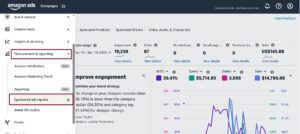
Step 2: Download the data for the most recent 14 days. Amazon limits each download to 14 days, so you may need multiple downloads for a longer range.
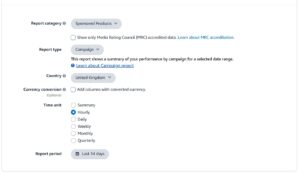
This report will list every hour of day for each campaign (or campaign group, depending on your settings) and include columns like Impressions, Clicks, Spend, Orders, Sales, etc.
Once downloaded, open the CSV or Excel file and prepare it for analysis. Typically you will want to pivot or aggregate the data by hour (and by day, if needed) to spot patterns.
Make sure you know which time zone Amazon is using for the report. Generally, Amazon reports use the time zone of the seller account or a standard time (often Pacific Time for US accounts). You may need to adjust if your campaigns target a different region or if daylight savings could affect interpretation.
Analyze Hourly Data with a Pivot Table
With the raw hourly data in hand, use a spreadsheet to digest it. A common approach is to build a pivot table. For example:
- Set “Start Time” (hour of day) as the row field.
- Add metrics like Clicks, Spend, Sales, Orders as values (summing each) .
- Calculate derived metrics by hour: Conversion Rate (Orders/Clicks) and ACoS (Spend/Sales) in additional columns.
The screenshot below illustrates this layout:
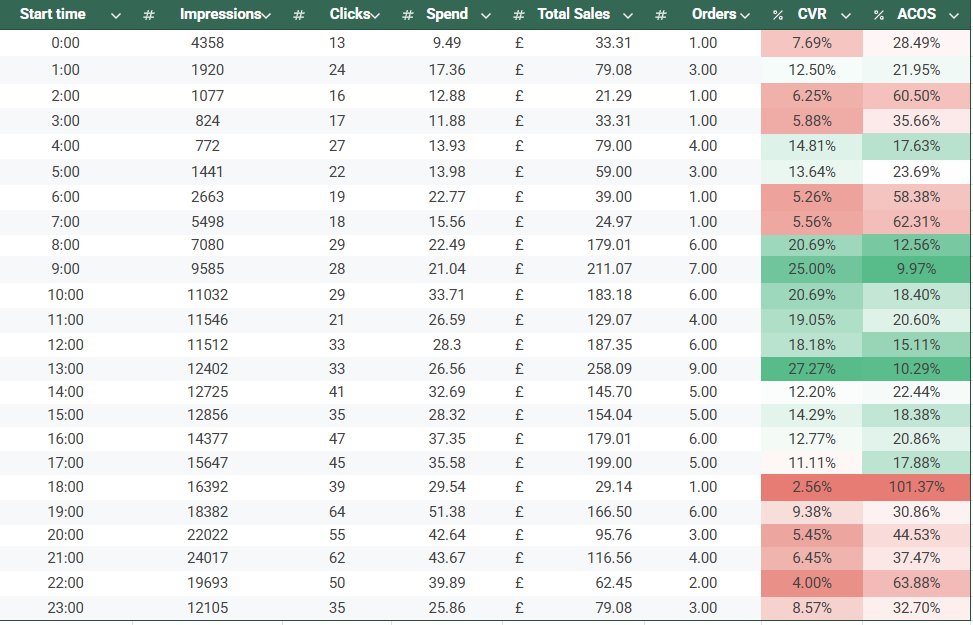
Each hour of day is a row, showing clicks, spend, orders, sales, CVR (conversion rate) and ACOS by hour. Color-coding highlights high/low values.
Using this pivot, you get an hourly breakdown of performance. Now the goal is to identify patterns: Highlight Good Hours: Look for hours with high conversions (or sales) and low spend/ACoS.
These are your prime times. You may color-code cells (green for high CVR/low ACOS, red for reverse). Spot Wasteful Hours: Flag hours with high spend but poor conversion or high ACOS. These represent wasted budget. For instance, in screenshot above you can notice the high CVR and low ACOS between 8:00-14:00 so you would increase bids during this time.
Once identified, note the time ranges. In above Screenshot, the conversion rate is lower and ACOS higher between 18:00-23:00 consistently, so during this specific time duration, reduce bids or pause.
In short notice continuous time periods when conversions are low, but spends are high, those are exactly where you’ll want to cut bids. On the other hand, hours with high conversion and low spend suggest opportunities to increase bids for maximum impact.
You can also aggregate by day of week (e.g. add weekdays to the pivot) to see if certain days outperform others. For instance, if Fridays or weekends have higher ROI, you might concentrate budget then. In practice, focus on hourly blocks first, then consider weekday patterns. The key is to base decisions on data: if your report shows hourly spend/sales imbalances, that signals where dayparting can improve efficiency.
How To Set Up Dayparting Rules

Once you know which hours to target, it’s time to implement the schedule in Amazon Advertising Console. Here are some of the ways to schedule bid optimization.
1. Amazon’s Budget Rules
A better method is to use Amazon’s automation feature: budget rules. Located in the Advertising Console, these rules let you adjust a campaign’s daily budget on a schedule. While you can’t technically “pause” a campaign, you can effectively sideline it by dropping the budget to the $1 minimum.
This tactic allows you to automate a basic dayparting schedule without third-party software.
Here’s how to implement this practically:
- Open Amazon Advertising Console and click on any campaign you want to apply budget rule. The go to Go to Rules → Add Budget rule.
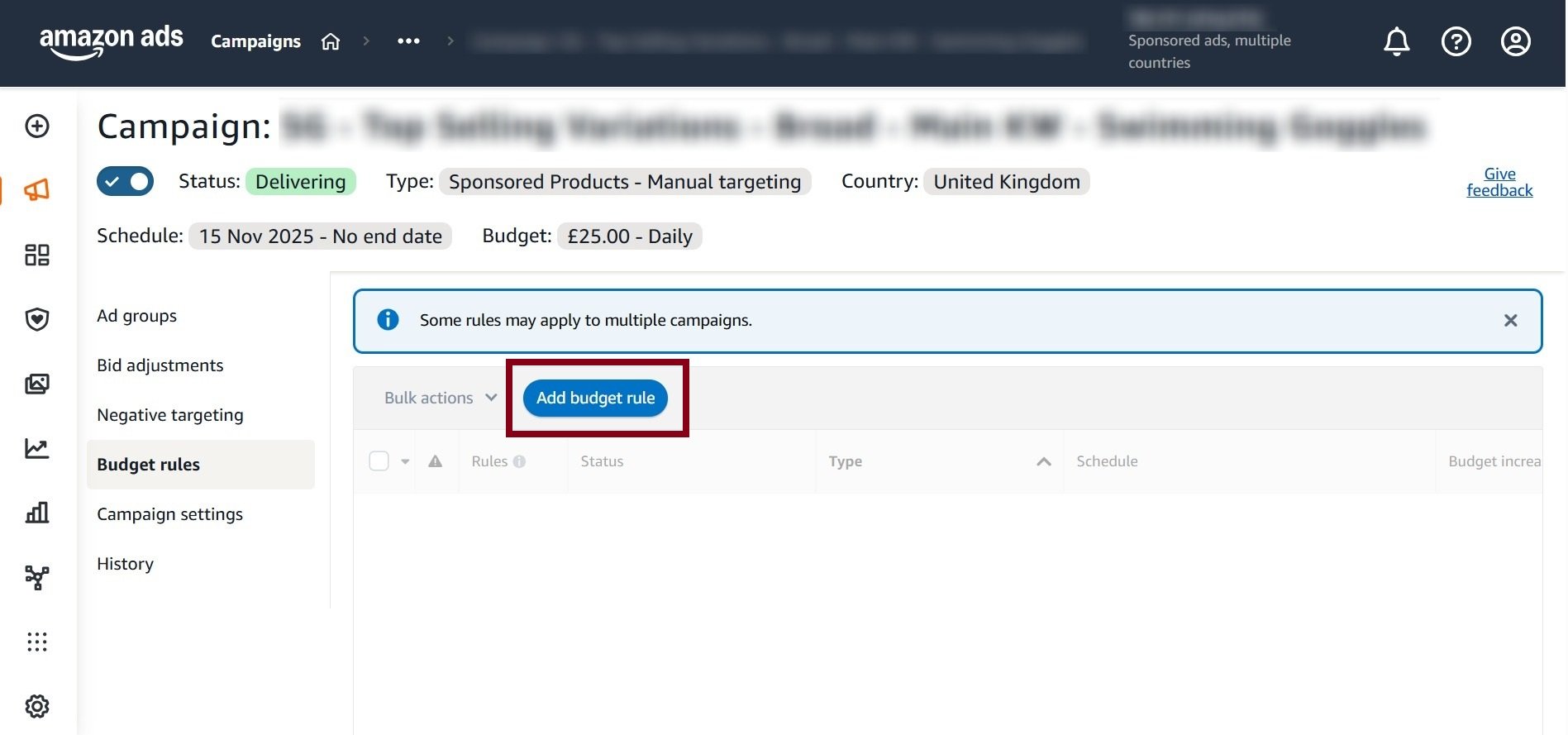
- Choose rule type: Increase budget or Decrease budget.
- Select type: Schedule (date and time) or Performance-based.
- Define time window aligned with peak hours (day parting logic).
- Set budget change value (percentage or fixed amount).
- Apply rule to selected campaigns or portfolios.
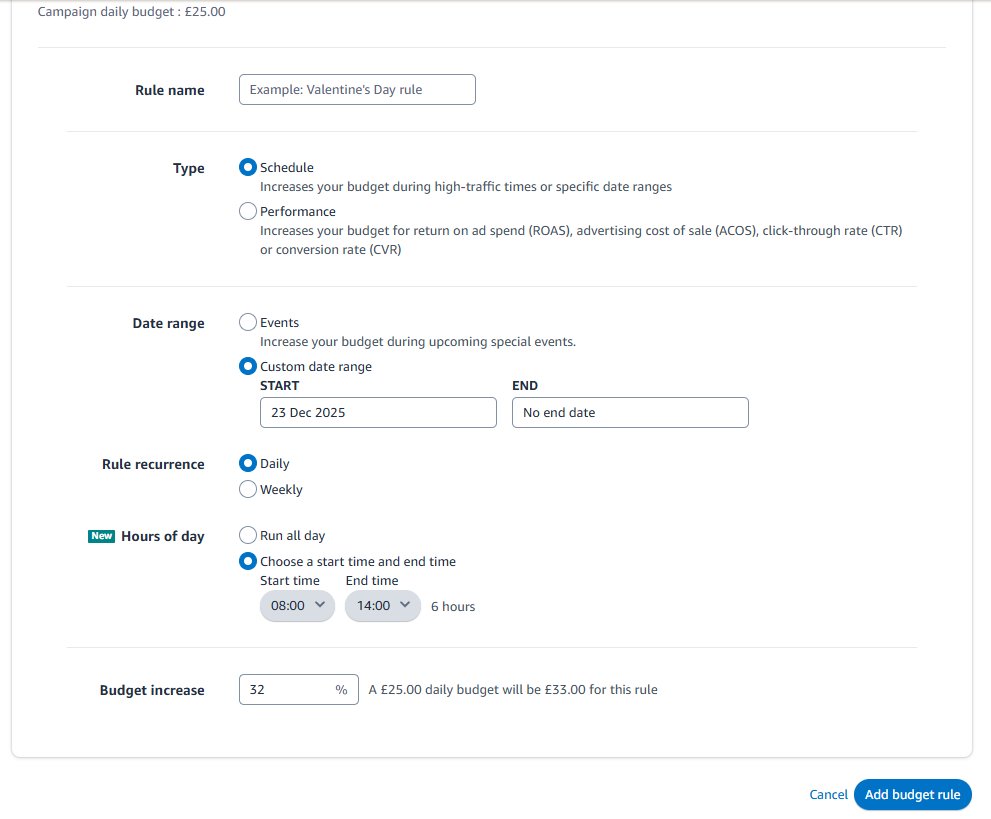
With these rules, you give Amazon an automated plan: invest more during profitable times and pull back when sales are slow.
3. Schedule Rule Method
Another method to bid adjustment is through “Schedule Rule” in Amazon PPC. This is Amazon’s native day-parting option available at the campaign level. It only allows increasing bids during specific days and hours and does not support bid decreases. Here is how to implement it practically.
- In Campaign Manager, click the campaign you want to daypart. You’ll repeat these steps for each campaign you want to adjust.
- Scroll down in the campaign’s settings to find and click on “Add schedule rule” (under Bidding Strategies).
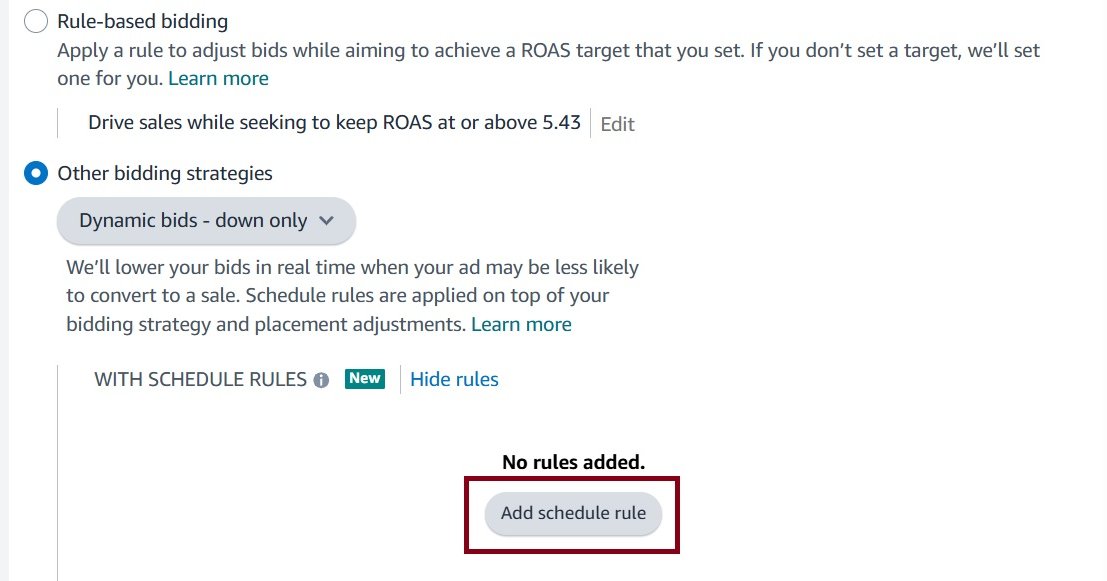
- Choose the start date (usually today) and optionally an end date for this rule.
- Choose whether the rule should run Daily or Weekly, and then select the exact hours.
- For each selected hour block, enter a percentage bid increase. For example, entering “+25%” for 08:00–14:00 means bids will be 25% higher during that hour.
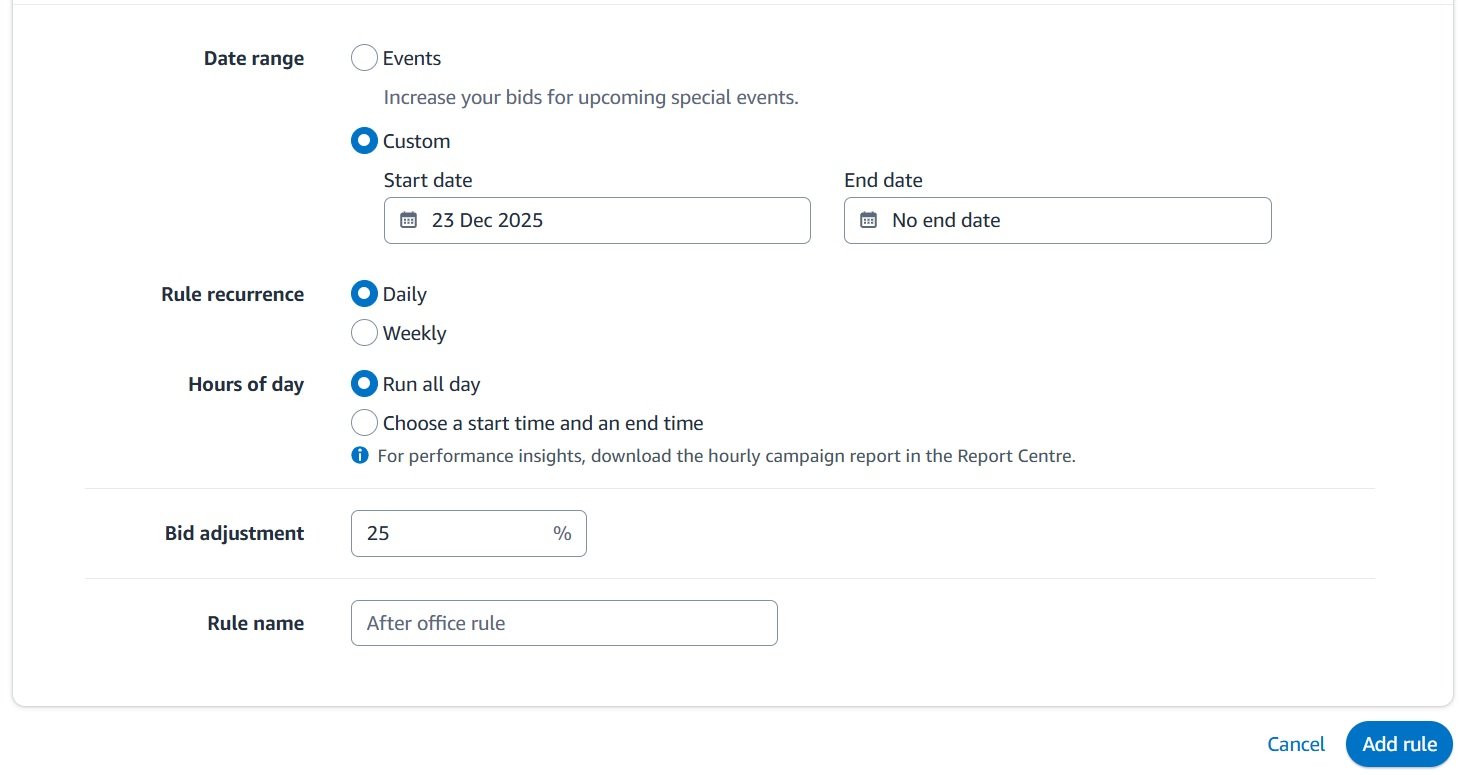
- Give the rule a descriptive name (e.g. “Daypart Peak Hours”) and click Save.
3. Bid Adjustment with PPC Bulk File
Another method to increase bids or budgets when managing multiple campaigns is through the Amazon PPC Bulk Operations file. This method is manual, scalable, and time-controlled by uploading changes only when higher bids or budgets are needed, then reverting later if required. Amazon does not auto-schedule this; timing is execution-based.
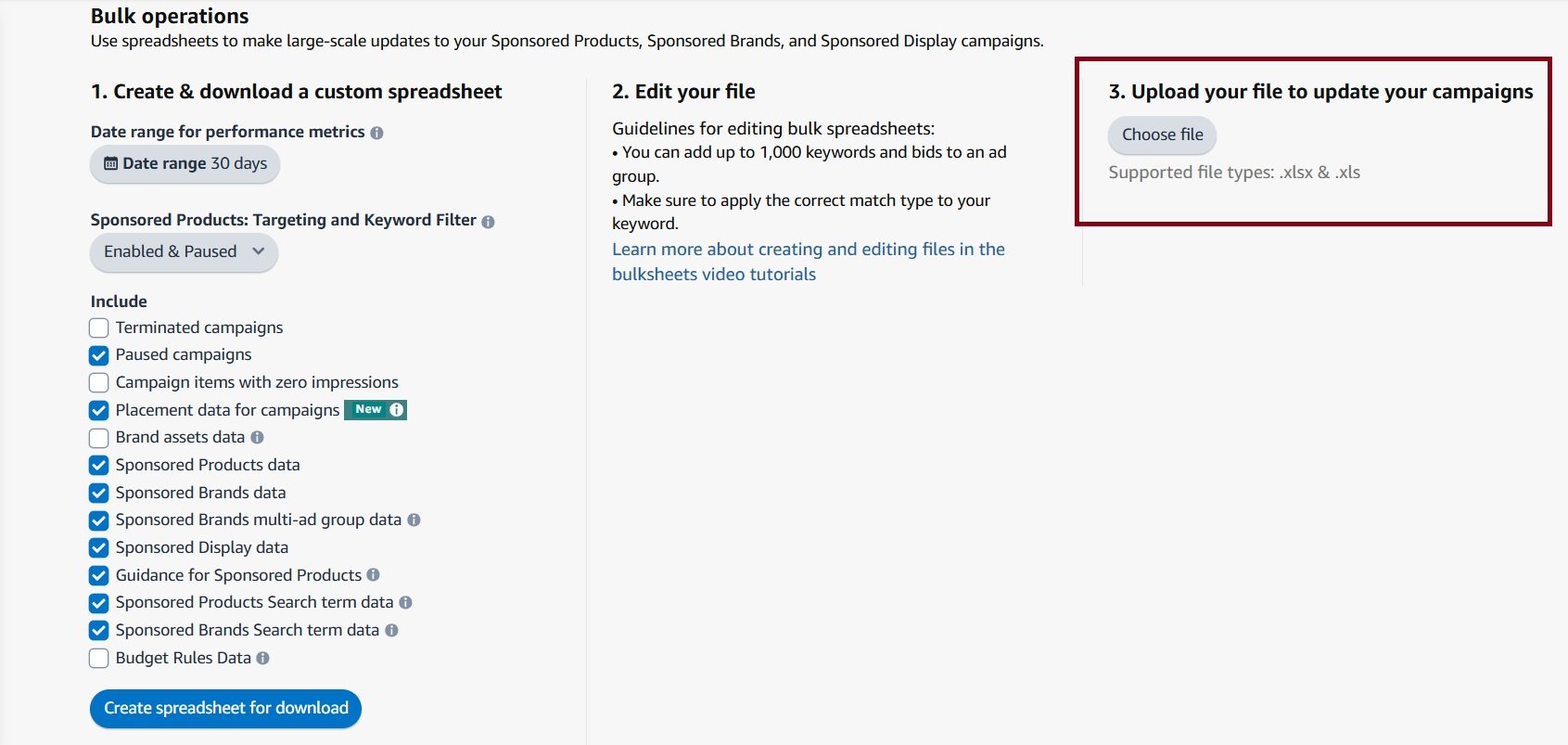
- Open Amazon Advertising Console and access Bulk operations.
- Select date range and data type you want to include in the file and choose Create spreadsheet for download.
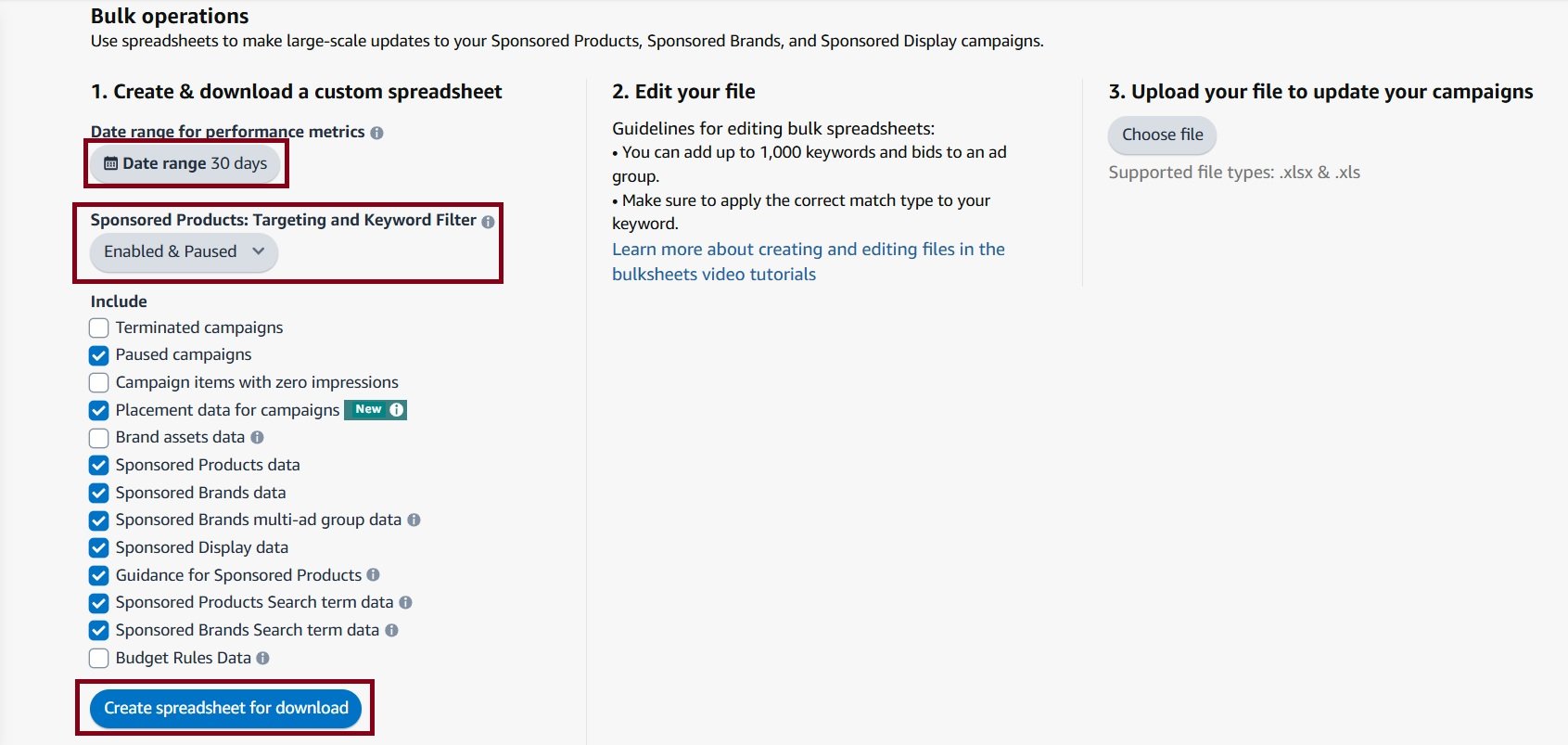
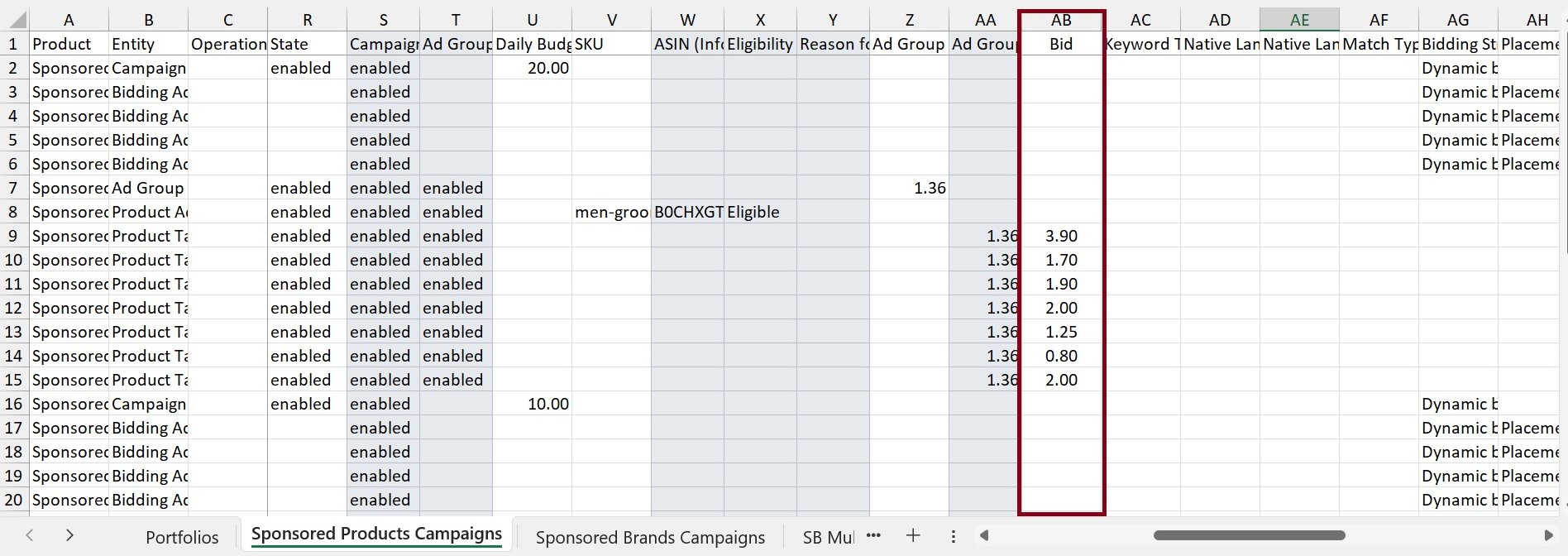
- Open the file and Locate “Bids” column. Add a new column at the end of the file and apply basic formula to increase or decrease bid based on the default bid. Now paste new bid data into default bid column as highlighted below and save the file.
- Now go back to bulk operations tab and upload the modified the bulk file every time you want to increase or decrease the bids. After peak hours, upload another file reverting default bids or budgets back to baseline.
4. When to Use Third-Party Tools
Amazon’s native rules are a good starting point but have limitations. They only control the daily budget, not your bids. For more advanced control, like reducing bids by 40% overnight while raising them 30% during the evening rush, you’ll need to look beyond Seller Central.
If you manage many campaigns or need to automate bid adjustments based on the time of day, investing in specialized Amazon PPC tools is the next logical step. These platforms offer advanced scheduling and rule-based bidding that Amazon’s tools don’t currently provide.
For these complex adjustments, many sellers also use PPC bid management automation to handle the rules without constant monitoring.
Best Practices and Tips to Improve ROI

To get the most from your ad budget, you need to think beyond a simple schedule. Amazon PPC dayparting becomes truly effective when you get granular and make strategic adjustments.
1. Test on Pilot Campaigns First
Try dayparting on one campaign at a time before rolling it out across all ads. Some campaigns (like brand awareness or organic-boosting ads) may not need rigid scheduling, while direct-sales campaigns benefit most.
2. Consider Daily Budgets
If you have tight daily budgets, be aware that adding schedule rules could change how quickly the budget depletes. You may need to slightly increase budgets on campaigns where you’ve added big bid boosts to ensure they don’t cap out too early on peak days.
3. Factor in Weekends and Events
If your product has seasonal or weekly variations, adjust accordingly. For example, if weekends convert better, use Amazon’s schedule rules to allocate more budget on Sat/Sun. (This may involve multiple rules or a weekly pattern.) Likewise, build in exceptions for Prime Day or holiday events by using Amazon’s scheduled budget rules (e.g. preset higher budgets on known sale days).
4. Check for Ad Exhaustion
If a campaign is hitting its budget early even on slower days, it may be a sign to limit its hours more aggressively. Conversely, if a campaign never spends its budget even during peak times, you might have room to increase bids further.
5. Placement Consideration
While Amazon’s schedule rules only handle bids, you can also manually adjust placement modifiers (like Top of Search boosts) in your campaign if you suspect certain hours favor certain placements. This is advanced and not automated, but worth noting if, for example, evenings historically perform better in Top-of-Search and you want extra exposure then.
6. Documentation
Keep a log of what rules you’ve set and why. Since each campaign needs its own rule, it’s easy to lose track. A spreadsheet or notes can help you remember which campaign boosts which hours, and what the outcomes were.
Frequently Asked Questions
When you first start with dayparting, many questions come up. Here are answers to some of the most common ones from sellers.
1. Should I run Amazon ads 24/7 or use dayparting?
Running ads 24/7 may seem like you’re reaching everyone, but it’s rarely efficient. You often burn a significant part of your budget during late-night hours when shoppers are browsing, not buying.
A smart Amazon PPC dayparting strategy changes that. You tell Amazon to show your ads only when your customers are ready to make a purchase. This shift helps you dominate peak shopping windows and stops budget waste during slow hours.
2. How often should I adjust my schedule?
This isn’t a “set it and forget it” task. Customer behavior changes with seasons, holidays, and market shifts.
At a minimum, review your hourly performance data once a month to ensure your schedule is still effective. During busy periods like Prime Day or the Q4 holiday season, you might need to check weekly or even daily to stay ahead.
3. Does dayparting work for all ad types?
Yes, dayparting principles apply to Sponsored Products, Sponsored Brands, and Sponsored Display. However, the best schedule will vary for each.
For instance, a top-of-funnel Sponsored Brands campaign for awareness might perform best in the evening, while a bottom-of-funnel Sponsored Products campaign targeting “buy now” keywords could convert better during lunch breaks.
4. Is dayparting good for a small budget?
Yes, it can be very effective. If you find your small budget is gone by 2 PM every day, dayparting is a great solution. It lets you pause ads during low-conversion periods and save your budget for hours that drive sales.
Just don’t get too restrictive. If you narrow your schedule to only one or two hours a day, you might not get enough clicks to gather the data needed for smart decisions. It’s about finding the right balance.
5. Will dayparting automatically fix my ACoS?
When done correctly, dayparting is a powerful way to lower your Advertising Cost of Sale (ACoS). The concept is simple: stop wasting money on hours that don’t convert and invest more in the times that do.
The result is more sales for the same or even less ad spend. This directly improves your ACoS and Return on Ad Spend (ROAS). The strategy is built on your own historical sales data, not just a guess.