
Amazon PPC has become the primary driver of sales for most sellers. CPCs have increased 15-20% annually while competition intensifies across every category. Without systematic optimization, advertising spend quickly exceeds returns.
Profitable advertising requires knowing your numbers. You need to calculate exactly what you can bid on each keyword, identify which placements convert, and systematically eliminate wasted clicks. This guide shows you how to do that with specific strategies.
Whether you’re launching your first Sponsored Products campaign or scaling a mature advertising portfolio, you’ll find actionable insights that translate directly into improved performance and profitability.
How Amazon PPC Actually Works
Amazon runs a modified second-price auction where your bid represents the maximum you’ll pay, but your actual cost is just $0.01 above the next highest bidder. However, bid amount alone doesn’t determine winners. Amazon weights bids by expected performance like your click-through rate, conversion rate, and overall relevance to the search query.
This means a seller bidding $1.50 with strong listing performance often beats a competitor bidding $2.00 with a weaker listing. Amazon makes more money from ads that convert, so they favor advertisers whose listings perform well. The practical implication is significant: listing optimization directly reduces your effective advertising costs.
The Amazon Ad Rank Formula:
Ad Rank = Your Bid × Expected CTR × Relevance Score × Conversion Probability
Your ad’s position depends on this composite score, not just your bid. Improving any component improves your competitive position without spending more.
Campaign Structure Framework
Poor campaign structure is the silent killer of advertising profitability. Sellers who mix match types, combine unrelated products, and lack strategic organization create data chaos that makes meaningful optimization impossible.
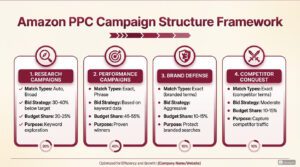
Professional campaign architecture follows one principle: every campaign should have a single, clear purpose that determines its settings, bids, and success metrics.
1. Research Campaigns
Discovery campaigns focus on keyword exploration and uncovering hidden opportunities through broad targeting.
These campaigns exist purely for keyword discovery. Your automatic campaigns and broad match manual campaigns cast wide nets to find converting search terms. Set bids conservatively at 30-40% below break-even and judge these campaigns by the keywords they graduate to performance campaigns, not by their own ACoS.
2. Performance Campaigns
Performance campaigns house your proven high-converting keywords with precise bid optimization for maximum profitability.
They house your proven winners in exact match. These keywords have demonstrated conversion through your research campaigns and now deserve precise bid optimization. Allocate your largest budget share.
3. Defense Campaigns
Defense campaigns protect your branded terms and maintain visibility on your own product listings.
These campaigns protect your branded searches and product listings from competitor conquest. These often show inflated ACoS because the customers would have purchased anyway, but the alternative is ceding that revenue to competitors.
The Recommended Campaign Structure:
Campaign Type | Match Types | Bid Strategy | Budget Share |
Research/Discovery | Auto, Broad | 30-40% below target | 20-25% |
Performance | Exact, Phrase | Based on keyword data | 45-55% |
Brand Defense | Exact (branded terms) | Aggressive | 10-15% |
Competitor Conquest | Exact (competitor terms) | Moderate | 10-15% |
For products generating $500+ monthly in ad spend, isolate them in dedicated campaigns rather than grouping multiple products together. This isolation provides clean performance data and prevents strong products from masking problems with weaker ones.
Strategy 1: The Profitable Bid Calculation System
Most sellers set bids through guesswork or by following Amazon’s suggested bid range. Both approaches leave money on the table. Amazon’s suggestions reflect competitive landscape, not your profitability requirements.
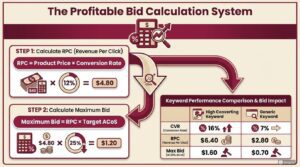
Instead of random bid optimization use Revenue Per Click Model. Revenue Per Click tells you how much money you earn on average every time someone clicks your ad. This single number becomes your bidding foundation.
RPC Formula:
RPC = Product Price × Conversion Rate
For example, a $40 product with 12% conversion rate generates $4.80 per click ($40 × 0.12 = $4.80). This means you can never bid above $4.80 without losing money on every click.
Your RPC sets the ceiling. Your target profit margin determines how far below that ceiling you should bid.
Maximum Bid Formula:
Maximum Bid = RPC × Target ACoS
Complete Example:
Step | Calculation | Result |
Product Price | — | $40.00 |
Conversion Rate | — | 12% |
RPC | $40 × 12% | $4.80 |
Target ACoS | — | 25% |
Maximum Bid | $4.80 × 25% | $1.20 |
Bidding $1.20 or less keeps you within your 25% ACoS target. Bidding higher eats into your profits. Different keywords convert differently, so each keyword has its own RPC and therefore its own maximum profitable bid.
Keyword | CVR | RPC | Max Bid (25% ACoS) |
stainless steel water bottle 32oz | 16% | $6.40 | $1.60 |
water bottle | 7% | $2.80 | $0.70 |
The specific keyword supports bids more than double the generic term. Bidding the same on both guarantees you’ll either overpay on one or underperform on the other.
Calculate RPC for your top keywords monthly and adjust bids accordingly. This single practice eliminates the majority of wasted ad spend.
Strategy 2: Keyword Research & Harvesting
Keyword research is the foundation of Amazon advertising strategy. You’ll constantly research new, relevant, and high-performing search terms while simultaneously filtering out wasteful ones.
Harvesting is the expert’s trick: continuously moving proven search terms from broad or automatic campaigns into exact match manual campaigns, giving you maximum control and efficiency.
1. Start with Keyword Research Tools
Use comprehensive tools to identify high-potential keywords your competitors are ranking for.
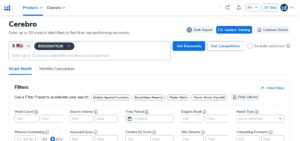
- Use tools like Helium 10 Cerebro, Jungle Scout, or Amazon’s brand analytics to see what keywords your top competitors are ranking for
- Focus on keywords with high search volume and reasonable competition levels
- Export competitor keyword data and filter by relevance to your products
2. Launch Auto Close Match Campaigns
Automatic campaigns discover a wide range of search terms while providing early performance data.
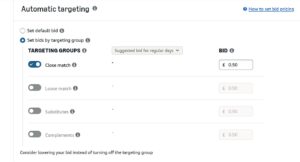
- Launch Automatic campaigns to discover a wide range of search terms your products rank for
- Set a competitive bid to ensure impressions
- For new product launches, wait 2-3 weeks before starting auto campaigns
- Create separate campaigns for Close Match, Loose Match, Substitutes, and Complements
3. Utilize Amazon Search Term Reports
Regular search term analysis identifies winning keywords and eliminates wasted spend on non-converters.
- Regularly (weekly/bi-weekly) download your Search Term Reports from Seller Central
- Filter by conversion rate, ACoS, orders, and sales to identify performing terms
- Move high-performing terms to exact match campaigns for precision control
Strategy 3: Placement Optimization Multipliers
Amazon allows bid increases up to 900% for Top of Search and Product Pages placements. These multipliers apply on top of your base keyword bid, creating opportunities for strategic positioning.
Top of Search placement consistently shows higher conversion rates. Shoppers clicking these positions demonstrate stronger purchase intent and less comparison shopping behavior.
Placement Bid Calculation:
Actual Bid = Base Bid × (1 + Placement Adjustment %)
Example:
- Base Bid: $1.00
- Top of Search Adjustment: 50%
- Actual Top of Search Bid: $1.00 × 1.50 = $1.50
Before setting multipliers, analyze your placement performance data in Campaign Manager → Campaigns → Placements. This report shows impressions, clicks, and conversions by placement type.
Placement | Performance Characteristics | Typical Adjustment |
Top of Search | Highest intent, highest CVR | 25-100% |
Product Pages | Varies by category, test carefully | 15-50% |
Rest of Search | Rarely beneficial to increase | 0-10% |
Product Pages placement performs inconsistently by category. Test incrementally with 15-20% adjustments rather than using too high percentage.
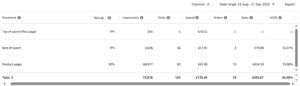
The screenshot below shows that for this specific campaign, Product Pages placement resulted in the lowest ACOS of 19%, so a 30% bid increase was applied to this placement. This way, the product will gain more visibility at this specific keyword and placement, which is expected to generate better results.
Strategy 4: Smart Bidding Strategies
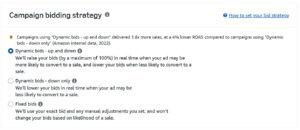
Your bidding strategy decides how Amazon spends your budget and how much you actually pay per click. The strategy you choose directly impacts campaign performance across different ad placements.
1. Dynamic Bids — Up and Down
Amazon raises or lowers your bid in real-time based on conversion likelihood.
- Top of search: can increase by up to 100% or fall below base bid if signals are weak
- Rest of search: can increase by up to 50% or drop lower
- Best for aggressive launches or growth stages to capture more top-of-search traffic
2. Dynamic Bids — Down Only
Amazon only reduces your bid when conversion chance is low, never raising it above your set amount.
- Provides better cost control and profitability
- Recommended starting strategy for most campaigns
- Use small placement adjustments (10-30%) on top of search after checking conversion data
3. Fixed Bids
Amazon uses the exact bid you set with no automatic increases or decreases.
- Best for retargeting or when you know the exact CPC range that works
- Pair with strong placement adjustments to force visibility where you want it
- Always review the Placement Report to identify which placements convert best
Strategy 5: Search Term Analysis and Keyword Graduation
Your search term reports contain data that transforms advertising performance. Systematic search term analysis should occur weekly not occasionally when you remember.
1. Search Term Report Analysis
Download search term reports for the past 7 days (recent trends) and past 30 days (statistical significance). Filter for terms with meaningful data, minimum 15 clicks for negative keyword decisions and 3+ conversions for keyword graduation.
Below is the criteria you can use for keyword migration and negative targeting.
Performance | Clicks | Conversions | Action |
Below Target ACoS | 15+ | 3+ | Graduate to exact match campaign |
Above Target ACoS | 20+ | 2+ | Reduce bid or add negative |
High Spend, No Sales | 20+ | 0 | Add as negative keyword |
Low Impressions | <10 | Any | Need more data |
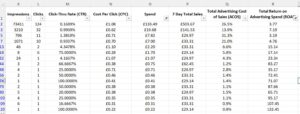
Filter and Sort for Action:
Below are common scenarios you’ll encounter in your Amazon search term report and the specific actions you can take for each.
Scenario 1: High Spend, Low Sales (Wasted Spend)
- Excel Filter:
Spent > 50% of Product PriceAND7 Day Total Sales = 0 - Action: Pause or add as negative keywords/ASINs.

Scenario 2: High Impressions, Low CTR (Irrelevant Traffic)
- Excel Filter:
Impressions > 1000ANDCTR < 0.3% - Action: Refine targeting or placement e.g increase bid for top of the search

Scenario 3: Profitable Search Terms to Scale
- Excel Filter:
ROAS > 3ANDSpend < 150 - Action: Raise bids or move to Exact Match campaign.
Scenario 4: New Search Terms with Potential
- Excel Filter: Impressions > 500 AND CTR > 0.5% AND Orders < 2
- Action: Move to test campaigns.

2. Keyword Graduation Process
Move proven converting keywords from discovery campaigns to exact match for maximum control.
When a search term demonstrates consistent conversion in automatic or broad match campaigns, graduate it to a dedicated exact match campaign where you can set precise bids based on its specific performance.
The most valuable analysis focuses on search terms that almost work. A keyword at 38% ACoS when your target is 25% might be one bid adjustment away from profitability.
Strategy 6: Negative Keyword Targeting
Negative keywords prevent ads from showing on irrelevant searches, directly improving efficiency by eliminating wasted spend. Aggressive negative management often delivers more improvement than any other optimization tactic.
1. Types of Negative Keywords
Choose between exact and phrase negatives based on how broadly you want to block terms.
Type | Blocks | Use Case |
Negative Exact | Only that precise term | When uncertain about variations |
Negative Phrase | Any search containing phrase | Clear irrelevant intent |
Any search term with 15+ clicks and zero conversions deserves evaluation. Ask whether the search represents genuinely different buyer intent or someone searching for a product you don’t sell, a different variation, or a brand you can’t satisfy.
Campaign-level negatives block terms across all ad groups in that campaign, appropriate for clearly irrelevant searches. Ad group-level negatives enable traffic sculpting, forcing specific searches to specific ad groups where you’ve optimized for that intent.
If you have separate campaigns for ‘water bottle’ (broad) and ‘insulated water bottle’ (exact), add ‘insulated water bottle’ as a negative exact in the broad campaign. This prevents the broad campaign from competing with the exact campaign for the same keyword.
Strategy 7: Product Targeting Campaigns
Product targeting puts your ads directly on competitor listings and related product pages. When shoppers view a competitor’s product, they’re actively considering a purchase in your category. If your product offers advantages, appearing at that decision moment can redirect their purchase.
1. Prioritize Weak Competitor Targets
Target competitors with exploitable weaknesses to maximize conversion opportunities.
- Lower star rating than your product
- Fewer reviews creating social proof gap
- Higher price making your product better value
- Recent negative review trends
- Listing quality problems (poor images, thin content)
Strategy 8: Sponsored Brands Ads Strategy
Sponsored Brands help shoppers discover your brand with video, image, or collections, appearing in prominent placements like top of search and product pages. These ads display your brand logo, custom headline, and multiple products to build brand recognition throughout the customer journey.
Sponsored Brands engage customers earlier in their research phase. Studies show that Sponsored Brand Ads typically achieve a click-through rate (CTR) ranging from 0.35% to 0.4%, with return on ad spend (ROAS) averaging between 2.5x and 4x.
1. Product Selection Strategy
Strategic product positioning in your Sponsored Brands ads maximizes credibility and basket size.
Position | Recommended Product |
First | Best-seller with strongest reviews (builds credibility) |
Second | Complementary product (increases basket size) |
Third | Premium option or new launch (demonstrates range) |
2. Landing Page Strategy
Choose your landing page based on customer intent and campaign goals.
- Send to Brand Store when: Targeting broad category keywords, building brand awareness, shoppers in research mode
- Send to Product Page when: Targeting specific product searches, driving immediate conversions, focus on single product
- Test both options for main keywords – data often reveals surprising results
Strategy 9: Sponsored Display Retargeting
Sponsored Display extends your reach beyond search results to shoppers throughout their Amazon journey. The retargeting capabilities let you re-engage shoppers who viewed your products but didn’t purchase.
Shoppers rarely purchase on first viewing. They compare options, check reviews, evaluate alternatives, and often leave without buying. Retargeting brings them back when they return to Amazon, providing another conversion opportunity at significantly higher rates than cold traffic.
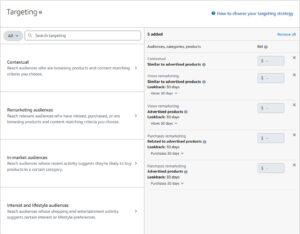
1. Audience Targeting Options
Different audience types serve distinct remarketing and conquest strategies.
Audience Type | Targeting | Best Use |
Views Remarketing | Viewed your products 7-30 days | Recapture warm traffic (2-4x higher CVR) |
Purchases Remarketing | Bought from you | Cross-sell, replenishment |
Competitor Audiences | Viewed competitor products | Conquest advertising |
In-Market | Active category shoppers | Top of funnel awareness |
2. View Remarketing Strategy
Segment audiences by recency to optimize bids and messaging for audience temperature.
Shoppers who viewed your products in the past 7-30 days represent warm audiences with demonstrated interest. Set different strategies based on recency like yesterday’s viewers are hotter than three-week-old viewers. Create separate campaigns for different lookback windows to optimize bids by audience temperature.
Target your own ASINs defensively to prevent competitor ads from appearing on your listings. This defensive use often shows poor direct ACoS but protects revenue from competitor conquest.
Strategy 10: Dayparting and Time-Based Optimization
Amazon advertising performance varies significantly by hour and day of week. Conversion rates typically peak during evening hours when shoppers complete purchases, while mid-day often shows lower conversion from mobile browsing without purchase completion.
Analyze your performance patterns by downloading hourly reports covering at least 4 weeks. Calculate conversion rate by hour and identify consistent patterns worth optimizing around.
1. Implementation
Use third-party tools or manual bid adjustments to optimize for high-performance time windows.
Amazon doesn’t offer native dayparting, but third-party tools enable time-based bid rules. Even without automation, manually adjusting bids during known low-performance windows reduces waste.
Weekend shopping behavior differs from weekday patterns in most categories. Some products see higher weekend conversion when shoppers have research time; others perform better on weekdays. Analyze your specific patterns across 4-8 weeks before adjusting strategy.
Strategy 11: Match Type Funnel Strategy
Each match type serves distinct purposes in your advertising system. Using them strategically creates a funnel that balances discovery with efficiency rather than treating all match types identically.
Match Type | Reach | Control | Strategic Purpose |
Broad | Highest | Lowest | Discovery engine, finding new terms |
Phrase | Medium | Medium | Capturing valuable variations |
Exact | Lowest | Highest | Maximizing proven performers |
1. The Keyword Funnel Process
Systematic keyword progression from discovery to optimization maximizes both reach and efficiency.
Start keywords in broad match for discovery, letting Amazon show your ads on related searches. As search term data accumulates, identify converting terms and graduate them to phrase match. After proving performance in phrase match, graduate top performers to exact match for maximum control.
This funnel ensures continuous keyword discovery while concentrating budget on proven winners. Sellers who skip the funnel like running only exact match, miss opportunities.
Match Type | Budget Share | Bid vs Exact Match |
Broad | 20-25% | 40-50% lower |
Phrase | 25-30% | 20-30% lower |
Exact | 45-55% | Full RPC-calculated bid |
Strategy 12: Single Keyword Ad Groups (SKAGs)
For your highest-volume keywords, isolating them in single keyword ad groups provides maximum control and cleanest performance data. When a keyword generates significant revenue, it deserves dedicated attention rather than being averaged with other keywords.
1. SKAG Benefits
Dedicated ad groups for top keywords provide unprecedented control and clarity.
- Precise bid control at individual keyword level
- Clean performance data without cross-keyword contamination
- Ability to set keyword-specific budgets
- Easier identification of performance changes
Keyword Criteria | SKAG Priority |
Top 5-10 revenue keywords | Highest – implement immediately |
100+ monthly clicks | High – strong candidate |
ACoS variance >20% from ad group average | Medium – isolation helps |
Long-tail, low volume | Low – management overhead exceeds benefit |
Create a new campaign for each high-priority keyword with a single ad group containing only that keyword in exact match. Set bids based on that keyword’s specific RPC calculation. Monitor and optimize independently from other keywords.
Strategy 13: New Product Launch Advertising
Launching new products requires fundamentally different advertising approaches than managing established products. Objectives, acceptable metrics, and strategy all differ because you’re buying velocity and data rather than optimizing for immediate profitability.
1. Launch Strategy
Prioritize velocity and ranking signals over short-term profitability during launch phase.
During the first 7-14 days, prioritize velocity over efficiency. Bid aggressively on your most relevant exact match keywords, accepting high ACoS. You’re buying conversion history, review velocity, and organic ranking signals not optimizing for profit yet.
Focus launch advertising on exact match for primary keywords. Broad discovery during launch wastes budget while your listing lacks conversion history. Start narrow, prove conversion, then expand as your listing strengthens.
During launch, track TACoS alongside ACoS. Even if campaign ACoS runs high, declining TACoS indicates your advertising builds organic ranking, the true measure of launch success.
Strategy 14: Brand Defense Strategy
Competitors will target your branded searches and product listings with their advertising. Without dedicated defense campaigns, you cede territory you’ve worked to build, paying customer acquisition costs twice when competitors intercept shoppers already looking for you.
Bid aggressively on your brand name, product names, and common misspellings in exact match. Include brand + category combinations (‘YourBrand water bottle’). This traffic typically shows lowest CPCs and highest conversion rates because shoppers already want your products.
Defense Type | Targeting | Bid Strategy |
Brand Keywords | Exact match brand terms | Aggressive – own your searches |
ASIN Defense | Sponsored Display on own listings | Moderate – block competitor ads |
Brand + Category | “Brand + product type” terms | Aggressive – capture high intent |
Defense campaigns often show inflated ACoS when viewed in isolation because those customers would have purchased anyway. The true value is preventing competitor interception, a cost that doesn’t appear in reporting but is very real when competitors steal your customers.
Strategy 15: Seasonal and Promotional Adjustment
Amazon’s advertising landscape shifts dramatically during peak periods. Competition intensifies, CPCs rise, and sellers who adjust strategy capture disproportionate value while others watch costs spiral without corresponding results.
Timing | Actions |
4-6 weeks before | Expand keyword coverage, test new targeting |
2-3 weeks before | Increase budge across campaigns |
1 week before | Raise bids 20-30% on proven performers |
During event | Monitor budgets multiple times daily |
Post-event | Mine search term data, gradually reduce bids |
Campaigns that normally last until 9 PM might exhaust budget by 2 PM during Prime Day. When high-converting campaigns exhaust budget, increase immediately – missed impression opportunity cost exceeds temporary inefficiency.
When running Lightning Deals or coupons, increase bids 30-50% during the promotional window. Your offer is most compelling during promotions to maximize visibility when conversion rates peak.
Strategy 16: Amazon Marketing Cloud (AMC)
Amazon Marketing Cloud is a cloud-based analytics platform that lets you analyze detailed shopping and ad interactions across Amazon to create precision audience segments beyond what keyword targeting alone can achieve. AMC connects purchase behavior to customer IDs, enabling you to understand who is buying what and why.
Launched in 2019 and now accessible directly through the Ads Console (as of September 2025), AMC provides advanced audience segmentation without requiring technical SQL skills, thanks to pre-built templates and AI assistance.
1. When to Use AMC
AMC requires sufficient data volume to be effective—it’s not for every brand at every stage.
- Ideal for established brands with consistent traffic, proven products, stable profitability, and ability to allocate 10% budget to testing
- Not recommended for new product launches, brands with minimal historical data, or those still establishing baseline conversion rates
- Best fit for Brands actively using Amazon DSP or spending consistently across multiple ad formats
2. Three Proven AMC Campaign Strategies
Each strategy solves a specific PPC limitation while minimizing wasted spend.
Strategy 1: Exact Match with Competitive Keywords
- Use for expensive, relevant keywords that normally don’t convert profitably
- Set intentionally low base bids, then apply high bid adjustments (+50-100%) for high-intent audiences
- Allows access to competitive keywords selectively without funding irrelevant traffic
Strategy 2: Auto Campaigns with Audience Filters
- Create three separate auto campaigns, each paired with different AMC audience (New-to-Brand, Likelihood to Purchase, Abandoned Cart)
- Set low base bids with minimal initial negatives
- Produces cheaper discovery clicks and cleaner search term data than traditional auto campaigns
Strategy 3: Broad Match for High-Value Shoppers
- Use broad or single-word keywords with conservative base bids
- Apply high bid adjustments exclusively to repeat purchasers or high-LTV segments
- Expands reach without sacrificing efficiency—use only after foundational campaigns are stable
Strategy 17: Budget Allocation and Portfolio Management
How you distribute advertising budget determines whether you maximize return or subsidize waste. Strategic allocation treats advertising dollars as investments to optimize across your entire catalog.
1. Define Campaign Tiers
Organize campaigns into priority tiers to ensure budget flows to highest-value opportunities.
- Tier 1 (High Priority): High-performing profitable campaigns, new launches, organic ranking campaigns – 60-70% budget
- Tier 2 (Growth/Maintenance): Moderate performers, brand defense, competitor targeting – 20-30% budget
- Tier 3 (Discovery/Testing): Auto campaigns, broad match, new keyword tests – 10-15% budget
2. Portfolio Budgets
Use portfolio budgets to let Amazon optimize spending across related campaigns automatically.
- Group related campaigns (same product line or brand) into portfolios
- Set total portfolio budget allowing Amazon to allocate between campaigns based on performance
- Monitor individual campaign performance while managing total spend at portfolio level
Strategy 18: ASIN & SKU Prioritization
Focus ad spend on the 20% of ASINs that yield 80% of results. This concentration helps achieve business goals efficiently while maximizing profitability.
1. Categorize Your ASINs/SKUs
Strategic categorization ensures each product receives appropriate advertising investment.
- Hero/Cash Cow ASINs: High-performing products with strong organic rankings – 70-80% budget
- Strategic Growth ASINs: Products with potential needing investment to scale – 10-20% budget
- Loss Leader ASINs: Lower margin products essential for customer acquisition
- Liquidation ASINs: Products to clear due to overstock or discontinuation
Strategy 19: Product Page Optimization for CVR
Your Amazon product page is the ultimate destination for every ad click. If listings aren’t optimized for conversion, all advertising efforts and spend will be squandered. A high-converting product page directly translates to lower ACoS.
1. High-Quality, Engaging Images
Professional imagery drives click-through and conversion rates across all ad placements.
- Main Image: Professional, high-resolution, white background, 85%+ frame fill
- Lifestyle Images: Show product in use with diverse models and settings
- Infographic Images: Highlight key features, benefits, dimensions, use cases
- Video: Essential for demonstrating features and building trust
- A/B Test: Use Manage Your Experiments to test different images
2. Compelling Title
Keyword-rich, benefit-oriented titles improve both search visibility and click-through rates.
- Include most important keywords in first 70 characters
- Clearly state product name, brand, key features/benefits, quantity
- Aim for clarity and conciseness, avoiding keyword stuffing
3. Benefit-Driven Bullet Points
Bullet points should focus on customer benefits rather than just listing features.
- Focus on benefits and how product solves customer problems
- Include 2 relevant keywords per bullet point naturally
- Address common customer questions or pain points
4. A+ Content & Reviews
Enhanced content and positive reviews significantly impact conversion rates and customer trust.
- Use A+ Content with rich media to showcase brand value proposition
- Gather 15-20 reviews before launching advertising campaigns
- Maintain ratings above 4.0 to improve conversion rate
Strategy 20: Ranking Near-Rank Keywords
Many sellers overlook keywords where their product already ranks between positions 20-45. These ‘near-rank’ keywords are ripe for acceleration with focused PPC investment.
1. Identify Near-Rank Keywords
Keyword tracking tools reveal opportunities where small investments yield significant ranking improvements.
- Use tools like Helium 10, Jungle Scout, or Brand Analytics
- Find keywords where your product ranks organically between positions 20-45
- Filter for high relevancy and decent search volume
2. Launch Dedicated Exact Match Campaigns
Focused exact match campaigns accelerate organic ranking for near-rank keywords.
- Create new Sponsored Products campaigns for near-rank keywords using exact match
- Bid competitively and accept slightly higher initial ACoS for organic rank improvement
- Monitor organic rank daily/weekly using keyword tracking tools
- Once organic rank improves to top 10, gradually reduce PPC bids while maintaining position
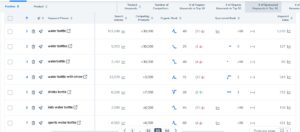
Below is a screenshot of keyword tracking with Helium10 keyword tracker. The tracking shows us real-time positions for terms like ‘water bottles.’ For example, the organic rank is 25, and by increasing spend on the Sponsored Products exact campaign, we can push this keyword higher.
Strategy 21: Clear Campaign Naming Structure
An organized campaign structure is the bedrock for control, scalability, and precise data analysis. It empowers you to swiftly identify what’s working at a glance, making optimization more efficient.
1. Campaign Naming Convention
Consistent naming enables quick campaign identification and streamlines reporting.
- Format: BRAND_PRODUCTLINE_PRODUCTNAME_TARGETINGTYPE_MATCHTYPE_GOAL
- Example: ACME_WidgetPro_RedWidget_KWD_Exact_Sales
- Example: ACME_WidgetPro_RedWidget_Auto_Discovery
2. Separate Campaigns by Targeting Type
Isolating targeting types allows precise bid management and performance analysis.
- Automatic Campaigns: For keyword discovery and broad reach
- Manual Keyword Campaigns: Exact, Phrase, Broad match in separate campaigns
- ASIN/Product Targeting: Target weak competitor ASINs
- Category Targeting: Target entire product categories
Strategy 22: Mix of Sponsored Products, Brands & Display Ads
Amazon provides a powerful suite of ad formats, each designed to serve distinct purposes. Leveraging all three maximizes reach and conversion opportunities.
1. Sponsored Products (Foundation)
Sponsored Products drive immediate traffic to individual product listings with precise targeting.
- Allocate 70-80% of your budget to Sponsored Products advertising
- Prioritize spending on Exact match campaigns within this budget
- Focus on high-converting keywords with proven performance
2. Sponsored Brands (Brand Building)
Sponsored Brands improve brand awareness and drive traffic to storefront or product collections.
- Use Headline Ads to drive traffic to Brand Store or custom landing pages
- Display 3-5 complementary products in Product Collection Ads
- Leverage Video Ads to tell brand story and demonstrate features
3. Sponsored Display (Reach & Retargeting)
Sponsored Display expands reach both on and off Amazon through audience and product targeting.
- Views Remarketing: Target customers who viewed your product but didn’t purchase
- Purchases Remarketing: Target customers who bought to promote complementary items
- Product Targeting: Target specific competitor product detail pages
Strategy 23: Search Term Report Analysis with Excel Filters
The Search Term Report is an indispensable treasure trove of customer intent data. It details exact search queries customers used that led to clicks on your ads.
1. Download Regularly
Weekly or bi-weekly downloads ensure you capture performance trends and opportunities promptly.
- Go to Seller Central → Advertising → Campaign Manager → Reports
- Create Report → Sponsored Products → Search Term
- Download weekly or bi-weekly for optimal optimization
2. Filter and Sort for Action
Strategic filtering reveals high-priority optimization opportunities across multiple dimensions.
- High Spend, Low Sales: Spent >50% of product price AND 0 sales → Add as negatives
- High Impressions, Low CTR: >1000 impressions AND <0.3% CTR → Refine targeting
- Profitable Terms to Scale: ROAS >3 AND Spend <150 → Raise bids or move to Exact
- New Terms with Potential: >500 impressions AND >0.5% CTR → Move to test campaigns
Strategy 24: Audience Targeting & Retargeting
Moving beyond keywords, sophisticated audience targeting reaches specific shopper groups based on demographics, interests, and past behavior, dramatically increasing conversion probabilities.
1. Views Remarketing
Your highest ROI audience—shoppers who viewed your product but didn’t purchase yet.
- Target shoppers who viewed your product detail page using Sponsored Display
- Segment by recency: 7-day, 14-day, 30-day viewers with different bids
- Bid higher on recent viewers, consider adding coupons for cart abandoners
2. Purchases Remarketing
Re-engage past customers for cross-sells and repeat purchases.
- Cross-Sell: Target customers who bought Product A to suggest Product B
- Repeat Purchases: Remind customers to reorder consumable products
3. Interest & Lifestyle Targeting
Expand reach to new customers based on long-term shopping patterns and interests.
- Target shoppers based on interests (e.g., outdoor enthusiasts, tech lovers)
- Use for top-of-funnel awareness to introduce brand to new audiences
- Implement frequency capping to avoid ad fatigue (3-5 impressions per day)
Strategy 25: Brand Awareness Campaigns
While many advertisers focus solely on direct response, cultivating brand awareness is critical for long-term sustainability. These campaigns introduce your brand to new audiences and foster trust.
1. Define Your Target Audience
Clear audience definition ensures brand messaging reaches the most relevant potential customers.
- Identify who you’re trying to reach based on interests and demographics
- Use Amazon’s audience segments (In-Market, Lifestyle) in SD and DSP
2. Use Sponsored Brands
Sponsored Brands provide premium visibility at top of search results for brand building.
- Headline Ads to Brand Store: Drive traffic to showcase brand story
- Brand Video Ads: Highly engaging format that captures attention
3. Measure Beyond ACoS
Brand awareness requires different metrics focused on reach and brand lift rather than immediate sales.
- Monitor brand search volume increases over time
- Track new-to-brand customer percentage
- Accept higher ACoS for awareness campaigns while monitoring long-term impact
Strategy 27: TACoS Management and Organic Flywheel
ACoS measures advertising efficiency in isolation. TACoS measures advertising in business context—spend relative to total revenue including organic sales. This broader view reveals whether advertising builds sustainable growth.
TACoS Formula:
TACoS = (Total Ad Spend ÷ Total Revenue) × 100
Example:
- Monthly Ad Spend: $5,000
- Advertising Revenue: $15,000
- Organic Revenue: $35,000
- Total Revenue: $50,000
- ACoS: 33.3% | TACoS: 10%
Healthy Amazon businesses show declining TACoS over time even as advertising spend grows. Advertising velocity builds organic ranking, generating organic sales, reducing advertising dependency.
TACoS Trend | Meaning | Action |
Declining | Ads building organic presence | Continue or increase investment |
Flat | Ads maintaining position | Optimize ads |
Rising | Ads not building organic value | Evaluate strategy, listing issues |
Sellers optimizing purely for ACoS often underinvest in advertising that would accelerate this flywheel. Accepting higher short-term ACoS to build velocity frequently delivers better long-term business results.
Strategy 28: Amazon PPC Bulk Operations
Bulk Operations is Amazon’s spreadsheet-based tool for managing campaigns at scale. Instead of making changes one keyword at a time through Campaign Manager, you download an Excel file containing all campaign data, make edits offline, and upload the changes in one batch.
For accounts managing 30+ campaigns or hundreds of keywords, bulk files eliminate hours of manual work while reducing errors from repetitive clicking.
When to Use Each Tool:
| Task | Best Tool | Why |
|---|---|---|
| Pause few underperforming keyword | Campaign Manager | Faster for single changes |
| Adjust bids for 100+ keywords | Bulk Operations | Consistent changes in minutes |
| Launch few new campaign | Campaign Manager | Visual setup is simpler |
| Create 20 campaigns for product line | Bulk Operations | Template approach saves hours |
| Add 5 negatives to 1 campaign | Campaign Manager | Quick and direct |
| Add same negative to 50 campaigns | Bulk Operations | One action prevents errors |
Core Bulk Operations
Spreadsheet-based management enables precision changes across thousands of campaigns simultaneously.
Common Bulk Edits:
- Adjust bids by updating Max Bid column for keywords or ad groups
- Change budgets by editing Campaign Daily Budget field
- Pause/enable campaigns, ad groups, or keywords via Status column
- Add negative keywords by inserting rows with NegativeExact or NegativePhrase match type
- Apply placement bid adjustments (Top of Search, Product Pages) in modifier columns
Strategy 29: Continuous Optimization
‘Set it and forget it’ is the death knell of any Amazon advertising strategy. True success stems from relentless, continuous optimization as the marketplace constantly shifts.
1. Establish Routine Optimization Schedule
Consistent review cadence ensures issues are caught early and opportunities are capitalized upon.
- Daily: Check budget pacing, identify urgent negatives, ensure no out-of-stock pauses
- Weekly: Full STR review, bid adjustments, budget reallocation, new test reviews
- Monthly: Campaign deep dive, trend analysis, ACoS/ROAS/TACoS assessment
- Quarterly: Strategic review, market conditions, competitor movements, seasonal planning
2. Data-Driven Decision Making
Every optimization should be based on specific data points and clear hypotheses.
- Never make changes based on gut feelings alone
- Every bid, budget, or targeting adjustment should be informed by data
- Document changes with dates, campaigns, and expected outcomes
3. Test, Learn, Iterate
Systematic testing reveals what works best for your unique products and market position.
- A/B test product listings via Manage Your Experiments
- Start with small changes (5-10%) to understand impact
- Keep a log of all significant changes for attribution
Frequently Asked Questions
1. How Do I Advertise On Amazon?
You can advertise by setting up Sponsored Product, Sponsored Brand, or Sponsored Display campaigns inside Amazon Ads Console. Start by selecting your ASINs, setting a daily budget, choosing match types (broad, phrase, exact), and adding target keywords or products.
2. What Does Sponsored Mean On Amazon?
“Sponsored” refers to paid ads that appear within Amazon’s search results or product pages. Sellers pay when a shopper clicks the ad, helping gain more exposure in search results and sales for selected ASINs.
3. What Are Amazon Sponsored Products?
These are pay-per-click ads promoting individual products directly in search results and competitor listings. They’re ideal for driving organic ranking and conversions for both new and established products.
4. How To Find Keywords For Amazon PPC?
Use tools like Helium10, Amazon Brand Analytics (Top Search Terms), and Search Query Performance reports. You can also study Amazon PPC Search Term Reports to find converting terms and negative out irrelevant ones.
5. How Should I Optimize Bids For New Keywords?
Start with a moderate bid (slightly higher than minmum recommended by Amazon) to gather data. Once clicks and conversions start rolling in, calculate RPC and adjust bids up or down based on performance to meet your target ACoS.
6. What Is ACoS In Amazon PPC?
ACoS (Advertising Cost of Sales) = (Ad Spend ÷ Sales) × 100. It helps you measure how much you spend to make a sale. Lower ACoS usually means more profit, while higher ACoS may indicate aggressive ranking or launch campaigns.
7. What Role Does CTR Play In Amazon’s A10 Algorithm?
Click-through rate (CTR) is a key signal for Amazon’s A10 algorithm. A higher CTR indicates your ad is relevant to shoppers, which can improve your ranking, visibility, and overall PPC efficiency.
8. How Often Should I Optimize My Amazon PPC Campaigns?
For active campaigns, review data every 3–5 days during launch and optimize campaigns every weekly afterward. Focus on adjusting bids, pausing low-performing targets, and reallocating budget toward converting search terms.