Amazon Sponsored Products campaigns promote individual ASINs (product listings), matching them to shopper searches, while Sponsored Brands campaigns are brand-level ads that feature multiple products or your brand logo with a headline or videos. In order to decide whether which format is to be prioritized for a new product launch is usually the first major decision taken in Amazon PPC services.
Sponsored Products ads appear in search results and on product detail pages, blending in with organic listings (marked with a small “Sponsored” tag). In contrast, Sponsored Brands ads typically appear at the top of search results, middle of the search or on product pages as a video showcasing product.
In 2025, Sponsored Products account for roughly 80% of Amazon ad spend, highlighting how critical they are for most sellers.
This guide explains both ad types, compares their features side-by-side, and shows you how to set up, optimize, and combine them in your PPC strategy.
What Are Amazon Sponsored Products?
Amazon Sponsored Products are keyword-based PPC ads that promote individual product listings. They look similar to organic product listings and appear at the top, middle, or bottom of search results and on product detail pages.
When a customer search terms match your keywords, your Sponsored Product ad can show up with your product image, title, price and reviews. The shopper clicks the ad and is taken directly to your product detail page.
Sponsored Products help sellers increase product organic ranking and sales by putting listings in front of highly relevant customers. You pay only when a shopper clicks on your ad (cost-per-click).
Because these ads target specific keywords & ASINs, they tend to drive high conversion rates drive most of the organic ranking. Key features of Sponsored Products:
- CPC model: You pay only for clicks, never for impressions. Ads run on Amazon and select off-Amazon
sites. - Automatic or Manual targeting: You can choose broad, phrase or exact match keywords (manual), or let Amazon auto-target relevant searches. You can also target competing products (ASIN targeting) or
categories. - Eligible products: Most new products in eligible categories can be advertised, as long as the seller has a Professional account and is Buy Box eligible. Used/refurbished items are not eligible.
What Are Amazon Sponsored Brands?
Amazon Sponsored Brands are banner-style or video ads that highlight your brand identity. A Sponsored Brands ad typically includes your logo, a custom headline, and up to three products or a video.
These ads appear in premium positions for example, at the top of search results even above the Sponsored products ads, alongside products and can link to your Amazon Store or a product collection page.
The goal of Sponsored Brands is to build brand awareness and crosssell. For example, you might use a Sponsored Brand to introduce shoppers to your entire skincare line, rather than a single product.
Key features of Sponsored Brands:
- Creative-rich format: Ads display your brand logo, a headline (up to 50 characters, and multiple products or a short video. You control the media and messaging, making it ideal for storytelling.
- Premium placements: These ads appear at the top of search results and on detail pages. This prime ad position helps capture customer attention early in their search journey .
- Brand registry required: You must be enrolled in Amazon Brand Registry with a registered trademark. (However, Buy Box ownership is not required for Sponsored Brands .)
- Branded traffic: When customers click a Sponsored Brand, they can be directed to your Amazon Store or product page. This drives “new-to-brand” traffic and helps shoppers discover more of your catalog.
Sponsored Products vs Sponsored Brands: Key Differences
The biggest difference between the two ad types is creative freedom. With Sponsored Brands, you aren’t stuck with a standard product image and title. You can use custom headlines, your logo, and lifestyle imagery or even video to craft a compelling narrative.
Understanding the benefits of running search ads for brand keywords is crucial here, as it’s the same core principle: control your brand’s presence at critical moments. This distinction becomes clearer when Search Query Performance (SQP) is reviewed, which reports impressions, clicks, and conversions by search term. Further, it makes easier to view where Sponsored Products and Sponsored Brands appear in search results.
The table below compares the two ad types across critical dimensions like targeting, placement, cost, goals, creative control, eligibility, and metrics.
| Feature | Sponsored Products | Sponsored Brands |
|---|---|---|
| Objective (Primary Goal) | Drive direct sales of individual ASINs and improve organic ranking | Build brand awareness; promote multiple products and drive traffic to brand Store or product pages |
| Ad Placement | Amazon search results (top, middle, bottom) and product detail pages | Premium placements at top of search results, product pages, mid of the page video ads |
| Creative Elements | These are keyword and ASIN based ads. Update Dec, 2025:Amazon now rolled out option to include videos. | Custom creatives: brand logo, headline, custom images or video; showcases up to 3 products |
| Targeting Options | Manual keyword targeting (broad, phrase, exact), automatic targeting, product/ASIN targeting, category targeting, negative keywords | Keyword targeting (broad, phrase, exact), product and category targeting, negative keywords available and no auto targeting option |
| Cost (CPC) | Generally lower CPC; optimized for conversion rate; typically 20–30% lower CPC than Sponsored Brands | Higher CPC due to premium placements and branding assets; commonly higher than Sponsored Products |
| Conversion & ROI | Higher conversion rates; shoppers closer to purchase; often delivers stronger ROAS | Lower conversion rates; upper-funnel focus; strong for new-to-brand awareness |
| Eligibility Requirements | Professional seller account, Buy Box eligibility, eligible categories | Brand Registry required; minimum 3 eligible products; Buy Box not mandatory |
| Creative Control | No control since they are keywords/ASIN based ads. Update Dec, 2025:Amazon now rolled out option to include videos. | High control; custom headlines, images, and videos for brand positioning |
| Performance Metrics | ROAS/ACoS, CPC, CTR, conversion rate at ASIN level | Impressions, clicks, Store visits, new-to-brand orders and percentage |
Setting Up Sponsored Products Ads
Launching a Sponsored Products campaign is straightforward and can be done in Seller Central’s Campaign Manager. The general steps are:
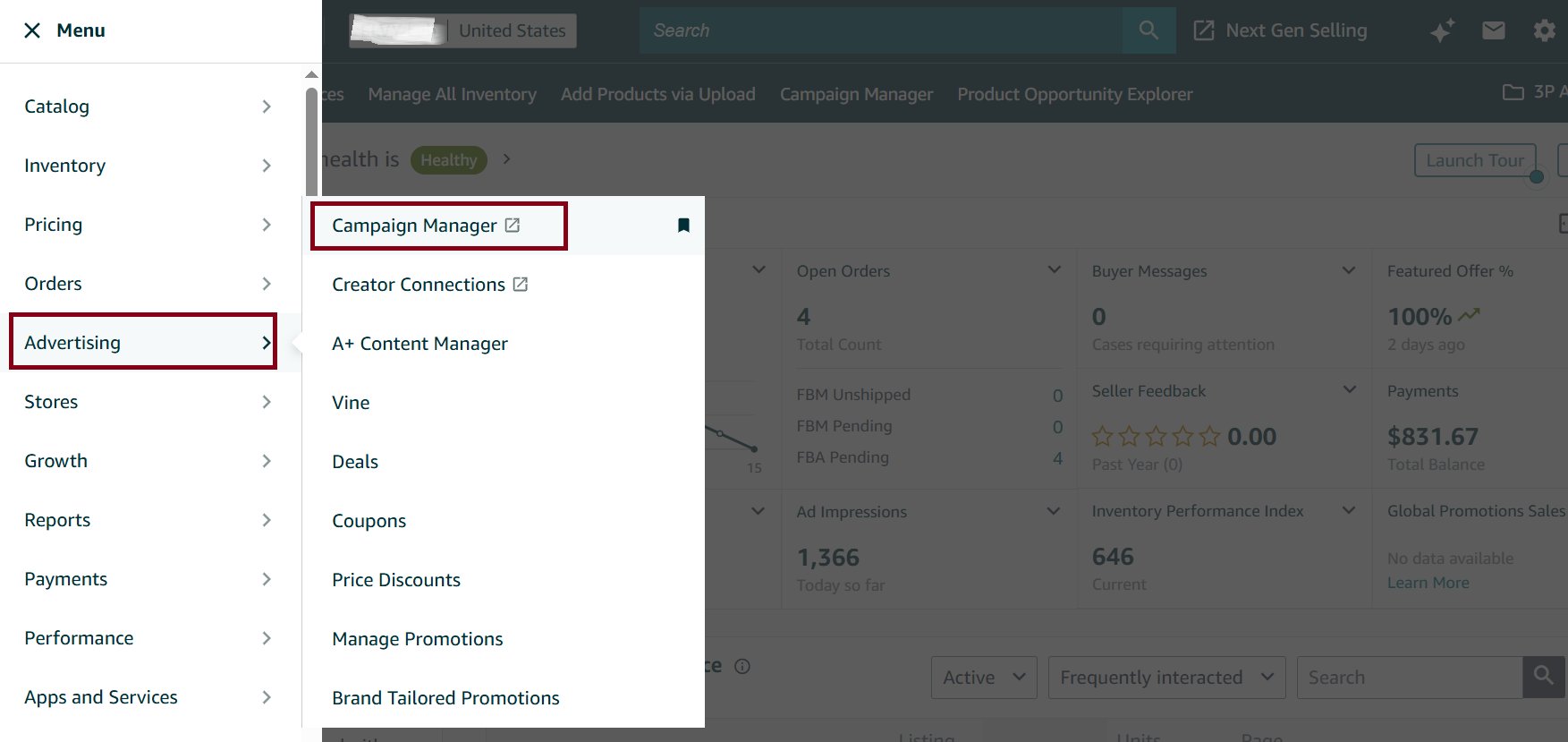
Step 1: In Seller Central, go to Advertising > Campaign Manager
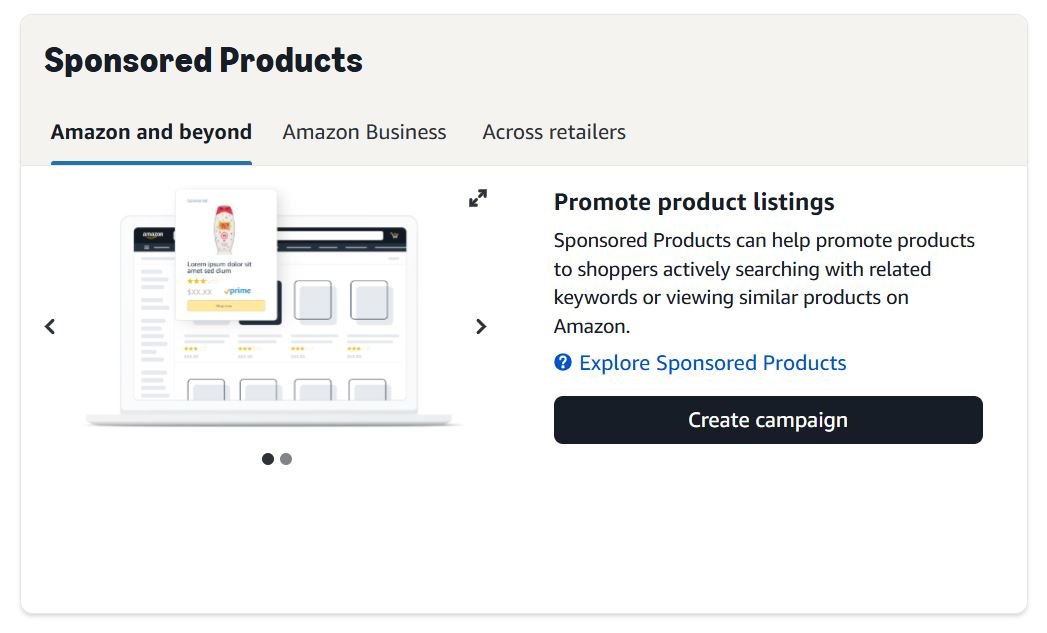
Step 2: Click “Create campaign”, then choose Sponsored Products.
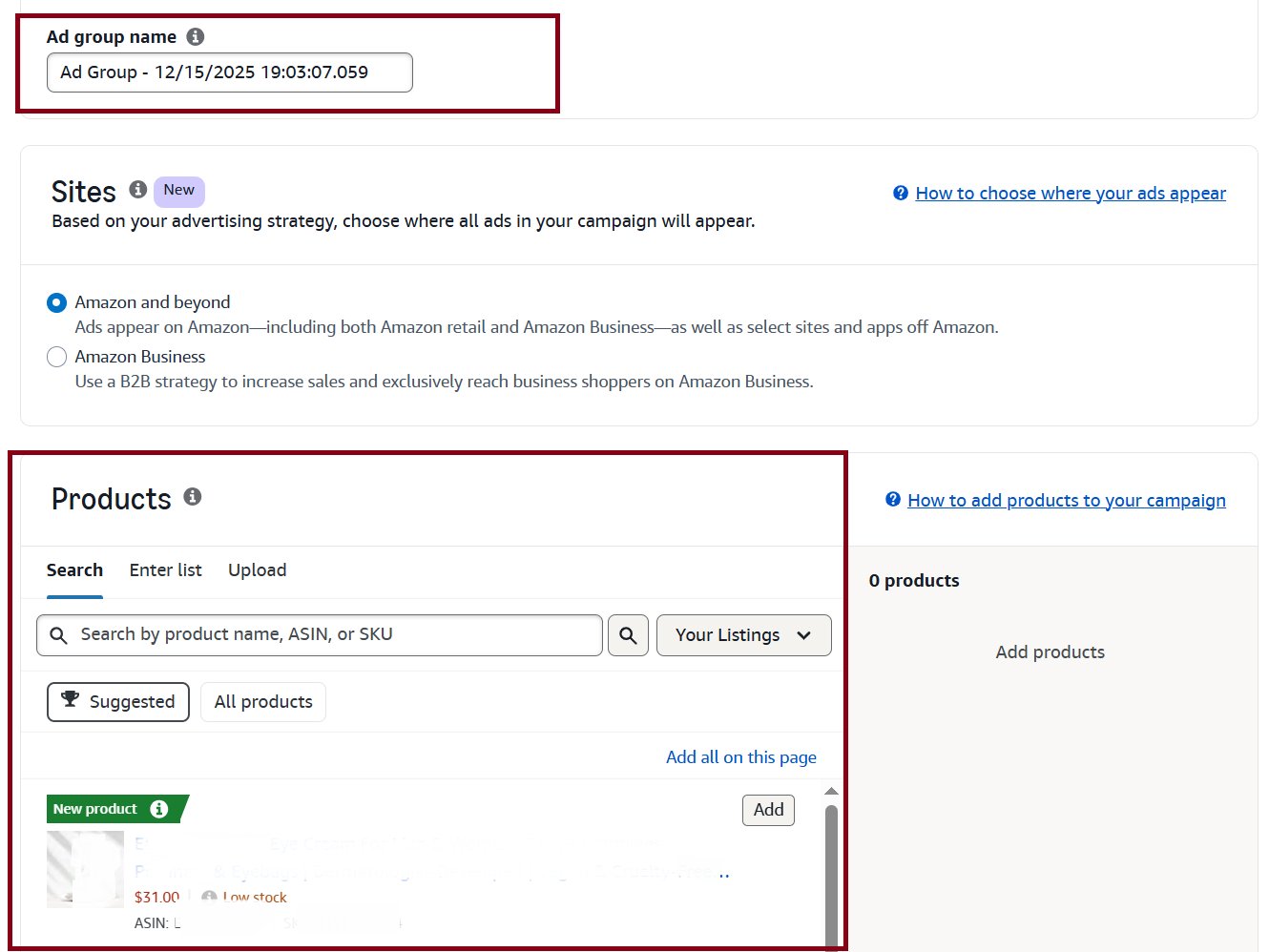
Step 3: Enter ad group name and select which ASIN(s) you want to advertise.
Step 4: Decide between Automatic targeting (Amazon chooses relevant keywords for you) or Manual targeting (you select keywords/ASINs). For Manual, add keywords with different match types. You can also use Product Targeting to show ads on specific competitor listings or categories .
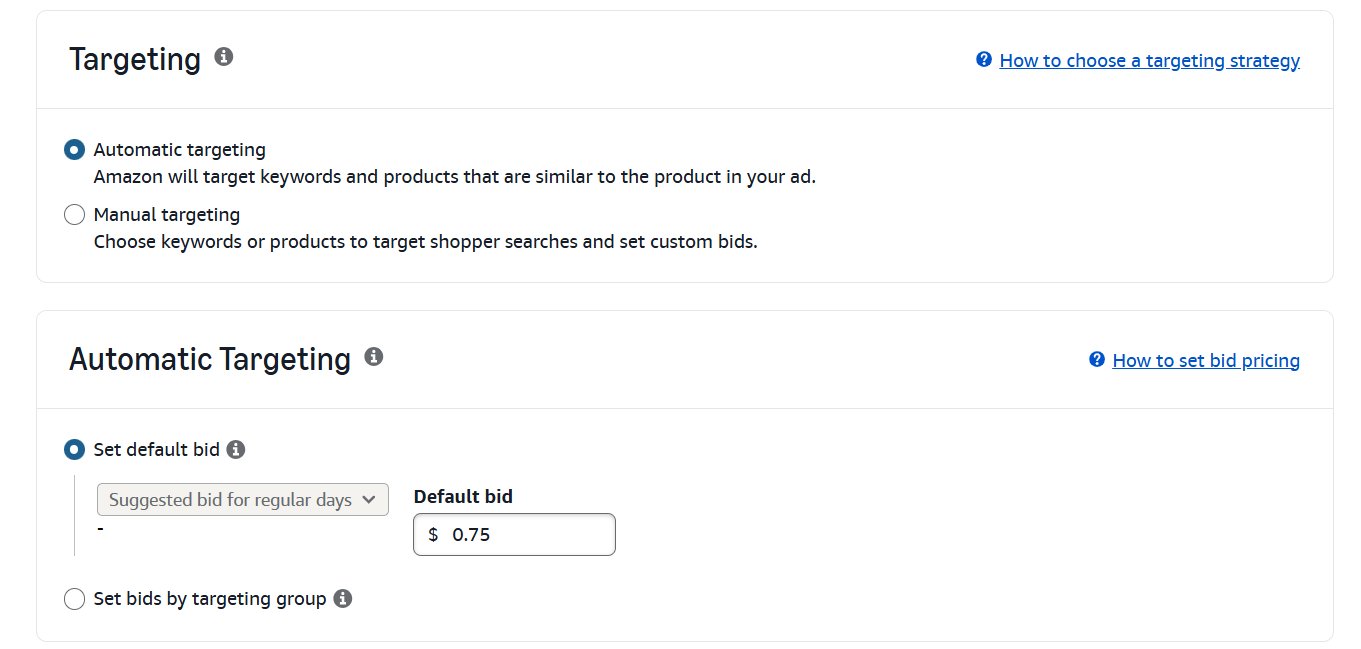
Step 5: For manual campaigns, enter your maximum CPC bids for each keyword. (You can start with recommended bids. Remember you only pay just above the next-highest bid.)
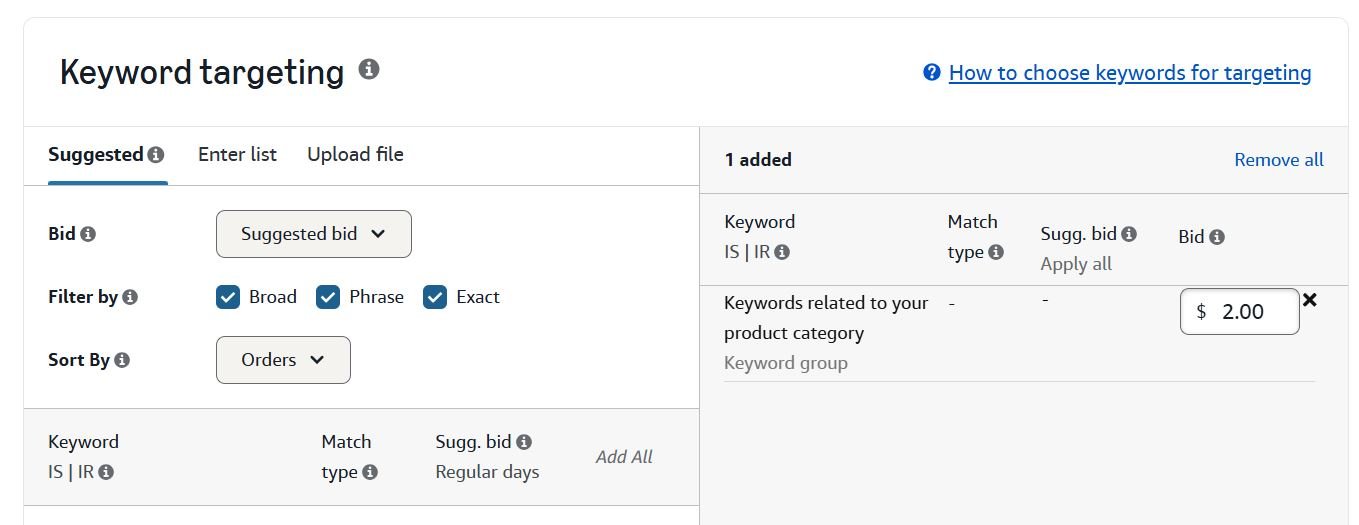
Step 6: Select Campaign bidding strategy as “down only” and Adjust bids by placement. For organic ranking campaigns enter high top of the search placement (20%-50% initially)
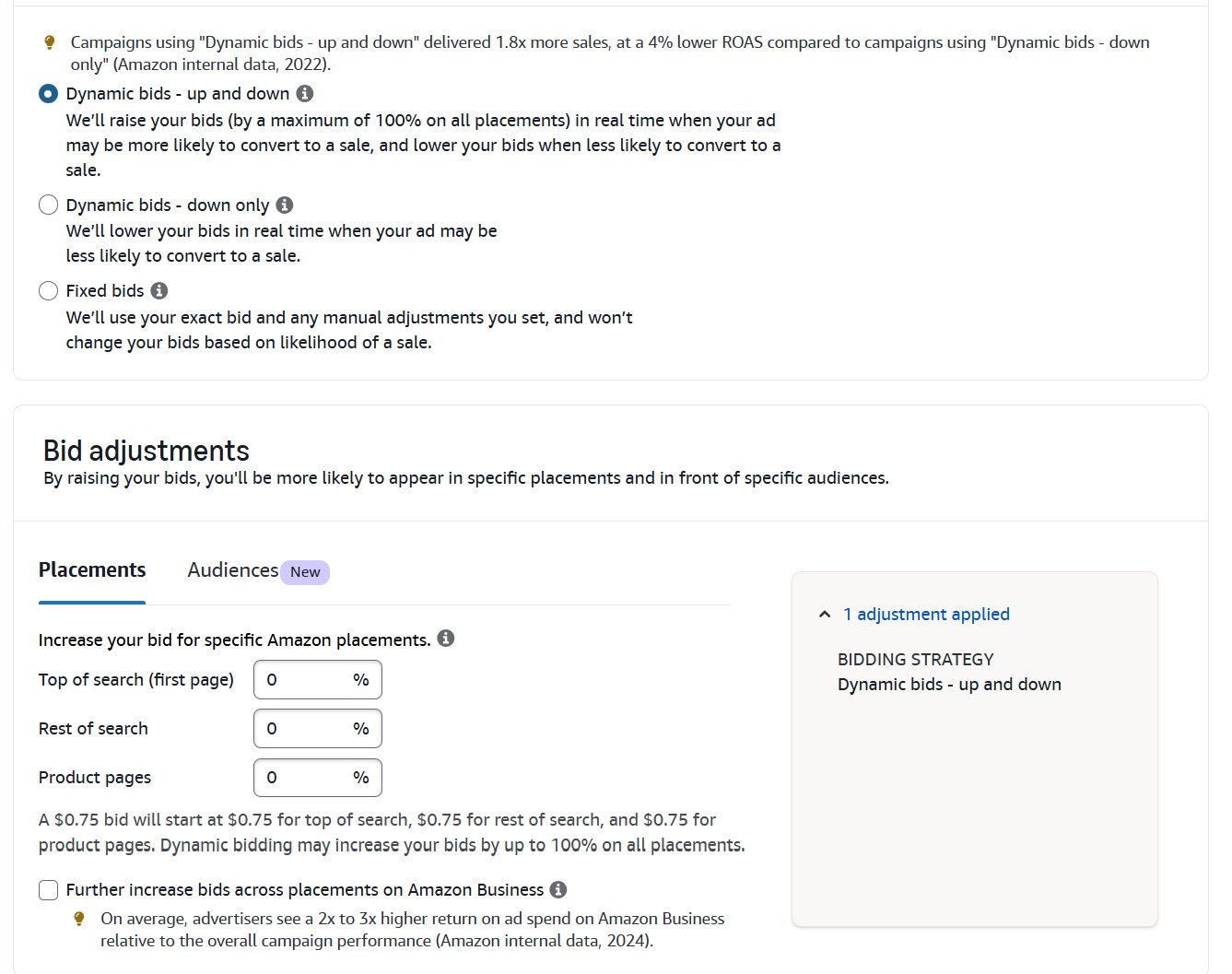
Step 7: Submit the campaign. Amazon will review it (often within few hours). Once live, monitor performance via search term and placement reports.
Ensure each advertised product is Buy Box eligible, in stock, and in an allowed category. Don’t launch ads for an unoptimized listing; poor titles, images or zero reviews can waste clicks. Also, avoid overly broad targeting without negatives, as that can drive irrelevant traffic and high ACoS.
Setting Up Sponsored Brands Ads
Creating a Sponsored Brands campaign is similar, but a few extra creative steps are required: You must have a Brand Registered account with at least 3 listed products.
Step 1: In Campaign Manager, click “Create campaign” and select Sponsored Brands
Step 2: select goal, give the campaign a name, set dates, and budget (daily or lifetime) and select your brand.
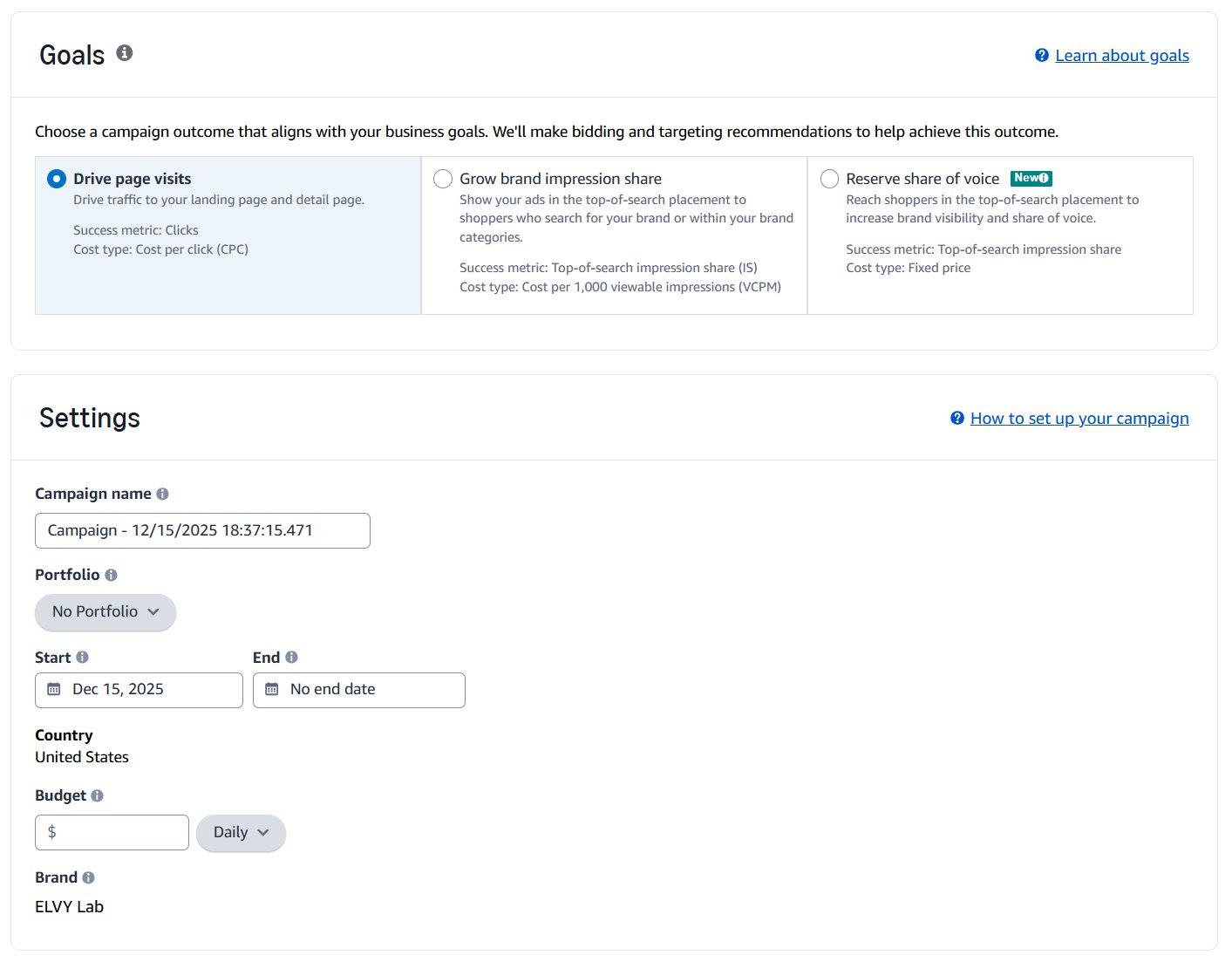
Step 3: Pick a format; Product Collection (images of products), Store Spotlight, or Video. Each format highlights multiple products. For beginners, “Product Collection” is common.
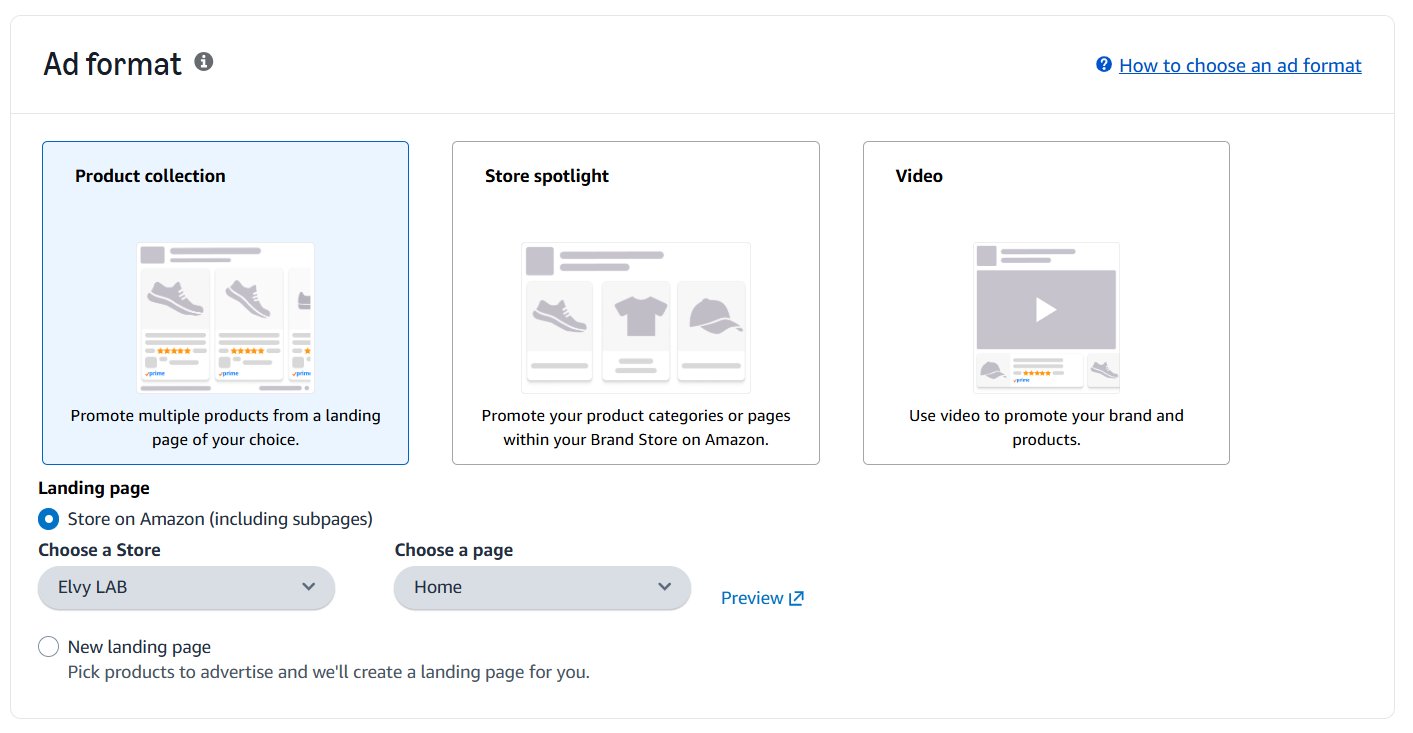
Decide where clicks go; usually to your Amazon Store or product page if selected video as format. If you send traffic to your Store, make sure it’s well-designed with featured products.
Step 4: If you select “Video” as format and landing page as “Product detail page”, you will enter relevant keywords for targeting and set CPC bids. You will need you upload video for this.
5:
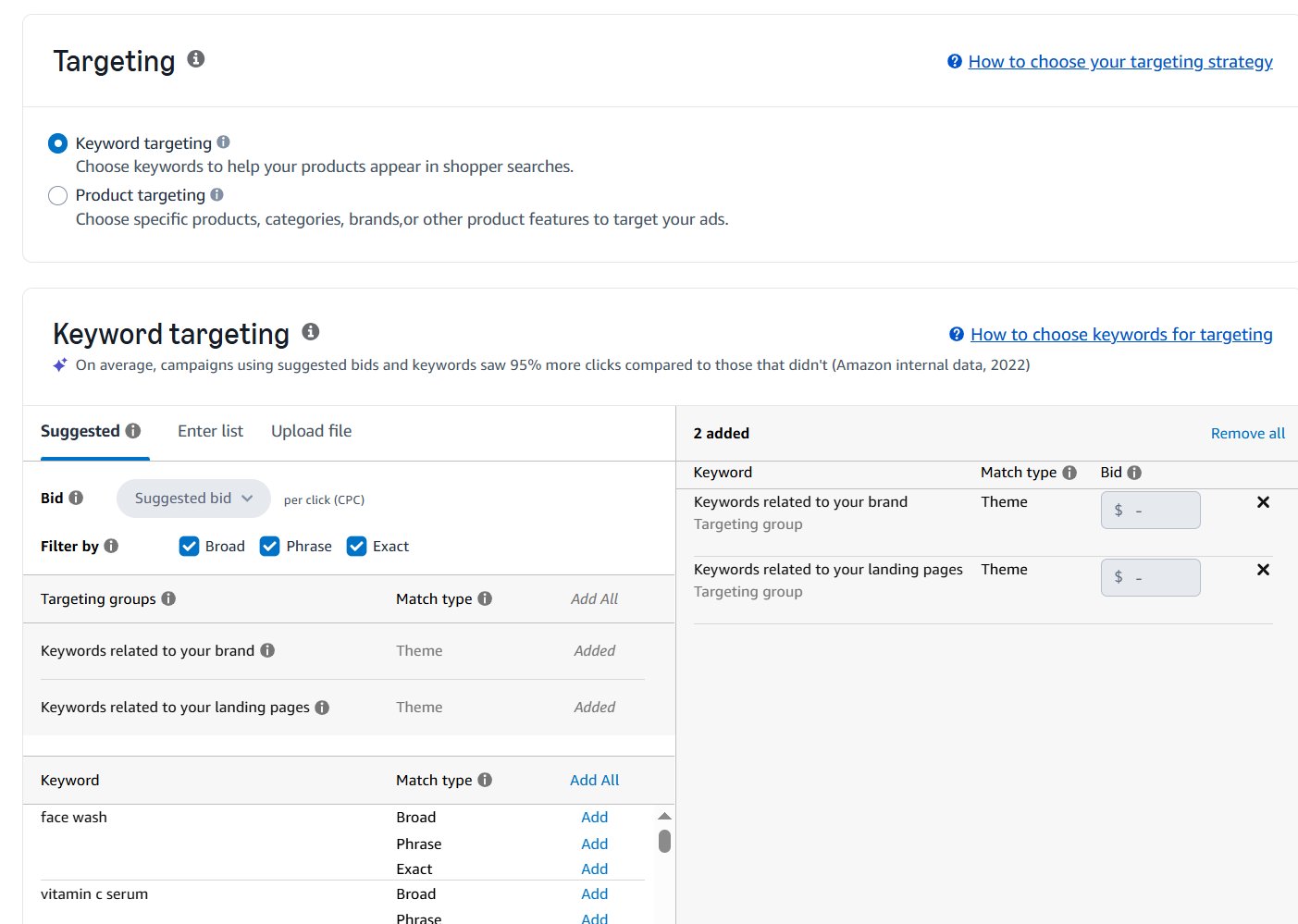
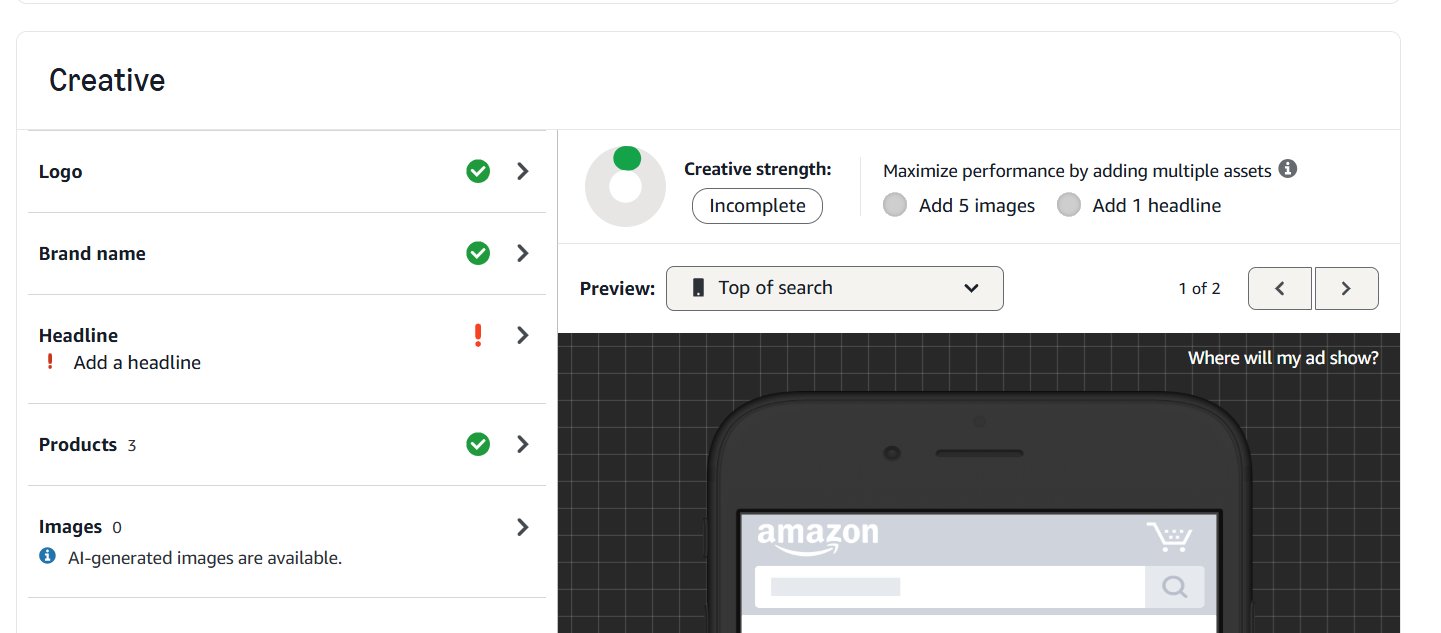
Step 5: For product collection ads to either product pages, you will upload your ad creatives like your brand logo and a headline (up to 50 characters). Select the up to three ASINs to display in the ad. (If using video, upload a 6–30 second branded video.)
Step 6: Launch: Submit the ad. It will go through Amazon’s review (usually 24–72 hours) before going live.
Remember SB requires a minimum number of products (typically ≥3) to display . Common pitfalls: Don’t start SB ads without strong brand assets.
A logo, good Store, and cohesive creative are essential. Treat Sponsored Brands as part of a brand-building campaign as they generally take time to pay off, so have patience.
Choosing the Right Ad for Your Goal
Knowing the technical differences between Sponsored Products and Sponsored Brands is one thing. Knowing exactly when to use each for maximum impact separates the pros from everyone else burning through their ad budget.
The right ad type isn’t a matter of preference; it’s dictated entirely by your immediate goal.
1. When To Use Sponsored Products
Think of Sponsored Products as your surgical tool. They’re designed for conversion-focused campaigns where the objective is clear, immediate, and tied directly to a specific product.
- Launching a New Product
When a new product hits the market, your number one priority is sales velocity. It’s a signal to Amazon’s A9 algorithm that your product is relevant, and it’s the only way to start climbing the organic ranks. Sponsored Products are perfect here. You can put your new item directly in front of shoppers with high purchase intent, driving those critical first sales. - Targeting Competitor Sales
Want to steal market share? Product targeting with Sponsored Products is a powerful weapon. This lets you place your ad directly on a competitor’s product detail page, right when a shopper is about to make a decision. It’s an aggressive move, but it can easily sway a customer at the last second, especially if your product has a better price point, more features, or stronger reviews. - Capitalizing on Seasonal Sales
During high-traffic events like Prime Day or the holiday season, shopper intent is through the roof. Sponsored Products let you run aggressive, short-term campaigns on your bestsellers to capitalize on the buying frenzy. Because these ads are tied to individual ASINs, you can quickly crank up the budgets on hot items and pull back on others.
2. When to Use Sponsored Brands
Sponsored Brands are for the bigger picture. They’re less about selling one item today and more about building a loyal audience that will buy from you for years to come.
- Building a Brand from Scratch
If you’re new, shoppers don’t know your name. A Sponsored Brands campaign puts your logo and a custom headline at the top of the search results, building crucial brand recognition from day one. The goal is to make your brand memorable, so when a shopper is ready to buy later, your name is already familiar. - Funneling Traffic to Your Amazon Store
Your Amazon Store is your brand’s home base on the platform. The Store Spotlight ad format is designed specifically to funnel traffic there, getting shoppers off the transactional search page and into your curated brand world. This is the move when you want to show off your full catalog, tell a deeper brand story, or encourage shoppers to bundle multiple items. - Cross-Selling and Increasing AOV
Do you sell products that work well together, like a camera and a compatible lens? The Product Collection format in Sponsored Brands was built for this. It lets you feature up to three related items in a single, cohesive ad unit. This is a fantastic way to increase your average order value (AOV) and introduce customers to the breadth of your product line.
3. The Hybrid Strategy
The most sophisticated sellers don’t choose between amazon sponsored products vs sponsored brands. They use both in a coordinated, full-funnel strategy.
Use Sponsored Brands to build top-of-funnel awareness and attract new-to-brand customers. Then, use Sponsored Products to retarget and convert those shoppers as they get more specific in their search.
Here’s what that looks like:
- Awareness: A customer searches for “camping gear” and sees your Sponsored Brands banner showcasing your tent, sleeping bag, and lantern. They click and browse your Store.
- Consideration: A few days later, they’re searching specifically for a “2 person tent.” This time, your Sponsored Products ad for that exact tent model shows up.
- Conversion: They recognize your brand, click your SP ad, land on the product page, and make the purchase.
This integrated approach ensures you’re present at every stage of the customer journey.
How To Allocate Your Ad Spend
Splitting your ad budget between Sponsored Products and Sponsored Brands directly shapes your growth and profitability. There’s no magic number that works for every seller, but there is a clear, data-driven starting point that you can adjust as your brand finds its footing.
For new sellers or anyone launching their first products, the game plan should be focused on conversions.
1. The 80/20 Rule for Beginners
For anyone just starting, the 80/20 rule is a solid framework: put 80% of your ad budget into Sponsored Products and the other 20% into Sponsored Brands. You need to make sales first.
Sponsored Products offer the most direct path to a conversion. They place your product right in front of shoppers with high buying intent, which drives the initial sales velocity you need to climb the organic ranks and collect reviews. That 80% is your engine for immediate ROI. The remaining 20% on Sponsored Brands starts the long game of building brand recognition.
2. Evolving Your Budget
As your brand matures, your budget split needs to evolve. An established brand has different priorities than a fresh launch.
Your allocation should shift based on your current goals:
- Defending Brand Keywords: If competitors are bidding on your brand name, you’ll need to pump more budget into Sponsored Brands to dominate the top of search results.
- Encouraging Cross-Selling: For brands with complementary products, shifting more budget toward Sponsored Brands Product Collection ads can boost your average order value (AOV). A 60/40 split might make more sense here.
- Maximizing Holiday Sales: During peak seasons like Q4, you might temporarily revert to an 80/20 or even 90/10 split favoring Sponsored Products to capture the surge in purchase-ready shoppers.
One of the most common mistakes is treating an ad budget as static. Your allocation should be a living thing that responds to sales data, seasonality, and your business goals. Review your campaign performance regularly to see where your money is working hardest.
3. Data-Backed Budgeting
The industry data backs up this heavy initial focus on Sponsored Products. Even enterprise-level brands often pour 40-50% of their entire Amazon ad spend into this one format. Why? Because Sponsored Products are responsible for 60-70% of total ad revenue on the platform.
In contrast, Sponsored Brands, despite their prime real estate, only account for about 11% of ad revenue. This makes them a powerful, but supplementary, investment for most sellers.
Ultimately, your job is to find the right balance. Keep a close eye on your campaigns and adjust your spend to maintain a healthy Advertising Cost of Sale (ACoS). To get a better handle on this crucial metric, check out our in-depth guide to mastering your Amazon ACoS. It will help you make smarter decisions when deciding how to split funds between amazon sponsored products vs sponsored brands.
Frequently Asked Questions
Let’s get straight to the questions we hear from sellers all the time when they’re weighing these two ad types.
1. Can I run both ad types at the same time?
Not only can you, but you absolutely should. Thinking of it as an “either/or” choice is a common mistake. An effective advertising strategy uses both to create a full-funnel machine that guides shoppers from discovery to checkout.
Sponsored Brands are your top-of-funnel workhorse, grabbing attention and making shoppers aware of your brand. Then, as those shoppers look at specific products, your Sponsored Products ads kick in at the bottom of the funnel to seal the deal.
2. Which is better for a new product launch?
When you’re launching a new product, your game plan should be almost 100% focused on Sponsored Products. Your only goal is to get those crucial first sales. This initial sales velocity tells Amazon’s algorithm your product is legit, which is vital for improving organic rank.
SP campaigns are built for one thing: conversions. They place your new product right in front of shoppers with high buying intent, which is exactly what you need to get the ball rolling and collect early reviews. Once you’ve got some sales history, you can layer in Sponsored Brands.
3. Do I need Brand Registry for both?
Nope. You only need to be enrolled in Amazon Brand Registry to run Sponsored Brands (and Sponsored Display) ads. Amazon requires this because these ad formats are all about brand building, and they need to verify you’re the actual owner of the brand you’re promoting.
Any seller with a professional account can start a Sponsored Products campaign. This makes SP the go-to starting point for virtually every new seller. That said, getting Brand Registered is one of the most valuable things you can do, as it unlocks the entire suite of powerful brand-building tools that SB offers.