
Amazon Product Launch: Step-by-Step Guide (2026)
Market research, launch costs, listing SEO, Amazon PPC, Vine reviews and post-launch optimization, with a real Ecom Brainly product launch example.
Last updated: October 15, 2026 • By Tanveer Abbas

Key Takeaways
- Validate demand, customer complaints, landed costs and competitors before ordering your opening inventory.
- Prepare keyword-focused listing copy, product images, A+ Content and Vine enrollment ahead of the PPC launch.
- Use priority Exact keywords, Auto Close and competitor ASIN targeting to collect relevant early sales and search-term data.
- Review ACoS, conversion rate, search terms and organic ranking together instead of increasing bids without a clear reason.
- Plan replenishment early. In the Ecom Brainly case study, advertising was reduced when strong demand threatened to exhaust stock.
A product launch on Amazon does three things simultaneously. You generate initial sales velocity, collect early reviews that help shoppers evaluate the product, and gather performance data to optimize your listing and advertising.
The first 30 to 90 days give you important information about how your new product performs against established competitors. Strong conversion rates, relevant traffic, competitive pricing, product quality and consistent availability matter more than simply generating clicks.
Here are the key goals of an Amazon product launch:
- Generate initial sales velocity from relevant shoppers.
- Improve click-through rate, conversion rate and the quality of the product detail page.
- Collect honest early reviews through Amazon-approved methods.
- Identify the keywords and competitor ASINs that produce sales, then concentrate PPC spending where it makes sense.
What About the Amazon Honeymoon Period?
Sellers often use the term honeymoon period to describe the early life of a new ASIN, when Amazon begins gathering information about how shoppers respond to the listing. Amazon does not publish a fixed 30-day or 45-day ranking advantage. Treat the first weeks as an important testing and sales period, not as a guaranteed algorithmic window.
Phase 1: Pre-Launch Preparation (30–60 Days Before)
Your pre-launch phase determines whether your product can compete profitably on Amazon. This is where you validate demand, calculate realistic profit margins, and build the infrastructure needed for a successful launch.
1. Market and Product Research
Validate demand for your product before investing. Use tools like Helium 10, Jungle Scout, or Amazon Brand Analytics data to check keyword demand, competitive ASINs and Best Seller Rank trends. BSR is relative to a category, so do not rely on one universal BSR cutoff to validate a product.
Study competitor products carefully. Read their reviews to spot customer pain points and gaps you can fill. Look for recurring complaints or missing features that your product can address. Ensure your product is differentiated with better materials, unique features, bundling, or improvements that create a compelling USP (unique selling proposition).
Check the price and review count of the most relevant competing listings, not just the category leaders. A product can look attractive in keyword research and still be difficult to sell if the leading offers are cheaper, better reviewed, or meaningfully different.
2. Business Planning and Unit Economics
Calculate your unit economics carefully before launch:
- Cost of goods, including manufacturing, inspection, international shipping and landed costs.
- Amazon FBA fees, referral fees, storage and applicable inbound charges.
- Advertising budget for the launch period.
- Desired profit margin and maximum acquisition cost.
Build a simple financial model for two ACoS scenarios before launch. Can you afford a 60% ACoS for a limited period, and what happens to your profit at 25%? Set a competitive selling price that leaves enough contribution margin for advertising.
Imagine you’re selling a product for $29.99 on Amazon. Here’s how your costs break down per unit. This is an illustrative calculation, not a fee quotation.
| Unit economics | Amount |
|---|---|
| Selling price | $29.99 |
| Manufacturing cost | $10.00 |
| Amazon and fulfillment fees | $6.50 |
| Storage, shipping and other modeled per-unit costs | $1.50 |
| Total modeled costs per unit | $18.00 |
| Contribution before advertising | $11.99 |
| Break-even advertising cost as a percentage of selling price | 39.98% |
This $11.99 is the amount available for advertising and profit under these assumptions. Include any other relevant costs before using the figure as your real break-even threshold.
Scenario 1: The 60% ACoS Launch Strategy
Many sellers wonder if they should go aggressive during launch by accepting a high ACoS, say 60%, to gain initial sales. But can you afford it?
Let’s say you’re targeting 10 sales per day for your first 30 days, and all 300 orders in this example are attributed to ads. Here’s what happens:
| Calculation | Amount |
|---|---|
| Daily sales | 10 units |
| Campaign duration | 30 days |
| Total units sold | 300 |
| Total revenue | $8,997 |
| Advertising cost at 60% ACoS | $5,398.20 |
| Modeled product and fulfillment costs | $5,400 |
| Result before unmodeled expenses | -$1,801.20 |
Does this mean you shouldn’t do it? Not necessarily. If you have the budget and are treating part of advertising as a launch investment, it may be affordable for a limited period. But go in knowing the possible loss and the amount of inventory you can support. 60% ACoS is an example, not a required launch target.
Scenario 2: Finding Your Profitable Level at 25% ACoS
Now let’s look at a healthier scenario. Here’s how the math works at 25% ACoS:
- Selling price: $29.99.
- Ad cost per attributed sale at 25% ACoS: approximately $7.50.
- Contribution before ads: $11.99.
- Contribution after modeled advertising: approximately $4.49 per advertised order.
If all 300 monthly orders are attributed to advertising at that rate, monthly revenue is $8,997, ad spending is approximately $2,249.25 and modeled contribution after product costs and ads is $1,347.75. This is before any expenses not already included in the calculation.
The important point is to calculate your own break-even ACoS instead of copying another brand’s launch target.
Quick reference:
- Contribution before ads = selling price minus all modeled non-advertising costs per unit.
- Break-even ACoS = contribution before ads ÷ selling price × 100, when calculating for ad-attributed units at that selling price.
- Ad cost per attributed sale = selling price × ACoS.
- Contribution after ads = contribution before ads minus advertising cost per attributed order.
3. Inventory and Logistics Planning
Determine lead times for manufacturing, quality control, and shipping. Plan your timeline backward from your intended launch date. If you want to be live during Prime Day or Q4, order production early enough to account for customs or delays.
Calculate a 90-day projection: (Expected daily sales × 90 days) + safety stock.
For a product you expect to sell 10 units daily, with 30 days of safety stock: (10 × 90) + (10 × 30) = 1,200 units.
If your FBA capacity only allows 800 units, you might ship 800 to FBA and keep 400 ready for replenishment. Check whether Amazon Warehousing and Distribution (AWD) is appropriate for your product and marketplace.
Amazon’s inbound placement options, related charges, and fulfillment fees vary by item and shipment. Check the current fees and placement choices in Seller Central when creating your shipment rather than relying on a fixed cost per unit.
Make sure you have enough inventory buffer. Running out of stock during launch interrupts sales and can affect organic performance. Our Amazon inventory management guide explains how to monitor replenishment requirements.
4. FBA vs. FBM: Which One Is Right for Your Launch?
Your fulfillment method directly affects sales. Before deciding between Fulfillment by Amazon (FBA) and Fulfillment by Merchant (FBM), check how the main competitors deliver their products. If most of the leading sellers use FBA, do not assume an FBM offer with slower delivery will compete equally. Shoppers consider delivery speed and Prime eligibility, and many prefer the convenience and trust associated with Amazon-fulfilled orders.
| Factor | FBA | FBM |
|---|---|---|
| Prime eligibility | Eligible FBA offers generally display Prime | Available when the seller qualifies for Seller Fulfilled Prime |
| Fulfillment speed | Amazon’s delivery network | Depends on your operations and shipping services |
| Storage | Amazon storage charges apply | You manage storage costs |
| Launch readiness | Inventory must be received and buyable | You fulfill orders directly |
| Packaging control | Amazon handles fulfillment | More direct packing control |
| Best suited for | Many private-label launches | Oversized, specialized, or lower-volume offers where FBM economics fit |
Our recommendation: If most competing listings use FBA, choose FBA for your launch unless you can offer a similarly attractive delivery experience through FBM. If competitors mainly use FBM, you can consider FBM too, provided your delivery times, costs and customer service are competitive. Compare the total fulfillment cost before deciding.
5. Keyword Research
Build a comprehensive keyword list before creating your listing. This research drives both listing optimization and PPC strategy.
- Primary keywords: The most relevant terms that describe the product and correspond to its main purchase intent.
- Secondary keywords: More specific versions that capture important features, dimensions, use cases or material types.
- Long-tail keywords: Detailed searches that may have less volume but can be closely aligned with the product.
Use multiple sources for keyword research, including Brand Analytics where available, Helium 10 Cerebro, Jungle Scout Keyword Scout, and relevant competitor ASIN reverse lookups.
6. Amazon Account Setup and Compliance
Create the appropriate Seller Central account and review the selling plan fees for your region. Enroll your brand in Amazon Brand Registry when eligible. Brand Registry supports access to features such as A+ Content and brand-focused advertising, subject to program requirements.
Check category restrictions. If your product requires approval, testing, certifications, batteries or hazardous-goods documentation, complete the necessary steps early. Review Amazon policies before submitting the listing and FBA inventory.
7. Launch Timeline Creation
Write a detailed launch checklist covering listing creation, PPC campaigns, promotions, external marketing and review requests. Assign dates to each milestone.
60 Days Before Launch
- Complete product and keyword research.
- Calculate unit economics and pricing strategy.
- Order inventory with an agreed manufacturing and shipping timeline.
- Prepare the seller account and brand documentation.
30 Days Before Launch
- Prepare shipment to Amazon FBA.
- Optimize the title, bullets, product attributes and backend search terms.
- Create product images, video and A+ Content.
- Prepare PPC campaigns for activation when the listing is buyable.
- Check Vine eligibility and enroll when appropriate.
Launch Week
- Verify inventory is buyable and the intended offer is displayed.
- Activate planned PPC campaigns when you have 10+ Vine reviews on the listing.
- Enable any suitable coupons or promotions.
- Announce the product to your existing audience, if appropriate.
Weeks 2–4
- Review advertising reports and remove irrelevant traffic.
- Use Amazon-approved review requests.
- Track conversion, BSR and keyword rankings.
- Adjust campaigns based on orders, costs and relevance.
Months 2–3
- Update listing content where customer feedback identifies a genuine issue.
- Increase budgets for worthwhile terms and reduce poor performers.
- Recalculate profitability and inventory needs.
8. Choosing Your Launch Strategy
When launching an Amazon product, you can choose between two approaches. A soft launch involves testing with a smaller advertising budget, allowing you to gather feedback and make improvements before spending more. This reduces the initial financial risk.
A hard launch means using a larger advertising budget and more aggressive targeting from the beginning, usually to acquire customers and test priority keywords more quickly.
Your choice depends on your budget, risk tolerance, and product readiness. Soft launches suit new sellers or less-validated products, while a larger launch may make sense when the product is well researched and there is sufficient inventory.
Phase 2: Listing SEO & Conversion Optimization
Your listing content is the foundation of conversion. The best advertising strategy won’t help if your product page doesn’t convince shoppers to buy.
1. Product Title and Item Highlights
Amazon now uses Item Name and Item Highlights for non-media products. The Item Name should be 75 characters or less and clearly state the brand, main keyword and product identity.
Use the additional 125 characters in Item Highlights for important features such as material, size, quantity or intended use. Both fields are searchable, so write naturally and avoid repeating the same information. Follow the current requirements for your category and marketplace.
2. Bullet Points (Key Product Features)
Use five bullet points where the product type supports them. Each should start with a short descriptive heading followed by useful text. Focus on what matters to buyers: benefits, uses, specifications and compatibility.
Incorporate secondary and long-tail keywords naturally. For example, a toothbrush listing might explain bristle softness, handle materials, pack quantity, storage and intended use. Claims such as whitening effectiveness or biodegradability should only be included when supported by appropriate evidence.
3. Product Description
Expand on your product story in the product description. Explain how the product solves a problem, how it was developed, and its important specifications. Include care instructions and warranties where relevant. Add additional relevant language naturally rather than following an arbitrary keyword-density percentage.
4. Images and Videos
Your Amazon product images are one of the most important factors in click-through rate and conversion. Customers can’t touch or examine your product physically, so your images need to show what shoppers actually receive and how they can use it.
A/B Tested Main Images
Before launch, you can test a few different main-image concepts using tools such as PickFu. After launch, continue testing through eligible Amazon tools or controlled experiments. The main image must follow Amazon’s category-specific image requirements.
Engaging Infographics: Visually explain key benefits. Use clear photographs, dimensions, materials or usage diagrams. Don’t just list features; show them.
Relatable Lifestyle Photos: Show people actually using the product where appropriate. This helps shoppers understand scale and use.
Essential Product Video: A short demonstration can explain the product’s features, assembly or use. Focus on the questions customers are likely to have, rather than a promotional montage.
5. A+ Content and Brand Store
If eligible, use A+ Content to add images, comparison charts, and text modules that answer shoppers’ questions. Build an Amazon Storefront when it suits your product range and brand strategy.
6. Category Selection and Browse Node Optimization
Choosing the right category affects how shoppers find your product and how its BSR is reported. Amazon uses browse nodes to organize products, and the wrong category can make the offer less relevant to its intended audience.
Start by searching your main keyword on Amazon and examining where closely comparable products are listed. Check the product details and category paths of five to ten competitors, then select an accurate product type and browse node in Seller Central.
Do not choose an unrelated category just because it appears less competitive. Check whether the category requires approval, certification or additional attributes before launch.
7. Listing Your Products Correctly
How you list products on Amazon affects inventory management, variation handling and customer experience. The method depends on catalog size and product complexity.
Single Product Listings (1–2 SKUs)
For a simple launch, create the listing through Seller Central, supply the required GTIN or approved exemption, enter the brand, manufacturer, product type and other attributes, upload the listing copy and images, then verify how the product detail page appears.
Variation Listings (Multiple Colors/Sizes)
For supported variation themes, create a parent-child relationship:
- Parent ASIN: The non-buyable parent record that groups eligible variations.
- Child ASINs: The buyable sizes, colors or other valid variations.
Set up variations with Seller Central’s supported listing tools or appropriate bulk templates. Don’t combine unrelated products under one parent just to share reviews.
For larger catalogs, bulk upload templates may save time. Check the processing report for errors after uploading and verify that attributes, variation relationships and offers display correctly.
8. Backend Search Terms
Use the backend search-term field for relevant synonyms, alternate spellings and terms that do not belong in visible copy. Avoid duplicate terms and prohibited claims. For many Amazon US product types the generic keyword limit is 250 bytes, but check the current rules and fields in Seller Central for your category and marketplace. The old advice to use 500 bytes in every field is not reliable.
9. Early Reviews With Amazon Vine
Eligible products can be enrolled in the Amazon Vine program to obtain honest reviews from Vine Voices. Vine reviewers are not required to leave positive feedback.
Amazon now permits eligible pre-launch enrollment before FBA inventory is received. Vine Voices can request products once inventory has been received by the Amazon Fulfillment Network; pre-launch review visibility follows Amazon’s program rules. Check the current enrollment fees and eligibility for the applicable marketplace.
Early reviews can give shoppers useful information, but do not schedule your launch around a promised number of reviews within a fixed number of days.
10. Set Up Organic Ranking Tracking
Set up keyword rank tracking with a tool such as Helium 10 or another tracker. Monitor the terms selected during keyword research. Compare changes in organic rank with advertising orders, total sales and inventory availability.
A rising organic position is useful, but PPC alone does not guarantee that a keyword will move up the search results. Keep the tracking method and marketplace consistent.
Phase 3: Launch Strategy and Execution
Launch execution involves coordinating PPC campaigns, promotions, reviews and inventory while monitoring how shoppers respond to the product.
1. Setting Your Launch Date
Choose an intended go-live date and work backward. Allow time for FBA receiving and fulfillment availability. A quiet period may make sense if you need to verify your offer, listing content and inventory before activating your advertising budget.
2. Promotions and Deals
Use Amazon promotions strategically during launch:
- Coupons: A relevant introductory discount may help a new listing compete. Confirm eligibility, fees, and the actual net selling price.
- Deals: Use eligible Lightning Deals or other promotions when the product qualifies and the economics make sense.
- Quantity discounts: Encourage larger orders when applicable, but calculate the effect on margin.
Do not use promotions simply because the product is new. Compare conversion before and during the offer and decide whether the incremental volume compensates for the reduced price.
3. Amazon PPC Strategy for Launch
Amazon PPC is an important part of most competitive product launches. Our original approach combines early data collection, manual keyword control, and regular optimization through Sponsored Products.
Week 1–2: Data Collection Phase
Start with the following campaign types. The number of actual campaigns and the budget for each depend on your product and advertising capacity.
- Automatic Campaigns: Use Close Match, Loose Match, Substitutes and Complements to discover relevant shopper searches and product pages. These can be managed as separate campaigns or controlled targeting groups. Separating them gives you more direct budget control.
- Manual Broad Match: Add 20–30 researched keywords when the budget supports them. Broad match can reveal variations and long-tail opportunities that aren’t obvious from the initial keyword list.
- Manual Phrase Match: Use closely related terms to target searches that contain the keyword phrase in order, including supported variations.
- Manual Exact Match: Start with the five to ten most relevant priority keywords. Give the strongest terms their own bids and sufficient budget to gather meaningful performance data.
- Manual ASIN Targeting: Target carefully selected competing ASINs where your price, product features and customer offer can compete. This was part of the Ecom Brainly launch documented below.
These are targeting approaches, not a requirement to launch exactly five campaigns. In a small account, you may start with fewer. Our documented product launch used Exact, Auto Close and ASIN targeting as part of an initial five-campaign setup.
Set initial bids with reference to Amazon’s suggested bid range, relevant competitor activity and the product’s break-even acquisition cost. Bidding 10% or 20% above a suggestion does not guarantee placement.
Daily Monitoring (Days 3–7)
Check impressions, spend, clicks, attributed orders and search-term relevance. Review the Search Term Report for irrelevant terms consuming budget.
If a term is clearly unrelated to your product, add an appropriate negative keyword. If it is relevant but has received clicks without sales, review its spend, CPC and expected conversion before deciding to reduce the bid or negate it.
Week 2–3: First Optimization
Perform a more complete search-term analysis. Move promising queries into controlled Exact campaigns where there is enough evidence to justify separate bids and budgets.
A useful review sequence is:
- Strong performers: Keywords generating repeat orders at an acceptable acquisition cost can receive additional budget or a measured bid increase.
- Moderate performers: Terms with early sales or useful engagement remain under observation until there is more data.
- Poor performers: Relevant targets with high spend and weak conversion may need lower bids; irrelevant terms should be excluded.
The original article used fixed adjustments such as increasing bids by 20%–30% or pausing after a set number of clicks. Those percentages can be useful as examples, but they should not be applied regardless of product economics.
Week 3–6: Scaling What Works
Build separate campaigns or tightly controlled ad groups for your best-performing keywords when necessary. Give stronger targets enough budget to meet demand while preserving clear performance reporting.
Continue automatic and broad campaigns at a budget appropriate for ongoing discovery. Add new useful search terms to focused campaigns, and review overlapping targets before using negative Exact routing.
There is no guaranteed week-six ACoS. Track how advertising costs change alongside organic keyword rankings and total sales.
Sponsored Brands and Sponsored Display
After Sponsored Products begins producing useful data, eligible brands can test Sponsored Brands and Sponsored Display where the product, creative assets, and budget justify them.
Use Sponsored Brands for relevant branded or product searches and consider display product targeting or remarketing when available. Do not apply one universal 70/20/10 budget split to every launch.
Negative Keyword Management
Add negative keywords to prevent wasted spend on searches that don’t fit the product. Use negative Exact for individual queries and negative Phrase more carefully, as it can exclude related variations.
A clearly irrelevant query can be excluded quickly. For a relevant query, compare cost and conversion expectations before adding a negative. Review product targets in the same way.
External Traffic
If your brand already has an audience, you can announce the product through your email list, social content, or relevant creators. Use Amazon Attribution where eligible to assess the effectiveness of off-Amazon marketing.
Follow Amazon’s promotional guidelines. Do not instruct buyers to manipulate search behavior or offer compensation for favorable reviews.
Review Generation
Reviews are important to shoppers evaluating a new listing. Use only compliant methods:
- Request a Review: Use Amazon’s built-in request workflow according to its permitted timing and rules.
- Approved follow-up tools: If you use one, confirm that its messages and timing comply with Amazon’s communication policies.
- Package inserts: Give helpful product information and avoid review incentives, selective review requests or requests for positive feedback.
Vine reviews and organic customer reviews arrive on their own schedule. Do not promise specific review counts by week four.
Price and Featured Offer
Ensure your price is competitive but profitable. Verify that the intended offer is eligible for the Featured Offer where applicable. FBA can support an attractive delivery promise, but it does not guarantee Featured Offer placement.
Monitoring Launch Metrics
Track these regularly from launch:
- Sessions and unit session percentage from Business Reports.
- Orders, units sold and sales revenue.
- Keyword positions for your primary terms.
- Advertising spend, ACoS, CPC and search terms.
- Total advertising cost relative to total sales, or TACoS.
- Review count, rating, inventory and delivery availability.
Ecom Brainly Product Launch Case Study
We launched a low-priced product in a competitive Amazon niche with an initial order of 1,000 units. Here is how we researched the offer, set up the listing and advertising, and adjusted the launch when stock started running low.
1. Research Competitors and Develop the Product
We compared competing products and read customer complaints before deciding what to develop. AI helped us explore product ideas, but we still had to check supplier options, costs and whether the offer could compete at the market price. We ordered 1,000 units to test demand.
2. Build the Listing and Collect Initial Reviews
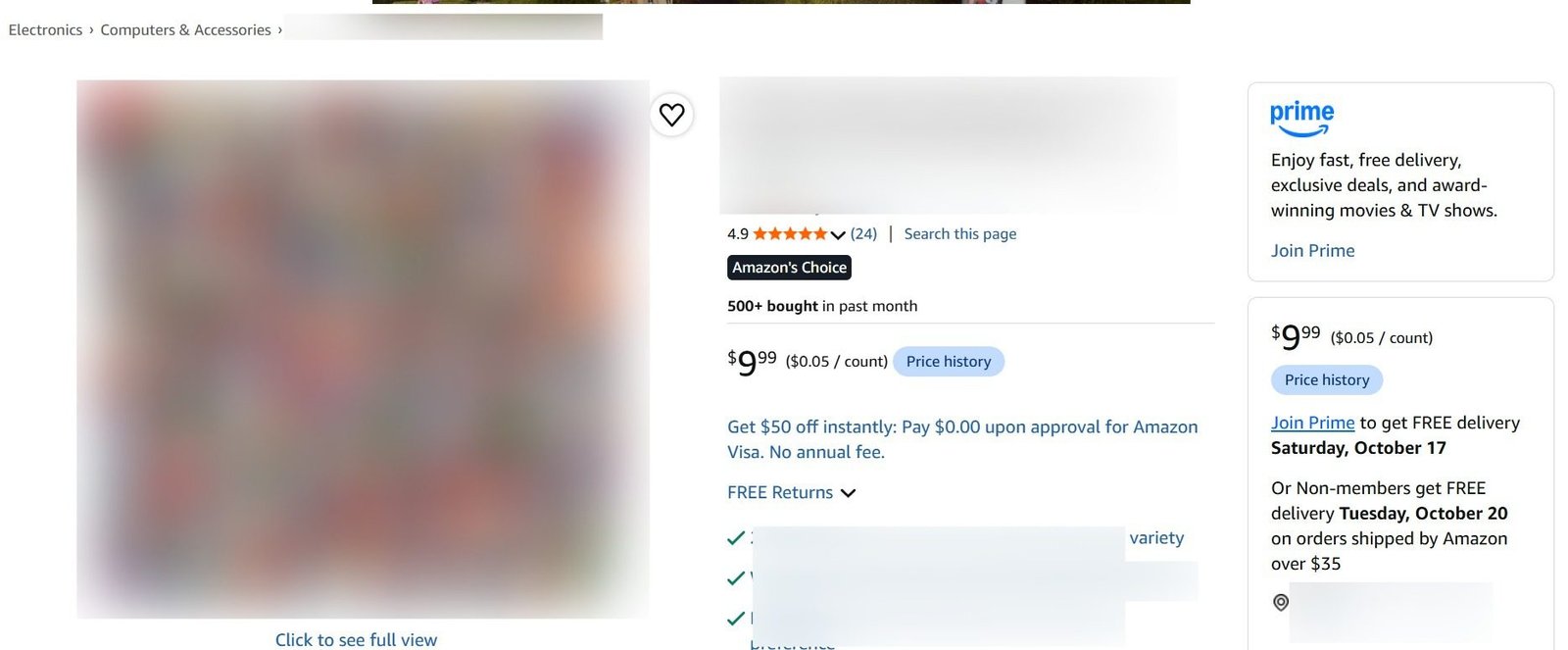
We completed the SEO-focused listing, product images, Seamless A+ Content and product video before launch. After inventory arrived at Amazon, we enrolled in Vine and started PPC once the listing had 10+ reviews, obtained in roughly one week according to our team. The later listing screenshot shows 24 reviews and a 4.9-star rating.
3. Launch PPC With Exact, Auto Close and ASIN Targeting
Our five starting campaigns included Exact targeting for 10 priority keywords, Auto Close and competitor ASIN targeting. Each served a different purpose: Exact focused spending on researched searches, Auto Close tested other closely related queries, and ASIN targeting reached shoppers comparing competing listings.
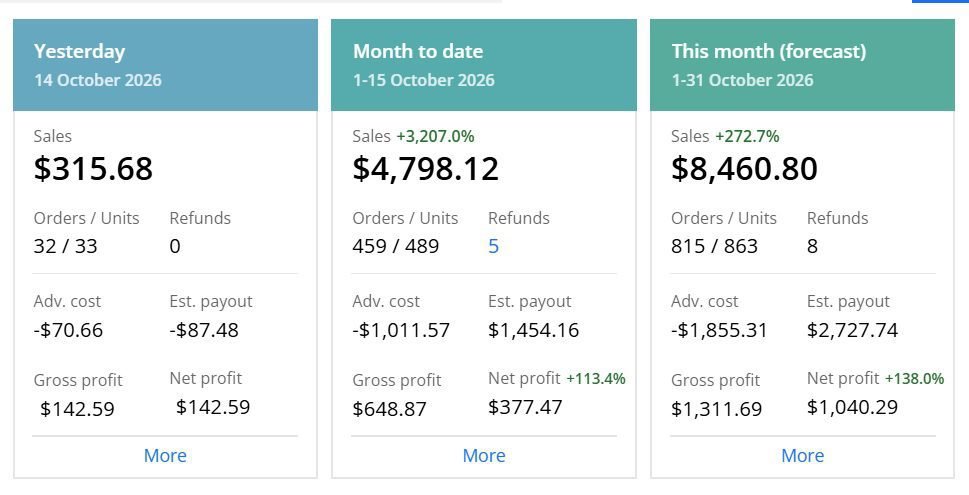
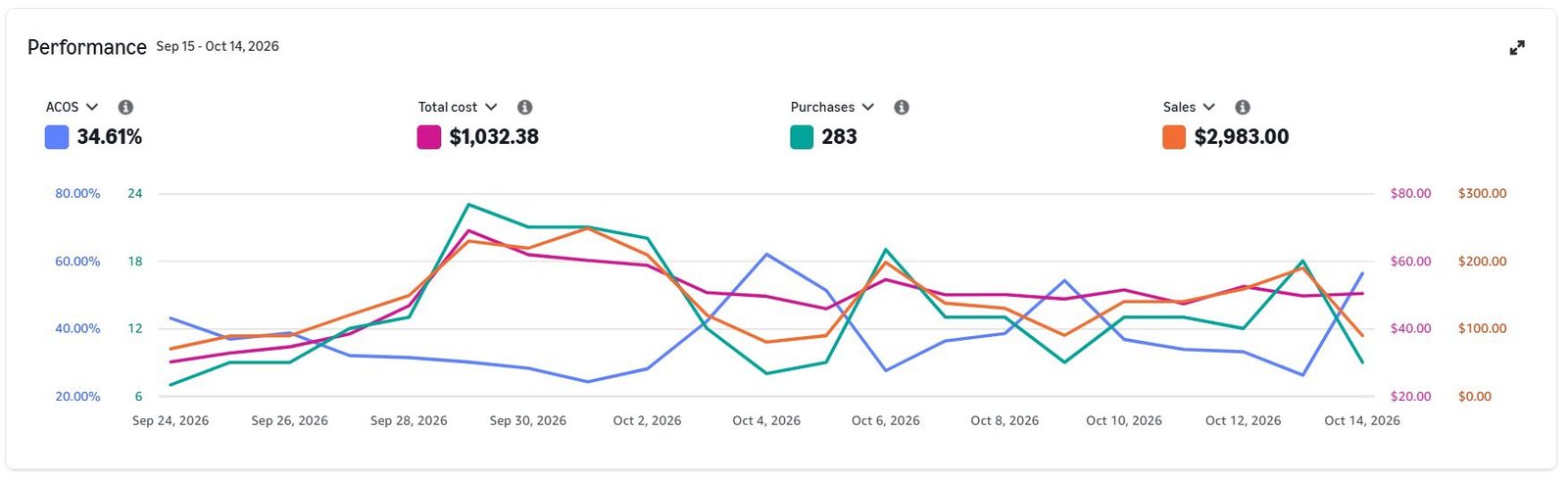
Within a week, sales reached roughly 30–50 units a day, with a team-reported conversion rate near 23%. The sales dashboard shows 489 units and $4,798.12 in sales for October 1–15. The separate PPC report shows 34.61% ACoS for September 15–October 14.
4. Reduce PPC When Inventory Runs Low
Our initial 1,000 units were selling quickly, but the supplier needed approximately 35 days for replenishment. We placed another order and reduced active PPC campaigns from five to two to slow inventory depletion. Keeping all five campaigns active could have exhausted stock before the next shipment.
The inventory decision mattered as much as the initial campaign setup. We project $20,000–$25,000 in monthly revenue after restocking if demand continues, but this has not yet been achieved.
What No Longer Works on Amazon
Search-Find-Buy Manipulation
Sellers have used manipulated URLs or coached buyers to search for specific keywords and then purchase to influence ranking. Do not use coordinated or artificial buying behavior. Focus on real shopper demand and compliant marketing instead.
Incentivized Reviews
Facebook review groups, review swaps, and offers of free products in exchange for positive feedback violate Amazon’s review rules. Vine and Amazon’s Request a Review workflow are compliant options when used according to their terms. Honest reviews may also occur without a request.
Phase 4: Post-Launch Optimization (Months 2–3+)
Your launch doesn’t end after 30 days. The post-launch phase is where you improve what works, cut wasted spending and refine the listing based on actual customer data.
1. Review and Feedback Management
Monitor new reviews and address legitimate product complaints. If multiple reviewers mention the same issue, update the listing information or use the feedback when improving the next production order.
Never attempt to change reviews or retaliate against negative feedback. Report reviews only when they violate Amazon’s published guidelines.
2. Listing Refreshes
Based on what you learn, adjust listing copy and visuals. If recurring questions appear in reviews, clarify them in the description or bullets. If an image isn’t performing, test different concepts using an eligible experiment tool such as Manage Your Experiments.
3. Keyword and SEO Optimization
Use sales and search-term data to refine keywords. If a valuable relevant term is absent from the listing, decide whether it belongs in visible copy, attributes or backend search terms. Avoid replacing readable buyer-focused content with keyword repetition.
Keep researching new relevant terms and testing them in ads or copy where appropriate.
4. Advertising Optimization
Pause or reduce bids on targets that are not converting economically. Reallocate money to stronger performers. Test new placements or targeting types when enough budget is available.
Watch your TACoS, the percentage of total sales spent on ads. A declining TACoS can be encouraging, but it must be interpreted alongside sales and contribution profit. Do not assume every product must reach 20% by month three or 15% by month six.
5. Inventory Planning
Keep close tabs on stock levels. Use your recent daily orders, supplier lead times and inbound receiving estimates to decide when to reorder. If the available stock can’t cover replenishment, reduce unnecessary traffic before the product runs out.
This was the central operating decision in the Ecom Brainly case study: PPC was reduced because demand was consuming available inventory faster than it could be replaced.
6. Performance Metrics
Track daily sales velocity, conversion rate, BSR trends, keyword rankings, reviews, paid versus total sales, inventory coverage and product-level profitability. Monitor material changes and investigate whether they are caused by conversion, pricing, reviews, advertising or stock availability.
Seasonal Product Launches
1. Major Sales Events (Prime Day, Q4)
Prime Day and the Q4 holiday period bring additional shopping demand, but competition and advertising costs can also increase. Prepare inventory and listings in advance. Don’t rely on a seasonal event to compensate for an uncompetitive product offer.
2. Seasonal Demand
Some products sell at particular times, such as patio items in spring or backpacks before the school season. Review demand history and plan manufacturing and receiving lead times backward from expected peak sales.
3. Off-Season Launch
If launching in a slower season, use expected demand and keyword economics to decide how much advertising makes sense. A smaller launch can still provide useful performance data without requiring a large seasonal budget.
Final Thoughts
Launching an Amazon product is a project with research, timelines and metrics to track. Begin with product quality, listing preparation, compliance and inventory. Once the offer is buyable, use PPC and customer feedback to learn which keywords and product benefits produce sales.
Keep advertising decisions connected to the available inventory and the product’s economics. As the case study shows, sometimes reducing campaigns is the right decision even when the product is selling well.
If you need support preparing or managing a product launch, Ecom Brainly offers Amazon account management and Amazon PPC services. You can also book a free strategy session to discuss your product and launch requirements.
Common Amazon Launch Questions
How Much Should I Budget for an Amazon Product Launch?
There is no fixed amount. Calculate your expected costs, break-even ACoS, likely CPC, planned daily clicks and inventory coverage. Your PPC budget should fit the amount you can afford to test before the first results come in.
How Long Does the Amazon Honeymoon Period Last?
Amazon does not publish a guaranteed honeymoon period. The first weeks are important for gathering data and improving the new listing, but there is no confirmed 30–45-day ranking window.
What Is a Good ACoS for a New Product Launch?
Use the product’s own margin and advertising objective. ACoS may be higher during launch, but it shouldn’t be high just for the sake of being high. Check your break-even ACoS and understand how much you are willing to invest to acquire early customers.
How Many Reviews Do I Need Before Launching?
A product can launch without reviews. Vine may help an eligible listing obtain early reviews, but there is no guaranteed number or delivery date. Make sure your offer and product quality are ready before investing heavily in traffic.
What Is a Good Conversion Rate for a New Listing?
Compare your product’s conversion with its category, offer conditions, traffic source, price and reviews. A lower-than-expected conversion rate can reflect weak images, pricing, an uncompetitive offer or poor keyword relevance. There is no universal rate that every new ASIN must reach after two weeks.
Is Amazon Vine Worth It in 2026?
It can be valuable when eligible and when the product is ready to receive candid customer reviews. Evaluate the current program fee, unit cost and competitive review environment for your marketplace.
When Should I Reduce Ad Spend After Launch?
Reduce unnecessary spending when conversion is weak, when advertising cost exceeds the planned acquisition limit, or when the available inventory cannot support the expected sales velocity. In our case study, the immediate reason was a 35-day replenishment lead time.
Do I Need a Trademark to Launch on Amazon?
You can sell eligible products without being Brand Registered. Brand Registry generally requires a qualifying registered or pending trademark and gives eligible brands access to additional tools, subject to the program’s rules.