Amazon digital marketing also known as Amazon PPC (Pay-Per-Click) advertising has become important tool for sellers to get initial sales velocity increase organic ranking.
Roughly three out of four Amazon sellers now use PPC to reach customers and nearly 80% of sellers advertise on or off Amazon.
With hundreds of millions of products struggling to rank, smart Amazon digital marketing campaigns make listings to appear on top slots of Page 1.
A well-managed PPC strategy routes traffic to your products and supports organic ranking (Amazon’s A9 algorithm favors products with sustained sales and traffic).
In this guide, we’ll explore in depth how each component of Amazon digital marketing (PPC) works, how to structure and optimize your campaigns.
Why Amazon PPC Matters
In 2025, Amazon ad revenue surged as competition intensified, making PPC a necessity for survival. Consider these key reasons why PPC is important for sellers:
1. Organic Rankings
Organic ranking remains the fulcrum of sustainable Amazon growth. However, Amazon PPC plays a critical role in gaining and stabilizing organic positions by generating consistent sales velocity in accordance with keyword relevance. PPC strengthens organic rankings rather than replacing it.
2. Targeted Reach
PPC allows you to place products in front of customers who have high purchase intent (e.g. people searching for your keywords or browsing similar products). By bidding on relevant search terms, you attract qualified traffic that is highly likely to convert.
3. Control Over Spend
Every click on your ad costs money, but also leads to revenue. Metrics like Advertising Cost of Sales (ACOS) and Return on Ad Spend (ROAS) let you measure ad efficiency. PPC provides real-time data so you can directly optimize campaigns for profit or growth.
4. Brand Awareness & Customer Retention
Beyond immediate sales, sponsored ads (especially Sponsored Brands and Sponsored Display) help build brand recognition. Video and banner ads capture attention, and remarketing campaigns re-engage buyers, improving the customer retention.
Given these benefits, almost all successful sellers today incorporate PPC into their marketing strategy. However, running profitable campaigns requires more than setting a default budget. You need to choose the right ad types, target the right keywords, set competitive bids, and continuously refine based on performance data.
Three Pillars of Amazon PPC
Amazon’s ad platform comes down to three core ad types, each built for a different job. Think of them as specialized tools in your marketing toolkit. Knowing which one to use and when is what separates a profitable ad campaign management strategy from an expensive hobby.
1. Sponsored Products
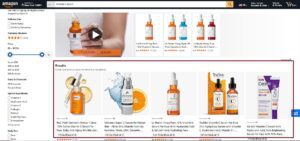
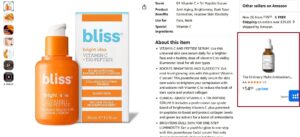
Sponsored products (SP) ads promote a single product and appear Top of the search (TOS) results, within Amazon search results (Rest of the search ROS) and on product detail pages (PP). They look very much like organic listings (same layout: image, title, price, etc.), blending seamlessly with search results.
Sponsored Products are the workhorse of Amazon PPC. They are most commonly used ads: 77% of sellers use Sponsored Products. You bid on search terms (automatic or manual targeting) and pay only when someone clicks.
Sponsored Products are ideal for scaling up sales of individual SKUs or giving a new listing initial sales velocity.
2. Sponsored Brands
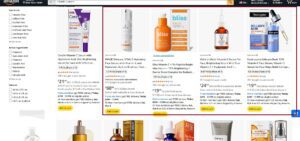
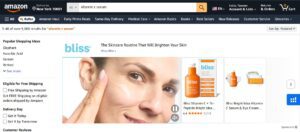
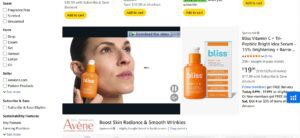
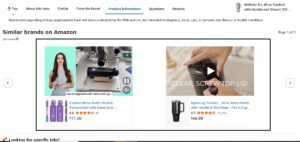
Sponsored Brands are the banner-style & video ads that appear at the top of the search results (Above SP TOS ads), showcasing your brand logo, a custom headline, and a few of your products.
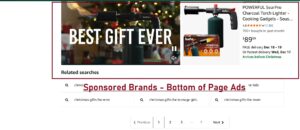
Sponsored Brands placements in the search results and at the bottom of the page feature product videos.
Their goal is to build brand awareness and making a bigger statement. You’ll want to use Sponsored Brands to:
- Introduce shoppers to your full catalog, not just one product.
- Funnel traffic to your Amazon Brand Store, where you control the experience.
- Dominate the top of the page, pushing competitors further down and out of sight.
3. Sponsored Display
Finally, we have Sponsored Display ads. Launched later (2019), Sponsored Display lets you retarget audiences both on and off Amazon. These ads can show up in similar placements as Sponsored Products or on external sites (affiliated publisher sites, social apps, etc.). There are two targeting modes:
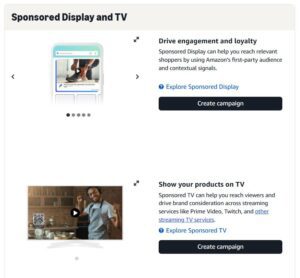
- Product Targeting: It places ads on specific product detail pages (useful for competitor targeting or cross-selling). For instance, your ad can appear on the detail page of a complementary or competing product.
- Audience Targeting: It reaches shoppers by behavioral segments (people who viewed your product in the past 30 days, or shoppers in certain in-market or interest categories).
In 2025, the Amazon Marketplace is home to over 300,000 global sellers clearing more than $100,000 a year. All that growth has driven up advertising costs, with Sponsored Products making up 68% of total ad revenue in Q1 2025 alone. You can find more insights in the latest Amazon advertising statistics for 2025 on luzern.co.
Keyword Targeting Strategies
An effective Amazon digital marketing campaign hinges on keyword targeting. Amazon provides both Automatic and Manual targeting modes for Sponsored Products, each with their own pros and cons:
1. Automatic Targeting
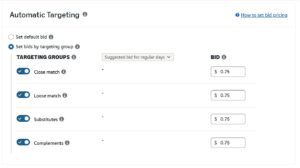
Amazon’s algorithm analyzes your product listing (title, bullets, backend search terms, etc.) and automatically matches it to relevant shopper search terms. This is a great way to cast a wide net when launching campaigns. Automatic targeting also allows you to set four bids by match group: Close, Loose, Substitutes and Complements.
A. Close Match
It will show your ad for searches very closely related to your product (e.g. your “wireless earbuds” ad on the term “Bluetooth earbuds”).
B. Loose Match
It covers broader or loosely related searches (e.g. “wireless earbuds” might match “Bluetooth headphones”).
C. Substitutes
It targets shoppers on detail pages of similar products (competitors).
D. Complements:
It targets shoppers viewing pages of complementary products (e.g. headphones on a smartphone page).
Automatic campaigns require minimal management and can discover new relevant keywords, but they lack full control.
2. Manual Targeting
Here you hand-pick the exact keywords or products to bid on. For keywords, Amazon offers three match types:
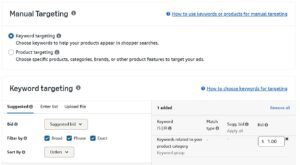
A. Broad Match: Ads show for searches containing your keyword in any order (plus synonyms/
variations). Broad match maximizes reach and finds new search terms, but can attract less precise
traffic.
B. Phrase Match: Ads show for searches containing your exact keyword phrase with additional words before/after. This balances reach and relevance.
C. Exact Match: Ads only show when the shopper’s search exactly matches your keyword (or very close variants). This yields the most precise targeting.
Manual targeting gives you complete control. You can bid aggressively on your best keywords and use negative keywords to exclude irrelevant traffic.
Search Term Reports & Negatives
After your ads run, download Amazon’s search term reports to see which actual queries triggered your ads, which converted, and which wasted spend. Use this data to refine:
- Add high-converting search terms to exact match campaigns (or raise their bids)
- Add irrelevant terms as negative keywords
Negative keywords are crucial for preventing wasted clicks. For example, if you sell leather wallets, adding “free” as a negative will stop your ad appearing on searches like “free wallet”.
Smart Strategy: A common approach is to utilize automatic campaigns to gather data and keywords, then create targeted manual campaigns.
Let your automatic campaigns run for at least 2 weeks or until you collect significant clicks, then identify the best-performing search terms in the report . Move these to manual exact/phrase campaigns at optimized bids. Meanwhile, any wasted terms (high spend, low or zero sales) should be negated . Regularly repeat this process to expand your keyword portfolio and improve cost efficiency.
Bidding and Budget Strategies
Amazon offers several bidding strategies and controls to improve ROI. Selecting the right one
depends on your goals:
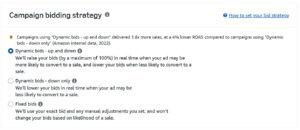
A. Dynamic Bids – Down Only
Amazon will lower your bid in real time if a conversion seems less likely. This setting helps prevent overspending on low-probability clicks. It’s often the safest default for most campaigns .
B. Dynamic Bids – Up and Down
Amazon can raise or lower your bid (up to +100%) depending on the likelihood of conversion. This is useful if you want more impressions or are in a highly competitive space.
For instance, new campaigns or keywords may benefit from Up-and-Down to win impressions; once you gather enough data and a working bid level, you can revert to Down Only to control cost.
C. Fixed Bids
Amazon uses exactly the bid you set, without adjustment. Use Fixed Bids when you need to dominate certain keywords or placements and are willing to pay your full bid to do so. This applies to high-value keywords where you want guaranteed visibility.
Regardless of strategy, remember that your bid is the ceiling for how much you’re willing to pay: you often pay less. Amazon’s auction means you usually pay just above the next highest bid, so improving your ad relevance and quality can reduce your actual cost-per-click (CPC) even if your bid is high.
Placement Adjustments
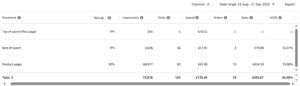
Amazon ads can appear in several placements: Top of Search, Rest of Search (page 1 or beyond), and Product Pages (detail pages of competitor products). You can view performance by placement and apply bid adjustments (also called bid modifiers) to favor or de-emphasize certain placements:
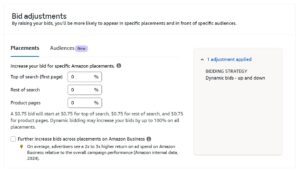
A. Top of Search
Highest visibility and click-through rate, but also highest CPC. Increase bids here to capture early buyers or launch a new product. This placement can dramatically raise sales, albeit at a higher cost.
B. Rest of Search
Cheaper clicks but lower conversion rates. Useful for awareness and brand exposure. Lower bids slightly to balance spend while still capturing broader traffic.
C. Product Pages (Sponsored Products on competitors’ listings)
Often the lowest cost per click but also the lowest conversion rate . These are best for retargeting shoppers who have seen a similar product. Use with a conservative bid unless you’re explicitly trying to steal sales from a specific competitor.
It is advised, if “Top of Search” is attain good results, consider raising its bid modifier to focus more budget there. Conversely, if certain placements are underperforming, dial them back . These adjustments help allocate spend to where it pays off most.
Campaign Structure and Setup
How you organize your campaigns can greatly impact performance and manageability. Here are best practices for structuring Amazon PPC campaigns:
A. Segmentation
Group similar products and keywords logically. For example, you might create one campaign per product or per product category/theme.
Keep broad, phrase, and exact match campaigns (for the same product) separate, and consider splitting campaigns by objective (e.g., brand awareness vs. sales).
This prevents your own keywords from competing (“cannibalizing” each other) and makes budget control easier.
B. Match-Type Tiers
It’s often wise to use separate ad groups/campaigns for different match types. For each product, you might run an Exact Match campaign for high-intent terms, a Phrase Match campaign for related queries, and a Broad Match or auto campaign for new keyword discovery. This allows you to bid differently based on intent and performance.
C. Naming Conventions
Adopt a clear naming system (e.g. Product_SKU_MatchType_Date) so you can instantly identify campaigns and avoid confusion. It is recommended naming campaigns and ad groups with product identifiers and campaign goals to stay organized.
D. Budgets
Set daily budgets high enough to gather data, especially when launching new campaigns. A common tip is to set budget and bids 50% above Amazon’s suggested levels when testing. This enables your ads can compete and generate impressions. Once you have stable performance, budgets can be tightened or reallocated to the best campaigns.
Establish a routine (e.g., weekly or bi-weekly) to review all campaigns. Check each campaign’s key metrics (ACOS, clicks, conversions) and make adjustments: raising bids or budgets on high converting keywords and reducing bids or pausing underperformers. With the right structure and a regular audit process, you can optimize efficiently without getting lost in data.
Amazon Brand Awareness
Amazon Sponsored Brands are specifically used for brand awareness. These ads place your brand name and logo at the top of search results, helping you gain recognition from people searching for related terms. You can use headline search ads and video ads to point traffic to your product pages or your brand store. This approach helps shoppers understand who you are before they even look at specific items.
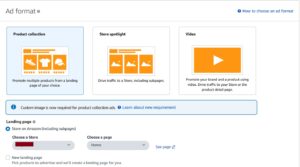
- Headline search ads show multiple products at once to give a broad view of your catalog.
- Video ads capture the interest of scrolling shoppers by showing the product in use.
- Directing traffic to a brand store helps build a multi-page experience for the buyer.
Retargeting Ads
Retargeting ads through Sponsored Display allow you to reach shoppers who have already shown interest in your products. You can use different audiences to target different customers based on how they interacted with your shop. This includes views remarketing, where you can target customers who know you because they previously looked at your listings.
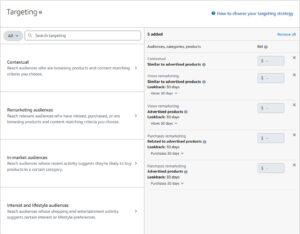
- Audience targeting helps you separate first-time visitors from repeat shoppers.
- Views remarketing serves ads to people who saw your product detail page but did not buy yet.
These ads appear Off-Amazon on various sites and apps to remind shoppers to return to your store.
Bid Optimization Tips
Bid optimization is a critical part of Amazon PPC optimization. Below are several strategies that can be used in Amazon digital marketing campaigns.
A. High ACOS Keywords
If a keyword’s ACOS is far above your target (e.g. 1000% when your goal is 30%), cut its bid by ~20–30%. Reducing a bid lowers CPC and can bring ACOS back into range. If a keyword is irrelevant to your product, consider adding it as a negative instead.
B. Low ACOS Keywords
For keywords already outperforming your target (low ACOS), increase the bid or campaign budget to capture more sales . These are your most efficient keywords; pumping more ad spend into them can boost volume while maintaining profitability.
C. Many Clicks, No Sales
Don’t panic if a keyword gets clicks but no sales immediately. Wait for sufficient data (30–50 clicks is a rule of thumb) before pausing . If after enough clicks it still yields nothing, first try a smaller bid (sometimes reducing CPC makes it profitable).
Also investigate your listing: a high CTR with no conversions often means the detail page isn’t answering customer needs. Fixing images, price, or content will turn those clicks into sales.
D. Low Impressions Keywords
If a relevant keyword isn’t getting impressions, your bid may be too low. Start by raising the bid to be competitive . Another cause can be keyword “cannibalization”: in a broad campaign with many terms, Amazon may favor a few keywords over others. In such cases, move the low-impression keyword into its own campaign or ad group to give it a fair chance to serve.
By systematically adjusting bids based on performance (and letting Amazon accumulate data between changes), you align spend with profit. Automated bidding tools (discussed below) can handle this at scale, but understanding these scenarios is critical for manual oversight.
Performance Metrics
Amazon PPC provides a wealth of data. Key metrics include ACoS (Advertising Cost of Sales), ROAS (Return on Advertising Spend), CTR, CPC, Impressions, and Conversion Rate. To optimize campaigns effectively, track a balanced set of KPIs and understand how they relate:
A. ACOS (Advertising Cost of Sales)
The classic Amazon PPC metric, calculated as: (Ad Spend ÷ Attributed Sales)×100%. ACOS reflects how much you spend to earn each dollar of ad revenue. For example, if you spend $20 and generate $100 in sales, ACOS is 20%.
Lower ACOS means more efficient spend. However, ACOS ignores profit margins: a low ACOS is only “good” if it’s below your break-even point. Amazon recommends calculating your break-even ACOS from your profit margin, then setting target ACOS around that . If growth is the priority, you might accept ACOS above break-even for a period (to build rank and reviews).
B. ROAS (Return on Ad Spend)
The inverse of ACOS, ROAS = (Ad Revenue ÷ Ad Spend). If ACoS is 20%, ROAS is 5x (100/20). ROAS gives a dollar-for-dollar view: e.g. a 5x ROAS means $5 of sales for each $1 spent.
A higher ROAS is better. Unlike ACOS%, which can only be 0–100%, ROAS can exceed 100 (for extremely efficient ads).
C. TACOS (Total ACOS)
This expands ACOS to include your total sales (not just ad-attributed sales). TACOS = (Ad Spend ÷ Total Sales)×100%. TACOS shows whether your advertising is boosting overall business, not just paid sales. It’s useful for brand growth campaigns: a high TACOS (say 60%) might be fine if overall sales are rising, indicating ads are building organic momentum.
D. Other Metrics
Always monitor
- Click Through Rate – CTR (clicks ÷ impressions)
- Conversion Rate – CVR (conversions ÷ clicks),
- Cost Per Click CPC – (Total Ad Spend ÷ Number of Clicks
High CTR with low CVR often signals there is issue with your offer. High impressions with low CTR might suggest poor relevance or creative problem. Use these to diagnose problems.
A key principle is contextual analysis: don’t fixate on ACOS alone. Don’t stare at ACOS in isolation: review CTR, CVR, impressions, and ROI alongside it.
For instance, a campaign with 10% ACOS sounds great, but if it’s only $100 sales, the absolute profit may be small. Conversely, a 40% ACOS campaign that drives large volume might be worth running if it yields scale and reviews.
Ongoing Optimization & A/B Testing
Amazon PPC is about scientific testing and continuous optimization. Together they yield the best
results over time. Here are actionable ways to refine campaigns:
A. Search Term Optimization
Regularly update campaigns based on search term reports. Add high-converting search terms to exact match ad groups and raise their bids. Add wasted search terms to your negative keyword lists. This constant pruning and expansion is critical to lowering wasted spend and doubling down on winners.
B. Ad Creative Testing
For Sponsored Brands and Display (which allow custom headlines and creatives), experiment with different ad copy and images. Amazon allows changing your SB headline copy and product grid.
Benefit-focused headlines often outperform generic ones, and including promotions (like coupons) in ads can boost performance .
For Sponsored Products, while the creative is fixed (your product image/title), you can use A/B testing tools or experiment with different primary images on your listing (which carries over into ads).
Ahigher-quality main image or more compelling title can improve click-through and conversion in ads.
C. Sponsored Brands Video Ads
If you have the content, test video versus static ads for Sponsored Brands. You will see significantly higher engagement with video ads. Show your product in use in the first 3-5 seconds.
D. Campaign Structure Tests:
Use Single-Keyword Ad Groups (SKAGs) on top 5 high search volume keywords to have full control over bids, budgets and performance monitoring. Use one match type under one ad group with maximum of 5-10 keywords.
E. Conversion Rate Optimization
Remember that PPC performance ties directly to your product detail pages. A high-traffic ad isn’t valuable if the listing doesn’t convert.
Optimize your titles, images, bullet points, reviews, and pricing. If an ad has good clicks but poor sales, consider running an Amazon Experiment (A/B test) on your page or revising your listing content. Amazon reports that improving listings and ad creative together can dramatically lower ACOS.
The average conversion rate on Amazon advertising hit an incredible 9.96% in 2025. That’s roughly 7 times higher than a typical e-commerce site. It all comes down to the high-purchase intent of Amazon shoppers.
You can explore additional Amazon advertising statistics on sequencecommerce.com to see more benchmarks like this. A low conversion rate on a listing with plenty of traffic is a huge red flag that something on the page needs to be fixed.
Review your Amazon advertising console, apply one new tactic from this guide (whether it’s a Sponsored Display retargeting campaign, a campaign restructuring, or a fresh set of automated rules) and watch your sales grow.
For ongoing support, consider working with PPC experts that help you stay aligned with changes in the Amazon ecosystem, such as insights shared through Ecom Brainly’s Amazon Advertising. The time to optimize is now: your competitors are already doing it.