Amazon’s advertising suite offers multiple self-service solutions for sellers and brands. Among these, Sponsored Display Ads allow advertisers to reach shoppers on and off Amazon using interest and behavior-based display campaigns.
Sponsored Display (SD) campaigns use Amazon’s shopping signals (not keywords) to automatically place your product ads as banner or video creatives.
Launched in 2019, these ads have evolved across devices (now including desktop, mobile apps, Fire TV, etc.) and markets, giving brand registered sellers and vendors new ways to improve sales.
Who Can Use Sponsored Display
Sponsored Display ads are available to most brand-registered sellers (and eligible vendors) on Amazon. Eligible regions include North America (US, CA, MX), Europe (UK, DE, FR, ES, IT, NL, SE, PL, TR), Asia-Pacific (AU, JP, IN, SG), Middle East (UAE, KSA), and more.
Small sellers must be Brand Registered to use SD ads and it is not open to individual or non-registered sellers. (By contrast, DSP can be used by non-Amazon advertisers, but requires minimum spend.)
SD is also not available for Kindle ebooks. In short, if you’re a brand-owner on Amazon with registered products, you can use Sponsored Display to amplify your product ads.
Where Sponsored Display Ads Appear
Unlike keyword ads which only appear in search results, Sponsored Display ads can appear in a variety of placements.
On Amazon, SD ads can show on the Amazon homepage, search results pages (in banners or side widgets), customer reviews sections, product detail pages (often on competitors’ listings or related categories), and even on the “Thank You” or post-purchase pages.
Beyond Amazon’s own sites and apps, Sponsored Display also delivers ads on third-party websites and apps (the Amazon Publisher Network). For example, your product ad might appear on Twitch or other partner apps when serving a relevant audience.
In short, SD extends your reach to Amazon shoppers both during and after shopping and to audiences on external sites, making it a true ecommerce display advertising channel.
How Sponsored Display Ads Work
Amazon Sponsored Display ads are powered by shopping signals, not by search keywords. Amazon tracks user behaviors (what products they view, what categories they browse, what they’ve purchased, etc.) and then matches your ads to those audiences.
When you launch an SD campaign, you choose the product(s) to advertise and a targeting strategy, then set your bids. Amazon’s auction system determines which ads win placements: the highest bidder’s product is then shown in the form of a display banner or video. The ad creative includes your product image, pricing and review badges, a short headline (usually the brand name or tagline), and a “Shop now” button linking to the product detail page.
There are two main targeting modes for SD: Contextual (Product/Category) Targeting and Audience (Retargeting/Interest) Targeting.
In Contextual targeting (formerly called Product targeting), you select specific ASINs or categories. Amazon will show your ad on the pages of those products or similar categories, filtered by things like brand, price, rating, and Prime eligibility. This is great for reaching customers actively browsing related items.
In Audience targeting, Amazon serves ads to shoppers based on their past activity: for example, customers who viewed your product detail pages or related products (View Remarketing), or who purchased your or complementary products (Purchase Remarketing). You can also use Amazon’s pre-built audience segments (lifestyle, in-market, interests, life events) to reach broader interest-based groups.
In short, you can retarget past viewers/buyers of your products, target shoppers of competitor products, or engage brand-new audiences identified by Amazon’s data.
Sponsored Display Targeting Options
Unlike Sponsored Products, which rely on keywords, Sponsored Display lets you target shoppers based on their location and behavior.
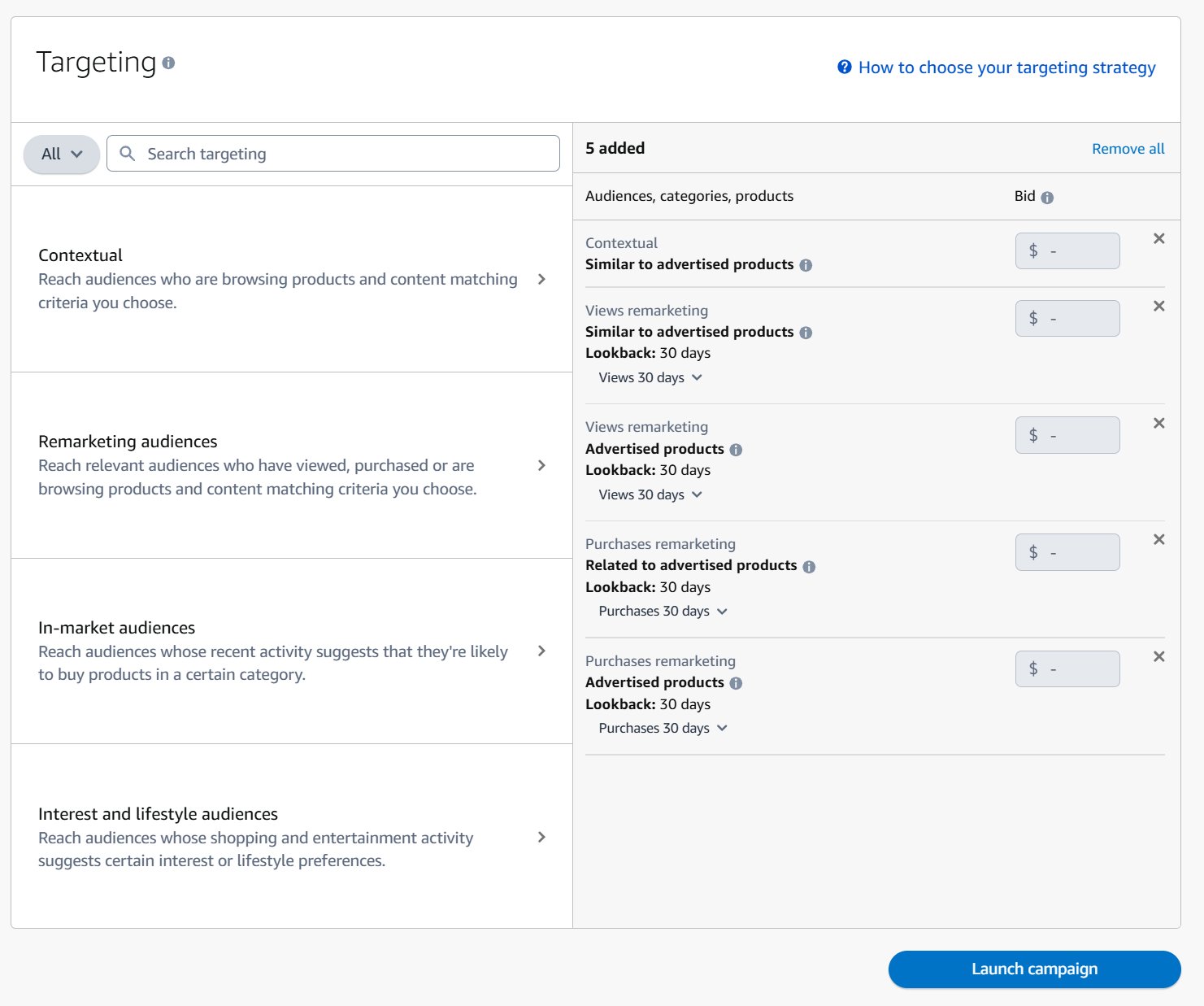
1. Contextual Targeting
This is the most direct approach. You’re not trying to figure out a shopper’s entire history; you’re just focused on what they are looking at right now.
Product Targeting: This lets you choose specific product detail pages to run your ads on. You can target individual ASINs of your competitors, place your ad on a complementary product’s page, or even target your own products to cross-sell. For example, if you sell a premium coffee grinder, you could target the ASINs of top-selling espresso machines.
Category Targeting: This is your wider net. Instead of picking ASINs one by one, you target entire product categories or sub-categories. You can then add filters for brand, price, or star rating to focus on the right traffic. It’s a great way to get in front of shoppers browsing for items like yours without manually collecting ASINs.
2. Remarketing Audiences
With Audience targeting, the focus shifts from the product to the person. This is where you re-engage shoppers who’ve already shown interest in your brand, which is an incredibly effective tactic.
Views Remarketing: This is classic retargeting. You can serve ads to shoppers who viewed your product detail page within a certain timeframe (e.g., the last 30 days) but didn’t buy. It’s a simple way to stay top-of-mind and bring back on-the-fence shoppers.
Purchases Remarketing: This strategy targets your past customers. You can use it to encourage repeat buys, cross-sell another product in your catalog, or announce a new launch to your most loyal fans. If someone bought your shampoo last month, you could show them an ad for the matching conditioner.
3. In-Market Audiences
Finds shoppers who are actively browsing and showing strong buying signals within a specific category. Amazon is telling you, “This person is ready to buy something like your product.”
4. Interest and Lifestyle Audiences
These audience, use Amazon’s first-party data segments (lifestyle, inmarket, interests, life events) to reach broader audiences. For example, target shoppers interested in health & wellness or those who have upcoming life events (move, wedding). Amazon even provides “Lifestyle” insights from media properties like Prime Video or IMDb, letting you reach customers based on entertainment-watching behavior
Each targeting option can be used alone or together. For example, you might run separate SD campaigns: one to retarget recent viewers, another to reach in-market lifestyle audiences, and another to target competitor ASINs. This full-funnel approach ensures coverage of awareness, consideration, and conversion stages. For instance, Amazon recommends targeting broad interest groups for awareness, contextual or competitor-product audiences for consideration, and then using view/ purchase remarketing for conversion lift .
As a use case, consider a seller of wireless headphones. You could:
- Use product targeting to show your ad on the detail pages of competing headphone models
- Use views remarketing to retarget customers who viewed your headphone but didn’t buy
- Use lifestyle segments to reach customers who watch tech review videos on Prime Video.
Together, these tactics ensure maximum exposure. SD also allows you to re-target your audience on and off Amazon i.e., anyone who has seen your products or similar products in a selected category within 30 days”
Choosing the right audience comes down to knowing your product and ideal customer. A great tool for this is Amazon’s own data. You can learn more in our detailed guide to using Amazon Brand Analytics in 2025. By combining these targeting options, you can build an ad funnel that finds new customers and keeps your loyal ones coming back.
How to Create a Sponsored Display Campaign
Alright, let’s build your first Amazon Sponsored Display campaign. The Amazon Ads Console can seem a bit much at first, but the process is more straightforward than it looks. We’ll walk through it step-by-step.
Getting the setup right from the start is the best way to avoid wasting ad spend on common mistakes.

Step 1: Set Up the Campaign
First, go to the Campaign Manager in your Amazon Ads account and click “Create campaign.” When asked for your ad type, select “Sponsored Display.”
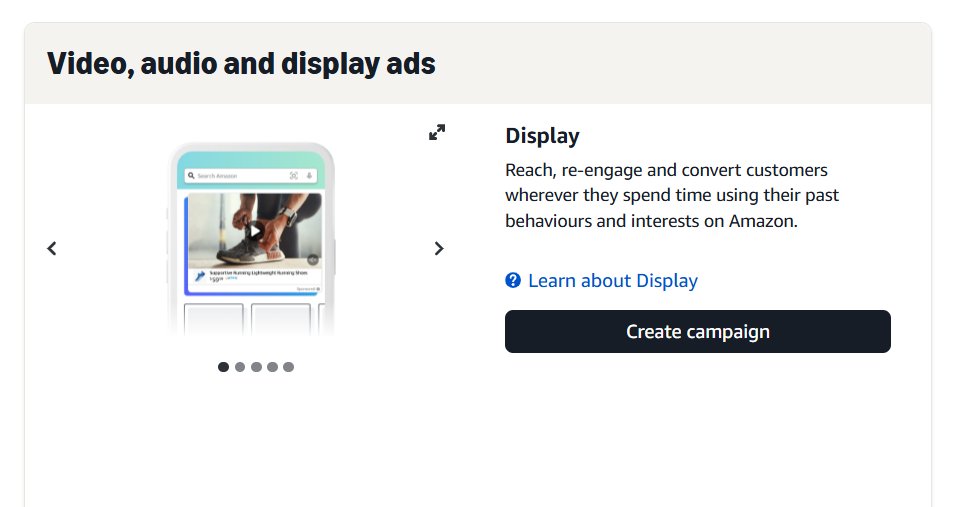
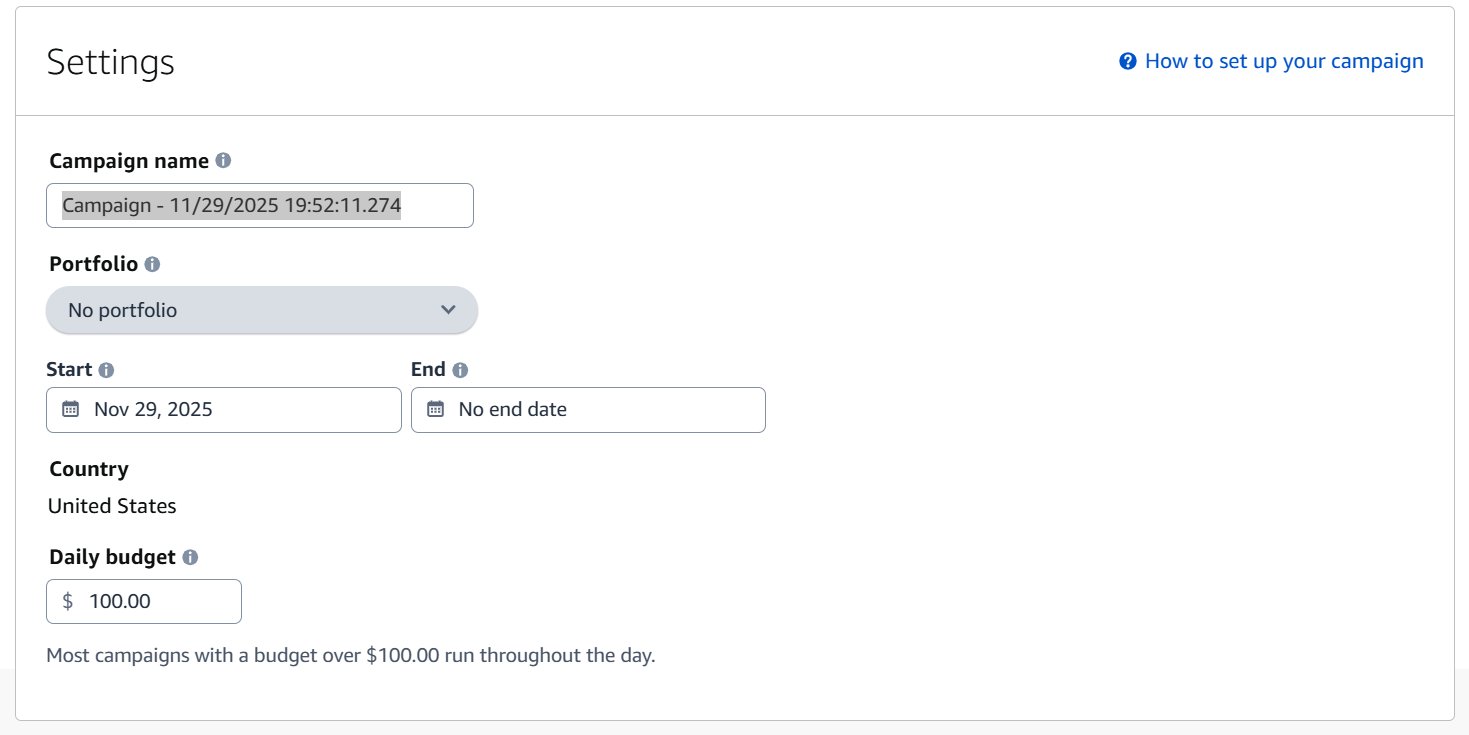
Now you’re ready to go. You’ll need to name your campaign, set its run dates, and decide on a daily budget.
Step 2: Set Up the Campaign
Set campaign name, start/end date and daily budget.
- Campaign Name: Be descriptive. A clean naming convention will save you headaches later. A good structure is
[Product] - [Targeting Type] - [Goal]. For example:Coffee Grinder - Views Remarketing - Conversions. - Start/End Dates: If it’s an ongoing campaign, you can just let it run. But for a holiday promotion or seasonal product, set a specific end date.
- Daily Budget: You don’t need to go big at first. Start with something comfortable, like $20 to $50 a day. You can always increase it once you see what’s working.
Step 3: Choose Ad format and Landing Page
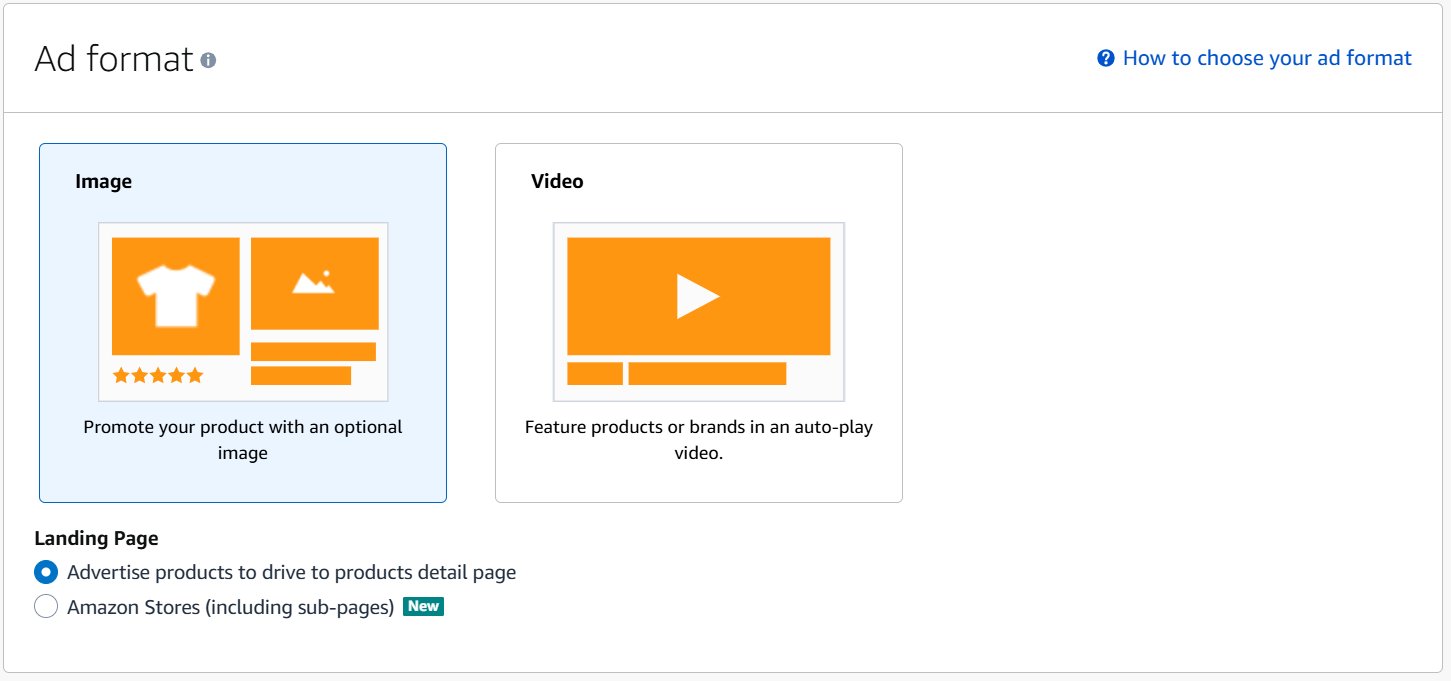
Pick Image (single image product ad) or Video (auto-play video placements) depending on assets you have. Then choose landing destination either product detail page or Amazon Store. Product detail pages are most common for direct conversions.
Step 4: Choose Optimization Strategy
Then you’ll choose your bidding optimization strategy. This tells Amazon what you want to achieve.
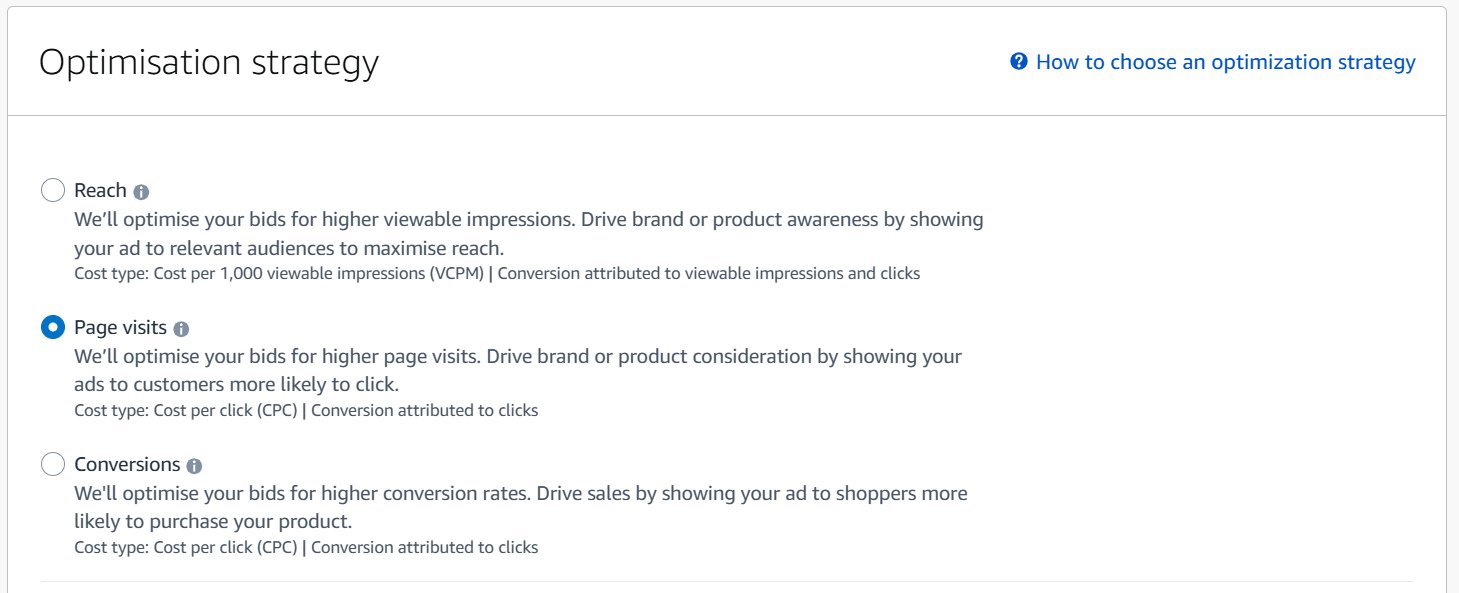
Amazon Sponsored Display is auction-based and pay-per-click (PPC), except for the reach-optimized option which is CPM. There are three optimization strategies (bid types) you can choose when launching a campaign :
Optimize for Reach: Focus on maximum impressions. Amazon will bid to get your ads shown (charging on a vCPM basis). Use this for pure awareness or when you want the most eyeballs. This is good if your goal is broad exposure rather than immediate clicks.
Optimize for Page Visits: Amazon optimizes to drive clicks. You bid in a CPC model, and Amazon will show your ads to shoppers most likely to click them . This is a balanced strategy for consideration-phase goals.
Optimize for Conversions: Amazon bids for higher conversion probability (CPC as well). The system aims to put your ad in front of shoppers likely to buy . This is ideal for direct sales goals or launch promotions.
Selecting the right strategy depends on your objective (awareness vs sales) and campaign type. You can also enable Dynamic Bidding and Cost Controls.
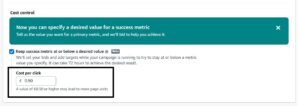
Amazon now offers a “Cost Control” feature similar to Sponsored Brands: you set a target cost (e.g. target ACoS or ROAS) and Amazon automatically adjusts bids to try to meet that target over a 7-day average. This simplifies management since you define a cost ceiling and let Amazon optimize for it.
Step 5: Select Your Targeting
Now for the important part: deciding who sees your ads. As discussed, you have two main options: Contextual Targeting and Audiences.
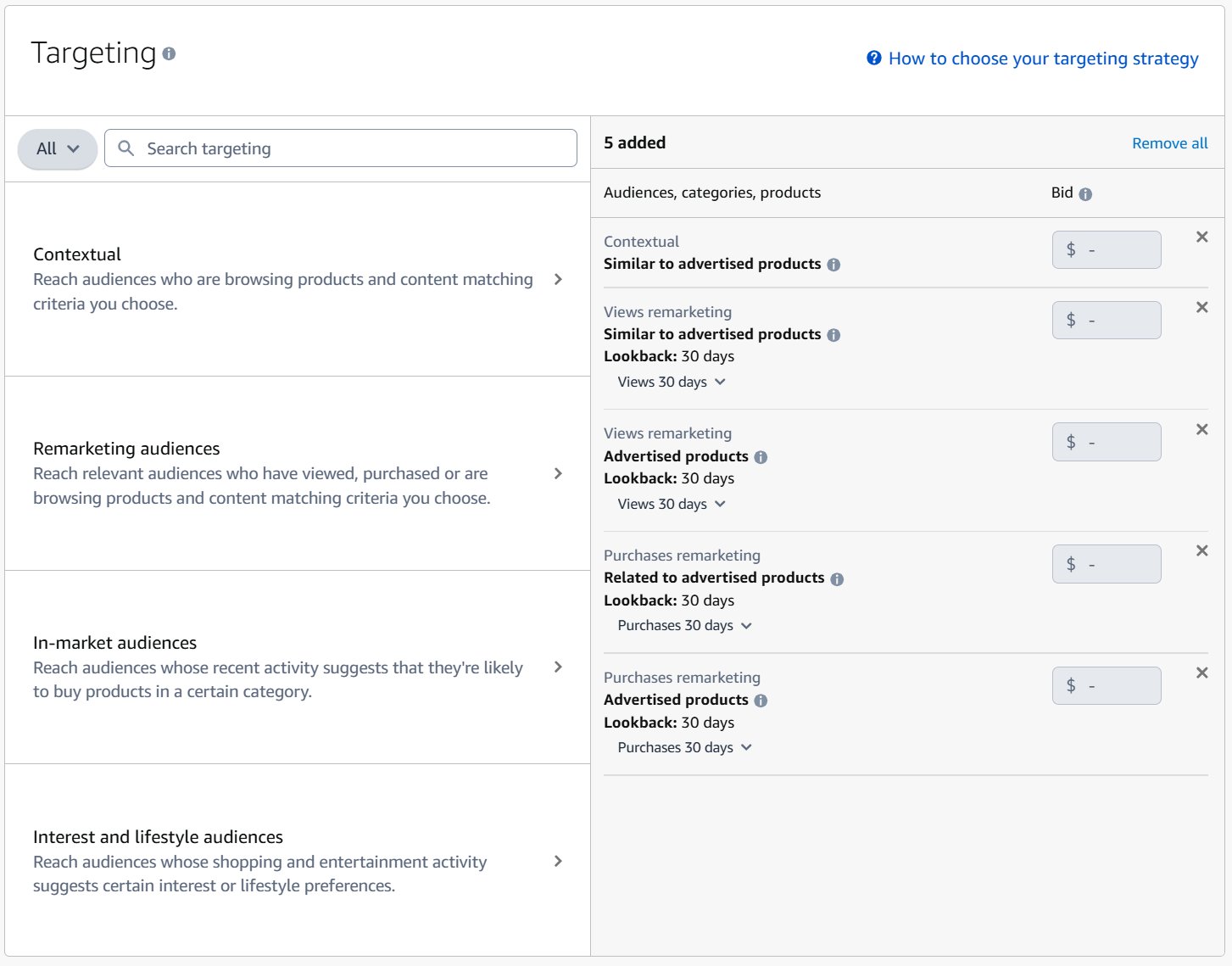
If you’re already running Sponosored products, starting with Views remarketing campaign is a great first choice. It targets a warm, high-intent audience and almost always delivers a strong ROAS.
Step 6: Customize Your Ad Creative
One of the best things about Sponsored Display is that you aren’t stuck with a generic ad. Amazon will create a default ad using your product’s main image and title, but you can, and should, improve it.
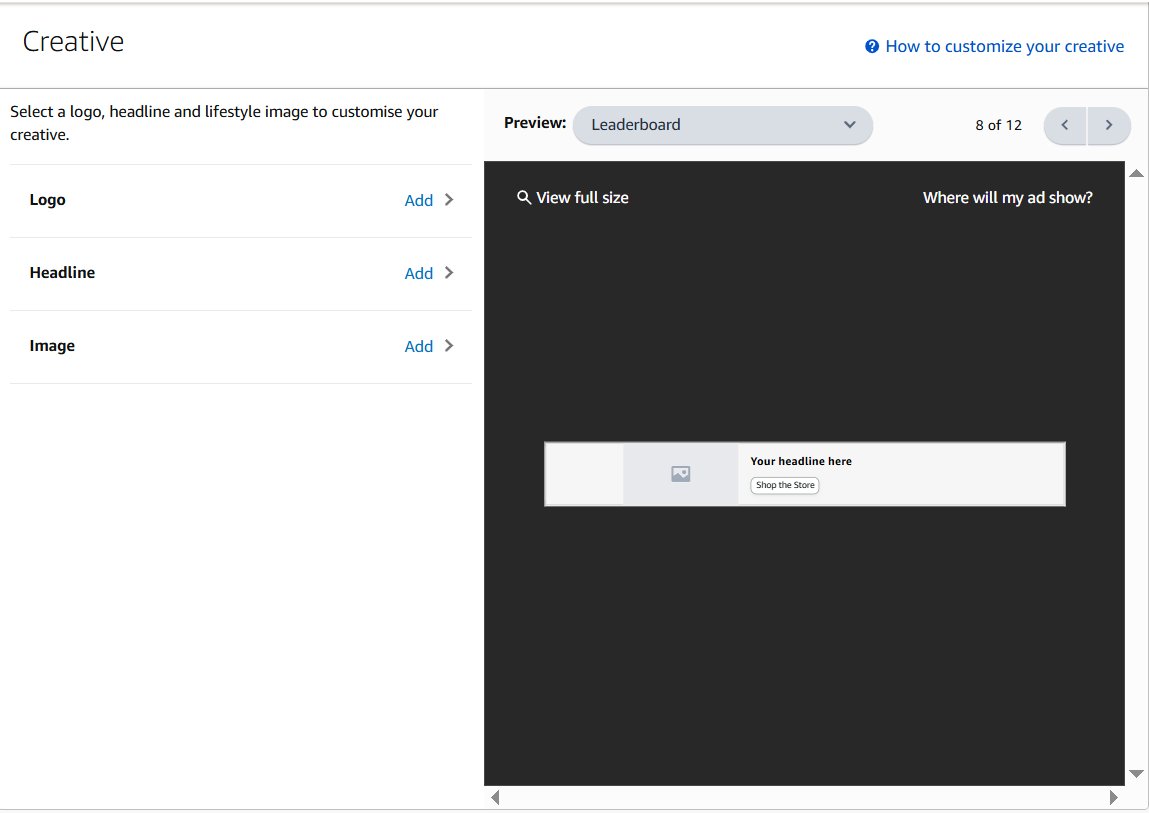
Add your brand logo and write a custom headline. A good headline is short and highlights benefits. Instead of just your product name, try something like “Durable, Quiet, and Consistent.” It’s a simple change that can make a real difference in your click-through rate (CTR). This is the same approach used in Amazon Sponsored Brands campaigns, where creative is a huge factor.
Step 7: Launch and Monitor
Last step. Select the specific products you want to advertise in this ad group. Once they’re added, give everything one final look. Double-check your budget, targeting, and ad creative.
If it looks good, hit “Launch campaign.”
But your work isn’t done. For the first few weeks, you need to watch your Campaign Manager. Keep a close eye on metrics like impressions, CTR, CPC, and especially your ACoS or ROAS. This initial data will show you what’s working and what needs to be adjusted.
Optimizing Your Campaigns
Launching an Amazon Sponsored Display campaign is just the beginning. The real profit comes from what you do next. Many sellers “set and forget” their campaigns, but the winners are constantly tweaking and optimizing.
To do it right, you need a clear plan that connects your actions to your business goals. Let’s break down how to optimize based on three common objectives: building brand awareness (Reach), driving traffic (Page Visits), and maximizing sales (Conversions). This approach helps you make data-driven decisions that actually improve performance.

The Amazon Ads Console provides a lot of data. The trick is knowing which numbers matter for each goal.
1. Optimizing for Reach
When your main goal is to get your brand in front of as many relevant people as possible, you’re focused on awareness. This is a top-of-funnel strategy to introduce your products to new audiences.
- Primary Metric: Your main metric here is Viewable Cost Per Mille (vCPM). This tells you what you’re paying for 1,000 viewable impressions. A lower vCPM is better.
- Bidding Strategy: When setting up your campaign, choose “Optimize for reach.” This tells Amazon’s algorithm to show your ad to the largest possible audience at the most efficient cost.
- Targeting: Go broad. Use targeting options like Lifestyle, Interests, or In-market audiences to find new potential customers.
The goal isn’t an immediate sale. It’s about making sure that when a shopper is ready to buy, your brand is the first one they think of.
2. Optimizing for Page Visits
If you want to get more shoppers to your product page, this is a mid-funnel strategy focused on getting clicks and pulling interested shoppers to your listing.
- Primary Metrics: Watch your Click-Through Rate (CTR) and Cost-Per-Click (CPC). A high CTR means your ad is grabbing attention, while a low CPC means you’re driving traffic efficiently.
- Bidding Strategy: The choice is simple: “Optimize for page visits.” This tells Amazon to show your ads to shoppers who are more likely to click.
- Targeting: This is where contextual targeting is most effective. Target specific competitor ASINs or narrow categories to intercept shoppers who are actively comparing products.
A high-quality ad creative is essential for driving clicks. You can learn more about optimizing product pictures for Amazon to make your ad stand out.
3. Optimizing for Conversions
For most sellers, this is the main goal: turning ad spend into profitable sales. This is a bottom-of-funnel strategy focused on maximizing your return.
- Primary Metrics: Here, Advertising Cost of Sales (ACoS) and Return on Ad Spend (ROAS) are your key indicators. A low ACoS and a high ROAS mean your campaigns are making you money.
- Bidding Strategy: “Optimize for conversions” is the clear choice. Amazon will use its data to predict which shoppers are most likely to buy and show your ads to them.
- Targeting: Views Remarketing is your best tool for conversions. You’re targeting shoppers who have already visited your product page, which means they’ve shown strong buying intent.
Never mix goals in a single campaign. A campaign built for Reach with broad targeting will perform differently than a focused Conversions campaign using remarketing. Keep them separate for clean data and effective optimization.
As you grow, managing different campaign types can get complicated. If you’re looking to improve your strategy, professional Amazon ads management can provide the structure needed to drive consistent growth. By aligning every campaign with a clear goal, you turn your ad spend from an expense into an investment.
Optimizing For ROI: Tips and Best Practices
Maximizing ROI on Sponsored Display involves strategic planning and continuous optimization. Some tips include:
1. Full-Funnel Strategy
Structure campaigns for each funnel stage. For example, launch a broad awareness campaign using interest or lifestyle audiences to build reach, then a consideration campaign targeting relevant categories or competitor ASINs, and a conversion campaign retargeting viewers and past customers.
2. Budget Pacing
Make your daily budget is sufficient so your ads run all day. Monitor if campaigns are “budget-constrained and consider increasing budget if you’re missing potential traffic. Conversely, if spend is too slow, you may need to raise bids.
3. Bid Adjustments
Start with conservative bids and scale up on strong performers. Starting bids don’t need to be high when launching your first campaign. Start with a low bid and move your way up based on the performance. If a target has high conversion rate, increase bids or, consider lowering bids or pausing.
4. Creative Iteration
Continuously test new images and headlines. Even small changes (color background, CTA wording) can impact CTR. Use both Amazon-generated and custom creatives to see what resonates.
5. Monitor for Seasonal Trends
Check performance around holidays or Amazon sales events. Some categories have surges in search volume, making display ads more effective at those times.
6. Pause Underperformers
If a certain ASIN target or audience segment consistently underdelivers (e.g. no conversions after a month), consider pausing it and reallocating budget.
7. Combine with Other Ads
SD works best in tandem with Sponsored Products and Brands. Campaigns using a mix of Sponsored Products, Brands, and Display saw about 15% higher year-over-year sales and improved ROAS compared to using only Sponsored Products.
In practice, use SPD to complement your keyword ads e.g. retarget shoppers who clicked your Sponsored Products ad but didn’t buy, or increase exposure for your best sellers.
8. ROI Focus
Always tie your SPD goals to business objectives. If clearing old inventory, be prepared to target bottom-of-funnel buyers and accept higher ACoS. If launching a new product, focus on impressions and NTB orders to grow awareness.
By following these practices and regularly reviewing your Amazon Ads metrics, you can fine-tune campaigns for the best return. Remember that display advertising often takes a bit of testing and patience, but the extended reach can unlock new customers.
Frequently Asked Questions
Have questions about Amazon Sponsored Display? You’re not alone. Here are some of the most common ones we hear from sellers.
1. Is Sponsored Display the Same as Amazon DSP?
No, they are different tools, though they both involve display ads.
Amazon Sponsored Display is a self-service tool inside the Amazon Ads console. It’s designed for sellers and vendors to quickly create display campaigns, mainly focused on remarketing and product targeting with flexible budgets.
Amazon DSP (Demand-Side Platform) is an enterprise-level tool. It’s a programmatic ad platform that offers massive reach across the web, detailed audience targeting, and video and audio ad formats. However, it usually requires a significant minimum ad spend (often starting at $50,000 in the US as of 2024) and more expertise to manage effectively.
2. Can I Run Sponsored Display Ads Off Amazon?
Yes, and that’s one of its biggest advantages. While some of your ads will appear on Amazon itself (like on competitor product pages), Sponsored Display can also follow potential customers to other websites and mobile apps.
This is the power of retargeting. It keeps your product in front of shoppers even after they leave Amazon, giving them a reminder to come back and complete their purchase.
3. What’s a Good Starting Budget?
You don’t need a huge budget to start. A good starting point for a new Amazon Sponsored Display campaign is between $20 to $50 per day. This is enough to gather initial performance data without a big risk.
For a views remarketing campaign, you can probably start at the lower end of that range since you’re targeting a smaller, highly interested audience. If you’re targeting broader audiences (like in-market or lifestyle segments), you might want a slightly higher budget to get enough impressions to see what works.
4. Do I Need Brand Registry to Use Sponsored Display?
You don’t need Brand Registry for the basic functions of Sponsored Display. You can start right away with product targeting and views remarketing using the standard, auto-generated ad creatives.
However, to access more powerful features, you’ll need to be enrolled in Amazon Brand Registry. This gives you access to custom ad creatives where you can add your logo and headline, plus certain advanced Amazon Audiences. We highly recommend it; customizing your creative can significantly improve your click-through rate.