Amazon PPC (Pay-Per-Click) advertising lets sellers bid on keywords or products so their items appear in search results and detail pages.
Within Sponsored Products campaigns (the most common Amazon ads), you can choose Automatic or Manual targeting. Automatic campaigns rely on Amazon’s algorithms to match your ads to keywords and product pages, while Manual campaigns let you specify exactly which keywords or products (ASINs) to target. The migration of high-converting search terms from automatic reports into manual campaigns is the backbone of Amazon PPC management.
Understanding the strengths and weaknesses of both targeting modes is key to lowering ACoS and scaling profitably.
How Automatic Targeting Works
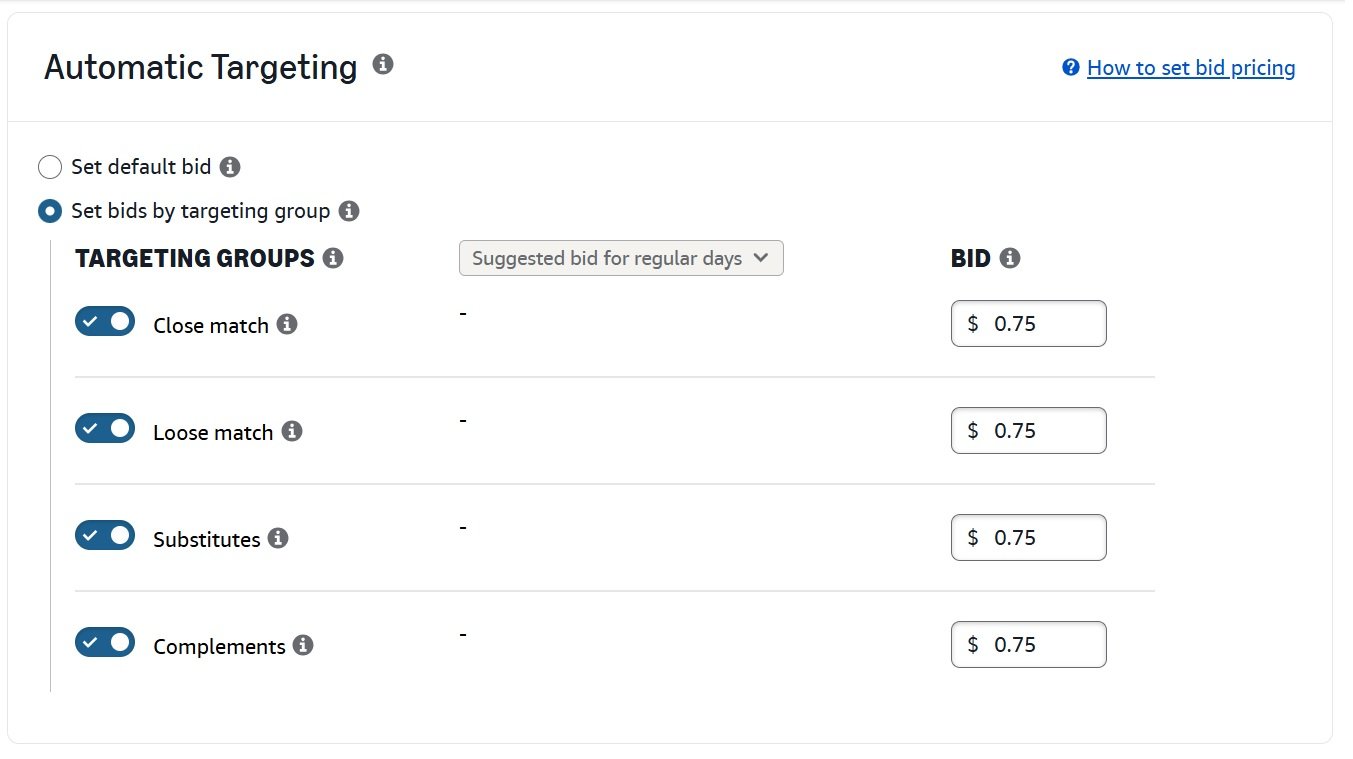
Amazon breaks automatic targeting into four internal match types. These determine why your ad shows and where it appears. You cannot choose these manually, but you can control bids for each one.
1. Close Match
Close Match targets search terms that are very closely related to your listing’s main keywords. These searches usually include small variations, modifiers, or attribute changes.
For example, If you sell “cotton 400-count sheets”, close match may trigger ads for:
- “cotton sheets”
- “400 count cotton sheets”
This match type typically delivers the highest relevance within automatic campaigns and often produces the strongest conversion rates.
2. Loose Match
Loose Match expands reach to broader or less precise search terms. These may include synonyms, reordered phrases, or category-level terms.
For example, If you are selling “cotton sheets” loose match may trigger ads for:
- “bed sheets”
- “queen size cotton sheets”
Loose match is useful for exploration but often brings mixed intent, requiring careful monitoring.
3. Substitutes
Substitutes target shoppers viewing similar or competing products. Ads appear on competitor detail pages or related search results.
For example, If you are selling “400-count cotton sheets” substitutes may show ads on:
- “300-count cotton sheets”
- competing brand listings
This match type is effective for competitive conquesting, but CPCs can be higher and conversion rates depend heavily on price and differentiation.
4. Complements
Complements place ads on product pages for items commonly purchased together with yours.
For example, If you are selling “cotton sheets” complements may show ads on:
- “comforters”
- “pillows”
Complement traffic is typically upper-funnel. It works best for accessories or products that naturally pair with others.
| Auto Match Type | What It Targets | Example |
|---|---|---|
| Close Match | Search terms closely aligned with your listing | “cotton sheets” → “cotton sheets 400 count” |
| Loose Match | Broader or loosely related search terms | “cotton sheets” → “bed sheets” |
| Substitutes | Shoppers viewing similar or competing products | “Cotton sheets” → competitor listings |
| Complements | Shoppers viewing related products often bought together | “cotton sheets” → “comforter”, “pillows” |
How Manual Campaign Targeting Works
Manual targeting campaigns require the advertiser to choose exactly which keywords or products (ASINs/categories) to target.
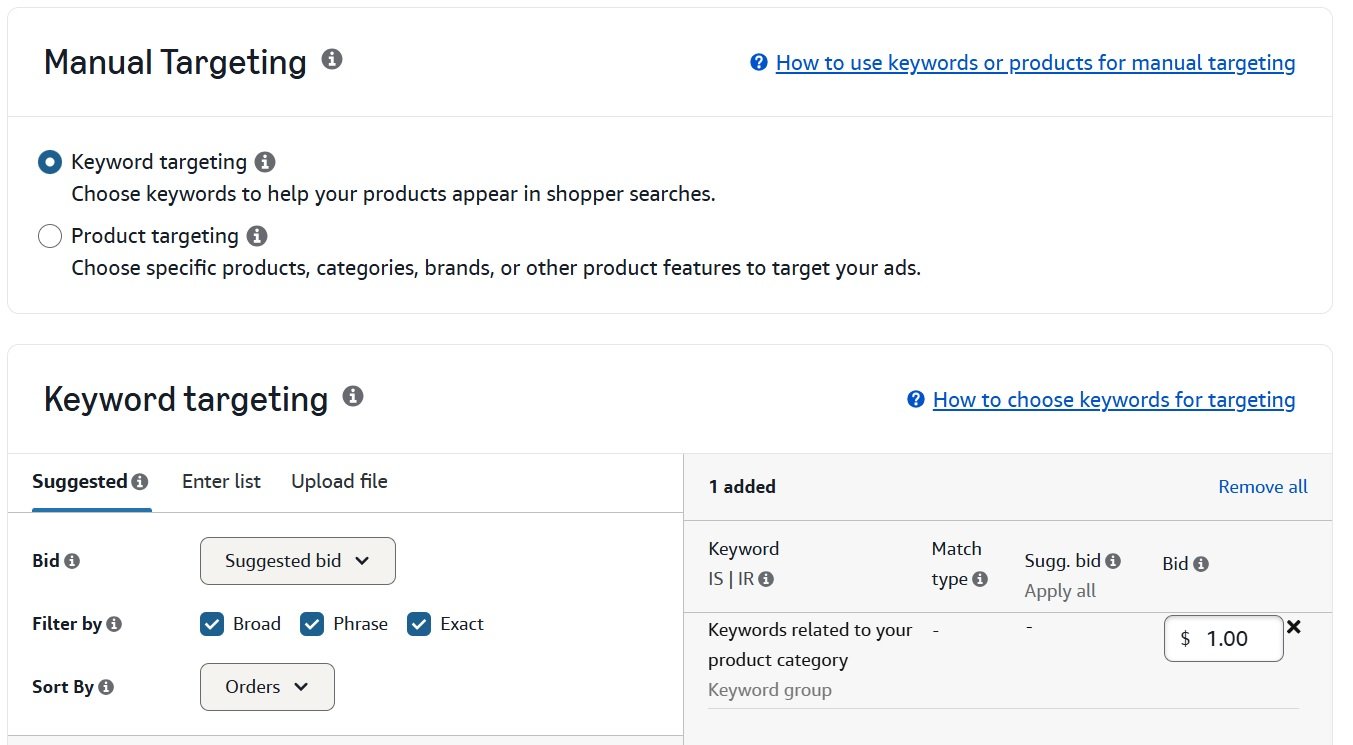
This involves more effort and analysis but gives much tighter control over ad spend. Manual campaigns are best for intermediate sellers who know their market: you can bid aggressively on high-converting keywords and prune out everything else.
Manual targeting gives you the flexibility to choose your own targets and manage performance at the target level. In manual campaigns, you have two main targeting types.
1. Keyword Targeting
You pick specific keywords to bid on (short-tail or long-tail). You also choose a match type for each keyword: Broad, Phrase, or Exact. The match type controls how closely a shopper’s query must match your keyword to trigger the ad.
2. Product (ASIN) Targeting
You target specific product detail pages or categories. You can select a whole category (e.g. Office Furniture > Office Chairs) or individual ASINs (for example, competitor products or complementary items). You can target specific products or entire categories that are similar or complementary to your products.
This means your ad could appear on any product pages within a chosen category, or solely on the detail pages of an exact ASIN you input.
Below is a breakdown of manual targeting options, with examples of how each works:
| Manual Targeting Type | How It Works | Example |
|---|---|---|
| Keyword Targeting – Broad Match | Ad may appear for any search containing all keyword terms in any order, including synonyms or related terms. Very wide reach, low cost per click. | Keyword “camera lens” (broad) → ad shows on “DSLR camera lens”, “lens for Canon camera”, or “digital camera accessories”. |
| Keyword Targeting – Phrase Match | Ad appears only if the search contains the exact keyword phrase in order. Moderate reach. | Keyword “women’s running shoes” (phrase) → ad shows on “women’s running shoes sale” or “best women’s running shoes for marathon”, but not on “running shoes women” or “women’s shoes running”. |
| Keyword Targeting – Exact Match | Ad appears only for the exact keyword terms (word-for-word), though pluralization is included. Most precise. | Keyword “golf wedges” (exact) → ad shows on “golf wedges” or “golf wedges sets”, but not on “best golf wedges” or “men’s golf wedges”. |
| Product Targeting – Category Target | Ad appears on product pages of an entire category or subcategory you select. Broad reach within that category. | Target the “Wireless Headphones” category → your ad shows on all wireless headphone product pages. |
| Product Targeting – ASIN Targeting | Ad appears on the specific product pages (ASINs) you choose. Highly focused (you pick exact competitors or complements). | Target a competitor’s ASIN (e.g. BestSellerX) → your ad shows only on that product’s detail page, trying to win that buyer. |
1. Keyword Targeting Details
Broad Match
Broad match can capture synonyms and plurals. It “offers your ad broad exposure” because Amazon may match related queries even if they don’t contain the exact words.
Broad match is useful for discovering new terms and maximizing visibility, but it can trigger off-target searches. Always pair broad-match keywords with vigilant negative keywords (for example, excluding “cheap” if you sell premium goods).
Phrase Match
Phrase match is more restrictive: the exact keyword phrase must be in the customer’s search, in the same order.
Other words can appear before or after. Phrase match is often seen as a middle ground and more controlled than broad, but still allowing for variation. It is useful for carving out more precise versions of a core keyword.
Exact Match
Exact match is the most restrictive. The shopper’s query must exactly match the keyword (word-for-word). Exact-match ads often have higher conversion rates because they align closely with shopper intent.
Typically, bids are highest on exact-match keywords and lowest on broad.
Test all three match types for a given keyword in separate ad groups. For example, you might run “wireless earbuds” on broad, phrase, and exact simultaneously with descending bids.
As a general guidance, set the highest bid on exact, a lower bid on phrase, and the lowest on broad, then let performance determine which to keep.
2. Product / Category Targeting Details
Product targeting in manual campaigns lets you reach shoppers on specific product pages rather than search results. There are two subtypes:
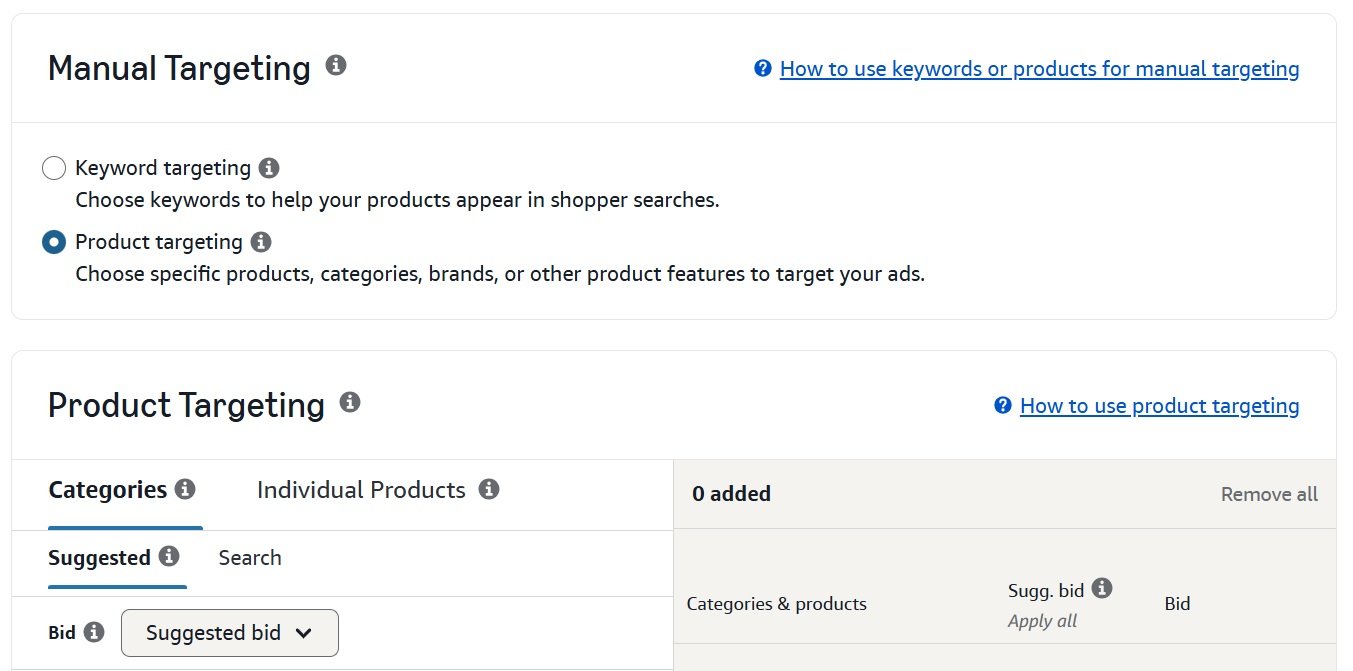
Category Targeting (Categories)
You choose one or more Amazon categories (and even subcategories). Your ad will show on products within those categories.
For example, targeting the “Men’s Shoes” category means your men’s running shoe ad could show on pages for men’s running shoes, boots, and related items.
This approach casts a relatively wide net and is useful for new products to build awareness. A common best practice is to start with narrower subcategories (such as “Trail Running Shoes”) before expanding to broader ones, and to keep different subcategories in separate campaigns due to performance variation.
ASIN Targeting (Individual Products)
You specify exact ASINs (product detail pages) to target. This is similar to placing a billboard on a competitor’s product page. Your ad will appear only on those listings.
ASIN targeting is commonly used to target competitors or complementary products. For example, if you sell men’s backpacks, you might target the ASIN of a top-selling hiking backpack to capture that shopper’s attention. Traffic from ASIN targeting is usually highly relevant, so bids should be competitive.
In short, manual product targeting gives you full control over where your ads appear on Amazon. It requires more research, identifying the right keywords, categories, and ASINs but well-chosen targets can be highly profitable and effective for scaling controlled traffic.
Strategies and Best Practices
Running automatic and manual Amazon PPC campaigns without a clear structure leads to wasted spend and inconsistent results. Each campaign type serves a different purpose, and real performance comes from using them together with intent.
The strategies below focus on how to balance discovery, control, and profitability in a practical, execution-driven way.
1. Use Automatic to Discover, Manual to Optimize
Start with automatic campaigns on new or poorly ranked products. Let Amazon find search terms and products. Then harvest the data: check the Search Term Report weekly and identify high-converting terms (keywords) or ASINs found by Auto. Move those winners into targeted Manual campaigns where you can bid more aggressively.
This feedback loop lets you scale what works. For example, if Auto shows “shoe insoles” is converting well, add that exact keyword to a manual campaign.
2. Keep Auto Running for Research
Even after migrating terms to manual, keep a smaller Auto campaign active. New trends and long-tail queries appear all the time. A low-budget Auto campaign acts as a continuous keyword-discovery engine.
Allocate about 20% of budget to Auto and 80% to Manual in mature accounts. This split maintains exploration while the bulk of spend focuses on known winners.
3. Regularly Add Negative Keywords
Whether in auto or manual, use negative keywords to cut wasted spend.
In Automatic campaigns, immediately add irrelevant terms found in the Search Term Report as negatives. For example, if you sell “luxury watch” and Auto returns “cheap watches,” add cheap as a negative.
Negative keywords act as filters, blocking non-converting traffic. Weekly review is ideal. A simple rule applies: Would you pay real money for this search term? If not, negate it.
4. Organize by Theme and Match Type
For manual campaigns, structure is critical. Use Single-Keyword Ad Groups (SKAGs) or, at minimum, separate ad groups for broad, phrase, and exact match types. This allows independent bid control for each match type.
Product targets should also be grouped by theme:
- One campaign for high-value competitor ASINs
- Another for broad category testing
A systematic structure makes optimization manageable. Manual targeting is intentional micromanagement and that’s an advantage when every click must be qualified.
5. Bid Smartly by Match Type
Broad match traffic is less targeted, so bids should be lower. Phrase match bids sit in the middle. Exact match bids are typically highest. See the typical example of how your bids can look like for different match types:
- Broad: $0.50
- Phrase: $0.75
- Exact: $1.00
This tiered approach balances reach and relevance. Over time, bids should be adjusted based on ACoS and conversion rate. Automated bidding options (such as Dynamic Bids up-and-down) can assist, but performance still needs monitoring.
6. Allocate Budget per Campaign Type
In early phases especially at product launch stage, more budget often goes to automatic campaigns to gather data. Once strong keywords are identified, budget shifts toward manual campaigns. A common post-launch structure:
- 80% Manual
- 20% Auto
Manual campaigns using proven keywords typically achieve 15–20% better ACoS than automatic campaigns. Auto should never be turned off entirely; it remains the discovery engine.
7. Monitor and Adjust Frequently
Amazon PPC is not static. Track ACoS, conversion rate, and CTR regularly. Lower bids or pause underperforming keywords or ASIN targets. If a manual keyword begins to degrade, test it in a broader match or negate it entirely.
Seasonality and competition can change performance patterns, so campaigns must be revisited continuously.
8. Use Keyword Types Strategically
Within manual campaigns, separate branded and generic terms.
- Branded keywords often convert well and are commonly used for defense.
- Generic category keywords drive awareness.
- Long-tail keywords tend to drive direct conversions.
Automatic campaigns often surface valuable generic and long-tail terms, which should then be refined and controlled via manual targeting.
Below is a common proven Amazon advertising workflow:
- Launch one automatic campaign with a healthy budget and all four match types enabled
- After 1–2 weeks, download the Search Term Report
- Identify 5–10 high-sales search terms or ASIN targets
- Create a manual campaign targeting those terms, with separate ad groups by match type
- Add negatives in Auto to exclude winning terms and irrelevant traffic
- Reduce Auto budget and repeat the cycle
By combining both modes, you maintain broad coverage without excessive waste. Automatic campaigns feed the funnel with new opportunities, while manual campaigns secure profitability on proven winners.
Choosing the Right Campaign Type
Deciding between an automatic or manual campaign isn’t about which one is better. It’s about matching the right tool to your current goal. A new product launch has different advertising needs than a mature, best-selling ASIN.
Are you in a research phase, trying to understand how customers search for your product? Or are you in a growth phase, ready to scale what you know works? Your answer will guide you to the right campaign type.
1. When to Use Automatic Campaigns
Automatic campaigns are your discovery engine. They are a good choice when you have more questions than answers.
Here are the best times to use an automatic campaign:
- New Product Launches: You might have a list of keywords you think will work, but you don’t know for sure. An auto campaign is the fastest way to validate them and uncover high-converting search terms you might have missed.
- Market Research: For established products, an auto campaign can help you stay current on search trends and identify new competitor ASINs in your niche.
- Expanding Your Keyword List: If your manual campaign’s growth has stalled, an auto campaign can introduce fresh, relevant keywords to feed into your more targeted efforts.
What Not to Do: Don’t let an automatic campaign run indefinitely without management. Its main job is data collection. Failing to regularly harvest winning keywords and add wasteful terms as negatives will lead to a high ACoS.
2. When to Use Manual Campaigns
Manual campaigns are your tools for profitability and scale. Use them when you have reliable data and want to use your budget with maximum efficiency.
Use a manual campaign in these situations:
- Scaling Proven Keywords: Once your auto campaign identifies keywords that consistently drive sales, move them to a manual campaign. Here, you can set specific bids on exact and phrase match types to capture high-intent traffic.
- Targeting Specific Competitors: If you have a direct competitor, an ASIN targeting manual campaign lets you place your ad on their product detail page, a powerful strategy to intercept sales.
- Lowering ACoS for Mature Products: For products with a long sales history, your goal is profitability. Manual campaigns give you the control to lower bids on less efficient keywords and focus on your most profitable ones, systematically reducing your ACoS.
Effective PPC is about the revenue each customer generates. While optimizing campaign types is a large part of this, you can also learn how to increase average order value.
The key is to see both campaign types as parts of a larger system. Automatic campaigns provide intelligence to your manual campaigns, which then turn that intelligence into profitable growth. To get this right, check out our article on ACoS vs ROAS to align your campaigns with the right financial metrics.
A Hybrid PPC Strategy
The most effective Amazon PPC strategies don’t choose between automatic or manual targeting. They make them work together.
A hybrid strategy drives consistent growth. It uses the broad reach of automatic campaigns to find what works and the precision of manual campaigns to scale those winners. You let auto campaigns find the opportunities, then use manual campaigns to capitalize on them.
This creates a self-improving feedback loop. You’re constantly discovering new customer search habits while focusing on the search terms you already know are profitable.
1. Keyword Harvesting
At the center of a hybrid strategy is a process called “keyword harvesting.” The goal is to systematically move high-performing search terms from a low-control environment (your auto campaign) to a high-control one (your manual campaigns).
Here’s how it works:
- Launch a Discovery Campaign: Start with a well-structured automatic campaign for your product. Give it a sufficient daily budget to gather data quickly.
- Analyze the Search Term Report: Let the campaign run for at least two weeks to collect enough data. Then, review your Search Term Report. This shows the exact phrases customers are using that lead to clicks and sales.
- Identify Winners and Losers: While reviewing the report, look for two things:
- Winners: Search terms that have generated two or more sales at a profitable ACoS.
- Losers: Irrelevant terms that get clicks but have zero sales.
- Harvest the Winners: Add your list of winning search terms as keywords into a separate manual campaign. For the best control, create dedicated ad groups for each match type, such as “Exact Match” and “Phrase Match.”
- Add Negative Keywords: This step is very important.
- Add the irrelevant, budget-wasting search terms as negative keywords in your auto campaign. This tells Amazon to stop showing your ad for those searches.
- Also, add your harvested winning keywords as negative exact match keywords in the auto campaign. This prevents your auto and manual campaigns from bidding against each other for the same search term, ensuring your manual campaign gets the impression.
This process builds a self-optimizing system. Your auto campaign continues to find new opportunities, and your manual campaigns become more profitable as you feed them proven keywords. For a deeper dive, these essential Amazon advertising tips can help refine this approach.
2. Campaign Structure
One effective way to set this up is using the “waterfall” method, where data and keywords flow into more refined campaigns.
- Automatic “Research” Campaign: This is at the top. Its purpose is to discover new, relevant search terms and ASINs.
- Manual “Broad Match” Campaign: Some sellers use a broad match campaign as a second research layer to test variations of promising keywords.
- Manual “Phrase Match” Campaign: Here, you can test keywords that have shown potential but aren’t top performers yet.
- Manual “Exact Match” Campaign: This is your profit engine. It only contains your best, high-conversion keywords, allowing you to bid aggressively.
By running auto and manual campaigns at the same time, you get the benefits of both. A 2024 study of 500 FBA accounts found that sellers using a hybrid strategy reached their target ACoS 62% faster than those who used only one campaign type.
The goal is to “graduate” keywords down the waterfall. A search term might appear in your auto campaign, move to a phrase match manual campaign for testing, and finally land in your exact match campaign once it’s a consistent winner. This structured approach to automatic vs manual campaign targeting in Amazon PPC gives you clarity and control over your ad account.
Common Questions
1. How long should an auto campaign run before harvesting?
A good rule of thumb is to let your automatic campaigns run for at least two to four weeks. This gives Amazon’s algorithm enough time to gather sufficient shopper data to show you what’s working. If you act too soon, you might pull keywords that haven’t had a chance to perform.
2. Can I use both campaign types for the same product?
Yes, you should. A hybrid approach is a smart PPC strategy. Running both an automatic and a manual campaign for the same ASIN creates a powerful feedback loop. The auto campaign finds new customer search terms, and you move the winners to your manual campaigns to scale them with optimized bids. Remember to add those high-performing keywords as negative keywords in the auto campaign to avoid bidding against yourself.
3. Which campaign type is better for a limited budget?
If you have a tight budget, starting with an automatic campaign is usually the best choice. It’s the most cost-effective way to gather performance data and identify converting keywords without guessing and potentially wasting money on unproven terms in a manual campaign. Once your search term report shows a few profitable keywords, you can launch a small, focused manual campaign using only those proven keywords with an exact match type.
4. Should I adjust bids in my automatic campaign?
Yes. While you can’t bid on individual keywords in an auto campaign, you can control the bids for each of the four automatic targeting groups: Close Match, Loose Match, Complements, and Substitutes. Regularly check the performance of these groups. If ‘Substitutes’ is spending your budget with zero sales, you can lower its bid or pause it. If ‘Close Match’ is performing well with a good ACoS, you might increase the bid to capture more traffic. To manage both campaign types, many sellers use powerful tools for Amazon PPC management.