Product identification on Amazon can be confusing, especially when terms like GTIN, UPC, EAN, FNSKU, and SKU all seem to mean the same thing but clearly don’t. Each identifier has a specific role in how Amazon catalogs products, tracks inventory, and validates listings. Some are universal standards recognized across every retail channel in the world.
Others exist only inside Amazon’s system and mean nothing outside of it. Knowing which is which, and when Amazon requires each one, is what keeps your listings live and your inventory moving without interruption.
Here’s the quick version before going deep:
- GTIN is the global standard that covers all product identifier formats
- UPC is one specific type of GTIN used in North America
- EAN is another type of GTIN used globally, especially in Europe
- SKU is your own internal reference number that you create yourself
- FNSKU is Amazon’s internal barcode that ties inventory to your seller account
Every UPC is a GTIN. Not every GTIN is a UPC. That one sentence clears up about 80% of the confusion sellers have with these identifiers.
What Is a GTIN?
GTIN stands for Global Trade Item Number. It’s the master standard managed by GS1, the international organization that governs how products get identified across global supply chains. Think of GS1 as the organization that decided the world needed one consistent way to say “this is product X made by company Y,” and then built the infrastructure to make that happen.
A GTIN is not a barcode. A barcode is the visual, scannable representation of a GTIN. The number itself is the GTIN. The black-and-white lines are just how scanners read it.
GTINs come in four lengths, and each serves a specific purpose:
| GTIN Format | Digits | Common Name | Where You See It |
|---|---|---|---|
| GTIN-8 | 8 | EAN-8 | Small retail packages |
| GTIN-12 | 12 | UPC-A | North American retail |
| GTIN-13 | 13 | EAN-13 | European and global retail |
| GTIN-14 | 14 | ITF-14 | Shipping cases, pallets |
What Is a UPC?
UPC stands for Universal Product Code. The standard retail version is UPC-A, which is always exactly 12 digits. It’s what you see on virtually every product sold in American retail stores, and it became the North American standard starting in the mid-1970s.
A UPC-A breaks down into three parts:
- Company Prefix: Assigned by GS1 to identify the brand or manufacturer. Length varies between 6 and 10 digits depending on how many unique products a company needs to identify.
- Item Reference: Assigned by the brand to identify a specific product. Combined with the company prefix, it must total 11 digits.
- Check Digit: The final digit, calculated mathematically from the first 11 digits to confirm the code wasn’t entered with an error.
The company prefix is the critical piece. It’s what connects a UPC to a specific registered legal entity in GS1’s database. When Amazon validates a barcode against GS1’s system, it’s looking to confirm that the prefix belongs to the brand listed on the product packaging. If those two things don’t match, the listing gets flagged.
This is exactly why buying cheap barcodes from third-party resellers creates problems. The numbers may be real GTINs issued to some company somewhere, but that company isn’t you, and GS1’s database reflects that.
GTIN vs UPC: What’s Actually Different
Here’s where most articles overcomplicate this. The relationship between GTIN and UPC is straightforward:
UPC is GTIN-12. They are the same number in the same format.

The difference is scope. GTIN is the umbrella term covering all product identifier formats across all countries. UPC is the North American implementation of GTIN-12.
When you submit a UPC to Amazon, you are submitting a GTIN. When Amazon asks for a GTIN, a UPC satisfies that requirement. There is no scenario where Amazon wants a GTIN but won’t accept a valid UPC, or vice versa, assuming the UPC is legitimate.
The practical difference shows up in three situations:
- International products: A product manufactured in Germany may have an EAN-13 (GTIN-13) instead of a UPC. That’s fine for Amazon US listings. You don’t need to purchase a separate UPC.
- Small packages: Products with limited label space sometimes use GTIN-8 (EAN-8). Amazon accepts this format as well.
- Wholesale/distribution: GTIN-14 appears on shipping cases but never on individual retail items. Amazon does not use GTIN-14 for product listings.
EAN vs UPC
EAN (European Article Number, now officially called International Article Number) is the 13-digit product identifier that functions as the global counterpart to the UPC. The standard format is EAN-13, and it’s the dominant retail barcode outside North America.
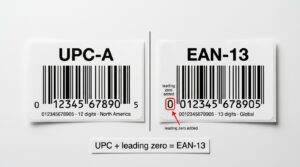
The conversion between UPC and EAN is simple: add a leading zero to any UPC-A to get an EAN-13. A product with UPC 012345678905 becomes EAN-13: 0012345678905. The underlying company prefix and item reference are unchanged. This is intentional design from GS1, which manages both standards and built them to be compatible.
What this means for Amazon sellers:
If you’re sourcing a product from a European supplier and it comes with an EAN-13 on the packaging, that number is your valid product identifier for Amazon. You don’t need a UPC. Amazon’s catalog system recognizes and accepts EAN-13 across all its marketplaces.
If you’re a private label seller launching a product for the US market, you’ll typically purchase a GTIN-12 (UPC) from GS1 because it’s the standard North American retail format. But if you plan to sell in Europe, either get a GTIN-13 or confirm that your GTIN-12 can be converted (which it can, since adding a leading zero creates a valid EAN-13).
EAN vs UPC side by side:
| Feature | UPC (GTIN-12) | EAN (GTIN-13) |
|---|---|---|
| Digits | 12 | 13 |
| Primary market | North America | Europe and global |
| Convertible? | Yes (add leading zero for EAN) | Yes (remove leading zero for UPC, if applicable) |
| Amazon accepted | Yes | Yes |
| GS1 issued | Yes | Yes |
| Modern scanner compatible | Yes | Yes |
| Required for EU marketplace | Not preferred | Standard format |
SKU vs UPC
SKU (Stock Keeping Unit) gets lumped in with UPCs and GTINs in conversations about product identifiers, but it operates in a completely separate system with a completely different purpose.
A UPC is universal. It exists outside of any specific company’s system, was assigned by GS1, and means the same thing whether the product is on Amazon, in a Target store, on your own website, or in a supplier’s warehouse.

A SKU is internal. You create it yourself, it means whatever you decide it means, and nobody outside your operation cares what it is. Amazon lets you assign any alphanumeric string as your SKU when creating a listing. There’s no standardization, no external authority, no verification process.
A seller carrying a coffee mug in three colors and two sizes might use:
- MUG-BLK-SM (Black, Small)
- MUG-BLK-LG (Black, Large)
- MUG-WHT-SM (White, Small)
- MUG-WHT-LG (White, Large)
- MUG-RED-SM (Red, Small)
- MUG-RED-LG (Red, Large)
These SKUs mean nothing to Amazon, nothing to customers, and nothing to any other retailer. They exist purely for that seller’s inventory management.
SKU vs UPC comparison:
| Feature | SKU | UPC |
|---|---|---|
| Created by | You | GS1 (via company prefix) |
| Standardized | No | Yes |
| Universal | No | Yes |
| Visible to customers | No | Yes (retail barcode) |
| Amazon requires it | No (auto-assigned if blank) | Yes (most categories) |
| Changes between sellers | Yes | No |
| Used across marketplaces | Only internally | Yes |
| Governs inventory identity | Internally only | Universally |
The SKU mistake that costs sellers hours later:
If you leave the SKU field blank when creating a listing, Amazon generates a random alphanumeric string for you. That works in the moment, but when you’re running inventory reports three months later, reconciling orders, or syncing data with external warehouse software, those auto-generated SKUs create confusion. Build a SKU naming system before you create your first listing and use it consistently from day one.
FNSKU vs UPC
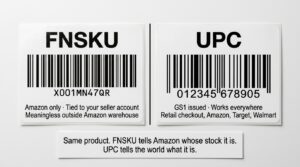
FNSKU is where Amazon’s system departs entirely from global standards and goes fully proprietary. FNSKU stands for Fulfillment Network Stock Keeping Unit, and it’s the barcode Amazon uses internally to track FBA inventory.
Here’s the problem FNSKU solves: two different sellers might send the exact same product to the same Amazon fulfillment center. Same ASIN, same UPC, same physical item. Without a way to distinguish whose inventory is whose, Amazon can’t fulfill orders from the correct seller’s stock.
FNSKU is that distinction. It’s a unique code tied to a specific ASIN within a specific seller account. Even if 20 sellers carry the same product with the same UPC, each one has a different FNSKU that Amazon’s warehouse scanners use to track their specific units.
What an FNSKU looks like:
FNSKUs follow the format X00XXXXXXX, starting with X followed by nine alphanumeric characters. For example: X001MN47QR. This format is Amazon-only and has no meaning outside of Amazon’s fulfillment network.
FNSKU vs UPC comparison:
| Feature | FNSKU | UPC |
|---|---|---|
| Created by | Amazon | GS1 |
| Unique to | Seller account + ASIN | The product itself |
| Required for FBA | Yes | Required for listing creation |
| Scannable at retail checkout | No | Yes |
| Scannable by Amazon warehouse | Yes | Not primarily |
| Means anything outside Amazon | No | Yes |
| Consumer-facing | No | Yes |
How Amazon Actually Validates Your Barcode
Amazon’s GTIN validation process is more sophisticated than most sellers realize, and understanding it prevents the most common listing errors.
When you submit a GTIN during listing creation, Amazon runs it against GS1’s Global Registry. The check isn’t just “is this a valid number format?” It’s “does the brand name on this listing match the brand registered to this GS1 prefix?”
If you’re a private label seller named “Summit Outdoor Gear” and you purchase a UPC from a reseller, that barcode’s company prefix is registered to whoever originally purchased it from GS1, not to you. Amazon’s validation check sees a mismatch between your brand name and the registered prefix owner. That’s when listings get flagged or suppressed.
The listing creation flow from start to finish:
- You enter a UPC during new listing creation
- Amazon validates the GTIN against GS1’s database
- Amazon checks whether an existing ASIN already uses this GTIN
- If a matching ASIN exists, your offer is linked to that existing product page
- If no ASIN exists, Amazon creates a new one for your product
- You assign your SKU (or Amazon auto-generates one)
- For FBA, Amazon generates your FNSKU once the listing is active
All identifiers together:
| Identifier | Full Name | Created By | Scope | Amazon Role |
|---|---|---|---|---|
| GTIN | Global Trade Item Number | GS1 | Universal | Required for listing (most categories) |
| UPC | Universal Product Code | GS1 | North America | Most common GTIN format used |
| EAN | European Article Number | GS1 | Global | Accepted alternative to UPC |
| SKU | Stock Keeping Unit | Seller | Internal | Optional (auto-assigned if blank) |
| FNSKU | Fulfillment Network SKU | Amazon | Amazon FBA | Required for FBA shipments |
| ASIN | Amazon Standard ID Number | Amazon | Amazon catalog | Auto-created, not purchased |
| ISBN | International Standard Book Number | GS1 | Books globally | Required for book categories |
What GTINs Actually Cost
One of the most common questions from new sellers is whether they need to pay GS1 annually or just once.
GS1 offers two purchasing models:
Single GTIN purchase: A one-time fee of approximately $30 for a single, permanent barcode. There are no annual renewal fees for single GTINs. This works for sellers with one product or a small number of products.
Company Prefix subscription: An annual license that gives you a block of GTINs under your own registered company prefix. The cost scales with how many unique GTINs you need:
| Prefix Size | GTINs Available | Annual Fee (Approximate) |
|---|---|---|
| Smallest prefix | Up to 10 | $250/year |
| Mid-size prefix | Up to 100 | $750/year |
| Large prefix | Up to 1,000 | $2,500/year |
| Enterprise prefix | Up to 10,000 | $10,000/year |
For most private label sellers starting out: A single GTIN purchase for each product is the most cost-effective approach. If your catalog grows to 10 or more products, a company prefix starts making financial sense because the per-barcode cost drops significantly.
For sellers concerned about brand registry: Having a company prefix with your brand name registered in GS1’s database strengthens your Brand Registry application because Amazon can verify the connection between your brand and your GTINs directly through GS1’s system.
Setting Up Identifiers Correctly: Step by Step
Here’s the practical setup process based on the most common seller situations.
For Resellers (Selling Existing Branded Products)
Find the UPC or EAN on the manufacturer’s packaging. Use that number when creating your offer. You’re linking your offer to an existing ASIN, so the GTIN is already validated by whoever created the original listing. Do not purchase new barcodes for products that already have them. This creates duplicate ASINs and catalog errors.
For Private Label Sellers (Launching Your Own Brand)
Go to gs1.org and purchase either a single GTIN or a company prefix depending on your catalog size. Register your brand name during the purchase process. That registered name must match what you put in your Amazon listings and what appears on your product packaging. Wait for GS1 confirmation before creating listings. Once the GTIN is registered, create your listing in Seller Central with your GS1-issued number. Assign your own SKU using a consistent naming convention.
Frequently Asked Questions
Is a GTIN the same as a UPC?
No, but a UPC is a type of GTIN. GTIN is the umbrella standard that includes UPC (GTIN-12), EAN (GTIN-13), and other formats. Every UPC is a GTIN, but not every GTIN is a UPC.
Can I use an EAN instead of a UPC on Amazon US?
Yes. Amazon accepts EAN-13 on the US marketplace. If your product has a legitimate GS1-issued EAN, you do not need to purchase a separate UPC to list on Amazon US.
What happens if Amazon rejects my GTIN?
Amazon will either block listing creation or suppress an existing listing. This typically happens when the GTIN wasn’t issued by GS1, was purchased from a reseller without proper transfer, or the brand name in your listing doesn’t match the registered prefix owner in GS1’s database.
Do I need both a UPC and an FNSKU for FBA?
Yes. The UPC (or EAN/GTIN) is used to create your listing and establish the product in Amazon’s catalog. The FNSKU is generated by Amazon after your listing is created and is used to track your specific inventory inside their fulfillment centers. They serve different functions.
Can two different sellers use the same UPC?
Yes, if they’re selling the same product. Multiple sellers can list offers against the same ASIN using the same underlying UPC. What separates their inventory in an Amazon warehouse is the FNSKU, which Amazon generates separately for each seller’s account.
Do customers ever see my SKU?
No. Your SKU is internal to your Seller Central account. It appears on inventory reports, FBA shipment documentation, and internal order management, but never on the product listing or detail page that customers see.
Where do I find my FNSKU in Seller Central?
Go to Inventory, then Manage FBA Inventory. The FNSKU appears in the product detail column. You can also access Print Item Labels from this screen to generate printable FNSKU barcode sheets.
Is GTIN-14 relevant for Amazon sellers?
Not for individual product listings. GTIN-14 is used for shipping cases and pallets in wholesale and distribution. Amazon does not accept GTIN-14 as a product identifier for retail listings. You may encounter it on supplier invoices or warehouse documentation, but it won’t appear in your Seller Central listing workflow.
What is an ASIN and how does it relate to a GTIN?
An ASIN (Amazon Standard Identification Number) is Amazon’s internal product catalog number, created automatically when a new listing is established. A GTIN is the universal identifier you provide to create that listing. The GTIN proves what the product is. The ASIN is Amazon’s internal reference for managing it within their system.
How many GTINs do I need if I have product variations?
Each variation requires its own unique GTIN. A t-shirt in three colors and two sizes needs six separate GTINs, one for each size-color combination. Using one GTIN across multiple variations is a policy violation and causes catalog errors.