Amazon SEO Services & Listing Optimization | Ecom Brainly

Amazon SEO Services for Better Search Coverage & Organic Rank

We optimize the full Amazon listing, that includes keyword mapping, listing copy, browse node, backend, images, A+ Content, indexing and the parts of the detail page that affect CTR and conversion.

Competitor keyword research, Brand Analytics, Search Query Performance and PPC search terms tell us which keywords belong in the listing, where they should go and what needs testing next.

✓Amazon keyword research ✓Listing optimization ✓Search Query Performance ✓Attributes & indexing
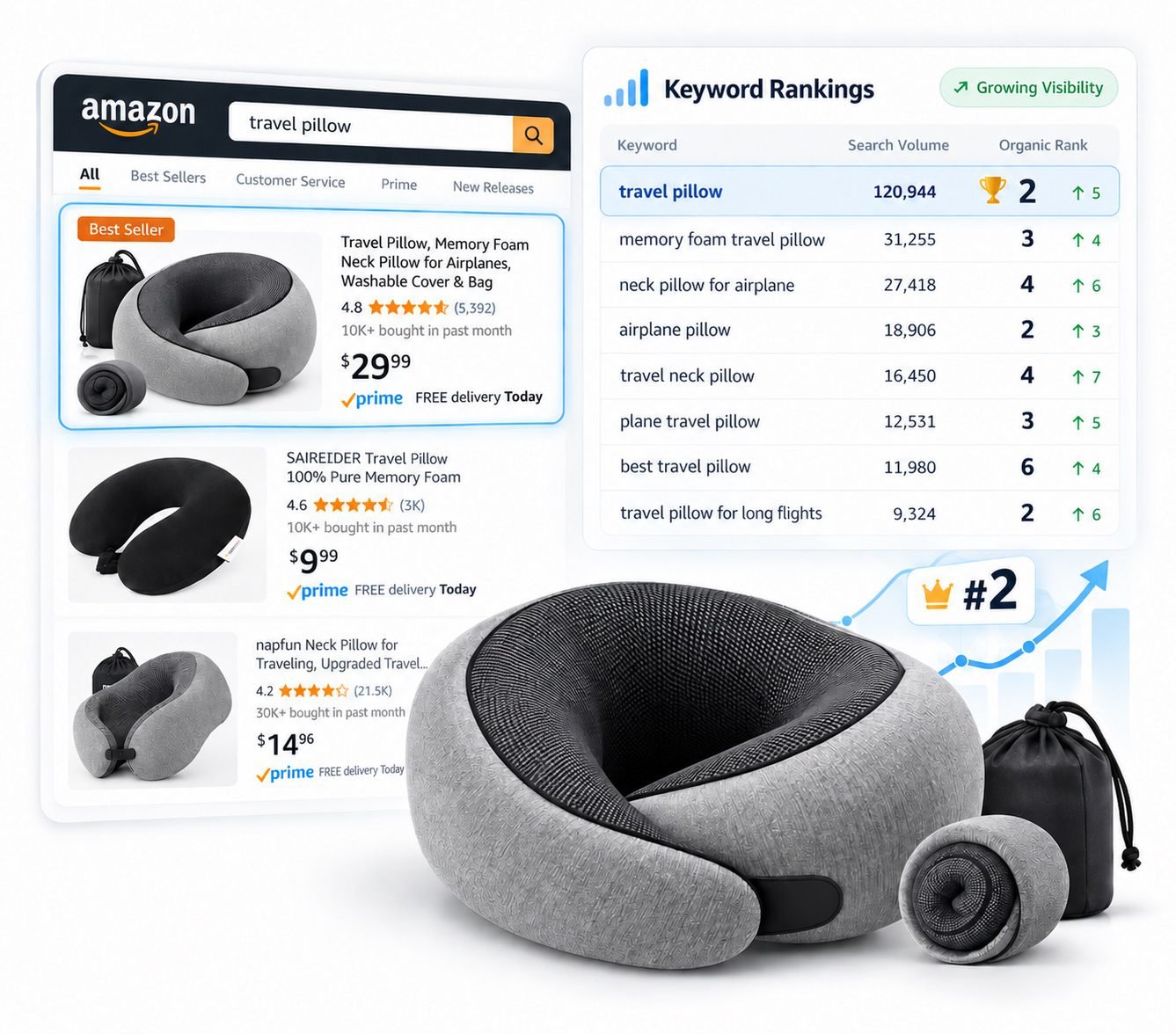
Amazon keyword ranking dashboard showing organic positions for target keywords
Keyword research
Competitor gaps, Brand Analytics and PPC search-term data
Listing & backend SEO
Visible copy, backend terms, product data and A+ text
Search & browse
Product type, attributes, category placement and indexing checks
Performance & testing
SQP, CTR, CVR and Manage Your Experiments where available

Trusted by Amazon brands and sellers across major categories

TRI-FIT Warmies MIULEE VIBOFROST Fimibuke Sweetcrispy VEVOR SURPUTS Petsology MySmile

What Amazon SEO Has to Do

For an ASIN to perform in search, Amazon has to match it to the right query, place it in the right category paths, earn the click and convert the visit.

Match the right searches

Amazon needs accurate keywords and product data to match the ASIN with relevant customer searches.

Appear in the right browse paths

Product type, browse placement and attributes affect which category paths and filters can show the ASIN.

Earn the click

Item Name, Item Highlights, main image, price, rating and offer all affect search-result CTR.

Convert the traffic

Bullets, images, A+ Content, reviews and the offer need to answer the buyer's main questions before purchase.

What We Optimize on the Listing

Amazon SEO is spread across visible copy, backend fields, catalog data, images and A+ Content. We map each keyword and product fact to the place where it can do the most useful work.

Listing elementWhat we optimizeWhat we check
Search relevance
Item Name & Item Highlights

Use the product type, main use case, strongest differentiator and the search language that best describes the item without forcing several keyword variations into the same line.

Current category rules, keyword coverage, readability and search-result presentation
Bullet Points

Answer the questions shoppers care about most: benefits, size, materials, fit, compatibility, use, care and limitations. Secondary keywords are added only where they read naturally.

Buyer questions, secondary keyword coverage, claims and conversion clarity
Product Description

Add useful product context that does not fit cleanly in the bullets, including use cases, compatibility, materials, care instructions and important limitations.

Useful context, semantic coverage and information missing from the visible listing
Generic Keywords

Use relevant terms that are not already covered well in the visible listing, such as synonyms, abbreviations and alternate search phrases. We also remove duplicated words when better indexing opportunities become available.

Unused terms, duplicate coverage, policy risks and the current marketplace byte limit
Catalog, browse & indexing
Product Attributes

Complete category-specific values such as material, dimensions, compatibility, size, style, audience, special features and intended use.

Filter coverage, missing attributes, conflicting values and product facts Amazon can use
Product Type & Browse Placement

Check product type, browse placement, category structure and Item Type Keyword where it is still relevant to the category.

Correct category paths, refinements, browse visibility and catalog conflicts
Indexing Checks

Verify that priority keywords and approved product data are being recognized after listing updates, and investigate terms that still fail to index.

Indexed vs. not indexed terms, live content, contribution conflicts and suppressed values
Images, A+ Content & conversion
Main Image & Image Set

Review the main image for search-result CTR and use secondary images to explain size, features, use cases, comparisons, instructions and product differences.

CTR, image order, unanswered buyer questions and conversion gaps
Image Files & Off-Amazon Use

We keep image files clearly named and organized before upload. When the same assets are published on your website or other search-indexed pages, descriptive filenames and proper web alt text are used there as part of off-Amazon SEO.

Amazon gallery images do not expose the same seller-entered alt-text field used in A+ Content
A+ Content & Brand Story

Use module text for product facts, use cases, compatibility, comparison points and common buyer questions. Important information stays in readable text fields instead of being trapped only inside graphics.

Module copy, product context, internal product links, mobile presentation and conversion
A+ Image Keywords / Alt Text

For A+ images where Seller Central provides the field, we write descriptive image keywords, also called alt text. In the U.S. editor this field is commonly up to 100 characters, so we use relevant product language that accurately describes the image and can cover useful terms not already emphasized elsewhere.

Amazon requires descriptive A+ alt text and states that it can help products in search results

We Track SEO and Conversion Changes With a 16-Point Checklist

We use the same checklist for every listing review so keyword coverage, indexing, catalog data, images, A+ Content and conversion work are tracked in one place.
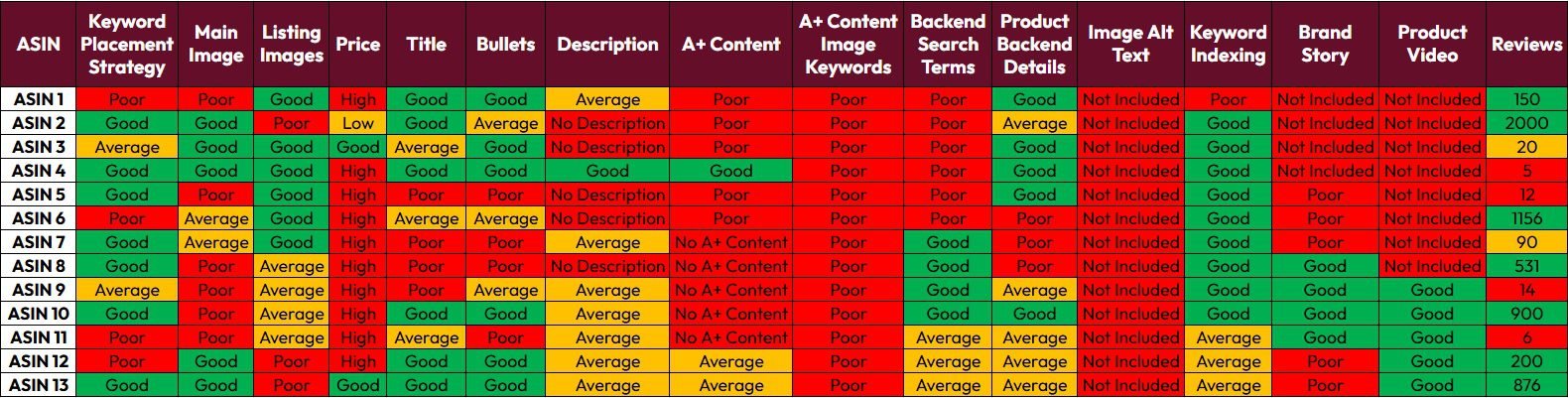
Amazon SEO and conversion optimization 16-point checklist

Keyword Research Starts With Evidence

Search volume matters, but relevance and conversion matter too. We check competitor rankings, PPC conversions and SQP data to see which queries already work and where the ASIN is missing clicks or purchases.

Keyword Research
Competitor keyword data

Helium 10 Cerebro, Magnet and DataDive help us find terms competitors rank for and gaps your listing has not covered.

Search Term Management
Brand Analytics

Search Query Performance shows query volume, impressions, clicks, cart adds and purchases for the brand and ASIN.

Sponsored Products
PPC search terms

Search Term Reports show the customer queries that produced clicks and orders, which helps us separate search volume from actual conversion.

What we do with each keyword

1
Use nowTerms that closely match the product and already show demand or conversion are placed in the most relevant listing field.
2
Test firstHigh-volume terms with uncertain relevance or conversion stay in PPC until the data is strong enough to justify adding them to the listing.
3
Keep outTerms that do not accurately describe the product stay out of the listing, even when competitors use them.
4
TrackAfter edits, we track indexing, organic rank, SQP share, CTR and conversion to see what changed.

Our 3-Stage Amazon SEO Process

Stage 1 builds or fixes the listing. Stage 2 uses SQP and PPC data to validate the keyword plan. Stage 3 updates the listing from new search, rank and conversion data.

Stage 1

Research & Listing Foundation

Build or rebuild the listing using product facts, customer search terms and competitor data.

  • Audit indexing, content, attributes, category placement, CTR and CVR
  • Build a master keyword list from Helium 10, DataDive, competitors and Brand Analytics
  • Separate core, secondary, long-tail, use-case and compatibility terms
  • Map keywords into Item Name, Item Highlights, bullets, description and Generic Keywords
  • Complete product type, browse placement and category-specific attributes
  • Review the main image and secondary images for CTR and conversion
  • Build or improve A+ Content, Brand Story text and descriptive A+ image keywords / alt text
  • Publish changes and verify that the correct content is live and indexed
Stage 2

SEO + PPC Validation

Use customer search terms and conversion data to decide which keywords need more focus.

  • Mine Auto, Broad and Phrase Search Term Reports for converting queries
  • Compare SQP impressions, clicks, cart adds and purchases by query
  • Move proven search terms into tighter Phrase or Exact campaigns when needed
  • Add converting, relevant terms when they are missing from the listing
  • Keep high-volume but irrelevant search terms out of the listing
  • Test titles, bullets or images with Manage Your Experiments or PickFu where useful
  • Check CTR, CVR, price, reviews and the offer before blaming indexing
  • Track keywords already close to page one and move them into ranking work when appropriate
Stage 3

Expansion & Ongoing SEO

Use SQP, organic rank and experiment data to update the listing when the data supports a change.

  • Recheck indexing and organic positions after approved content changes
  • Expand into long-tail, use-case and compatibility terms that prove relevant
  • Use SQP purchase share and PPC conversion to prioritize the next keywords
  • Remove duplicated backend terms when visible fields or attributes change
  • Refresh attributes, product facts and compatibility as the catalog evolves
  • Improve A+ text, product context and image keywords / alt text when new use cases are identified
  • Run controlled experiments and keep the version that performs better
  • Fix catalog contribution conflicts when approved edits do not appear live
  • Share the next SEO actions and keyword opportunities from the latest data
After each round, we keep the fields that are working, fix the ones that are not, and use new query data to choose the next changes.

Search Query Performance Shows Where SEO Is Failing

Search Query Performance shows impressions, clicks, cart adds and purchases for individual customer queries. That tells us where the drop happens.
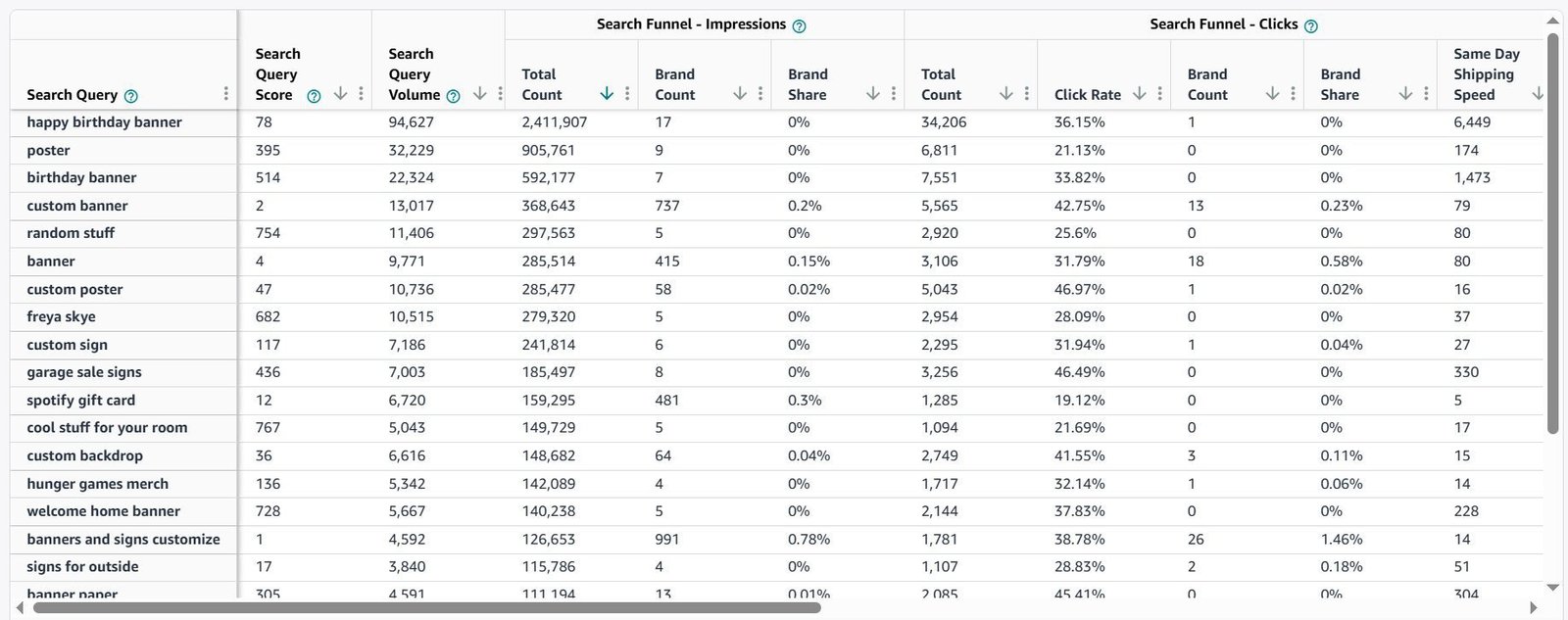
High impressions, low clicksThe product is being shown but not clicked enough. We check the Item Name, Item Highlights, main image, price, rating and query relevance.
Clicks, few cart addsThe query may be too broad, or the detail page may not explain the product well enough for that shopper.
Cart adds, weak purchasesWe check price, delivery, variation selection, reviews and the offer for issues that can stop the purchase.
Strong purchase shareKeep these queries in the SEO and PPC plan and watch them closely for rank or purchase-share drops.
Amazon Search Query Performance data showing impressions, clicks, cart adds and purchases

When SEO Problems Start in the Catalog

If the product type, attributes or catalog contributions are wrong, listing copy alone will not fix the search problem.

Account Setup

Wrong product type or browse node

The ASIN can miss relevant category paths and refinements even when the visible copy looks correct.

Listing Audit

Missing product attributes

Color, material, compatibility, dimensions and category-specific attributes can affect filters, comparisons and product understanding.

Campaign Structure

Updates are not showing live

Contribution conflicts, catalog data or suppressed values can stop title, bullet or attribute changes from appearing on the detail page.

Product Targeting

Poor variation structure

Poor parent-child setup can split reviews, confuse selection or make the catalog harder to manage across related products.

When the problem is catalog structure rather than copy, we fix that first or move the work into our Amazon Catalog Management workflow.

Use PPC Search Terms to Improve SEO

PPC Search Term Reports show the exact customer queries that produced clicks and orders. We use that data to decide which relevant terms belong in the listing and which should stay in advertising or ranking campaigns.

Find converting search terms

We review Auto, Broad and Phrase search terms to see which customer queries produce orders and which ones waste spend.

Map the useful terms

Relevant search terms that convert can be added to Item Name, Item Highlights, bullets or Generic Keywords. Others may stay in PPC or ranking campaigns.

Watch organic performance

After a listing change, we track organic rank, SQP share, CTR, CVR and TACoS to see whether performance improved.

See Amazon PPC Services

Test Listing Changes With Customer Traffic

For eligible Brand Registry ASINs, Manage Your Experiments can compare supported listing content using live customer traffic.

Listing Audit

Titles & bullets

Test product-name wording, benefit order or bullet copy and keep the version with better performance.

Creative Optimization

Main image & secondary images

Test main-image options when search CTR is weak, and secondary-image changes when detail-page conversion needs work.

Case Studies

A+ Content & Brand Story

Test A+ Content or Brand Story versions when the ASIN has enough traffic to produce a useful result.

See Amazon Creative Services

How We Manage SEO After the First Optimization

We review SQP, PPC search terms, organic rank, indexing and catalog changes, then update only the fields that need work.

Query reviewReview SQP, Search Catalog Performance, organic rank and PPC search terms for changes in clicks, purchases, share or rank.
Listing editsUpdate the listing when keyword coverage, attributes, compliance or conversion data shows a specific problem.
Indexing & catalog checksVerify that important terms and product data are being recognized and that the live detail page matches Seller Central.
TestingRun Manage Your Experiments or controlled creative tests when the ASIN has enough traffic for a useful result.

Results From Managed Amazon Accounts

These accounts combined SEO with PPC, catalog and conversion work.
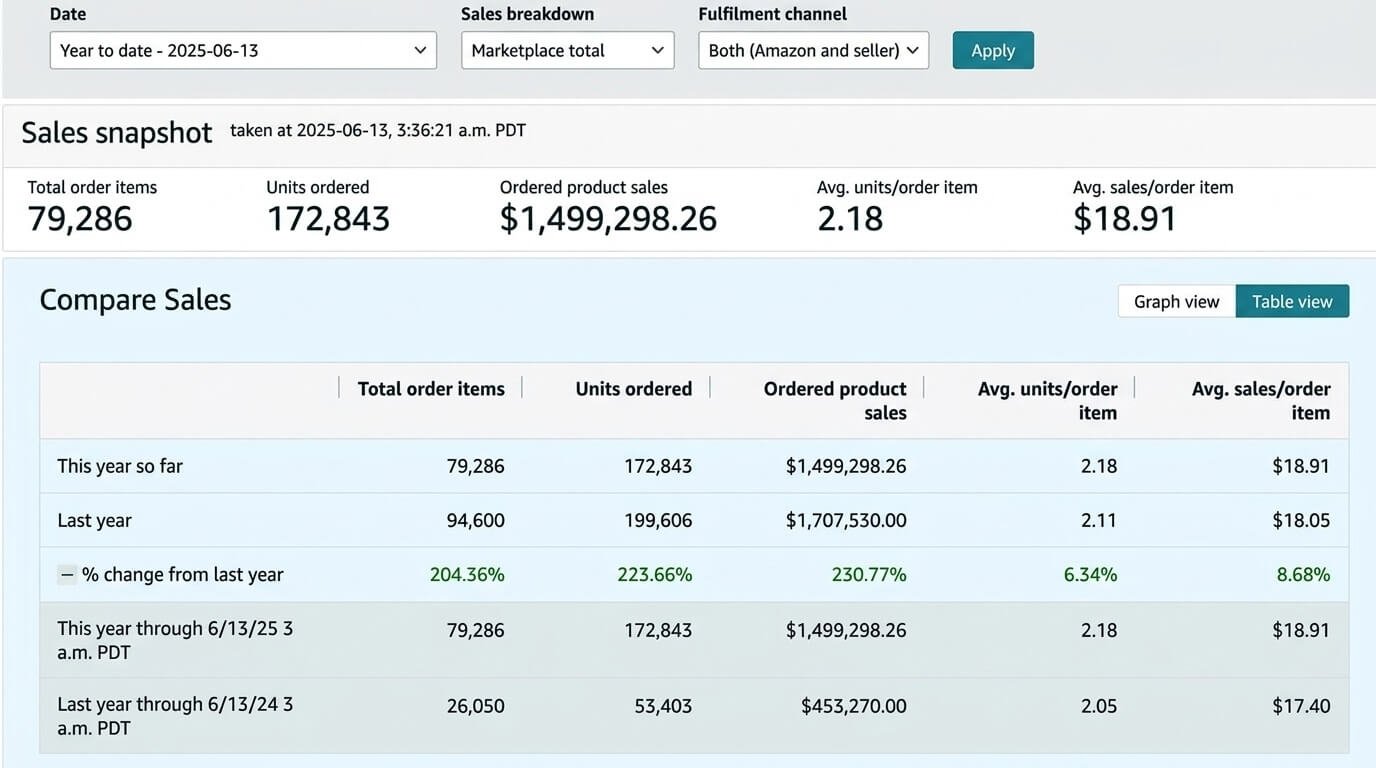
Amazon SEO organic sales growth case study
↑41%
Organic sales growth

Best Seller Badge

SEO, listing optimization and PPC moved monthly orders from 5K to 15K+ while organic sales increased 41%.

Read case study
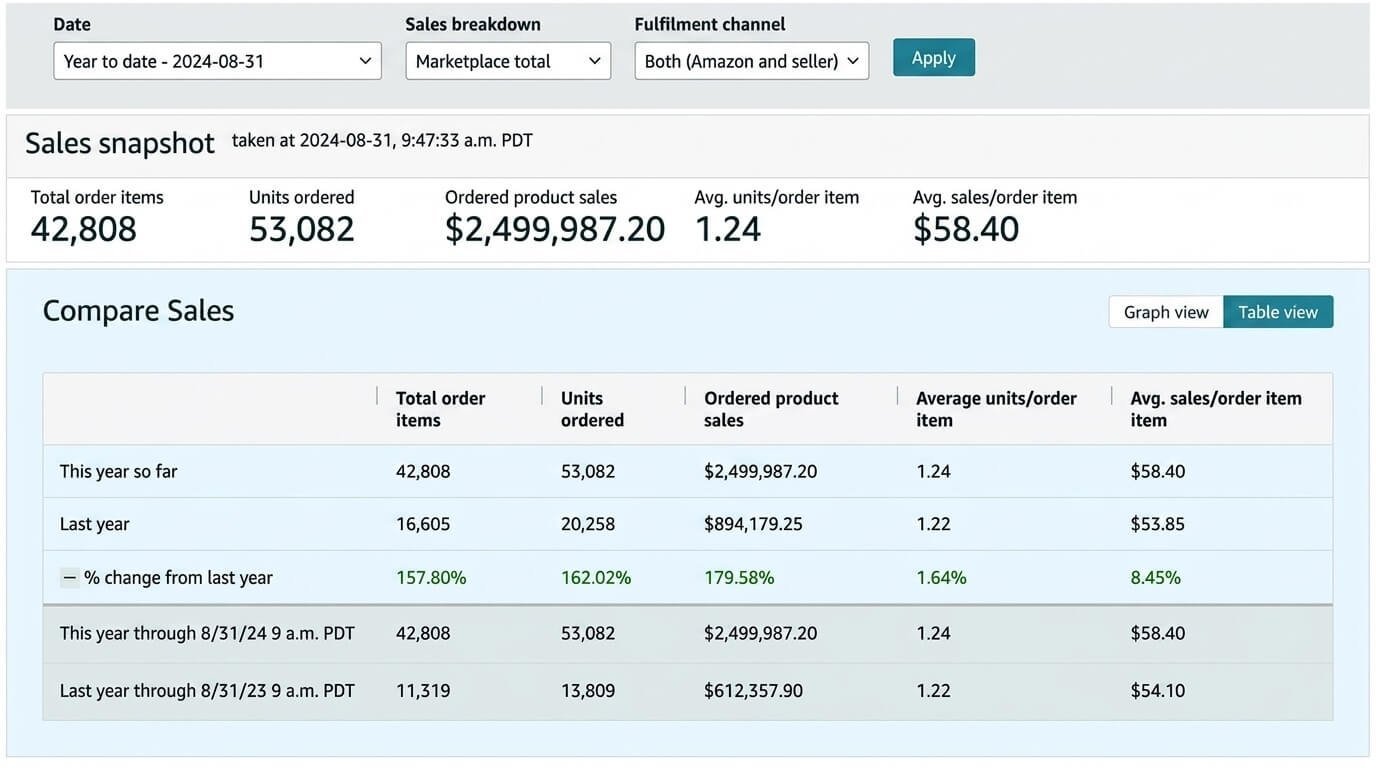
Sports and Outdoors Amazon SEO ranking case study
↑Top 5
Seasonal keyword positions

Sports & Outdoors

Target seasonal terms reached top-five organic positions while CTR improved 32% and conversion improved 25%.

Read case study
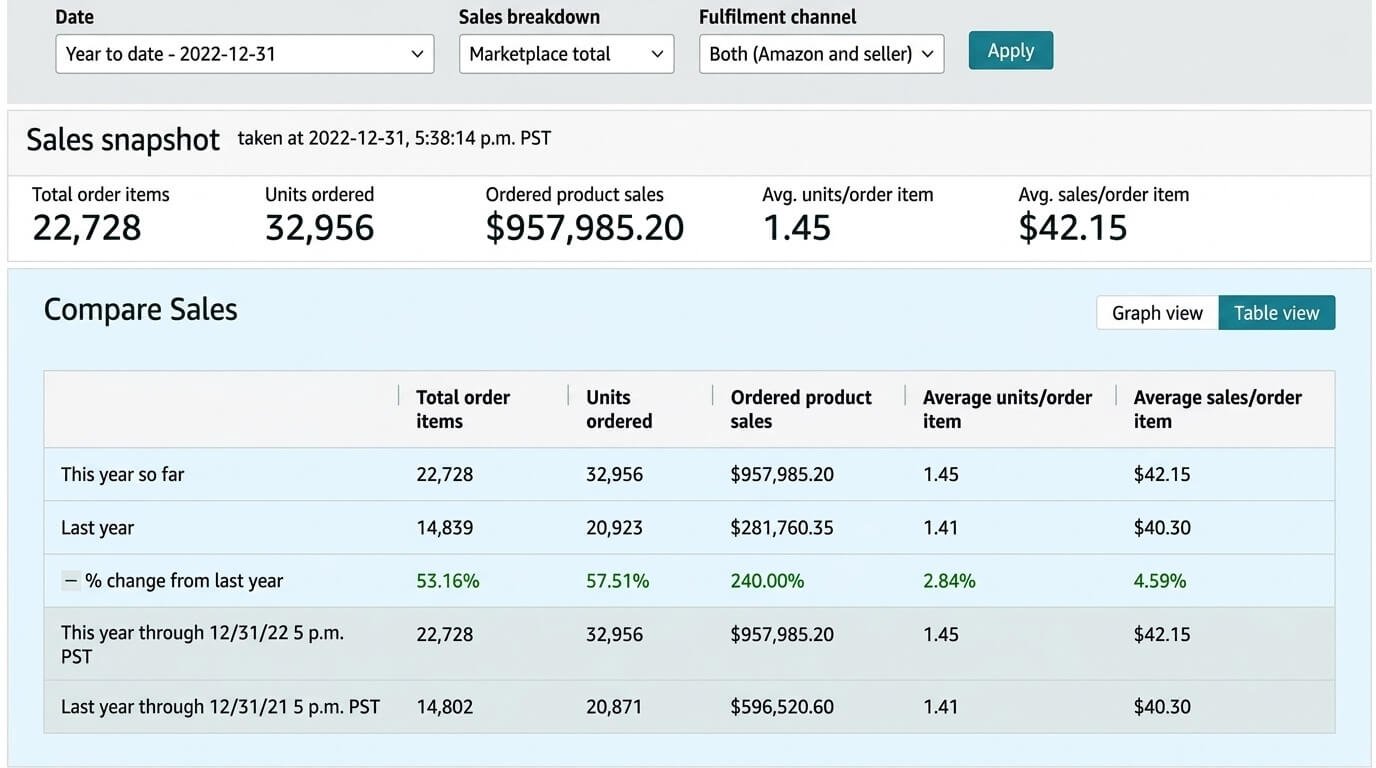
Home and Kitchen Amazon SEO keyword funnel case study
↑240%
Monthly revenue growth

Home & Kitchen

A keyword funnel strategy grew monthly revenue from $50K to $170K in seven months.

Read case study

Request Your SEO Audit

Share the ASINs and marketplace you want reviewed.


Your account details are used only for the audit.

Get a Free Amazon SEO Audit

We review the listing, search coverage and query data to find missing keywords, indexing issues, catalog problems and conversion gaps.


  • Keyword coverage and indexing
  • Item Name, Item Highlights, bullets, description and backend terms
  • Product attributes, product type and browse placement
  • Search Query Performance and PPC search-term data
  • Main image, secondary images and A+ Content
  • Catalog or contribution issues blocking approved content
Add the main ASINs and the biggest SEO problem in the form so we can review them before the call.

Amazon SEO Questions

Amazon SEO services improve how an ASIN is matched to searches, placed in browse paths and presented to shoppers. Our work covers keyword research, listing copy, Generic Keywords, product attributes, indexing checks, Search Query Performance and A+ Content.
From July 27, 2026, most non-media categories use a 75-character Item Name and a separate 125-character Item Highlights field. Amazon says both fields are inputs for search and neither one is prioritized over the other.
Item Highlights are a separate field introduced with Amazon's 2026 title update. They can hold materials, use cases and other product details that help shoppers understand the item in supported Amazon experiences.
Amazon currently limits the Generic Keyword attribute to less than 250 bytes in most marketplaces. Old advice telling sellers to fill a 500-byte field is outdated for those marketplaces. We follow the current rule for the marketplace and product type being optimized.
Usually no. Amazon advises against unnecessary repetition in Generic Keywords. We use that field for relevant terms that are not already covered well elsewhere.
Amazon recommends spelling variations but says common misspellings are not necessary because its systems compensate for them. We use useful variations and alternate names rather than filling the field with misspellings.
Amazon does not provide the same seller-entered alt-text field for normal listing gallery images that it provides inside A+ Content. We still use clean descriptive filenames for asset management and for off-Amazon use when those images are published on a website. For A+ Content, Seller Central requires image keywords / alt text, and Amazon states that descriptive alt text can help products in search results. We use the available field accurately and avoid keyword stuffing.
A+ Content supports product understanding and conversion, and Amazon recommends using module text fields plus descriptive image keywords / alt text. We use A+ for use cases, compatibility, comparisons and buyer questions, while core keyword coverage still stays in the main listing fields and backend search terms.
Attributes help shoppers filter, compare and evaluate products. Complete product data also gives Amazon more information to place and describe the ASIN correctly in search and shopping experiences.
SQP shows query volume, impressions, clicks, cart adds and purchases for the brand or ASIN. It shows whether the ASIN is being shown, clicked, added to cart and purchased for a specific query.
PPC gives us actual customer search terms and conversion data. We use it to decide which relevant terms should be added to the listing and which should stay in advertising or ranking campaigns.
Amazon does not publish a fixed public A9 or A10 scoring formula for sellers. We use the search, browse, attribute, query and performance data Amazon provides.
Amazon SEO covers listing relevance, classification, keyword coverage, product data, CTR and conversion. Product ranking work focuses on moving selected keywords to stronger organic positions with rank tracking, exact-match PPC and query-level analysis. See our Amazon Product Ranking Service for that work.
There is no fixed timeline. Indexing and listing changes can appear quickly, but organic rank and sales depend on competition, CTR, conversion, price, reviews, stock and sales history. We track the results after each change.
Get a Free SEO Audit
Scroll to Top