Amazon restricts certain categories, subcategories, and brands to protect buyers from counterfeit, unsafe, or regulated products. If you want to sell in these protected areas, you need approval through a process sellers call “ungating.” Getting ungated opens the door to less competition and higher margins, but the process can be confusing.
This guide breaks down every step, requirement, document, and strategy you need to get ungated on Amazon in 2026. Whether you are a new seller trying to unlock your first restricted category or an experienced merchant going after gated premium brands, this article covers it all.
What Does “Gated” Mean on Amazon?
When a category, subcategory, or brand is “gated” on Amazon, it means sellers cannot list products in that area without first receiving explicit approval from Amazon. The term comes from the idea of a literal gate blocking entry until you prove you meet specific criteria.
Gating applies at three distinct levels on Amazon. Understanding which level you are dealing with determines the exact steps you need to take.
The three levels of Amazon gating are outlined below.
- Category Gating: Entire categories like Grocery, Fine Jewelry, or Watches require approval before you can list any product within them
- Subcategory Gating: Some categories are open, but specific subcategories within them are restricted (for example, Topical Products under Health and Personal Care)
- Brand Gating: Individual brands like Nike, Disney, LEGO, or Hasbro are restricted regardless of what category they fall into
- ASIN-Level Restrictions: Occasionally, specific ASINs (individual product listings) are locked and require separate approval
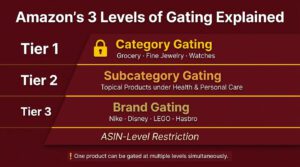
A product can be subject to multiple gates simultaneously. For instance, selling a Disney toy could require both Toys and Games category approval and Disney brand approval.
Why Does Amazon Gate Certain Categories and Brands?
Amazon does not gate categories arbitrarily. Every restriction traces back to customer safety, legal compliance, or brand integrity. Sellers who understand the reasoning behind gating tend to prepare stronger applications.
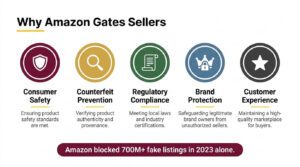
The primary motivations behind Amazon’s gating system include the following.
- Consumer Safety: Categories like Dietary Supplements, Pesticides, OTC Medications, and Children’s Products carry health and safety risks that require verified sourcing
- Counterfeit Prevention: Brands like Nike, Adidas, and Apple are heavily counterfeited, so Amazon restricts who can sell them
- Regulatory Compliance: Products regulated by the FDA, EPA, or CPSC (Consumer Product Safety Commission) need proper documentation
- Brand Protection Requests: Brand owners enrolled in Amazon Brand Registry can request gating to control their distribution channels
- Customer Experience: Restricting low-quality or unverified sellers from certain categories helps maintain Amazon’s reputation
Amazon’s 2023 Brand Protection Report confirmed that the company proactively blocked over 700 million suspected bad listings before they ever went live. Gating is one of the mechanisms that makes this possible.
Complete List of Amazon Restricted Categories (2026)
Amazon’s restricted category list evolves regularly. Some categories that were heavily gated years ago have become easier to access, while new restrictions get added as regulations change. The table below reflects the current state of Amazon’s gated categories as of 2026.
| Restricted Category | Difficulty Level | Common Requirements |
| Automotive and Powersports | Moderate | Invoices, sometimes brand approval |
| Collectible Coins | High | Documentation proving authenticity |
| Entertainment Collectibles | High | Certificates of authenticity, invoices |
| Fashion Jewelry | Moderate | Invoices from authorized suppliers |
| Fine Jewelry | Very High | Gemological certifications, invoices, quality assurance docs |
| Grocery and Gourmet Food | Moderate | Invoices, FDA compliance, expiration date documentation |
| Health and Personal Care | Moderate | Invoices, product compliance documentation |
| Dietary Supplements | Very High | FDA facility registration, COA, invoices, cGMP docs |
| OTC Medications | Very High | FDA NDC registration, drug listing, manufacturer info |
| Industrial and Scientific | Moderate | Invoices |
| Jewelry | Moderate | Invoices, sometimes hallmark documentation |
| Made in Italy | High | Documentation proving Italian origin, invoices |
| Music and DVD | Moderate | Invoices |
| Collectible Books | Moderate | Invoices, condition documentation |
| Personal Safety and Household | Moderate | Compliance certificates, invoices |
| Pet Food | High | Invoices, AAFCO compliance documentation |
| Pesticides and Pesticide Devices | Very High | EPA registration numbers, state registrations |
| Postage Stamps | High | Invoices, authenticity documentation |
| Sports Collectibles | High | Certificates of authenticity, invoices |
| Streaming Media Players | High | Brand authorization, invoices |
| Toys and Games (Holiday) | Moderate | Performance metrics, invoices (seasonal gating) |
| Topical Products | High | Product registration, safety data sheets |
| Video, DVD, and Blu-ray | Low to Moderate | Invoices |
| Watches | High | Invoices, brand authorization, authenticity guarantee |
| Wine | Very High | State licenses, federal permits, compliance docs |
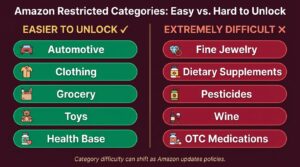
1. Categories That Are Easier to Unlock in 2026
Some categories that were previously difficult have become more accessible due to Amazon streamlining its approval process. Many sellers report auto-approval or quick approvals in these areas.
- Automotive and Powersports (for common parts and accessories)
- Clothing, Shoes, and Jewelry (base category, not Fine Jewelry)
- Health and Personal Care (base category, not supplements or OTC)
- Toys and Games (outside of Q4 holiday season)
- Grocery and Gourmet Food (with proper invoices)
2. Categories That Remain Extremely Difficult
These categories consistently require extensive documentation and have lower approval rates.
- Fine Jewelry (gemological certifications required)
- Dietary Supplements (FDA, cGMP, COA requirements)
- Pesticides and Pesticide Devices (EPA registration mandatory)
- Wine (federal and state licensing required)
- OTC Medications (FDA drug listing required)
- Watches (luxury brands especially difficult)
3. Amazon Restricted Brands List (2026)
Brand gating operates separately from category gating. Even if you are approved to sell in a category, you may still be blocked from listing products under certain brands. Amazon gates brands at the request of brand owners or proactively to prevent counterfeiting.
The following table shows some of the most commonly gated brands on Amazon. This is not exhaustive, as Amazon restricts hundreds of brands and the list changes frequently.
| Brand | Category | Typical Ungating Difficulty |
| Nike | Clothing, Shoes | Very High |
| Adidas | Clothing, Shoes | Very High |
| Under Armour | Clothing, Shoes | High |
| New Balance | Clothing, Shoes | High |
| Disney | Toys, Clothing, Entertainment | Very High |
| LEGO | Toys and Games | Very High |
| Hasbro | Toys and Games | High |
| Mattel (Barbie, Hot Wheels) | Toys and Games | High |
| Apple | Electronics | Very High |
| Samsung | Electronics | High |
| Sony (PlayStation) | Electronics, Video Games | Very High |
| Bose | Electronics | High |
| JBL | Electronics | High |
| Chanel | Beauty | Very High |
| Dior | Beauty, Fashion | Very High |
| L’Oreal (select lines) | Beauty | Moderate to High |
| Yeti | Outdoor, Kitchen | High |
| Patagonia | Clothing, Outdoor | Very High |
| North Face | Clothing, Outdoor | High |
| Ralph Lauren | Clothing | High |
| Marvel | Toys, Entertainment | Very High |
| Crocs | Shoes | Moderate to High |
Key Differences Between Category and Brand Ungating
Sellers often confuse category ungating with brand ungating. The table below clarifies the differences.
| Factor | Category Ungating | Brand Ungating |
| What It Unlocks | All products in the category (unless brand-gated) | Specific brand’s products only |
| Typical Documents | Invoices from any authorized supplier in the category | Invoices specifically for that brand’s products |
| Authorization Letters | Rarely required | Often required from brand owner or distributor |
| Difficulty Range | Low to Very High (depends on category) | Moderate to Very High (depends on brand) |
| Auto-Approval Possible? | Yes, for many categories | Rarely, usually manual review |
| Can Be Denied Permanently? | No, you can reapply | Some brands are effectively closed to new sellers |
How to Check If You Are Gated on Amazon
Before starting the ungating process, you need to confirm whether you actually need approval for the product or category you want to sell. Amazon does not gate every product in every restricted category, and your account status may already allow access to certain areas.
Follow these steps to check your gating status in Seller Central.
- Log into Seller Central and go to Catalog, then select “Add Products”
- Search for the specific product you want to sell by name, UPC, or ASIN
- Look at the listing result. If you see a “Listing Limitations Apply” message or an “Apply to Sell” button, the product is gated for your account
- Click “Apply to Sell” to see what Amazon requires from you. Sometimes it is auto-approved instantly. Other times it asks for documentation
- Check the “Add Products” tool regularly. Your gating status can change as your account ages and your performance metrics improve
You can also check category-level restrictions by navigating to Seller Central, then going to Inventory, followed by “Add a Product,” and selecting “Selling Applications” from the menu.
Always check your gating status before purchasing inventory for a restricted category or brand. Buying wholesale inventory for a gated category you cannot access yet is one of the most common and costly mistakes Amazon sellers make.
Requirements for Getting Ungated on Amazon
Amazon evaluates several factors when reviewing ungating applications. Meeting the minimum requirements before you apply significantly increases your chances of approval on the first attempt.
1. Account-Level Requirements
Your Amazon seller account needs to meet certain baseline criteria before you can even apply for most restricted categories.
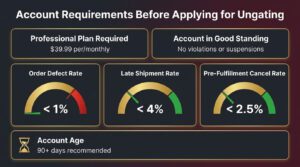
- Professional Selling Plan: You must be on Amazon’s Professional plan ($39.99 per month). Individual plan sellers are blocked from applying for most gated categories
- Account Age: While Amazon does not publish a minimum account age, sellers with accounts older than 90 days generally have higher approval rates
- Account Health: Your account should be in good standing with no active policy violations or suspensions
- Order Defect Rate (ODR): Should be below 1%
- Late Shipment Rate: Should be below 4%
- Pre-Fulfillment Cancel Rate: Should be below 2.5%
- Valid Business Information: Your business name, address, and tax information must be verified and current
2. Document Requirements
The specific documents Amazon asks for vary by category and brand, but the most common requirements fall into a few standard categories.
- Wholesale Invoices: The most universally required document. Must meet Amazon’s specific formatting criteria (detailed in the invoice section below)
- Letters of Authorization: Required for many brands. Must come from the brand owner or an authorized distributor confirming you have permission to sell their products
- Certificates of Authenticity (COA): Required for collectibles, sports memorabilia, and entertainment collectibles
- Compliance Certificates: Required for children’s products (CPC), electronics (FCC), and other regulated items
- Safety Data Sheets (SDS): Required for products classified as hazardous materials or containing chemicals
- FDA Documentation: Required for supplements, OTC drugs, and certain food products
- EPA Registration: Required for pesticides and pesticide devices
- Product Images: Some applications require photos of the actual product, packaging, and labels
How to Get Ungated on Amazon: Step-by-Step Process
This section walks through the exact process for getting ungated, from finding a supplier to submitting your application and handling rejections.
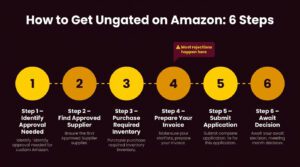
Step 1: Identify What Approval You Need
Start by searching for the product you want to sell in Seller Central’s “Add a Product” tool. Click “Apply to Sell” to see the specific requirements Amazon lists for that item.
Write down exactly what Amazon is asking for. Requirements differ between categories, subcategories, and brands. Getting the wrong documents wastes time and money.
Step 2: Find an Approved Supplier
Amazon requires invoices from legitimate wholesale suppliers or authorized distributors. The supplier you choose must meet specific criteria for your invoices to be accepted.
Your supplier should meet the following qualifications.
- Must be a registered business with a verifiable address, phone number, and website
- Must sell the products at wholesale prices (retail receipts from stores like Walmart or Target are generally not accepted)
- Must provide commercial invoices (not receipts, packing slips, or order confirmations)
- Must be contactable by Amazon because Amazon may call or email your supplier to verify the invoice
- Should ideally be a US-based supplier when applying on Amazon.com (though international suppliers are sometimes accepted)
Some well-known wholesale suppliers and distributors that Amazon sellers commonly use for ungating include the following.
- Dollar Tree / DollarDays (for Grocery, Health and Personal Care basics)
- Wholesale Central (directory of verified wholesalers)
- TopHatter / Faire (wholesale marketplace)
- Direct brand distributors (contact brands directly for authorized distributor lists)
- Local wholesale distributors (check industry-specific distributors in your region)
Step 3: Purchase the Required Inventory
Once you have identified an approved supplier, place an order. Amazon typically requires invoices showing a minimum purchase, though the exact quantity varies by category.
The table below summarizes common minimum order requirements sellers have reported for successful ungating.
| Category | Typical Minimum Units on Invoice | Estimated Minimum Cost |
| Grocery and Gourmet Food | 10+ units across 3+ ASINs | $50 to $200 |
| Beauty | 10+ units across 3+ ASINs | $75 to $300 |
| Health and Personal Care | 10+ units across 3+ ASINs | $50 to $200 |
| Toys and Games | 10+ units across 1-3 ASINs | $100 to $300 |
| Topical Products | 10+ units, compliance docs needed | $100 to $500+ |
| Dietary Supplements | 10+ units, extensive documentation | $200 to $1,000+ |
| Fine Jewelry | Varies, authenticity documentation | $500 to $5,000+ |
| Watches | Varies, brand authorization needed | $300 to $2,000+ |
These are approximate figures based on seller-reported experiences. Amazon does not officially publish minimum purchase requirements, but invoices showing too few units or very low dollar amounts are more likely to be rejected.
Step 4: Prepare Your Invoice to Meet Amazon’s Standards
Amazon is extremely specific about what qualifies as an acceptable invoice. Invoices that do not meet these criteria are the number one reason ungating applications get rejected.
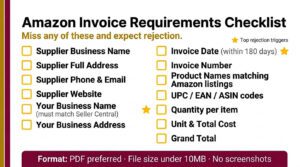
Every invoice you submit must include the following elements.
- Supplier’s full legal business name
- Supplier’s complete address
- Supplier’s phone number and email
- Supplier’s website (strongly recommended)
- Your full legal business name (must match your Seller Central account exactly)
- Your business address (must match your Seller Central account)
- Invoice date (must be within the last 180 days, ideally within 90 days)
- Invoice number (unique identifier)
- Product names that clearly match the Amazon listing titles or descriptions
- UPC codes, EAN codes, or ASIN numbers for each product
- Quantity purchased for each item
- Unit cost and total cost for each line item
- Grand total for the entire order
Amazon also enforces these additional invoice rules.
- The invoice must be a single document (not multiple pages from different orders combined)
- It must look like a professional commercial invoice, not a handwritten or informal document
- It should be in English (or with a certified translation) when applying on Amazon.com
- The file format should be PDF, JPEG, or PNG
- The file must be clear and legible with no blurry text or cut-off edges
- Amazon may redact pricing from your invoice, but the pricing information must be present when you submit
Step 5: Submit Your Application in Seller Central
With your invoices and any additional documents ready, submit your application through Seller Central.
Follow these steps to submit.
- Go to Seller Central and click Catalog, then Add Products
- Search for a product in the gated category or brand
- Click Apply to Sell or Request Approval
- Upload your invoice(s) and any additional required documents
- Fill in any additional information Amazon requests (supplier contact details, product descriptions, etc.)
- Click Submit and wait for Amazon’s response
Step 6: Wait for Amazon’s Decision
Amazon’s review timeline varies significantly depending on the category, your account history, and whether your application requires manual review.
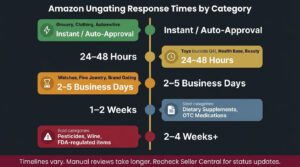
The table below shows typical response times.
| Scenario | Typical Response Time |
| Auto-Approval (common categories, strong account) | Instant to 24 hours |
| Standard Manual Review | 1 to 5 business days |
| Complex Categories (supplements, fine jewelry) | 5 to 14 business days |
| Applications Requiring Supplier Verification | 7 to 21 business days |
| Resubmission After Initial Rejection | 3 to 10 business days |
You will receive the decision via email and as a notification in Seller Central. If approved, you can immediately start listing products in the unlocked category or brand.
Category-Specific Ungating Guides
Each restricted category has unique requirements beyond the standard invoice submission. This section provides targeted guidance for the most commonly requested categories.
1. How to Get Ungated in Grocery and Gourmet Food
Grocery is one of the most popular categories sellers want to unlock because of consistent demand and repeat purchases. The good news is that Grocery has become easier to get into compared to previous years.
Key requirements for Grocery ungating include the following.
- Professional Seller account in good standing
- Invoices from a wholesale supplier showing at least 10 units
- Products must comply with FDA food safety regulations
- All products must have valid expiration dates at least 90 days out from the date they arrive at Amazon’s fulfillment centers
- Packaging must be intact, sealed, and compliant with Amazon’s prep requirements
- Some sellers report auto-approval for Grocery if their account is older than 90 days with strong metrics
2. How to Get Ungated in Beauty
The Beauty category covers cosmetics, skincare, haircare, and personal beauty products. It is moderately difficult to unlock but very profitable once approved.
Specific considerations for Beauty ungating are listed below.
- Invoices must show products from recognized beauty brands or authorized distributors
- Products must be new, sealed, and unused
- Topical products (anything applied to the skin) may require additional approval under the Topical Products subcategory
- Organic or natural beauty claims may need supporting documentation
- Some beauty brands are independently gated, requiring separate brand approval
3. How to Get Ungated in Toys and Games
Toys and Games follows a seasonal gating pattern. Amazon tightens restrictions during Q4 (October through December) to ensure only reliable sellers handle holiday toy inventory.
The following points apply to Toys and Games ungating.
- Outside of Q4, many sellers receive auto-approval or quick approval with basic invoices
- During Q4 holiday gating, Amazon requires sellers to demonstrate a strong sales history and excellent metrics
- Holiday gating criteria typically include: at least 25 orders fulfilled between August 15 and October 15, ODR below 1%, and pre-fulfillment cancel rate below 1.75%
- Specific toy brands (LEGO, Disney, Hasbro, Mattel) have additional brand-level gating
- Invoices should come from authorized toy distributors
4. How to Get Ungated in Health and Personal Care
Health and Personal Care is a broad category with several subcategories that have their own restrictions. The base category is relatively accessible, but subcategories like Dietary Supplements and OTC Medications are much harder.
Here is what to expect for Health and Personal Care ungating.
- Base category approval usually requires standard invoices from a wholesale supplier
- Dietary Supplements require FDA facility registration, Certificates of Analysis (COA), cGMP (current Good Manufacturing Practice) documentation, and product-specific invoices
- OTC Medications require FDA National Drug Code (NDC) registration and drug listing documentation
- Topical Products (lotions, creams, serums, sunscreens) require product registration and safety data sheets
- Products with drug claims (even cosmetics claiming to treat acne, for example) may fall under OTC drug regulations
5. How to Get Ungated in Watches
Watches, especially luxury and designer brands, are among the harder categories to unlock. Amazon scrutinizes watch sellers closely because of the high counterfeiting risk in this category.
Successful Watch category applicants typically need the following.
- Invoices from authorized watch distributors or directly from brands
- Letters of authorization from the brand or authorized distributor
- Product photos showing the watch, box, documentation, and serial numbers
- Some luxury watch brands (Rolex, Omega, TAG Heuer) are effectively impossible for most third-party sellers to get ungated for
Invoice Requirements for Amazon Ungating
Because invoices are the single most important document in the ungating process, this section provides a comprehensive breakdown of what makes an invoice acceptable versus what gets rejected.
1. What Amazon Accepts vs. What Amazon Rejects
The following comparison table clarifies common invoice scenarios.
| Accepted | Rejected |
| Commercial wholesale invoice with all required fields | Retail store receipts (Walmart, Target, Costco) |
| Invoice dated within 180 days | Invoice older than 180 days |
| Supplier name and address clearly printed | Invoices with missing or incomplete supplier info |
| Your business name matching Seller Central exactly | Personal name instead of business name |
| Product names matching Amazon listings | Generic product descriptions (e.g., “assorted goods”) |
| UPC/EAN/ASIN included for each product | No product identifiers listed |
| PDF or high-resolution image | Blurry, cropped, or illegible scans |
| Single continuous invoice document | Multiple receipts stitched together |
| Products from the category you are applying to | Products from unrelated categories |
2. Formatting Your Invoice
Even when your invoice contains all required information, formatting issues can cause rejection. Follow these best practices.
- Convert the invoice to PDF format if possible (cleaner than photos)
- Ensure no information is cut off at the edges of the document
- If your supplier provides a digital invoice, download it directly rather than taking a screenshot
- Highlight or annotate the products relevant to your ungating application if the invoice contains many items
- Keep file sizes under 10 MB
- Name the file clearly (e.g., “Grocery_Ungating_Invoice_January2025.pdf”)
How to Get Ungated on Amazon for Free
Many new sellers wonder if ungating costs money. The ungating application itself is always free. Amazon does not charge an application fee. However, the process does have indirect costs because you need to purchase inventory and obtain invoices.
There are several strategies to minimize or eliminate your costs when getting ungated.
- Apply first without documents. For some categories, Amazon auto-approves sellers with strong accounts. Always click “Apply to Sell” before purchasing any inventory. You may get instant approval
- Use low-cost wholesale sources. Purchase the minimum quantity needed (often 10 units) from budget-friendly wholesale suppliers. A $50 to $100 order from Dollar Tree’s wholesale program can unlock Grocery
- Sell the inventory you purchased. After getting approved, sell the products you bought for your invoice. If you purchased wisely, you can break even or profit
- Check auto-ungating periodically. Amazon sometimes removes gates from categories or brands without announcement. Check your status monthly
- Upgrade your account metrics first. Sellers with excellent performance histories are more likely to get auto-approved, saving the cost of purchasing invoice inventory
Common Rejection Reasons and How to Fix Them
Getting rejected is frustrating but fixable. Amazon provides a rejection reason (though sometimes vague), and you can resubmit your application after correcting the issue. You can reapply as many times as needed.
The following table covers the most frequent rejection reasons and their solutions.
| Rejection Reason | What It Means | How to Fix It |
| Invoice does not meet requirements | Missing required fields, wrong format, or illegible | Review the invoice checklist above and obtain a corrected invoice from your supplier |
| Business name does not match | Your name on the invoice differs from Seller Central | Update your Seller Central info or get a new invoice with the correct business name |
| Invoice is too old | Invoice date is more than 180 days ago | Purchase new inventory and obtain a current invoice |
| Products do not match category | The items on your invoice are not relevant to the category | Purchase products specifically within the gated category |
| Supplier cannot be verified | Amazon called or emailed your supplier and could not confirm | Use a more established supplier with a verifiable web presence and responsive customer service |
| Insufficient quantity | Too few units on the invoice | Purchase at least 10 units (some categories need more) |
| Account health issues | Your account metrics do not meet minimum thresholds | Improve your ODR, late shipment rate, and cancel rate before reapplying |
| Category not accepting applications | Amazon has temporarily or permanently closed the category | Wait and try again later, or consider selling related ungated products |
| Suspected fraudulent documents | Amazon believes the invoice is fabricated | Only submit genuine invoices from real transactions. If legitimate, contact Seller Support to clarify |
Frequently Asked Questions
How much does it cost to get ungated on Amazon?
Amazon does not charge any fee for ungating applications. The only cost is purchasing wholesale inventory to obtain qualifying invoices. Most sellers spend between $50 and $500 depending on the category. Some sellers get auto-approved without purchasing anything.
Can I get ungated on Amazon with a new account?
Yes, but it is harder. New accounts with no sales history face more scrutiny and are less likely to receive auto-approvals. Most sellers recommend building at least 60 to 90 days of sales history before applying for competitive restricted categories.
How many times can I apply for ungating?
There is no limit. You can resubmit your application as many times as needed. However, you should fix the specific issue that caused the rejection before reapplying. Submitting the same rejected documents repeatedly will yield the same result.
Do I need a Professional Seller account to get ungated?
Yes, for the vast majority of gated categories. Amazon’s Individual selling plan ($0.99 per item sold) does not allow applications for most restricted categories. The Professional plan costs $39.99 per month and is required for ungating.
What is the easiest category to get ungated in?
Grocery and Gourmet Food and Clothing are widely reported as the easiest categories to unlock, especially for accounts with some sales history. Many sellers receive auto-approval for these categories. Toys and Games is also relatively accessible outside of the Q4 holiday season.
What is the hardest category to get ungated in?
Fine Jewelry, Dietary Supplements, Pesticides and Pesticide Devices, Wine, and OTC Medications are consistently the most difficult. These require extensive documentation including government registrations, certifications, and compliance proof beyond standard invoices.
If you’re trying to get ungated for items with age restrictions, you need to be prepared. It’s a good idea to research age verification best practices for regulated products to ensure you’re compliant.
For more information related to gated categories, check this list of ungated products and categories on ecomautomized.com.
Can Amazon revoke my ungating after approval?
Yes. If Amazon finds that you violated category-specific policies, sold counterfeit products, received excessive customer complaints, or submitted fraudulent documentation, they can revoke your category or brand approval. Maintain compliance with all Amazon policies to protect your access.
Are ungating services legitimate?
Some are, but many are not. Legitimate ungating services guide you through the process and help you find proper suppliers. Illegitimate services create fake invoices or use fraudulent documentation, which can get your account permanently suspended. If a service guarantees instant ungating for a flat fee, treat it with extreme caution.