
Amazon Customer Retention:
7 Strategies That Build Repeat Revenue
A complete, experience-backed guide to turning one-time buyers into loyal repeat customers, using Amazon’s native tools in the right sequence, at the right moment.

Why Amazon Retention Is Different From Every Other Channel
Amazon customer retention is the percentage of buyers who return to purchase from your brand again after their first order. That definition is simple. The execution is not, because Amazon strips away every tool that makes retention manageable on other platforms.
You cannot email customers after purchase. Amazon owns the inbox. You cannot build a points-based loyalty program. Amazon prohibits it. You cannot run standard retargeting to your own pixel-built audiences. Amazon controls what communication reaches the customer and when. The moment someone clicks “buy,” that relationship belongs to Amazon’s platform, not your brand’s CRM.
That sounds like a disadvantage. It is also an opportunity that most sellers never exploit. Amazon’s own retention tools reach customers exactly where they are already buying. Every strategy in this guide works within that constraint rather than against it.
What we see across 40+ brands: Sellers who use Amazon as a pure acquisition channel, spending on PPC to get the first sale, then moving on, consistently underperform against those who build structured retention systems. In our managed accounts, brands that actively use Brand Tailored Promotions, Subscribe & Save, and Sponsored Display together show 2.3x higher customer lifetime value compared to those that use PPC alone. The gap widens significantly in consumable categories.
The numbers that justify this focus: repeat customers spend 67% more per order than first-time buyers. Acquiring a new customer on Amazon costs between five and twenty-five times more than retaining an existing one. A 5% improvement in your repeat purchase rate can increase brand profit by 25% to 95%. Every customer who does not return is a customer you paid to acquire and never fully monetised.
What Amazon Does and Does Not Allow
Before building any retention system, acknowledge what Amazon does and does not allow:
- ✓You cannot email customers directly. Amazon’s Buyer-Seller Messaging system permits only transactional messages related to existing orders, not promotional outreach. Review solicitation is limited to Amazon’s own Request a Review tool. Any email that promotes products outside of order fulfilment is a terms of service violation.
- ✓You cannot operate a traditional loyalty programme. Points systems, external reward schemes, and “buy ten, get one free” programmes that redirect customers off Amazon violate platform policy. Every retention mechanism must operate natively inside Amazon.
- ✓You cannot use customer data for off-Amazon targeting. Customer PII (names, emails, addresses) from Amazon orders cannot be used to build external remarketing audiences. Amazon’s clean-room tools like AMC (covered in Strategy 4) provide an approved alternative pathway.
- ✓Amazon controls reorder recommendations, not you. The “Buy Again” section, Subscribe & Save suggestions, and the “Frequently Bought Again” carousel are all algorithmically driven. You influence them through retention behaviour signals, not by requesting placement.
The strategies below work within all of these constraints. None involve grey-area tactics that risk your account. Each uses a tool Amazon explicitly provides to Brand Registry-enrolled sellers.
How to Measure Retention in Amazon Brand Analytics
You cannot fix what you have not measured. Amazon provides precise retention data inside Brand Analytics, data that most sellers never open. Before running a single retention campaign, pull these three reports and understand exactly where your customers are disappearing.
1. Repeat Purchase Behavior Report
This is the most directly actionable retention report Amazon provides. Go to:
For Vendor Central accounts, find the same report under: Reports → Analytics → Consumer Behavior Dashboards → Repeat Purchase Behavior.
Once inside, use the toggle at the top to switch between Brand View and ASIN View. Brand View gives a portfolio-level picture. ASIN View is where the real diagnostic work happens, it shows you exactly which products generate loyal buyers and which generate one-time transactions. These are fundamentally different problems requiring different responses. A low-repeat hero ASIN with high volume needs immediate investigation. A low-repeat ASIN with low volume is a product-market fit issue, not a retention campaign problem.
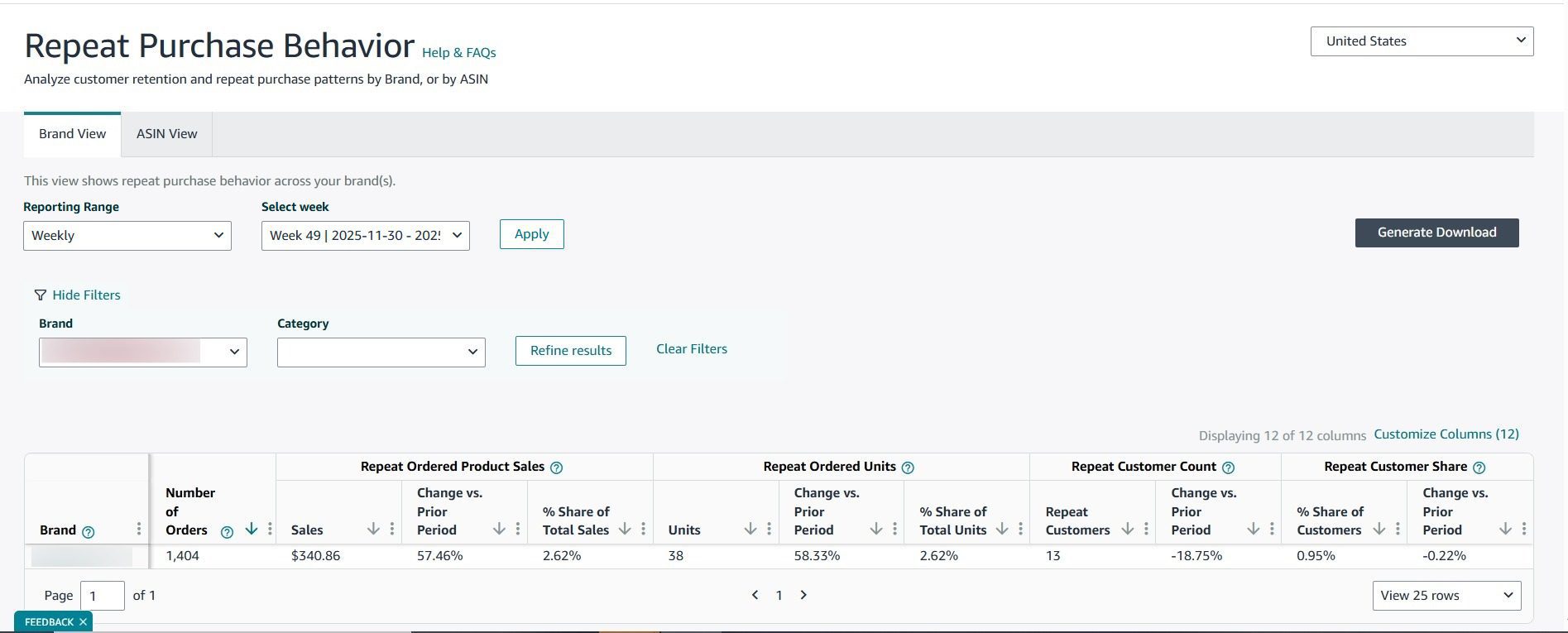
The Repeat Purchase Behavior report in Brand Analytics, switch to ASIN View to diagnose which specific products are generating loyal buyers
The Time Between Orders column is the most operationally useful number in this report. It shows the average days between a customer’s first and second purchase per ASIN. This single figure should set the timing for every retargeting and re-engagement campaign you run. A supplement with a 47-day Time Between Orders should have Sponsored Display re-engagement ads start at day 38, not day 60 and not on a default 30-day window.
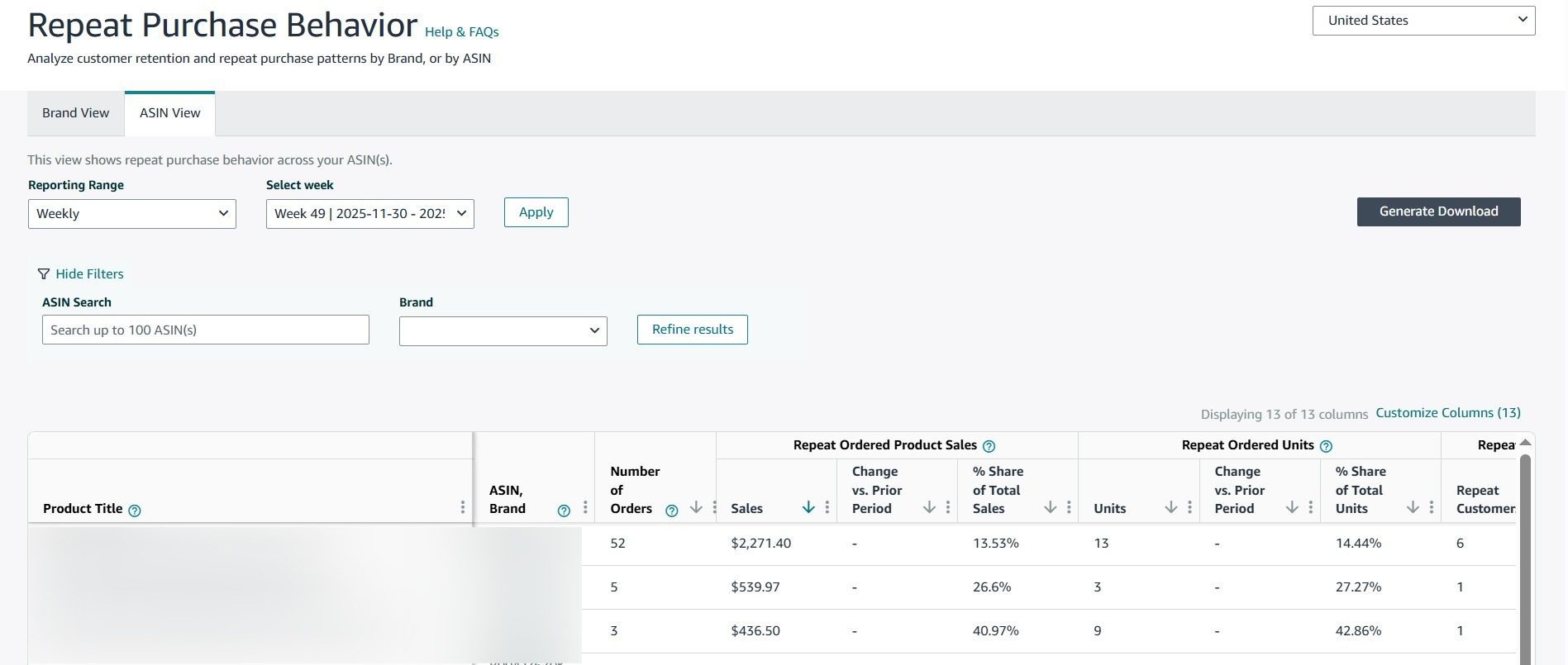
ASIN View breaks down repeat purchase rate per product, the figure to watch weekly on your top five SKUs
Pull this report every Monday. If the repeat purchase percentage on any key ASIN drops for two consecutive weeks, something changed, inventory, reviews, product quality, or a competitor ran a promotion. Catch it early. A declining retention rate that goes unaddressed for a month is exponentially harder to recover than one caught in the first week.
2. Customer Loyalty Analytics Dashboard
Go to:
This dashboard segments your entire customer base into four behavioural tiers based on purchase recency, frequency, and spend. Each tier requires a different response. The mistake most brands make is applying the same approach to all four with a blanket coupon.
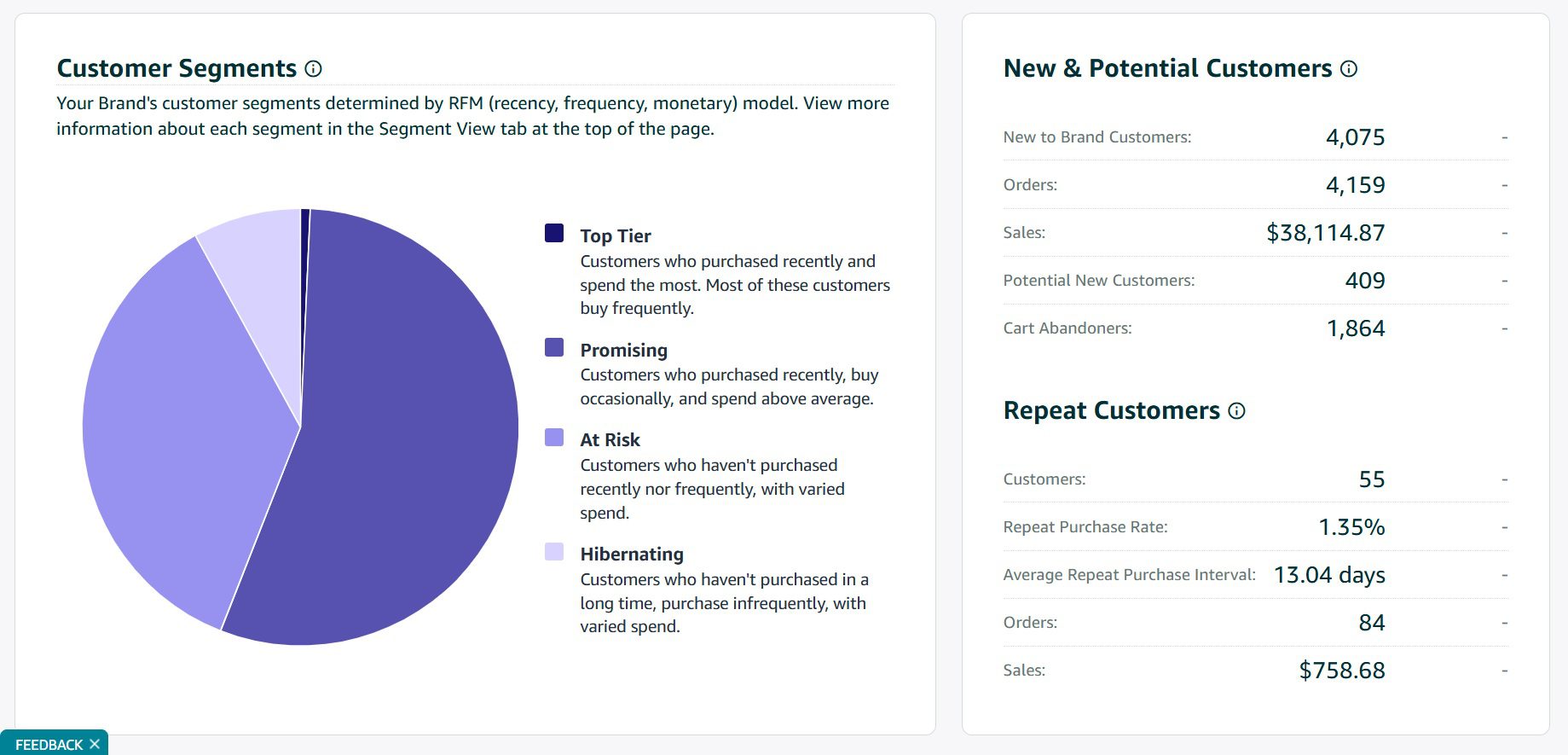
The Customer Loyalty Analytics Dashboard, four customer tiers, each requiring a different retention approach
| Tier | Who They Are | What They Need | Mistake to Avoid |
|---|---|---|---|
| Top Tier | High-frequency, high-spend buyers who repurchase without incentives | Exclusive early access to new products; loyalty recognition that does not require a discount | Reflexively discounting this segment, you are training them to wait for a deal on purchases they would have made anyway |
| Promising | Buyers who have purchased more than once but have not reached consistent frequency | One well-timed Brand Tailored Promotion or a Subscribe & Save nudge at the point of likely reorder | Ignoring this segment, they are the easiest to move up a tier with minimal spend |
| At-Risk | Previously active buyers whose frequency is declining | Time-sensitive re-engagement, a targeted offer matched to the product they last purchased | Waiting too long. The re-engagement window on At-Risk customers is short. If the At-Risk count is growing, act this week, not next month |
| Hibernating | Buyers who have gone completely inactive, no purchase in 12+ months | A compelling offer paired with a new product announcement; highest discount threshold of any tier | Writing them off entirely in consumable categories, reactivation rates of 8–15% are realistic with the right approach |
Retention compounds with each order: Data from Nozzle shows that first-to-second purchase retention rates average around 32%. But from second-to-third purchase, that figure jumps to 46%. Retention gets easier the longer a customer stays. This means getting a customer past their second order is worth far more than the revenue from that single transaction, because the third and fourth orders come at a much higher rate. Every campaign in this section is ultimately about crossing that first-to-second threshold.
From direct account management: The At-Risk tier is the one most brands respond to too slowly. In our experience managing supplement and beauty brands, brands that run weekly loyalty dashboard reviews and launch a BTP re-engagement campaign within the same week the At-Risk count rises recover 30–40% of that cohort. Brands that check monthly recover far fewer because those customers have already reordered from a competitor.
3. Three Numbers to Track First
Before spending a penny on retention campaigns, calculate these three metrics for each of your top five ASINs. These are not nice-to-have figures. They are the inputs that determine whether your campaigns run at the right time and for the right cost.
Repeat Purchase Rate
The percentage of first-time buyers who returned within 90 or 180 days. Consumable categories should sit at 30–40%. Durable goods are healthy at 15–20%. Any consumable ASIN below 10% has a product or listing optimisation problem, not a retention campaign problem, fix the root cause first.
Customer Lifetime Value (CLV)
Average order value × average order frequency × average active months. This tells you exactly what each retained customer is worth and how much you can justify spending to recover or retain them. A supplement customer with CLV of £180 can absorb a 20% re-engagement discount across two orders and still be deeply profitable.
Churn Rate & Time Between Orders
Churn rate is the percentage of customers who do not return within your expected reorder window. For a product with a 47-day Time Between Orders, a customer who has not repurchased by day 60 has churned for that cycle. Time Between Orders (from the Repeat Purchase Behavior report) sets your campaign timing: if TBO is 47 days, your re-engagement campaign goes live on day 40. These two numbers together tell you who to target and when.
Retention Benchmarks by Category
Overall, third-party sellers average 20–40% repeat purchase rate (SalesDuo, 2025). Consumable categories (supplements, pet food, baby care, beauty) sit at the higher end of this range, while durable goods and electronics typically see 8–18%. Pull your own ASIN benchmarks from the Repeat Purchase Behavior report and compare week-on-week rather than relying on category averages, since product quality and price point vary too much for generic targets to be reliable.
Amazon Customer Retention Strategies 2026
Measuring retention tells you where the revenue is leaking. The strategies below seal those leaks. Each one uses a tool Amazon already provides to brand-registered sellers. None require external platforms, violate Amazon’s terms, or depend on the email access you do not have. What they require is consistent execution and an understanding of which tool fits which stage of the customer journey.
Strategy 1: Subscribe & Save
Subscribe & Save is the single most powerful retention tool available to Amazon sellers. It converts a discretionary purchase decision, “should I reorder?”, into an automatic recurring shipment the customer has opted into. No other mechanism on the platform removes that friction at the same scale.
Subscribers carry 3x the lifetime value of regular customers and purchase 2.5x more frequently. A 5% seller-funded discount is enough to double Subscribe & Save conversion rates in most categories. The margin cost is real, but the economics almost always favour it once you account for the cost of re-acquisition.
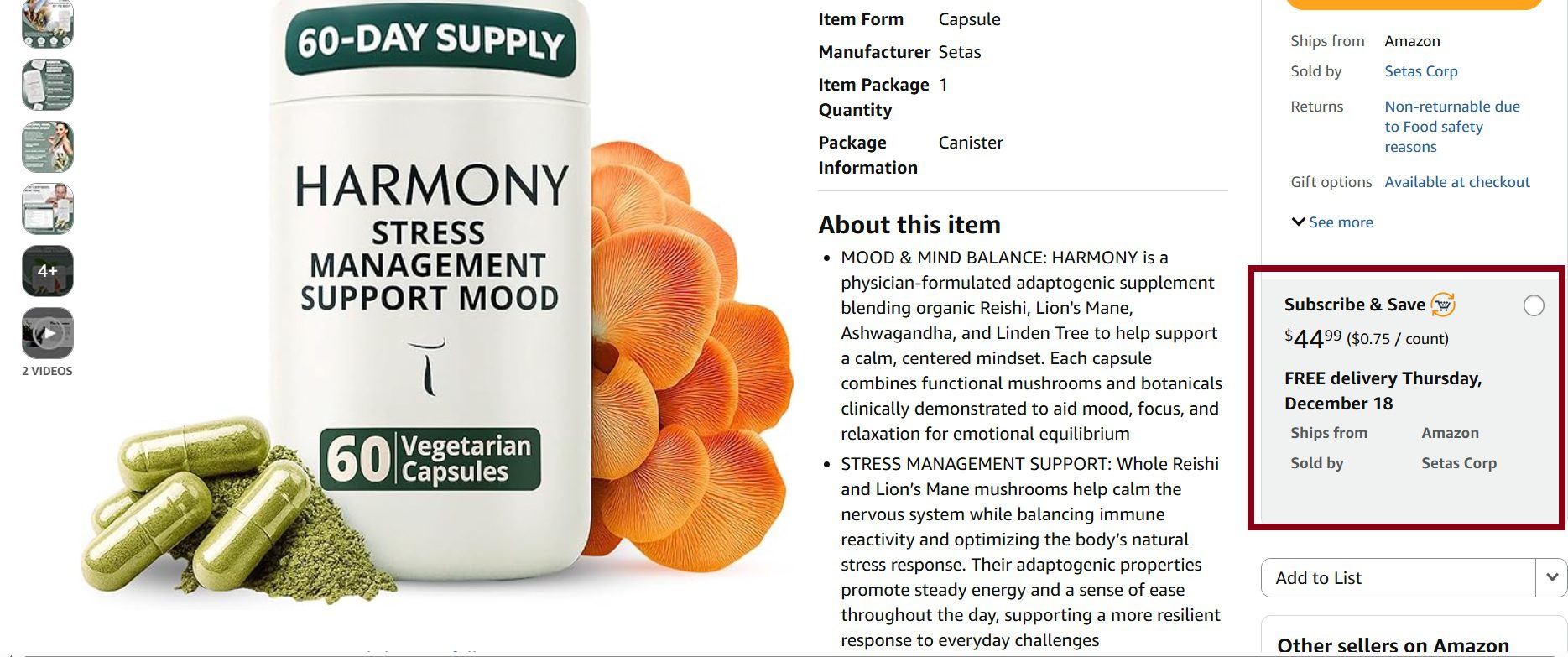
Subscribe & Save appears directly on the product detail page, customers who subscribe remove the recurring repurchase decision entirely
Customers who subscribe receive free shipping plus a 5% discount. In health, baby care, grocery, and beauty, customers with five or more active subscriptions qualify for 15% on eligible items. All other categories are capped at 10%. For sellers, the programme works best for products with a natural reorder cycle of 30 to 90 days: supplements, vitamins, coffee, baby care, beauty and personal care, pet food, and household cleaning supplies.
To enrol, go to:
The Subscribe & Save dashboard shows active subscriber count, shipped units, and shipped revenue, monitor this weekly as a retention health metric
One more native retention tool: the Buy Again button. Amazon automatically surfaces previously purchased products in a dedicated “Buy Again” section on the homepage, product listings, and cart pages. This is algorithmically driven; you cannot pay for it. But products with strong sales velocity, consistent stock, and fast fulfilment times earn better placement there. Products enrolled in Subscribe & Save also benefit because Amazon shows the “convert to subscription” prompt directly within the Buy Again interface. Keep your top repeat ASINs in stock consistently and let this placement work for free.
The Subscribe & Save problem most sellers do not plan for: A well-documented pattern among Amazon shoppers is subscribing to get the first-order discount (5–15%) and then cancelling immediately after delivery. Seller Central forums show brands reporting 90%+ of cancelled orders coming from Subscribe & Save abuse. The fix is to start with a modest 5% discount rather than the maximum, and monitor your cancellation rate inside the Subscribe & Save programme page weekly. If cancellations spike within 7 days of delivery, the discount is attracting deal-seekers rather than genuine subscribers. Reduce it. The first subscription is the hardest to get. Once a customer is in a subscription cycle, genuine subscribers tend to stay, but be aware that a segment of shoppers subscribe only to get the first-order discount and cancel immediately. Monitor cancellations inside the Subscribe & Save programme page. Front-load your incentive to attract the right customers, not just deal-seekers.
Strategy 2: Brand Tailored Promotions
Brand Tailored Promotions (BTP) is where most brands should be spending significantly more time than they currently are. It lets you stop broadcasting generic coupons to every shopper and instead deliver targeted discounts to specific customer segments based on their exact purchase history with your brand.
Go to:
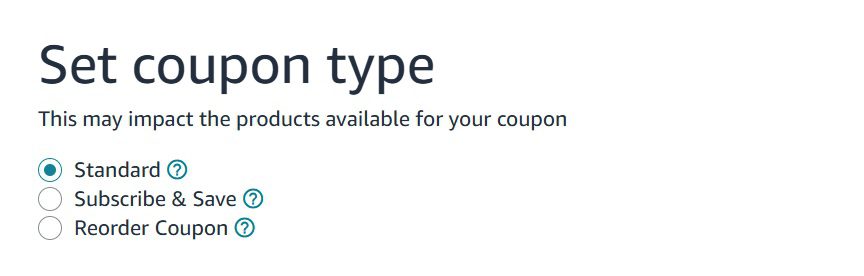
When you create a promotion, you select a goal. Each goal opens a different set of pre-built audience segments. This is not a basic coupon tool, it is a segmented CRM built directly into Amazon’s platform.
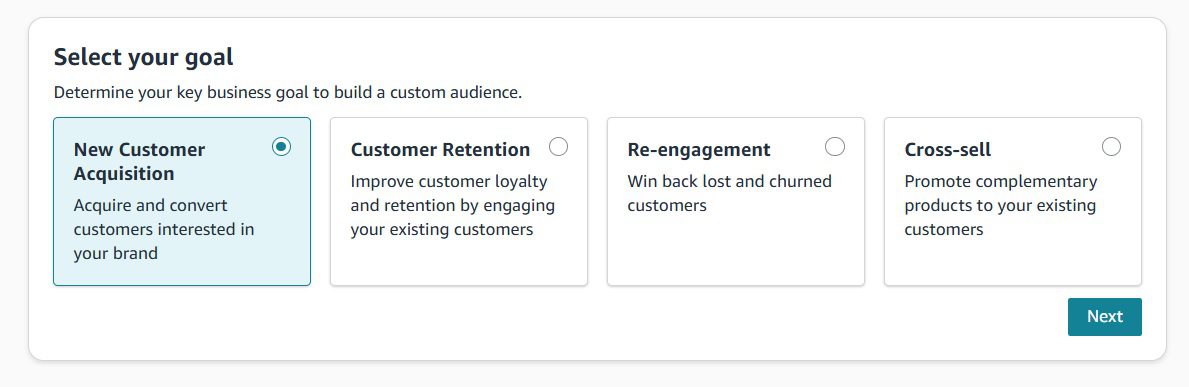
Brand Tailored Promotions, four distinct goals, each targeting a different stage of the customer relationship
Goal 1: New Customer Acquisition
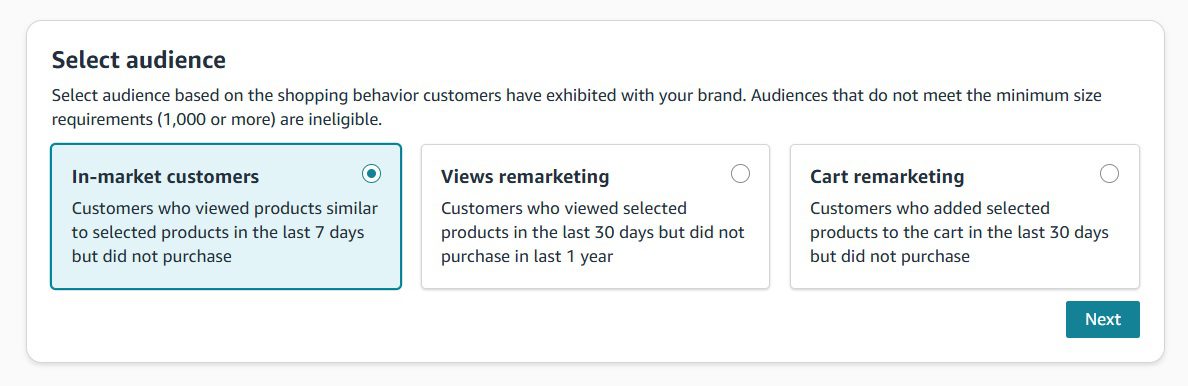
Despite the name, this goal plays a vital role in the retention lifecycle by converting high-intent shoppers before a competitor does. The three audiences available under this goal are:
- ✓In-Market Customers: Shoppers actively searching for products in your category in the last 7 days but who have not yet purchased. A 10% promotion here can capture buyers who are in active purchase mode before they convert on a competitor’s listing.
- ✓Views Remarketing: Shoppers who have viewed your brand or products in the last 12 months but have not purchased. These are browsers who did not convert, a targeted offer often closes the gap between consideration and purchase.
- ✓Brand Cart Abandoners: Customers who added your product to their cart in the last 30 days but have not purchased. This is your hottest audience. Cart abandoners have demonstrated intent at the point of decision. A 20% discount to this segment consistently outperforms any other BTP configuration in our managed accounts.
Goal 2: Customer Retention
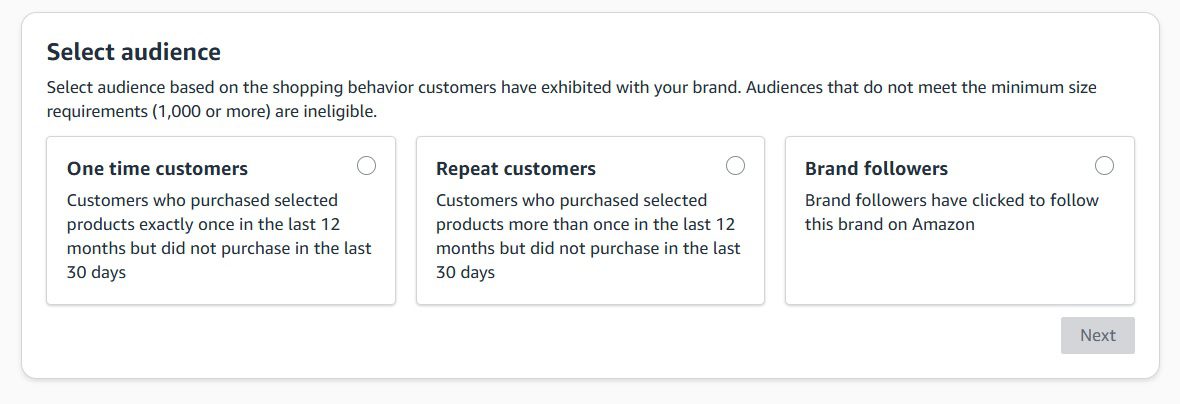
This is the foundation of your loyalty strategy. These audiences target customers who have already purchased from your brand, the people most likely to buy again with the right nudge at the right time.
- ✓One Time Customer: Customers who purchased your products exactly once in the last 12 months but not in the last 30 days. This is your highest-priority retention audience. A single purchase means interest was confirmed. A 15% targeted offer timed to the expected reorder window (use your Time Between Orders figure) converts a meaningful percentage into repeat buyers.
- ✓Repeat Customers: Customers who purchased more than once in the last 12 months but not in the last 30 days. These buyers are already loyal, they just need a timely reminder. A 10% promotion here protects against drift to a competitor during the reorder window without over-discounting a customer who would have returned anyway.
- ✓Brand Followers: Customers who have followed your brand on Amazon. This is an engaged audience with demonstrated brand affinity. Use this segment for early access to new product launches rather than discounts, it rewards loyalty without training this group to expect price reductions.
Goal 3: Re-engagement
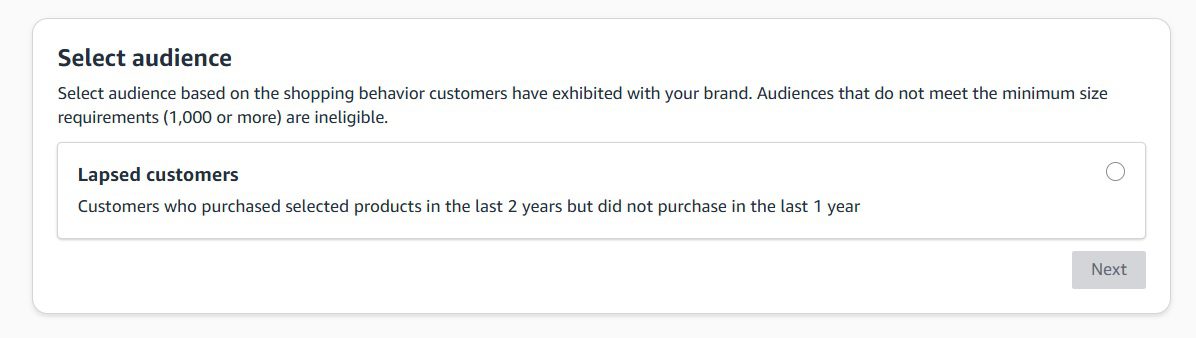
- ✓Lapsed Customers: Buyers who purchased from your brand at some point but have not purchased anything in the last 12 months. This is your hardest audience to convert, but for consumable products, a 20–25% reactivation offer paired with a new product announcement produces the best response rates. Do not use your standard 10% here. Lapsed customers left for a reason and a minimal discount will not overcome that inertia.
Goal 4: Cross-sell
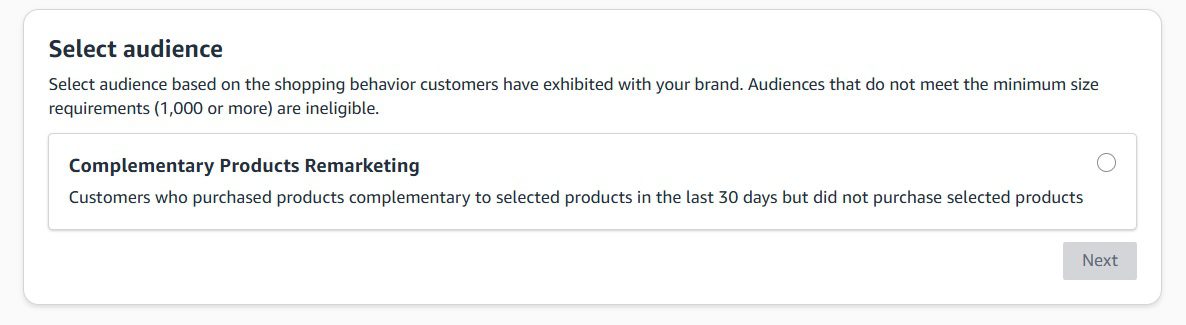
- ✓Complementary Product Remarketing: Targets customers who viewed or purchased products that frequently sell alongside your items. A customer who bought your protein powder receiving a targeted offer for your shaker bottle is a natural cross-sell that increases CLV without requiring new customer acquisition spend.
BTP discount floor and practical thresholds: Amazon requires a minimum 10% discount for all Brand Tailored Promotions. In practice: Cart Abandoners convert well at 20%. One Time Customers respond at 15%. Repeat Customers only need 10%. Lapsed Customers need 20–25%. Applying a flat 10% across all segments wastes budget on audiences that need more incentive and over-discounts those that need less.
Is Your PPC Budget Funding One-Time Buyers?
Paid campaigns bring first orders. Without a retention system, you pay for the same customer again and again. Our free PPC audit shows exactly where budget goes to buyers who never come back.
Strategy 3: Sponsored Display Retargeting
Sponsored Display is the paid retention channel that keeps your brand visible between purchase decisions. Unlike Sponsored Products, which intercepts customers when they are actively searching, Sponsored Display finds your previous buyers while they are browsing across Amazon and third-party sites, during the reorder window, not just at the moment of search.
Go to:
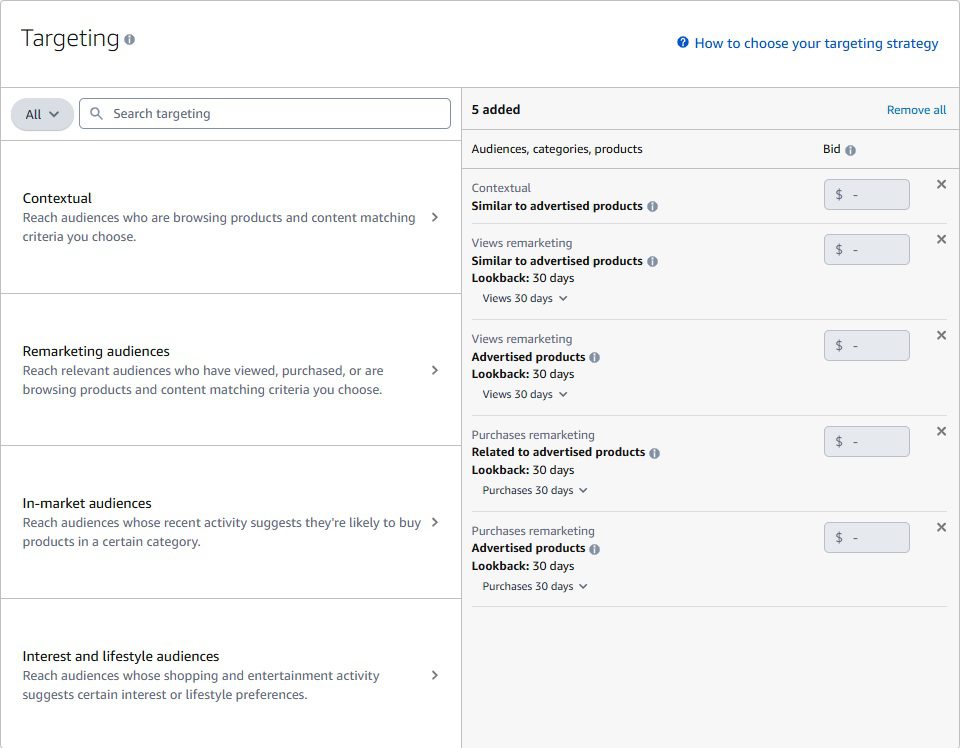
Sponsored Display’s Remarketing audiences, set the lookback window to match your ASIN’s Time Between Orders, not the platform default of 30 days
The most damaging and most common Sponsored Display retention mistake is using Amazon’s default 30-day lookback window on products with 45–90 day reorder cycles. The ads stop running before the customer reaches the natural decision point. Use your Time Between Orders figure to set every lookback window:
| Time Between Orders | Start Retargeting At | End Window At | Rationale |
|---|---|---|---|
| 20–30 days | Day 18 | Day 35 | Supplements, coffee, skincare with high-frequency use |
| 45–60 days | Day 38 | Day 70 | Most health and beauty consumables |
| 60–90 days | Day 52 | Day 100 | Vitamins, cleaning products, pet food (large bag) |
| 90+ days | Day 75 | Day 120 | Durable consumables, seasonal replenishment products |
Post-Prime Day Retention Sequence: Major sales events flood your brand with first-time buyers who will not return without structured follow-up. Run this sequence after every event: Days 1–7 post-event: Sponsored Display Purchase Remarketing on all event buyers. Days 7–30: Layer a BTP Repeat Customers campaign cross-selling a complementary product at 10%. Days 30–60: If no second purchase, move those buyers into BTP One-Time Customers at 15%. After day 60 with no conversion: move non-responders into DSP lapsed audience retargeting. Brands that run this sequence consistently retain 20–30% more event buyers than those who run a single post-event coupon.
Building a Retention System for Your Brand?
We build and manage the full retention stack including Brand Tailored Promotions, Sponsored Display sequences, AMC audience builds, and Subscribe & Save optimisation for Amazon brands generating consistent repeat revenue.
Strategy 4: Amazon Marketing Cloud (AMC)
Amazon Marketing Cloud (AMC) is now accessible directly from the Amazon Ads console, not just through Amazon DSP as it used to be. Amazon opened AMC to sponsored ads advertisers in 2024, which is a significant change most articles still have wrong. You no longer need a minimum DSP spend threshold to start building AMC audiences. If you run Sponsored Products, Sponsored Brands, or Sponsored Display, you can access AMC and put its audience-building capabilities to work for retention campaigns.
AMC is a privacy-safe, cloud-based clean room. It pulls together signals from your Sponsored Ads, DSP (if you run it), and your own first-party data (like hashed email lists), then lets you build custom audience segments based on actual customer behaviour, not just the pre-built definitions that every competitor in your category has access to as well.
What changed in 2024-2025: AMC audiences can now be activated directly in Sponsored Display campaigns (for targeting) and in Sponsored Products and Sponsored Brands campaigns (as bid multipliers). You no longer need DSP access to activate AMC audiences across Amazon Ads. Amazon also launched Ads Agent inside AMC in 2025, which lets you build audiences and run analytics using plain language prompts, without writing SQL queries at all.
How to Access AMC in Amazon Ads Console
Go to:
If you do not see AMC in your console, contact your Amazon Ads representative to get it linked to your advertiser account. It is free to access for advertisers running active sponsored ads campaigns. Some premium features (organic purchase data, extended retail history) are paid add-ons at approximately $200 per month, but the core audience-building functionality is free.
Three AMC Audiences That Directly Improve Retention
Standard Sponsored Display and Brand Tailored Promotions audiences use fixed Amazon-defined rules. AMC lets you build segments with your own logic. For retention, these three audiences produce the most direct impact:
Reorder-Window Non-Purchaser
Customers who bought your ASIN within the last 90 days but have not placed a second order, and are past their average Time Between Orders. Standard BTP only targets one-time buyers in a 12-month window. AMC lets you narrow this to exactly the customers who are overdue based on your ASIN’s specific reorder cycle, the highest-precision re-engagement audience available on Amazon.
High-LTV Repeat Buyer Lookalike
Build a segment of your top repeat buyers (customers with 3+ purchases and above-average order value), then create a lookalike audience from that seed list. Amazon uses behavioural signals to find new shoppers with similar purchasing patterns. This is one of the most efficient acquisition channels because it targets people who resemble customers already shown to retain and spend well.
Lapsed Buyers Beyond 12 Months
BTP’s Lapsed Customers audience stops at 12 months. AMC can reach buyers from 12 to 25 months ago, using Amazon’s expanded 25-month ad traffic lookback window (available as of 2025). For consumable products with annual purchasing patterns, these are not permanently lost customers. They are buyers who fell out of a subscription or purchasing habit and can be brought back with a compelling reintroduction offer.
Cross-Channel Path to Purchase
AMC shows which sequence of ad touchpoints, for example Sponsored Brands video impression → Sponsored Products click → Sponsored Display retargeting, actually leads to a repeat purchase. Standard campaign reports only show last-click. This path-to-purchase data tells you which campaigns actually contribute to retention so you can allocate budget based on real attribution, not assumptions.
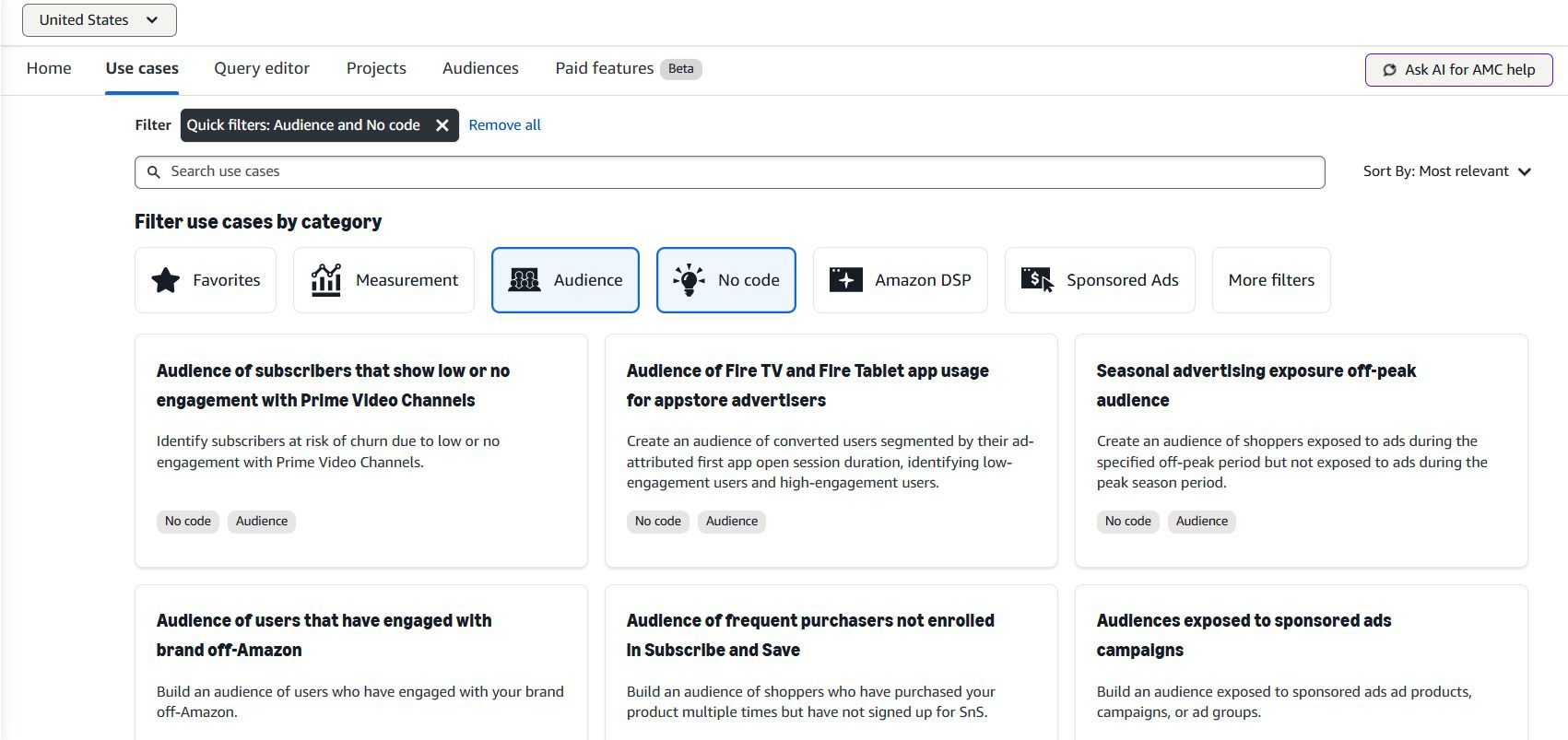
Amazon Marketing Cloud audience builder in the Amazon Ads console — create custom retention segments beyond what standard BTP and Sponsored Display tools allow
Step-by-Step: Building a Retention Audience in AMC
Open AMC in Your Ads Console
Go to advertising.amazon.com, log in, and select your advertiser account. Find Amazon Marketing Cloud under Measurement & Reporting. On the AMC homepage, you will see a curated library of audience and analytics templates, so you do not need to start from scratch. Select “Audiences” from the left-hand navigation.
Choose a Template or Use Ads Agent
AMC now offers pre-built audience templates for common use cases including “Purchasers who have not returned,” “High-value customers,” and “Cart abandoners.” Select the template closest to your goal. Alternatively, type your goal in plain language into Ads Agent (the AI assistant inside AMC), for example: “Build an audience of customers who bought my supplement ASIN in the last 90 days but have not reordered.” Ads Agent will write and run the query for you.
Define the Audience Parameters
Set the lookback window (use your Time Between Orders figure from Brand Analytics as the starting point), the ASIN or ASIN group, and any exclusion rules (for example, exclude anyone who has already reordered in the last 14 days). Set the audience refresh frequency, weekly works well for most retention audiences so the segment stays current as customers reorder and fall off the list.
Activate the Audience in a Sponsored Display Campaign
Once the audience is built (typically processed within 24 hours, minimum 1,000 users required), it becomes available in your Sponsored Display campaign targeting. Go to Seller Central → Advertising → Campaign Manager → Create Campaign → Sponsored Display → Audiences. Your AMC custom audiences will appear alongside standard Amazon audiences. Select your AMC audience and set a bid matched to the segment’s value. For a reorder-window non-purchaser on a high-margin ASIN, a higher CPM is justified because conversion rates on this audience are significantly above standard retargeting.
Layer AMC Audiences as Bid Multipliers in Sponsored Products
For Sponsored Products and Sponsored Brands, AMC audiences work as bid multipliers rather than direct targeting. In the campaign settings, go to Audience bid boosts, select your AMC audience, and set a bid increase percentage (typically 25–50% above base bid for high-value retention audiences). When a shopper in your audience searches a relevant keyword, your ad gets a higher bid, improving your placement for people you already know are likely to reorder.
Real result from AMC audiences in practice: Brands using AMC audiences for Sponsored Display retargeting have reported 60% higher ROAS compared to standard campaign benchmarks (Amazon Ads, Revive case study). A wellness brand targeting shoppers who had viewed ads and added to cart but not purchased achieved cost per product detail page visit at 50% of previous equivalent campaigns. These numbers reflect what happens when audience precision improves, the same ad budget reaches people far more likely to convert.
Strategy 5: A+ Content & Brand Store
Most sellers treat A+ Content as a first-purchase conversion tool. It is also a retention tool, and for brands with strong repeat buyers, it may be more important as a retention mechanism than as an acquisition one.
Every time a loyal customer returns to reorder and lands on your product page, the quality of that experience either reinforces their decision or quietly introduces doubt. A+ Content at the point of a repeat visit is not about educating a new buyer. It is about confirming the decision a customer who already trusts you is already making.
Structure your A+ Content for returning customers, not first-timers. Include precise usage instructions, dosage guidance for supplements, care instructions for applicable products, and before/after comparisons where relevant. Customers who fully understand and correctly use your product have measurably lower return rates and higher reorder rates. A supplement customer who understands how to stack their product correctly does not abandon it after one bottle.
Use the comparison module within A+ Content to map your product variations against real customer use cases. This cross-sells your catalog naturally to a customer who is already on your page, the highest-intent placement in your entire retention system.
Your Amazon Brand Store is the one page on the platform you control completely. Structure it for repeat visits: a Best Sellers section for your highest-repeat ASINs, a New Arrivals section (updated monthly, a store that never changes gives returning customers no reason to return), and a Bundle Deals section that converts single-product buyers into multi-product customers. A customer who regularly buys three of your products requires a competitor to displace all three simultaneously. That is exponentially harder to do than displacing a single-product buyer.
Strategy 6: Cross-Selling & Upselling
Retention does not always mean the same product in the next order. It means the same brand. A customer who buys three of your products has invested in your brand rather than in a single SKU. That kind of relationship is qualitatively different from single-product loyalty and far harder for a competitor to disrupt.
Amazon Brand Story is the cross-selling surface most brands leave completely unused. It is an A+ Content module that appears across every product detail page in your catalog, a permanent, high-visibility placement that every returning customer sees on every product page they visit.
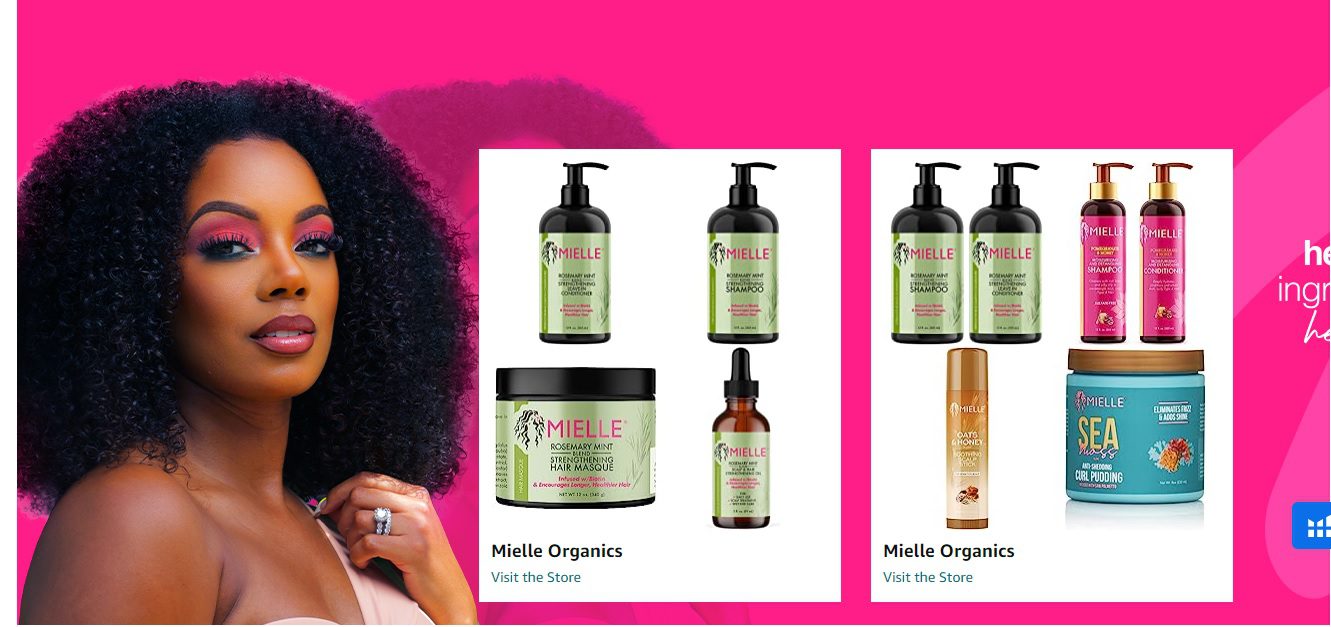
Amazon Brand Story, the cross-sell surface that appears across your entire catalog; structure it around customer problems, not company history
Structure your Brand Story around the customer’s problem, not your company’s origin. Lead with the primary need your brand was built to solve. Show how different products in your range address that need at different stages or use cases. A supplement brand’s Brand Story should not read like a corporate about page, it should show a customer with a goal and a range of products that serve that goal at different stages of their journey. Include a direct link to your Brand Store so engaged customers can explore the full catalog immediately.
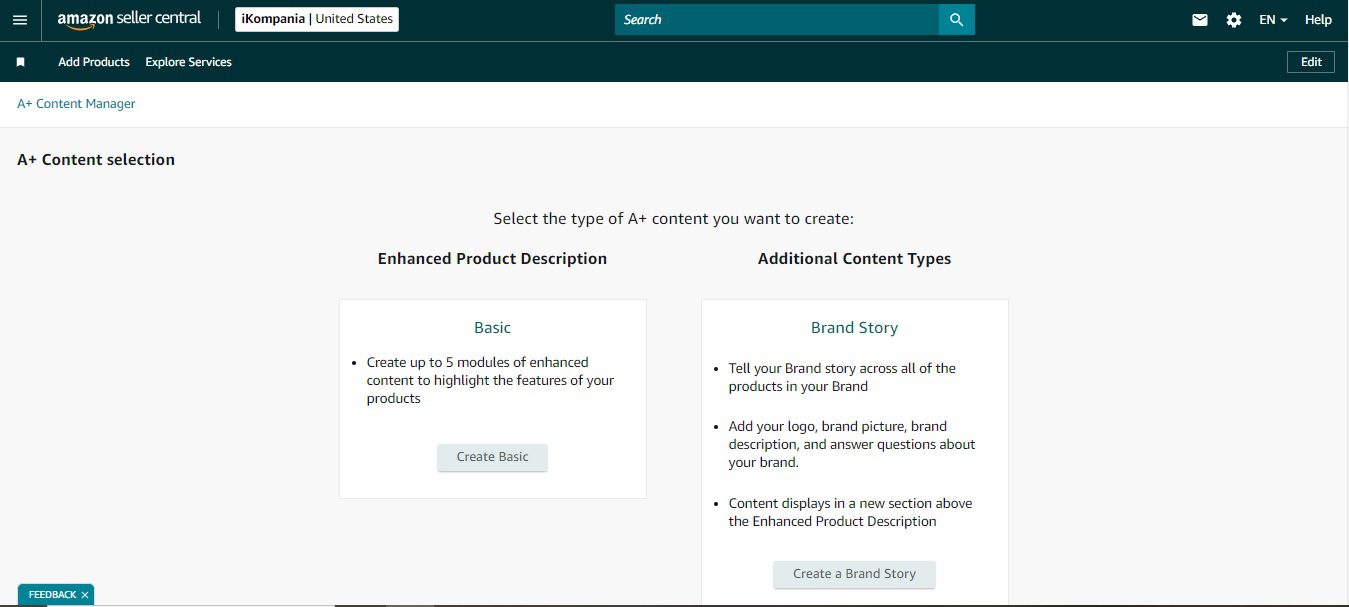
A well-structured Brand Story module, product-focused narrative with direct catalog links visible on every ASIN detail page
Virtual Bundles for cross-category loyalty: Amazon Virtual Bundles let Brand Registry sellers create bundle listings from existing standalone ASINs without creating new inventory. A customer who buys the bundle becomes a multi-product customer in a single transaction. Bundle conversion to repeat purchase is significantly higher than single-ASIN conversion because the customer’s investment in the brand is immediately broader.
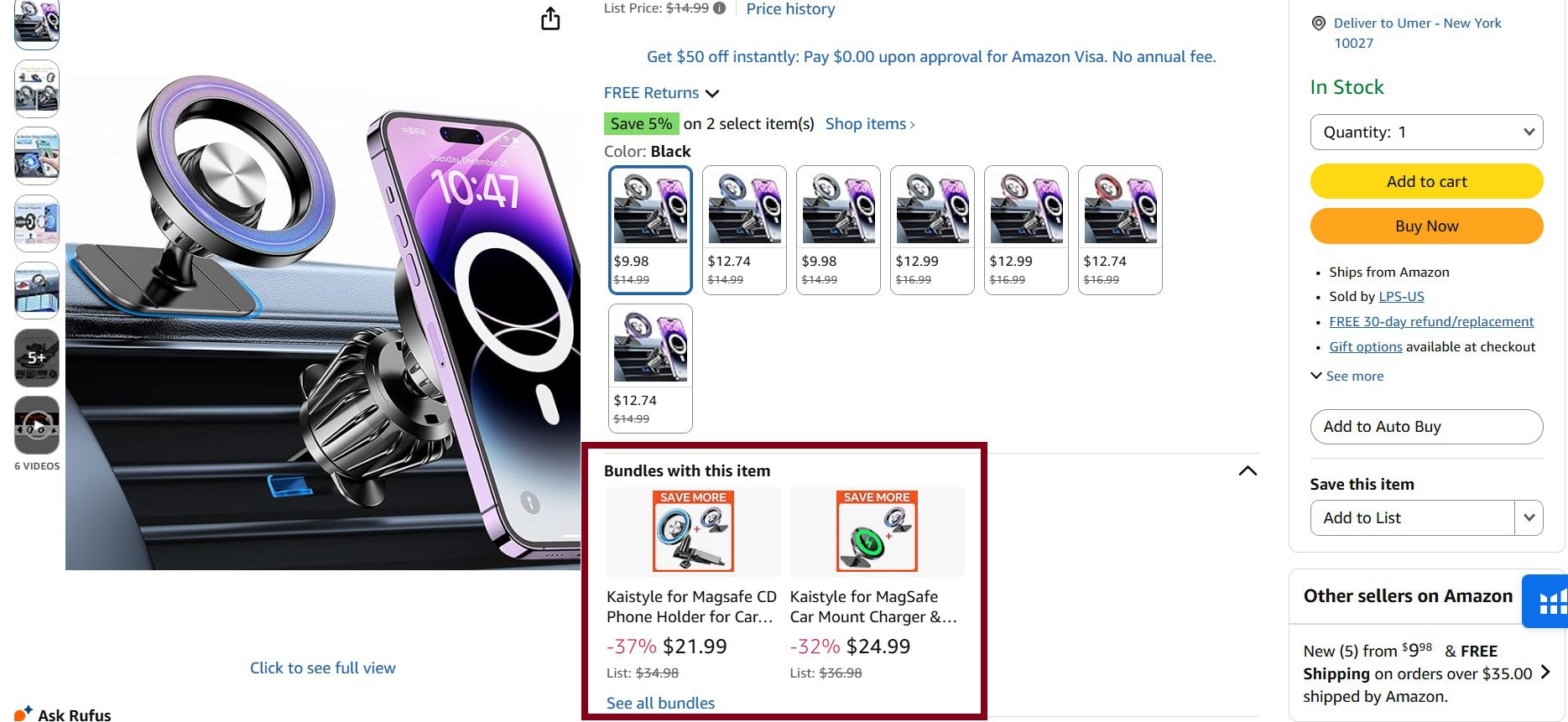
Amazon Virtual Bundles, create multi-product listings from existing standalone ASINs without holding new inventory
Strategy 7: Inventory & Review Health
The two retention killers that no campaign can fix are stockouts and declining review quality. Both drive involuntary churn, customers who wanted to reorder but could not, or who returned and found their trust in the product eroded by new negative reviews. Every retention campaign you run sits on top of these foundations. If the foundations are unstable, the campaigns underperform regardless of targeting quality.
Packaging Inserts
Physical product packaging is the one post-purchase touchpoint Amazon cannot control. A well-executed insert (a QR code linking to a usage guide, a care card, a registration page for warranty or premium content, or a simple thank-you card with your brand story) increases the emotional investment a customer has in your product. Higher emotional investment means lower likelihood of switching to a competitor on the next purchase. Do not use inserts to solicit reviews (against Amazon TOS) or to redirect to your DTC website with coupon codes (also against policy). Use them to deliver genuine value that makes the product experience better.
Stockout Prevention
Stockouts are the single most common cause of involuntary customer churn on Amazon. A customer who returns to reorder and finds your listing out of stock does not wait. They find an alternative in the same category and potentially do not return. For inventory management, the retention-specific rule is: calculate your reorder points using your Time Between Orders data, not generic lead-time assumptions. If your ASIN has a 47-day Time Between Orders and you go out of stock for two weeks, you miss a meaningful percentage of that reorder cycle entirely.
- ✓Set restock alerts at 30-day supply remaining for your top five repeat-purchase ASINs. The standard FBA restock tool defaults to a 60-day horizon, which is too late for fast-moving consumables. In Seller Central → Inventory → Manage Inventory, set custom restock alerts per ASIN.
- ✓Monitor Inventory Performance Index (IPI) weekly. A falling IPI is often the first visible signal that an ASIN is about to hit restock friction. Catch it at 70+ days of supply rather than at zero.
- ✓For Subscribe & Save subscribers specifically: A stockout mid-subscription cycle triggers an automatic delay in the shipment. Customers who receive a delayed Subscribe & Save notification cancel at a rate approximately 3x higher than those who never experience a stockout. Protect this cohort above all others with dedicated safety stock.
Review Monitoring as a Retention Signal
A decline in your average star rating is a leading indicator of upcoming retention problems. Customers who had a positive experience and are ready to reorder often check the listing’s current reviews before doing so, especially in health, beauty, and food categories. A drop from 4.6 to 4.2 stars caused by a batch of negative reviews in the last 30 days will suppress repeat purchase rates within weeks, regardless of any retention campaign running simultaneously.
Monitor the review profile of your top-repeat ASINs weekly. If you see a spike in negative reviews within a rolling 30-day period, check three things in order: inventory batch quality (was a recent FBA shipment from a different production run?), product instruction clarity (are customers using the product incorrectly and blaming the product?), and listing accuracy (are the images and descriptions matching what customers receive?). Resolve the root cause before running a re-engagement campaign on an ASIN with a degraded review profile, you will convert customers back to a listing that disappoints them on arrival.
Mistakes That Kill Retention
Across the brands we manage, the retention failures cluster around the same avoidable mistakes. Understanding what damages retention is as useful as knowing what builds it.
| Mistake | What It Actually Causes | The Fix |
|---|---|---|
| Generic 10% BTP coupons to all audiences | Over-discounting customers who would have reordered anyway; under-incentivising lapsed buyers who need 20–25% to return | Segment by loyalty tier and apply discount thresholds matched to the behavioural data, see the BTP section above |
| Default 30-day Sponsored Display windows on 60-day products | Ads stop before the customer reaches natural reorder decision; a competitor’s ad fills the gap | Match every lookback window to the Time Between Orders figure from Brand Analytics per ASIN |
| Using A+ Content only for first-purchase conversion | Returning customers see an experience built for someone who has never heard of your brand, it reinforces nothing and cross-sells nothing | Build A+ Content to serve both audiences: usage depth for retention, catalog breadth for cross-sell |
| Checking loyalty data monthly instead of weekly | At-Risk cohorts grow unchecked for 3–4 weeks before action; by then half have reordered from competitors | Monday morning: Brand Analytics open, At-Risk count checked, re-engagement campaign live by Wednesday if count is rising |
| Running retention campaigns on out-of-stock ASINs | Spend money to bring customers back to a listing they cannot buy, drives cost per retention with zero return | Pause BTP and Sponsored Display retargeting the moment inventory drops below 14 days. Resume the day stock is confirmed back in FBA |
| Discounting Top Tier customers reflexively | Training your most loyal customers to expect a discount before every purchase, suppressing full-price revenue on your highest-LTV segment | Reward Top Tier with exclusivity (early product access, first-to-know launches) rather than discounts they do not need to repurchase |