When browsing Amazon, if you notice videos playing within the search results or large banner/video below the search bar, these are Sponsored Brands ads, designed to showcase products to shoppers.
These ads are completely different from Sponsored Products, which are more like placing a single product at eye-level within search results or product pages.
What Are Amazon Sponsored Brands?
Sponsored Brands ads let you tell a story. Instead of competing on a product-by-product basis, you build a narrative around your brand, making it more memorable long after a shopper has left the page.
For sellers who want to build brand awareness and encourage repeat purchases, these ads are essential. The Amazon advertising console is where you’ll manage these campaigns. It’s where you move from simply selling products to strategically building a brand that customers recognize and trust.

1. Benefits of Sponsored Brands Ads
Sponsored Brands have several key advantages for sellers. Here are the benefits of SB ads.
Increased Brand Awareness
With large banners and video content, these ads capture attention right away . According to Amazon SB ads increase brand awareness and help you stand out with rich creatives.
Brand Storytelling:
Sponsored Brands let you customize the ad to reflect your brand’s image. You can upload your brand logo, write a compelling tagline, and use lifestyle or product images/videos .
This combination of elements helps convey what’s unique about your brand and products. For example, adding a lifestyle background image or a brand tagline can make shoppers curious about your story, increasing click-through.
Multi-Product Exposure
Sponsored Brands headline search ads can feature up to three products. This lets you promote new launches alongside best-sellers, or cross-sell complementary items.
Grouping products by business goal e.g. a bundle of similar items, can drive better results than promoting one SKU at a time.
Targeted Traffic
You control who sees your ads through keyword, product or audience targeting. This means your videos/banners can reach shoppers searching for relevant terms.
With new-to-brand metric, so you can track how many first time customers discover you via Sponsored Brands. The data shows these ads are effective, leading to a 28% increase in new-to-brand orders and a significant 45% jump in Store visits when you use video.
Flexible Landing
You can send clicks either to a product listing or to a custom landing page/Brand Store. Driving traffic to your Store encourages shoppers to browse your full catalog, which can increase cross-sells and repeat purchases.
Linking to your Store also means customers won’t see any competitors’ products when they click, creating a focused shopping experience.
3. When to Prioritize Sponsored Brands
So, when should you use these campaigns? They’re most effective when your goal is to grow your brand’s presence on Amazon, not just chase immediate sales. A common mistake new sellers make is pouring their entire budget into bottom-funnel ads and then wondering why they aren’t building a loyal customer base.
Think of it this way: you need a balanced approach. It’s not about choosing one ad type over another; it’s about making them work together. By combining them, you create a full-funnel strategy that attracts, engages, and converts shoppers at every stage of their journey. There are many strategies to increase overall brand awareness and grow your business that can be amplified with these ads.
Sponsored Brands vs. Sponsored Products
Sponsored Brands (SB) and Sponsored Products (SP) target different layers of shopper intent. SP ads brings the sales to rank organically while the SB ads creates brand awareness and increases the new to brand customers. Here’s the structural difference before you dive into the details.
1. Ads Placement
Sponsored Brands ads only show four places ads search page, 1st on the the top-of-search position, 2nd ad within results, 3rd ad end of the page detail pages and 4th on product detail pages.
While Sponsored Product ads (SP) can appear throughout the page (top, bottom, sidebar) and mix in with organic listings. Only 3 Sponsored Brands ad shows per search page whereas up to a dozen Sponsored Products may appear.

2. Content
Sponsored Products highlight a single SKU. Sponsored Brands feature your brand logo, custom headline, and up to 3 products in one banner. In other words, Sponsored Brands are “banner-style” brand ads. This gives you more room to tell your brand story and showcase multiple products at once.
3. Objective
Sponsored Products drive direct sales of specific items; Sponsored Brands are especially powerful for building brand awareness, broadening reach, and cross-selling within your brand . They typically have higher click-through rates and engagement (thanks to the prime placement). However, they require more setup (graphics, copy, multiple SKUs) and often a higher CPC.
Where Sponsored Brands Ads Appear
Sponsored Brands can show in several premium spots across Amazon. These placements help shoppers discover your brand earlier in their search journey and guide them toward your Store, product collection, or video.
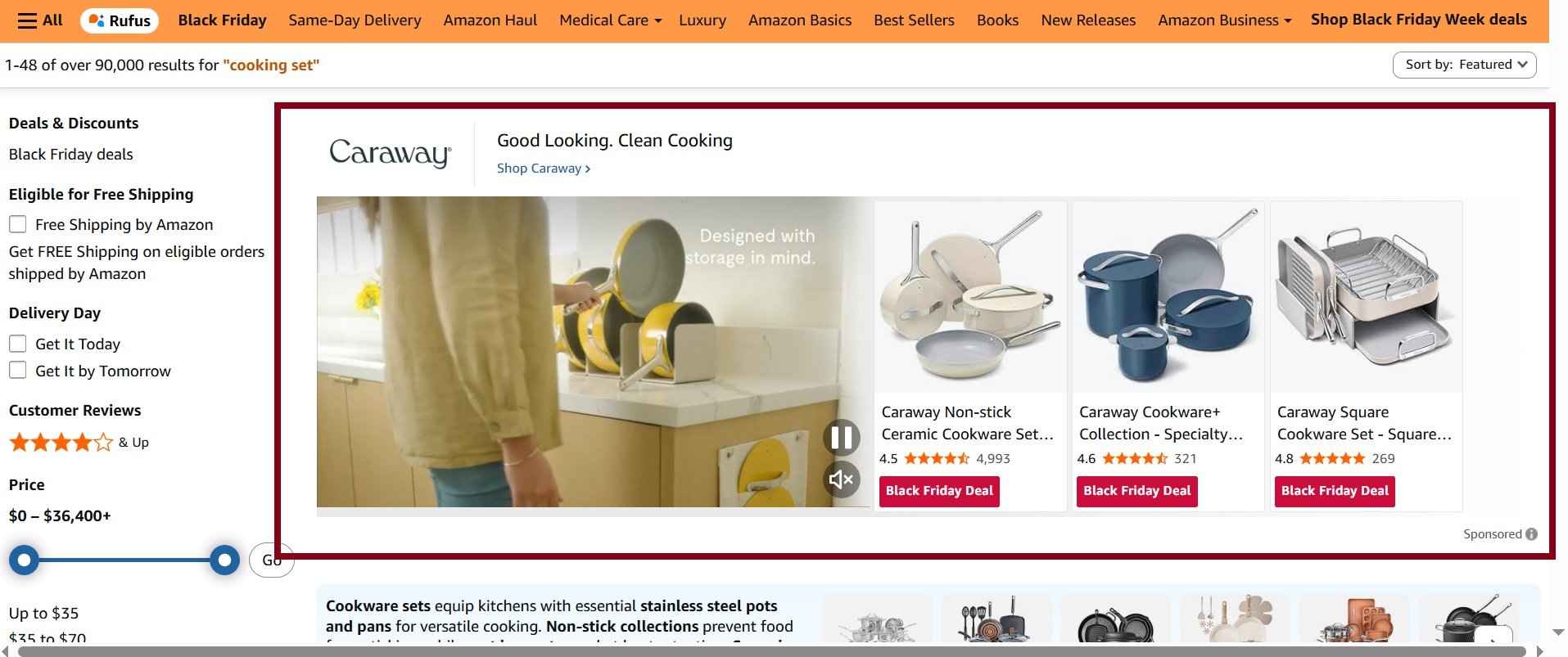
1. Top of Search
This is the most sought-after placement for Sponsored Brands. Your ad appears above all organic and Sponsored Products results.
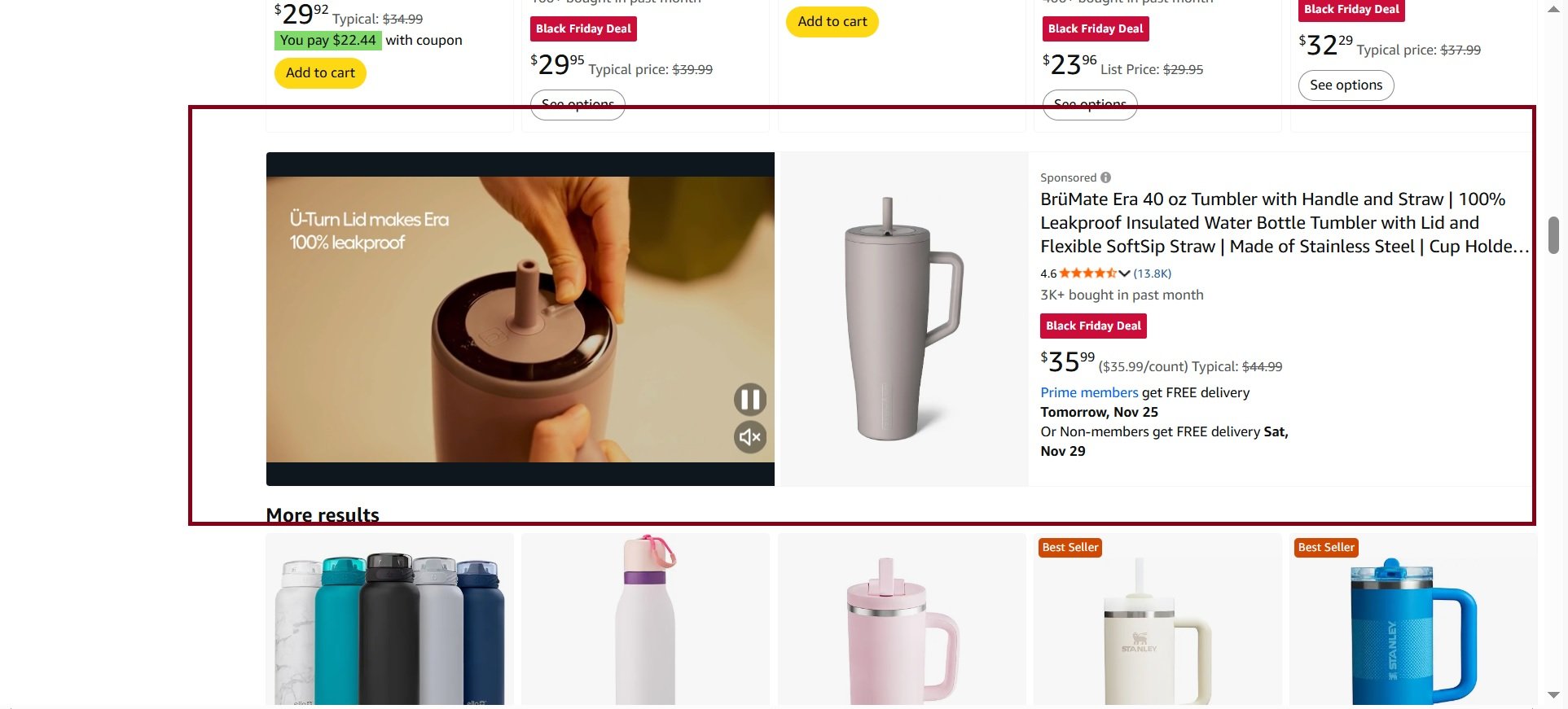
2. Search Results Middle Placements
These placements appear within the search results. Shoppers can encounter them while scrolling down the page, making them good for mid-funnel discovery.
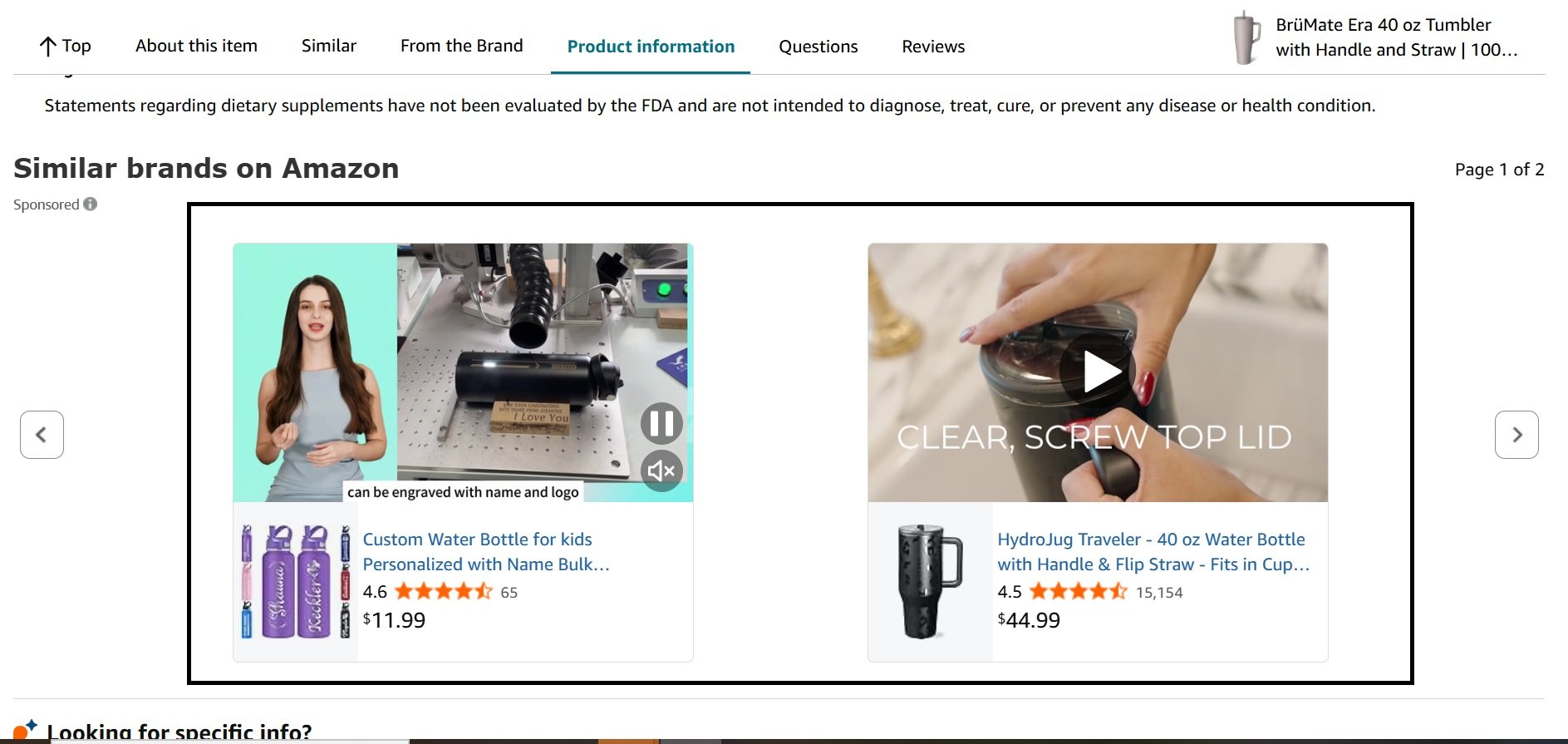
3. Detail Page Placements
Certain Sponsored Brands formats, especially video and product-collection variations, can appear on product detail pages. You may show next to “Products related to this item” or similar sections.
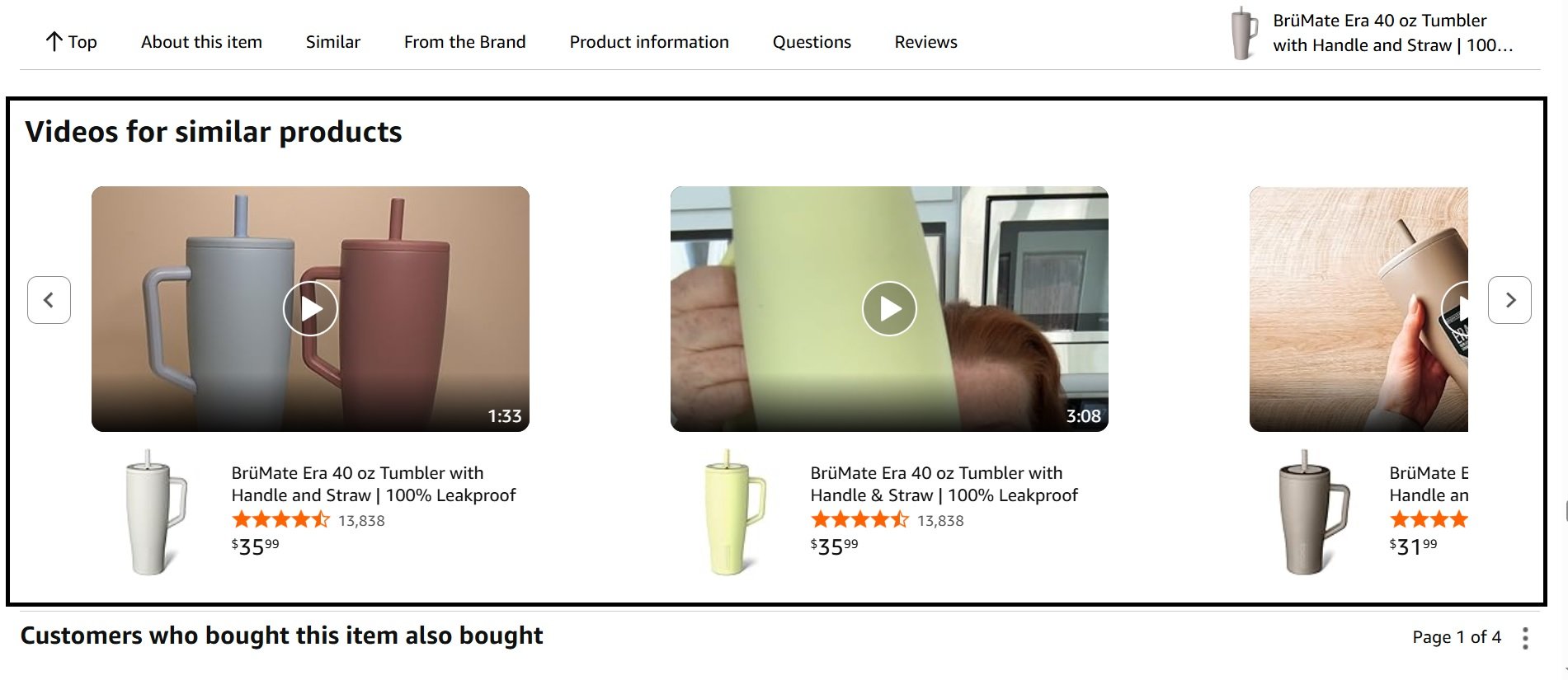
Sponsored Brands Ad Formats
Amazon gives you three ad options, and your choice will completely change how shoppers see and interact with your brand.
Each format has a specific strategic purpose, and matching the format to your goal is where the real results come from.
1. Product Collection Ads
The Product Collection ad shows your brand logo, a custom headline, and up to three of your products right in the banner.
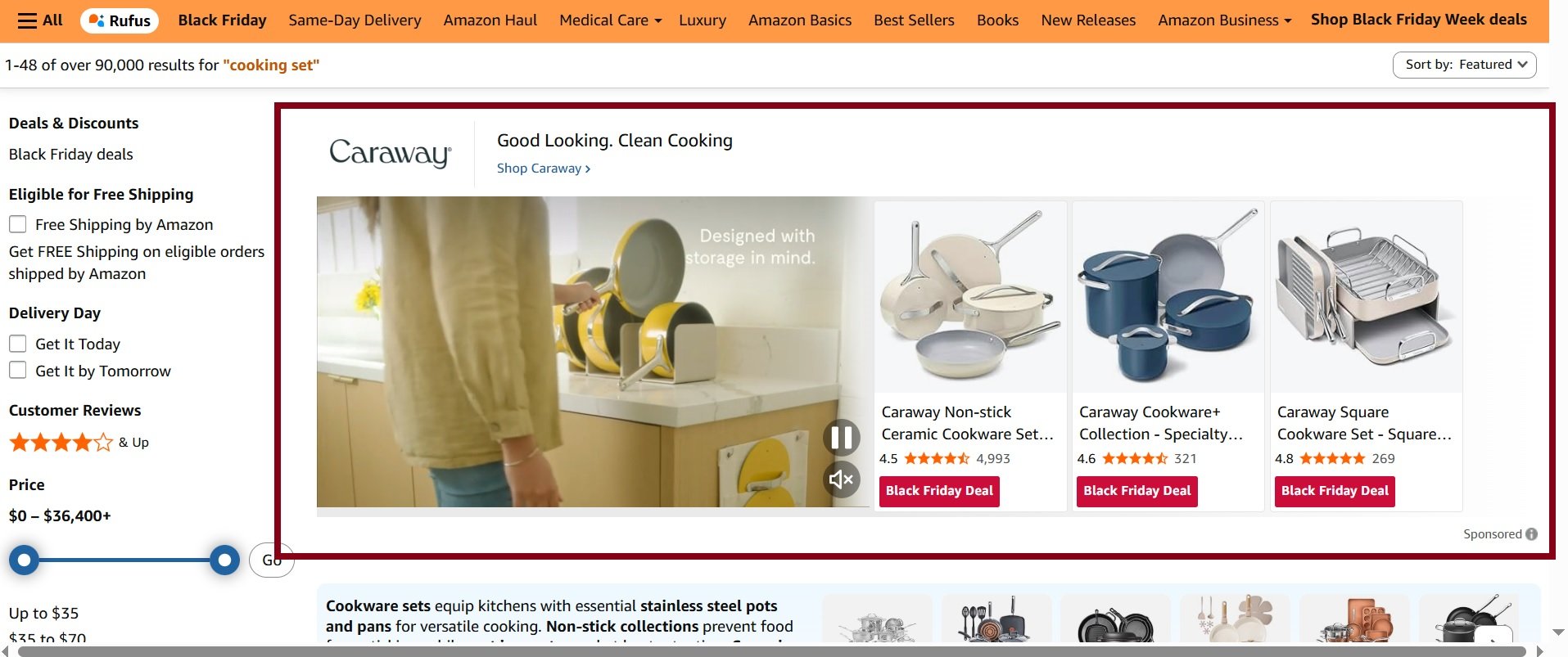
When a shopper clicks a specific product, they land on its detail page. But if they click your headline or logo, you can send them to your Amazon Store or a custom landing page. This format is a workhorse for a few key jobs:
- Increase Average Order Value (AOV): By showing complementary items together, you suggest a bundle.
- Showcase Your Catalog: It’s a great way to let shoppers know you sell more than just the one thing they were searching for.
- Control the Message: Custom headline can stop a shopper mid-scroll and tell them exactly why your brand is the right choice. These ads are also known as Amazon Headline Search Ads.
This format is best for brands wanting to feature a curated product set, drive cross-sells, and highlight a specific product line.
2. Store Spotlight Ads
If you’ve built a great Amazon Storefront, the Store Spotlight format is your reward. Instead of featuring individual products in the ad, this format puts your Store’s subpages front and center, complete with their own custom images and headlines.
This ad becomes a direct portal into your brand’s world. It’s less about selling a single item and more about selling the entire brand experience.
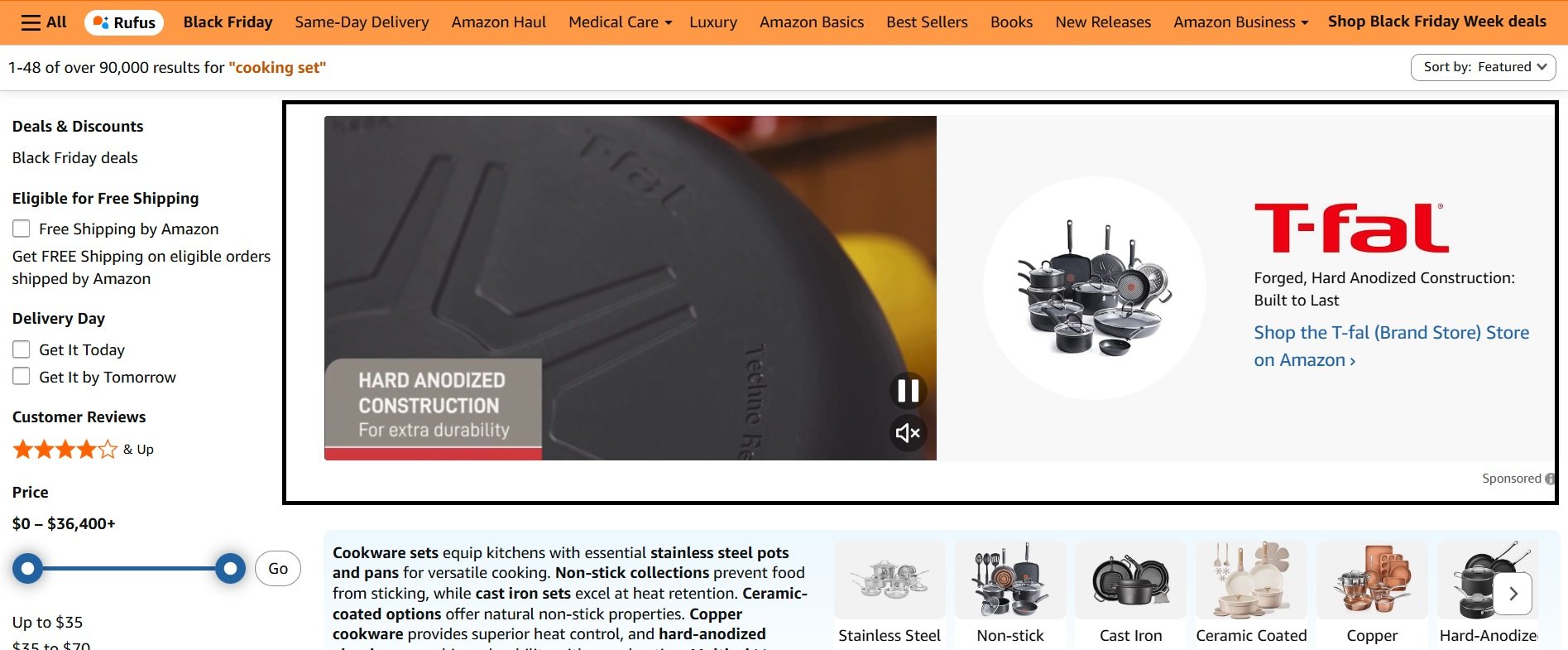
When someone clicks on one of the subpage images, they land on that specific page within your Store. This is excellent for brands with distinct categories, like a skincare company with separate lines for “Anti-Aging,” “Hydration,” and “Sun Care.”
Best for: Brands with a well-designed Amazon Store, a diverse product catalog, and the goal of pulling shoppers deeper into their brand ecosystem.
3. Sponsored Brands Video Ads
Nothing grabs attention like a silent, auto-playing video. The Sponsored Brands Video format puts a single product in the spotlight, and the video does all the talking without saying a word.
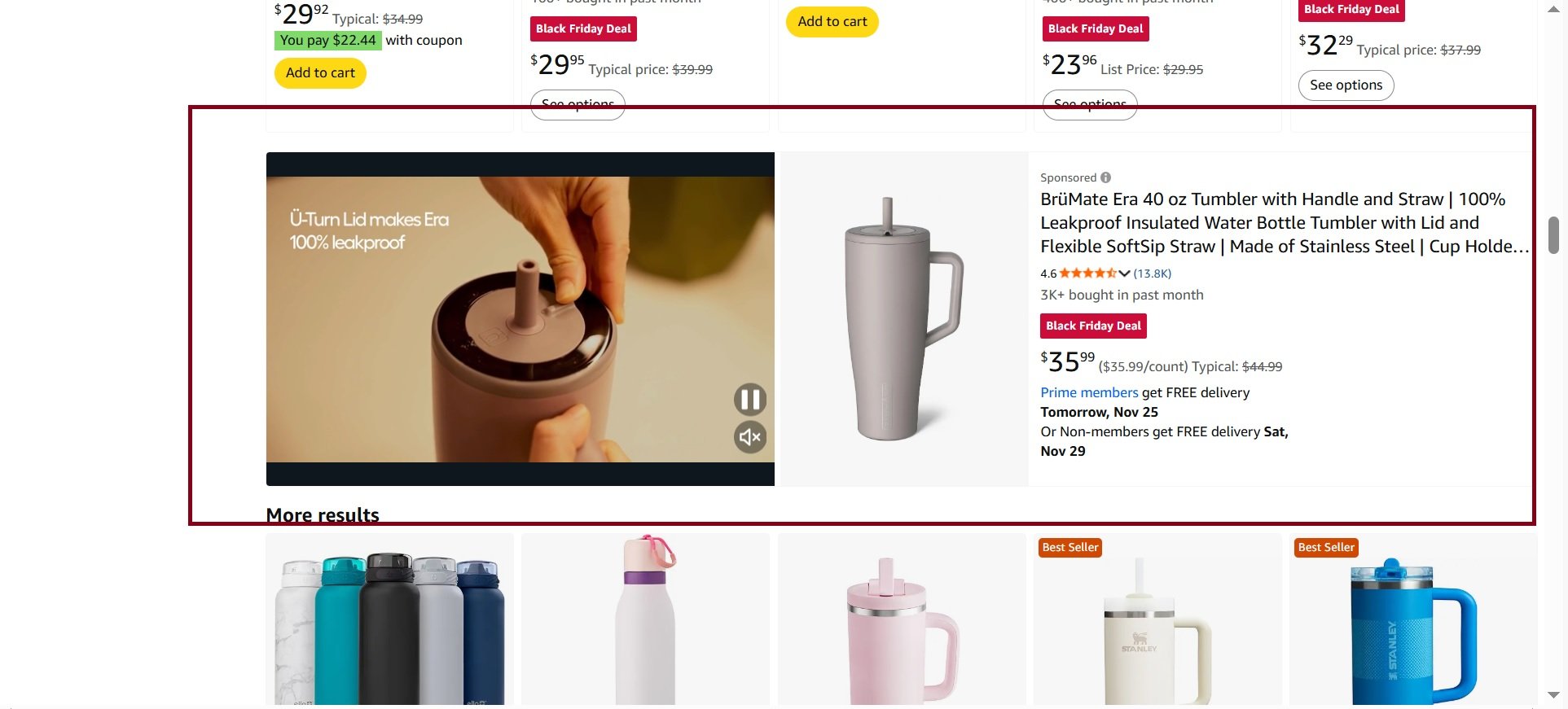
The video plays automatically once it’s visible on the screen, making it powerful for showing a product’s features and benefits in action. Static images can’t compete.
A recent study found that video ads can lead to a 45% increase in total Store visits. Imagine a kitchenware brand showing a short, satisfying clip of its vegetable chopper quickly dicing an onion; that’s more persuasive than a picture. Here are a few tips for a winning video ad:
- Get to the Point: Show your product within the first 1-2 seconds. Don’t waste time.
- Design for Silence: Most people watch with the sound off. Use on-screen text and clear visuals to tell the story.
- Keep it Short: Aim for 15-30 seconds. You want a quick, impactful message, not a short film.
Step-by Step Process to Set Up Your Campaign
Let’s walk through the entire setup, focusing on the steps you’ll need to make to get your ad live and performing from day one.
Step 1: Define Your Goal
Before you even open Seller Central, ask yourself one simple question: What do I want this ad to accomplish? Your answer is your campaign goal, and Amazon will ask you to choose one right at the start to help tailor the settings.
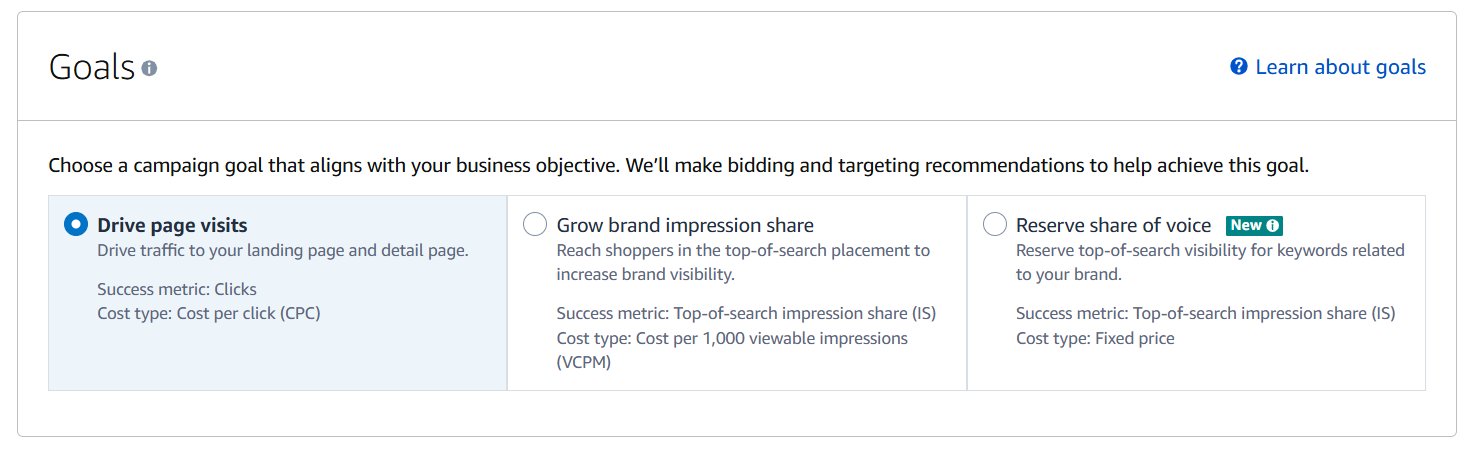
- Drive page visits: This is your go-to for new brands or product lines. The main objective is to get shoppers to your collection. You’re trying to get eyeballs on your Store or a custom landing page, plain and simple.
- Grow brand impression share: This goal is all about visibility. You’re telling Amazon you want to show up for a certain percentage of top-of-search placements. It’s perfect for building brand recognition and owning your space.
- Reserve share of voice: With this one, you can defend your brand with focus on top of search visibility especially if you have heavy branded traffic.
Step 2: Set Up Campaign Basics
This handles the campaign’s internal structure. A clear naming system and realistic budget make optimization much easier when running multiple campaigns.
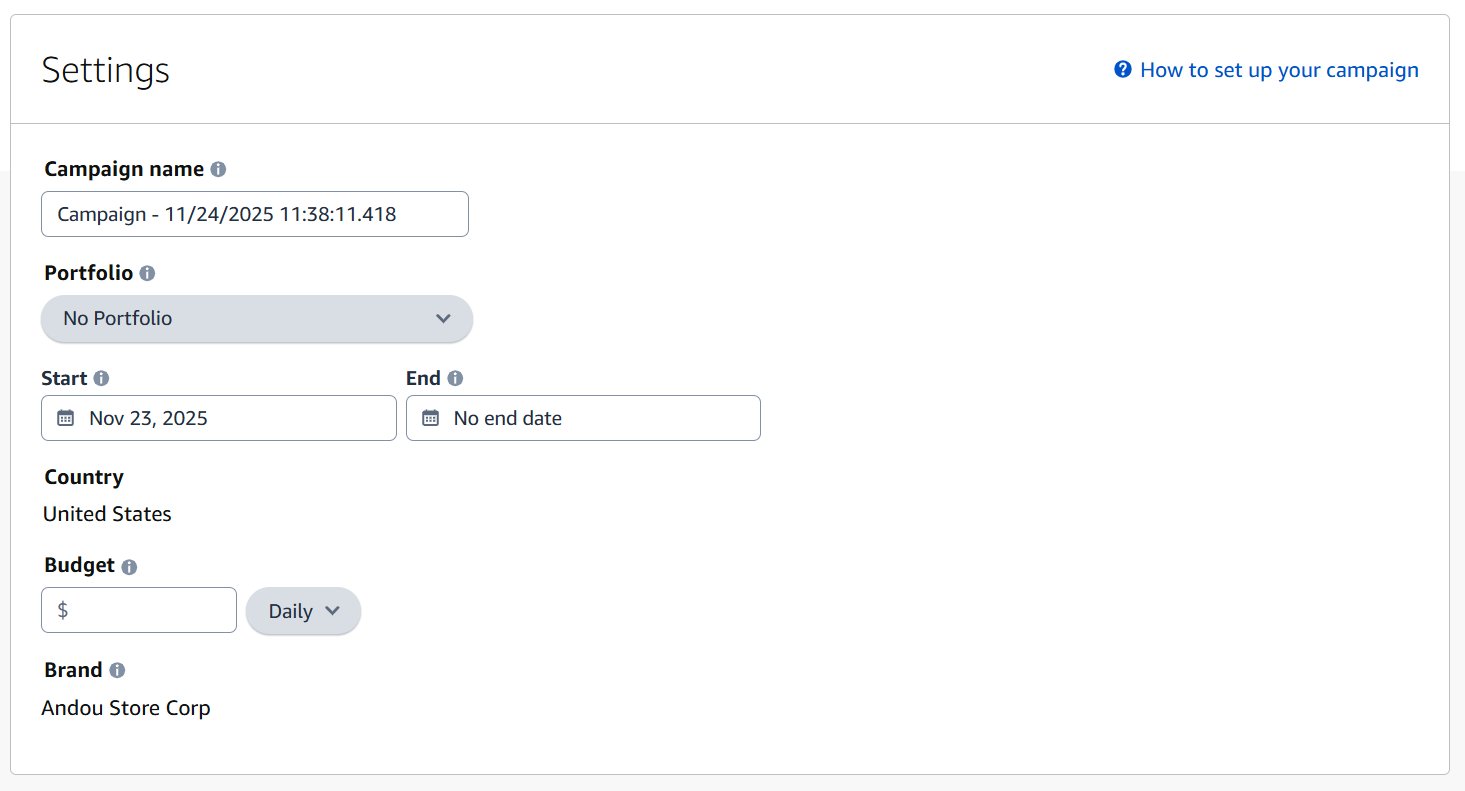
- Use names like “SB | ASIN | Goal | Targeting | Main Keyword | Date”
- Set daily budgets that allow steady delivery instead of constant throttling
- Portfolios help organize campaigns when you scale to dozens
Step 3: Choose Where the Ads Should Run
You can run Sponsored Brands on Amazon Retail and Amazon Business. The choice depends on whether your catalog is relevant for both audiences.
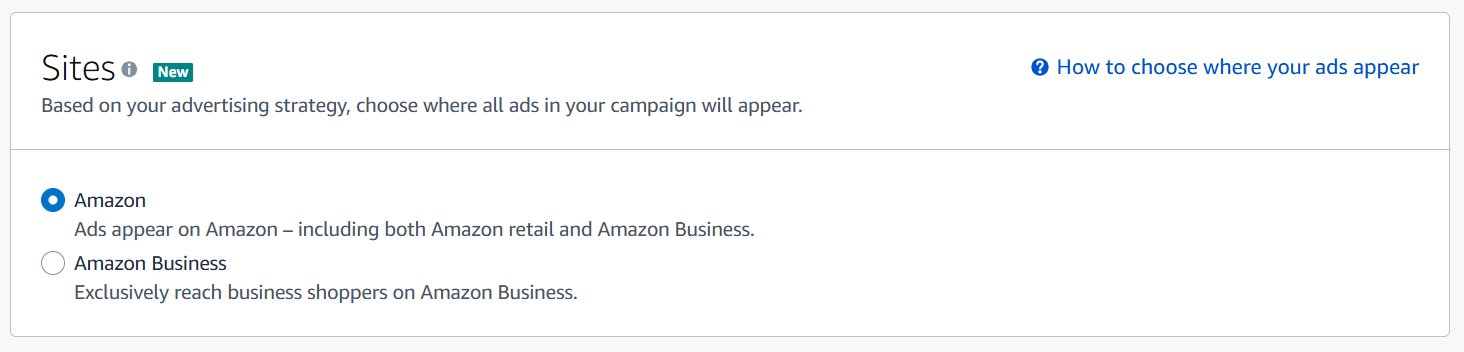
Amazon Retail is always on. Amazon Business may help categories like office supplies or tools that businesses require most of time.
Step 4: Create the Ad Group and Pick Your Ad Format
This is where you select the actual format the shopper will see. Each format performs differently, so choose based on your goals and available creatives.
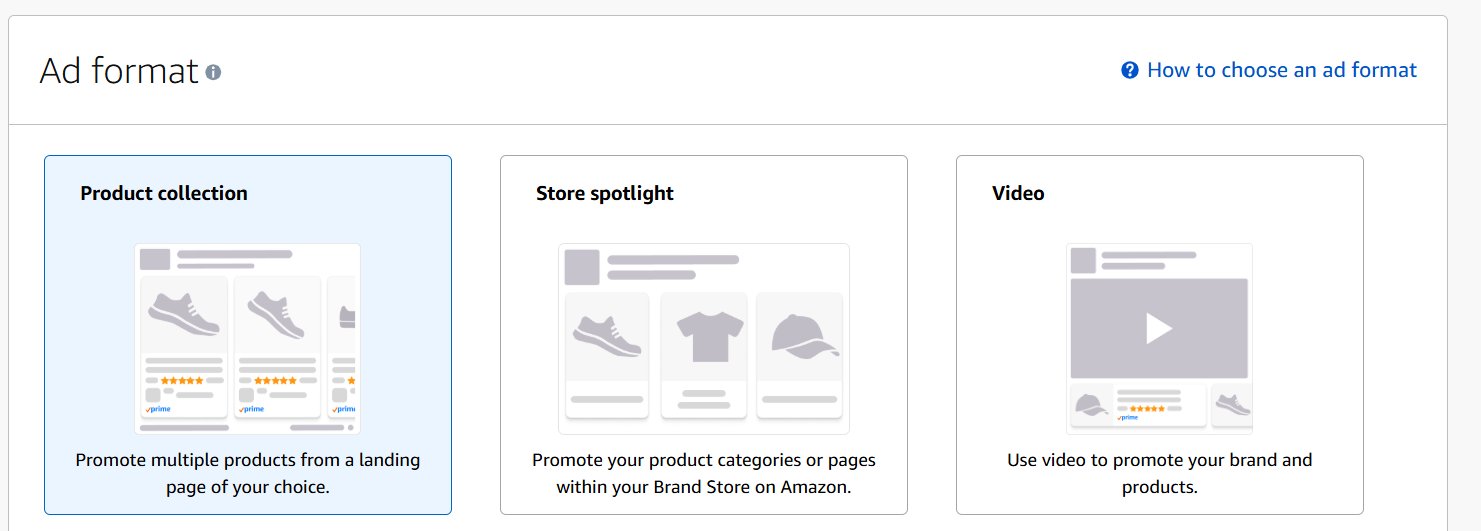
- Product Collection is best for beginners and general search traffic
- Store Spotlight works when you want to push a category-specific Store page
- Video creatives grab attention in search results and can significantly raise CTR
Step 5: Select the Landing Page
Your landing page determines how relevant the user’s experience will be. Sending traffic to a generic page leads to low conversions, even with good keywords.
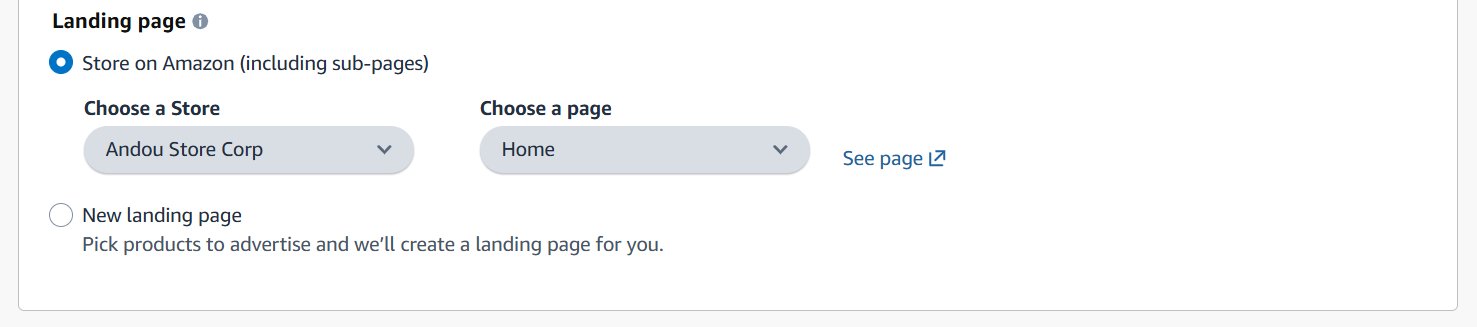
- Choose a Store page or subpage that matches the ad’s message
- Link directly to product detail pages if promoting a single hero SKU
- Avoid Store homepages for keyword-focused campaigns
Step 6: Adjust Placements
Placement adjustments help you push harder for premium positions like Top of Search. These boosts influence where your ads appear within the results.
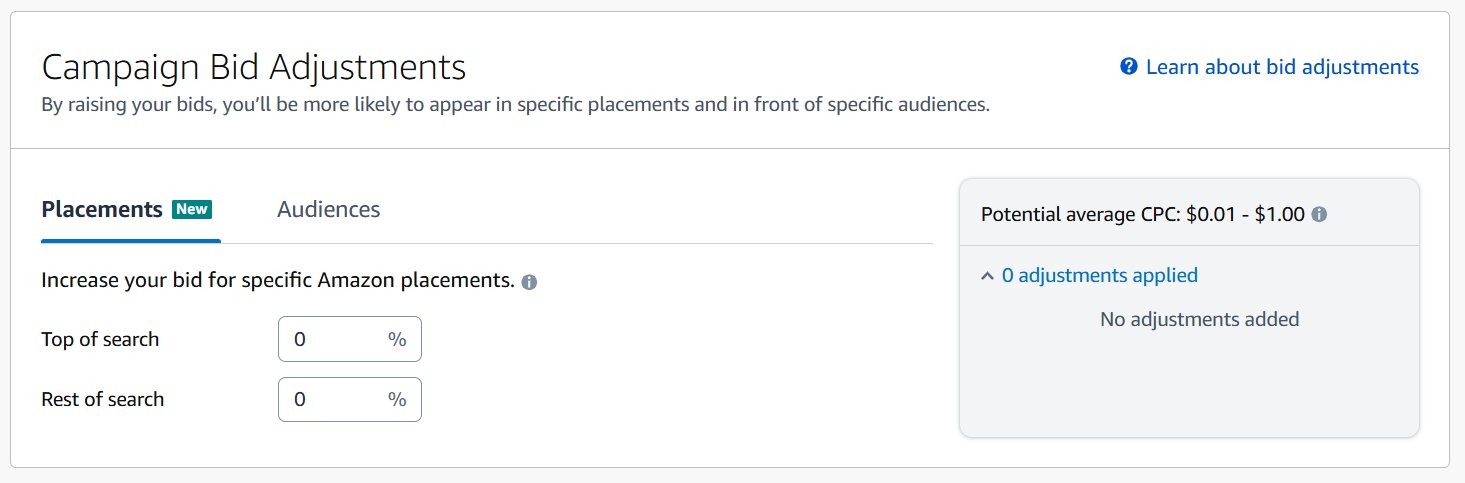
- Start with modest increases like 10–20 percent
- High boosts (50–100 percent) should only be used when conversion rates support them
- Monitor CPC closely after raising placement percentages
Step 7: Choose Targeting (Keyword or Product)
Your targeting determines who actually sees your ads. Sponsored Brands lets you reach shoppers through search terms or product pages.
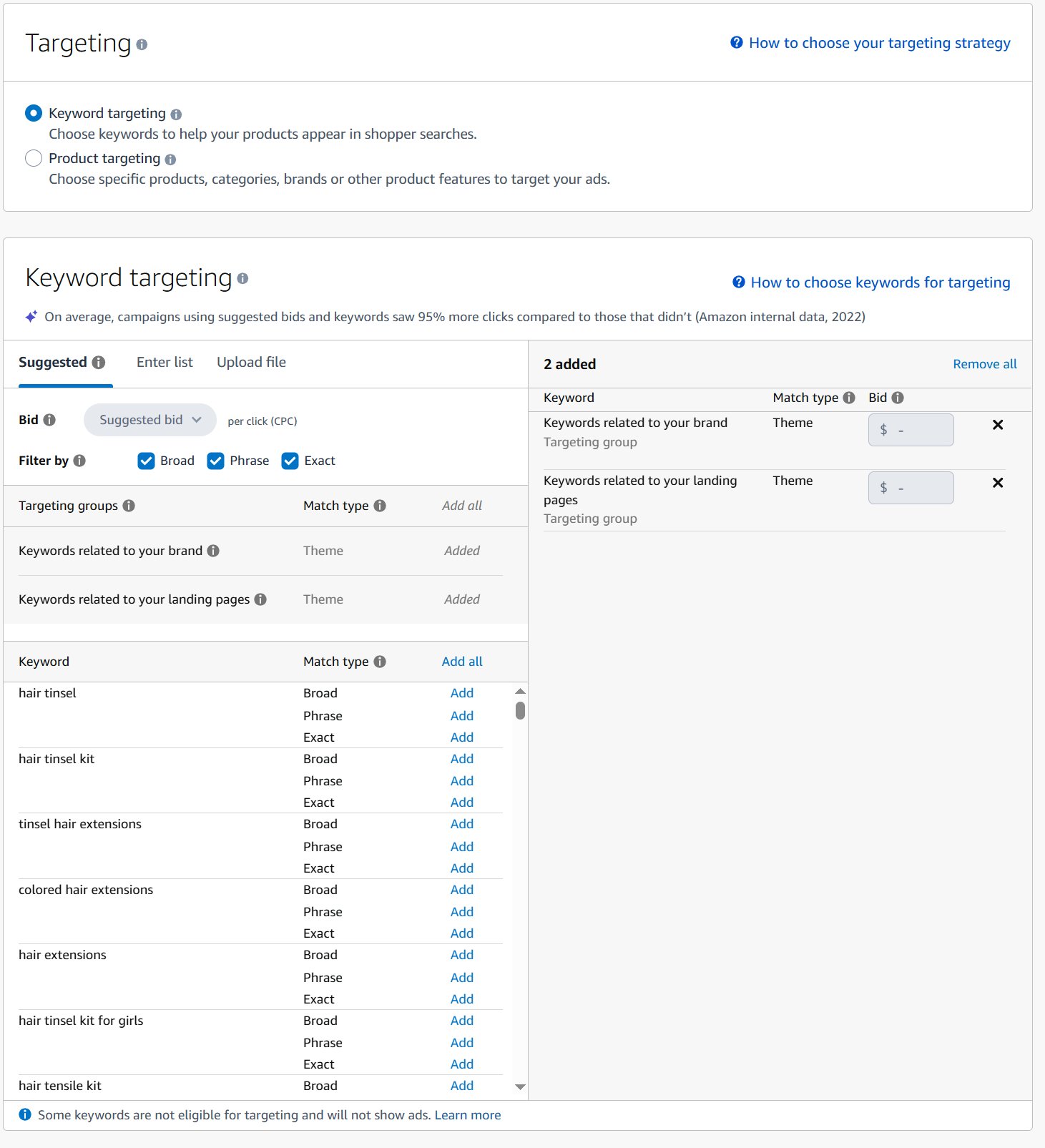
- Exact match works for high-intent searches
- Phrase match captures close variations based on shopper patterns
- Broad match helps discover new converting queries
- Product targeting lets you appear directly on competitor ASINs or categories
Step 8: Create the Ad Creative
Now for the fun part: designing what shoppers will actually see. For a Product Collection or Store Spotlight ad, you’ll need to pull together three main components.
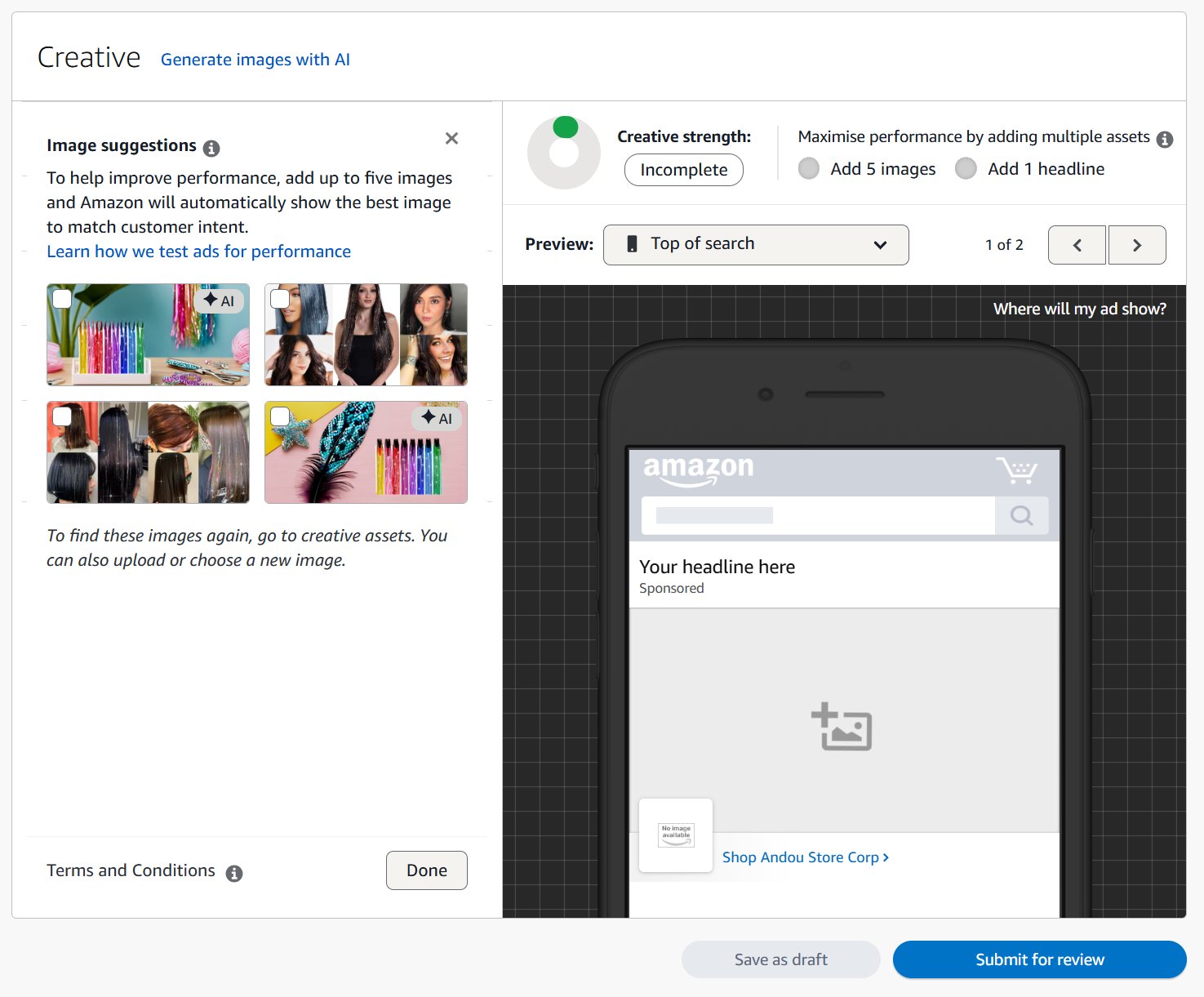
- Brand Logo: This is your brand’s signature. Make sure it’s a high-quality, clear image that’s easily recognizable.
- Custom Headline: You have limited space here, so every character counts. Focus on a strong benefit or a question that makes people stop and think. Instead of something generic like “High-Quality Yoga Mats,” try “Your Last Yoga Mat, Guaranteed.”
- Products or Store Pages: Be selective. Pick the ASINs or Store pages that are a perfect match for your campaign’s theme. If your ad is for “summer grilling,” don’t include a winter blanket.
For video ads, the video itself is the main event. Just remember to design it for sound-off viewing (most people won’t have audio on) and get your product on screen within the first two seconds.
Sponsored Brands Ads Best Practices
Setting up an Amazon Sponsored Brands campaign is the easy part. The real work, the part that separates a money-draining ad from a sales-generating machine, comes down to two things: creative that grabs attention and targeting that finds the right shoppers. Nail these, and your ad spend becomes a serious investment.
A great campaign is a perfect match between what shoppers see and who sees it. You could have the most beautiful ad creative, but if it’s showing up in front of the wrong audience, you’re just throwing money away. Likewise, even precise targeting won’t save an ad that’s boring or confusing.
1. Creative
Your creative is your digital handshake. It’s the first impression you make, and it has to be sharp, professional, and instantly communicate value. Here’s where to put your energy.
Test Your Headlines: Don’t just write one headline and call it a day. A/B test different angles. Compare a benefit-driven headline (“Never Buy Plastic Wrap Again”) against a pain-point question (“Tired of Cling Wrap Waste?”). Let the data tell you which one connects with people.
Use High-Quality Imagery: This isn’t optional. Your brand logo needs to be crisp and clear, even when it’s shrunk down on a mobile screen. For product collections, use high-resolution lifestyle shots that show your product in the real world. Shoppers connect more with something they can picture themselves using.
Optimize for Video: If you’re running a Sponsored Brands Video ad, you’ve got to hook them in the first three seconds. Seriously. Most videos on Amazon autoplay on mute, so use bold on-screen text to get your message across without sound. To learn more, check out a complete guide to creating AI video ads that convert.
2. Targeting
Smart targeting is all about efficiency. It ensures your ad budget is spent on shoppers who are actually looking for what you sell, maximizing your return.
One of the most powerful tools is negative keywords. These are the terms you don’t want your ad to appear for. For instance, if you sell premium leather dog collars, you’d add words like “cheap,” “nylon,” and “vegan” as negatives. This stops you from paying for clicks from people who are never going to buy your product. Our guide on keyword research for Amazon can walk you through building out both your positive and negative keyword lists.
Another effective tactic is competitor ASIN targeting. This lets you place your ad directly on your competitors’ product detail pages. It’s an aggressive move, but it gives you a chance to win market share from shoppers who are one click away from buying from someone else.
Amazon is constantly adding new features. For example, the Sponsored Brands “reserve share of voice” feature has nearly doubled top-of-search impression shares from 62.7% to 99.3% for advertisers using it. The result? A 143% jump in click-attributed sales, proving how much strategic placement matters.
3. Mobile Optimization
Most Amazon shopping happens on mobile, so your ads must shine on small screens. Keep these in
mind:
Shorter Headlines: Aim for ~35 characters or less for mobile, so the text doesn’t get cut off .
What’s fully visible on desktop might truncate on phone. Test your headline on a phone preview.
Crisp Logo: On mobile, detail can blur. Use a simple, bold logo design and verify it looks good at
small scale . Transparent backgrounds help it pop.
Product Images: Some mobile SB layouts only show one product image at a time. Choose
products with clear white backgrounds and no tiny text or labels, so they’re easily recognizable.
Avoid showing product packaging text (it’ll be too small to read).
4. Key Metrics and Optimization
To figure out if your campaign is working, you need to track the right Key Performance Indicators (KPIs). Track these metrics to gauge performance and optimize your Sponsored Brands campaigns:
Impressions and CTR
Impressions show reach. CTR shows whether the creative and targeting make people click. Low impressions mean weak bids or weak keyword selection. Low CTR means the ad isn’t attracting interest, so update the headline or product mix.
New-to-Brand
This measures first-time customers from Sponsored Brands. Rising numbers mean the campaigns are pulling in new to brand customers.
Sales and Orders
Track which campaigns and keywords drive actual conversions. Compare units and revenue to see where performance concentrates.
ACoS and ROAS
These metrics show cost efficiency. Sponsored Brands usually carry higher ACoS, so evaluate them by broader brand impact. Cut bids or pause costly, low-return targets.
Placement Performance
Top-of-search gets stronger visibility but costs more. Lower placements drop CTR. Adjust bids based on where performance is good.
Search Term Report
Download SB search term report and review search queries. Add strong performers. Block irrelevant traffic. Monitor which ASINs attract the most engagement in product-targeting.
While ACoS and ROAS are your go-to metrics for profitability, don’t ignore the others. Impressions and New-to-Brand sales tell a bigger story about how effectively you’re building brand recognition and growing your audience over the long term.
For a detailed look into the two most important profitability metrics, check out our detailed guide on ACoS vs. ROAS.
Quick Answers to Common Questions
1. What Is a Good ACoS for Sponsored Brands?
That’s a common question, but there’s no single magic number. A “good” ACoS for Amazon Sponsored Brands depends completely on your strategy and profit margins.
While many sellers see benchmarks between 20% and 40%, that’s just a general range. If you’re launching a new product and your main goal is visibility, you might be fine with a higher ACoS. But for a well-established product, you’ll want a lower ACoS to protect your profits.
2. Can I Run These Ads Without Brand Registry?
No, you can’t. Enrollment in Amazon Brand Registry is a firm requirement for Sponsored Brands, and for good reason.
These ads are built to showcase your brand, using your official logo and linking to your Amazon Storefront. Since Brand Registry is how you manage those assets, Amazon requires it to run these specific campaigns.
3. How Long Does It Take to See Results?
You’ll see clicks and impressions almost immediately, usually within a day or two. But don’t get too hung up on that initial data. The real impact on brand awareness and sales takes more time to become clear.
Give any new campaign at least two to four weeks to collect enough data. This gives you a solid foundation to make smart decisions about your bids and targeting, rather than just reacting to daily changes.
4. How Much Should I Spend on a Sponsored Brands Campaign?
If you’re just starting, a daily budget of $25 to $50 is a great starting point. It’s enough to gather some initial data without a large investment.
Once you start seeing which keywords and targeting methods are profitable, you can begin to scale up. The idea is to double down on what’s working while keeping your ACoS right where you want it.