Amazon Attribution is a free measurement solution that lets brands track how their off-Amazon marketing channels drive traffic, sales, and engagement on Amazon. Think of it as a UTM tracking system built specifically for Amazon, one that connects the dots between a Facebook ad, a Google search campaign, a YouTube video, or an email newsletter and the actual purchase that follows on Amazon.
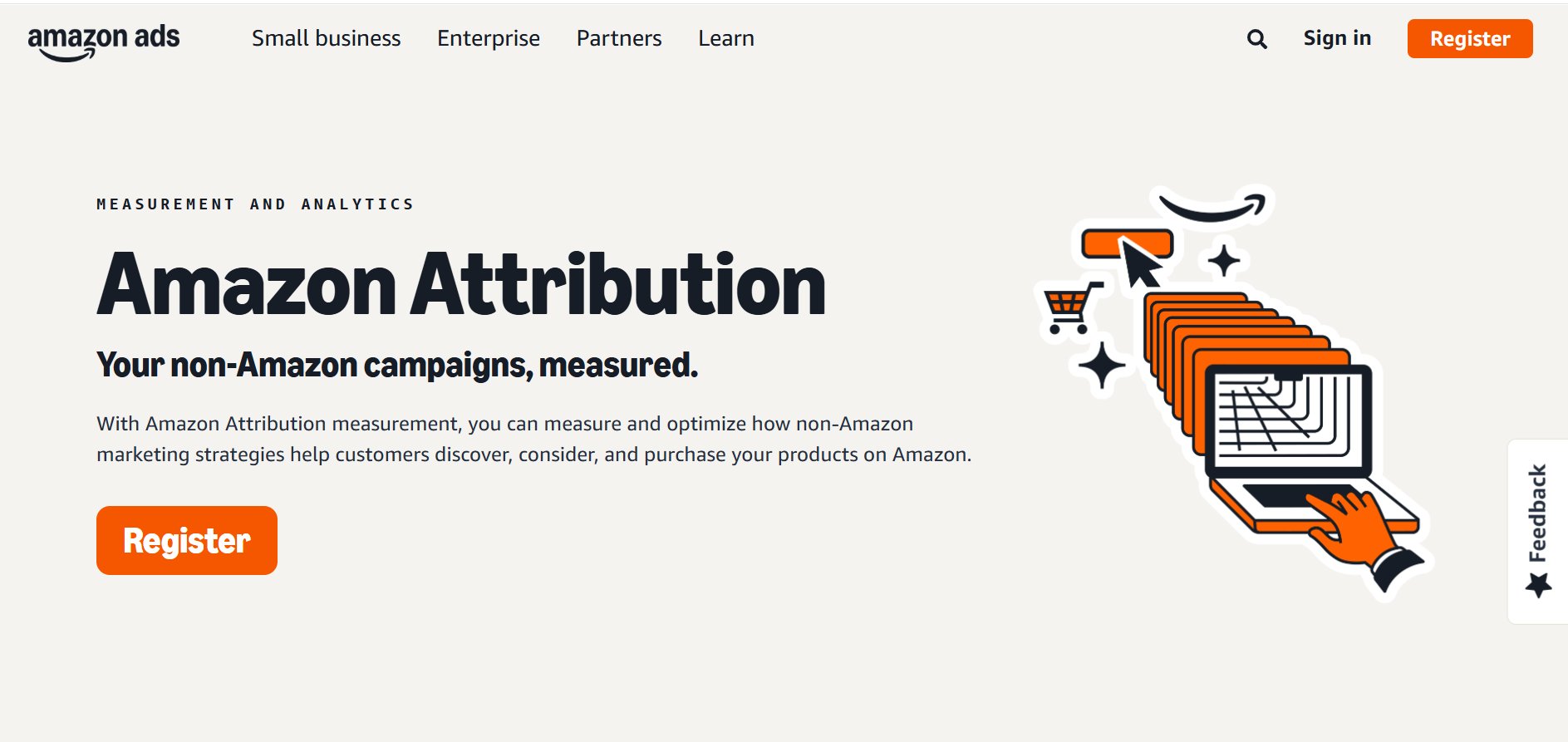
Without it, you are essentially running blind. You spend money on external traffic, it lands on your Amazon listing, conversions happen, and you have no idea which channel drove them. Amazon Attribution fixes that by generating unique tracking links for each campaign or creative, then attributing resulting Amazon activity back to the source.
The program is available to sellers enrolled in Amazon Brand Registry, vendors, and agencies managing those accounts. It works across all major marketing channels including paid search, social media, display advertising, email, and video.
What Amazon Attribution Actually Does
Amazon Attribution assigns a unique URL to each marketing touchpoint you create outside Amazon. When a shopper clicks your Facebook ad link, visits your Amazon product page, and buys within 14 days, that sale gets attributed to that Facebook campaign. You can then pull a report inside Seller Central or the Amazon Attribution console and see exactly what that traffic did.
The data you get includes detail-page views, add-to-cart rates, purchase rates, total sales, and new-to-brand purchases. That last metric matters a lot. It tells you whether your off-Amazon traffic is acquiring new customers or just recapturing people who already knew your brand.
1. The 14-Day Attribution Window
Amazon uses a 14-day post-click attribution window. If someone clicks your attribution link and buys within 14 days, that conversion gets credited to your campaign. This window applies across all channel types. If someone clicks again through a different attribution link before purchasing, the most recent click gets the credit.
2. What Gets Measured
Each attribution tag captures the following data points inside your reporting dashboard:
- Click volume (how many people clicked your link)
- Detail page views (how many arrived at your listing)
- Add to cart (how many added your product)
- Purchases (how many bought)
- Total sales attributed
- New-to-brand purchases and sales
3. What Amazon Attribution Is Not
It is not a bidding platform. It does not run ads. It does not replace your Facebook Ads Manager, Google Ads, or your email platform. It is purely a measurement layer sitting on top of your external marketing activity. You still manage your campaigns in those native platforms. Amazon Attribution just tells you what those campaigns did after the click landed on Amazon.
Who Can Use Amazon Attribution
Access requires enrollment in Amazon Brand Registry. If you are a third-party seller without brand registry, Amazon Attribution is not available to you. Vendors on Vendor Central also have access through their own version of the console.
Agencies managing multiple brand accounts can apply for agency access, which lets them manage attribution across a portfolio of clients under one login. This is called the Amazon Attribution API and agency tag workflow, and it is particularly useful for performance marketing agencies running paid media for multiple Amazon brands at once.
As of 2026, Amazon Attribution is available in the United States, Canada, United Kingdom, Germany, France, Italy, Spain, India, Japan, and several additional marketplaces. Availability has expanded significantly since the program launched as a beta in 2018.
How to Create Amazon Attribution Links
The process of creating attribution links lives inside the Amazon Attribution console, which is accessible through your Seller Central account. Here is how the workflow actually operates in practice.
Step 1: Go to Advertising Console Dashboard
First, you need to get to the right place. The entire setup lives inside your Amazon Advertising console, the same spot where you manage your PPC campaigns.

- Log in to your Amazon Advertising account (or head to Seller Central and go to Advertising).
- Click the three-line menu icon in the top-left corner to open the main navigation.
- Under the “Measurement & Reporting” section, you’ll see Amazon Attribution. Click it.
If you’re using it for the first time, Amazon might ask you to complete a quick registration. Once you’re in, you’ll land on the main dashboard where all your future campaigns will be organized.
Step 2: Creating a New Campaign
Now it’s time to build your first campaign. The goal here is to create a clear structure that lets you track a specific marketing push. For instance, you could set up campaigns like “Summer Sale – Facebook Ads” or “Q4 Influencer Outreach.”
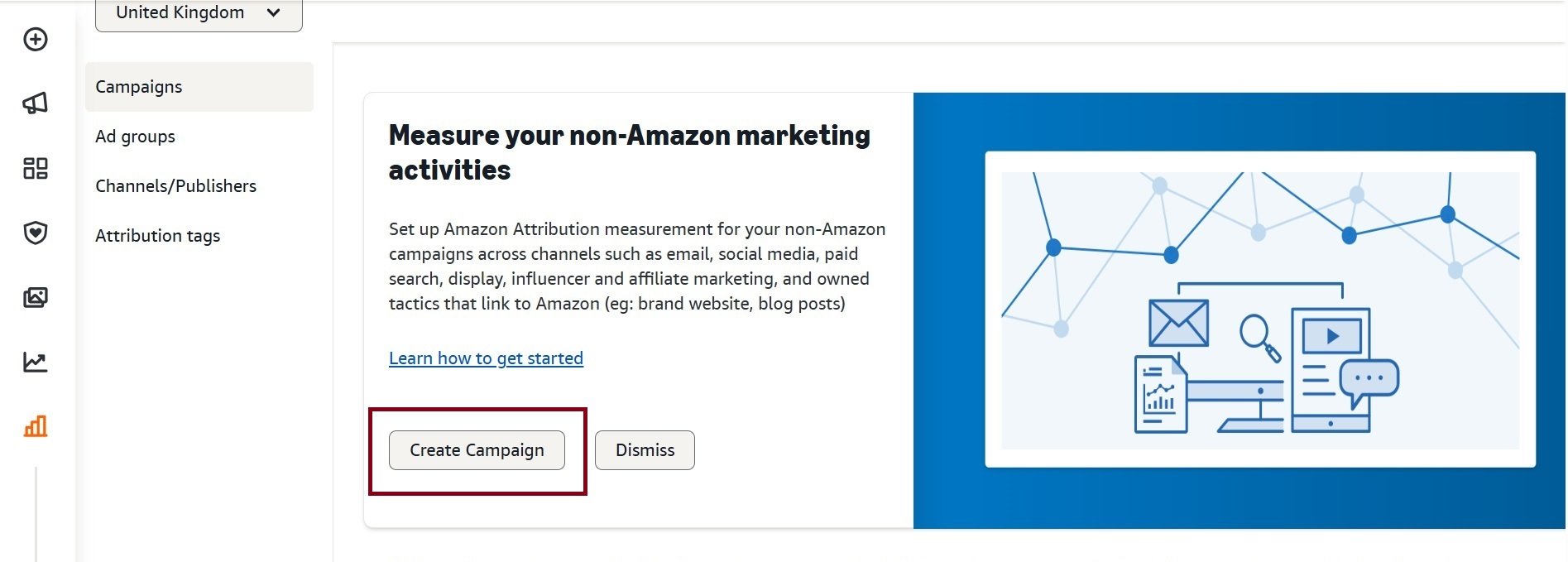
- Click the yellow “Create campaign” button.
- Amazon will ask how you want to create your campaign. For your first one, choose “Create manually.” The bulk creation option is useful later when you’re making dozens of links for Google Ads keywords, but starting manually is the best way to learn the process.

- Next, you’ll land on the campaign setup screen. This is where you’ll tell Amazon exactly what you’re tracking.
Amazon Attribution supports bulk tag creation via a spreadsheet upload. If you are running a Google Shopping campaign with hundreds of SKUs or managing a large email campaign with multiple product links, the bulk upload option saves significant time. You download the template, fill in the required fields for each tag, upload the file, and the console generates all the URLs in one pass.
Steps 3: Adding Products
You need to tell Amazon which of your products this campaign is promoting. This step is important because it focuses the tracking on specific ASINs, letting you see exactly how your external ads are boosting their performance.
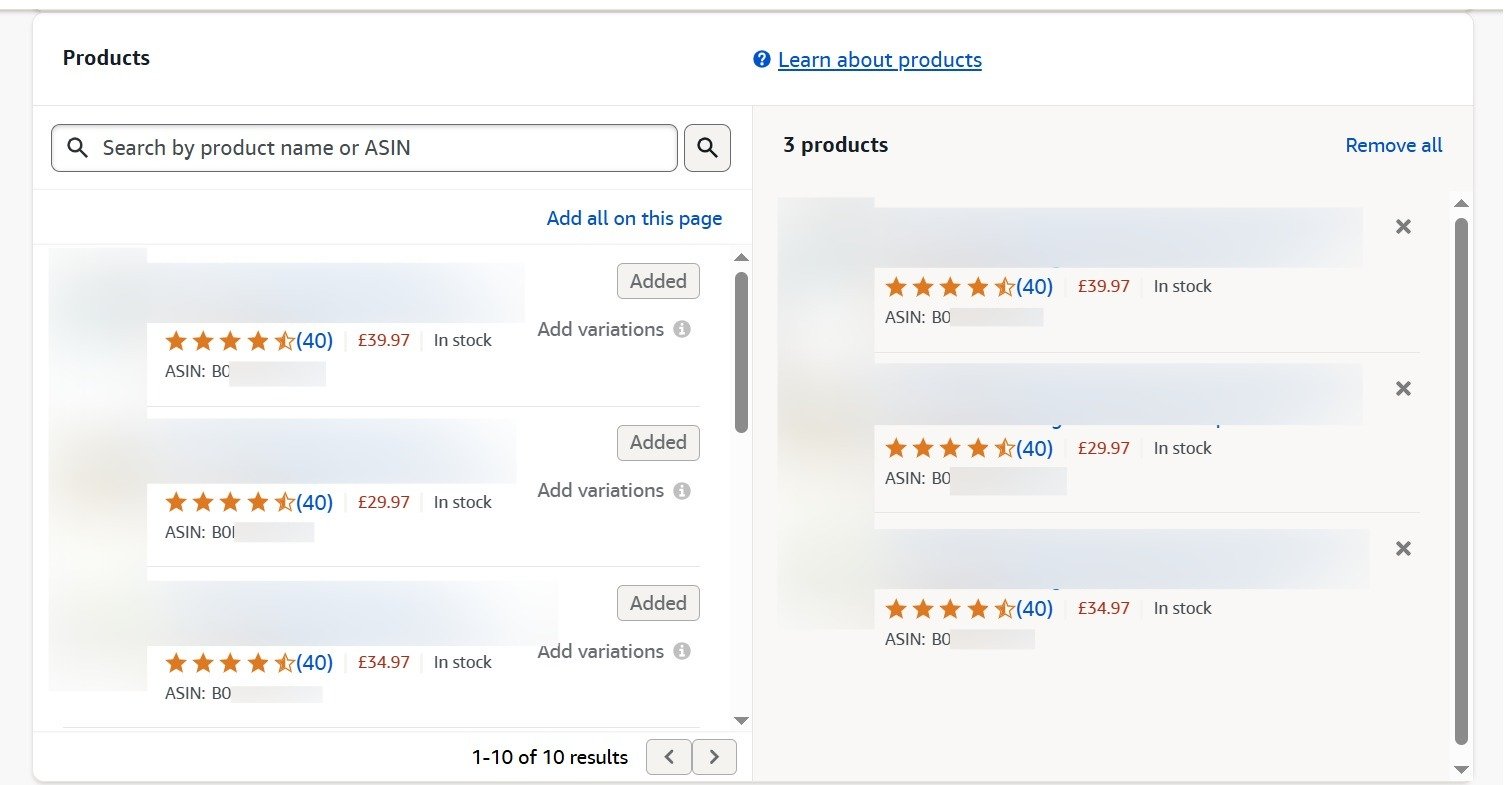
- In the “Products” section, click “Add”.
- You can search for your products by name, ASIN, or SKU.
- Select all the products you’re featuring in this specific marketing effort and add them to your campaign.
Step 4: Defining Your Ad Group
This is where you’ll create the actual tracking link (what Amazon calls an “attribution tag”) and tell Amazon where you plan to use it. Think of an ad group as a container for one unique tracking link.
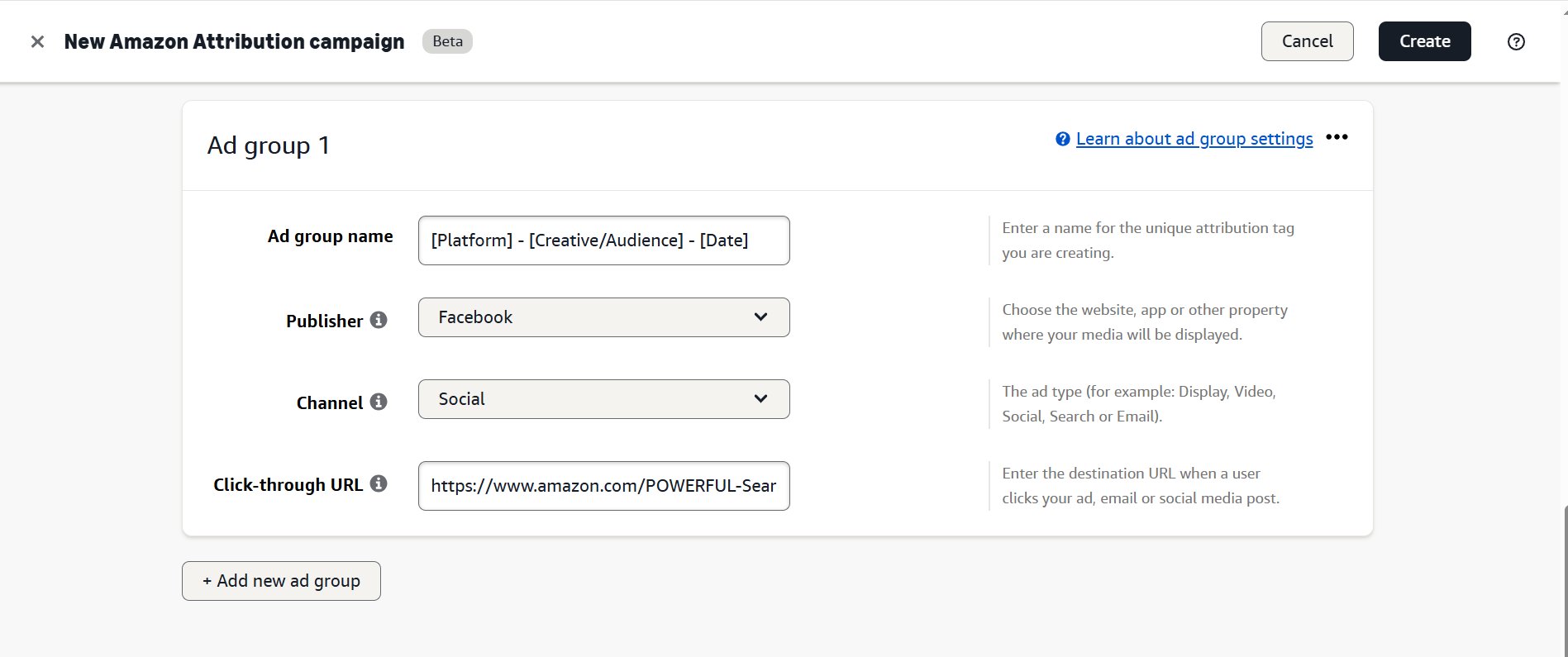
- Give your ad group a descriptive name. A clear naming convention is essential for staying organized. A good format is [Platform] – [Creative/Audience] – [Date]. For example:
Facebook - VideoAd1 - Nov2024. - Under “Publisher,” you’ll find a dropdown with a list of marketing channels like Facebook, Google Ads, YouTube, and Email. Select the one that matches where your ad will run.
- For the “Click-through URL,” paste the destination link on Amazon. This could be a single product detail page, your brand’s Amazon Storefront, or even a custom landing page showing multiple products.
Step 5: Generating Your Attribution Tag
Once you’ve filled everything out, click “Create.” Amazon will instantly generate a unique URL for you. This is your attribution tag.
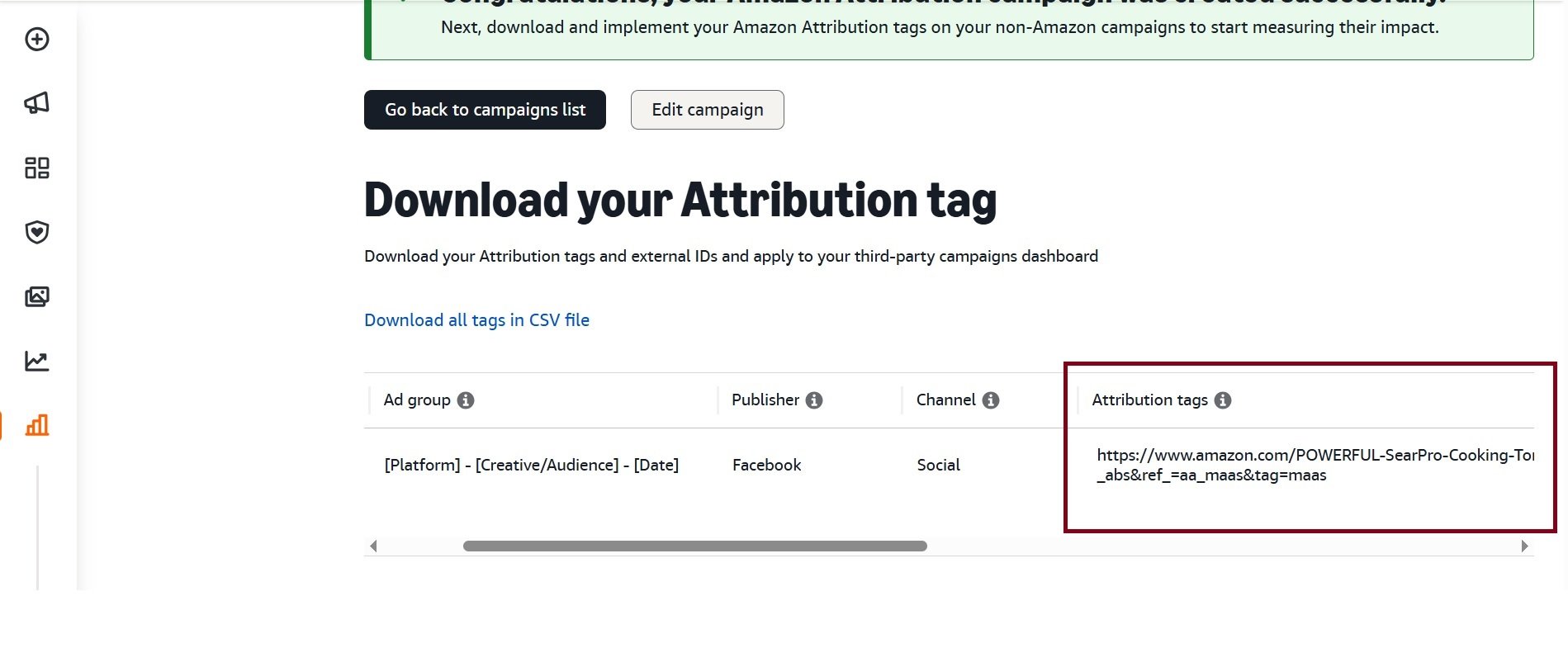
This is the exact link you must use in your external ad. Copy this URL and paste it as the destination link for your Facebook ad, the call-to-action button in your email, or the link in your influencer’s bio. Now, any clicks and sales that come through this specific link will be tracked right inside your Amazon Attribution dashboard.
Amazon Attribution Reporting
The reporting interface gives you campaign-level and tag-level data. You can filter by date range, channel type, or individual order. Reports are available directly in the console and can be downloaded as CSV files for deeper analysis in Excel or a business intelligence tool.
1. Reading the Metrics Correctly
The click-to-detail-page-view ratio is the first number to evaluate. If you are getting 1,000 clicks but only 600 detail page views, that 40% drop-off happens because some shoppers are not logged into Amazon, others click away before the page loads, and some traffic may come from bot clicks or low-quality ad placements. A healthy ratio tends to sit above 70%.
Detail-page-view to purchase rate varies significantly by category. In competitive categories like supplements or electronics, a 2-5% purchase rate from external traffic is realistic. In lower-competition niches where your listing is strong and prices are competitive, you can see rates above 10%.
2. New-to-Brand Metrics
New-to-brand purchases tell you how much incremental value your external marketing is generating. Amazon defines new-to-brand as customers who have not purchased from your brand in the past 12 months. If your external traffic is converting at a high rate but most of those buyers are existing customers, your ads are not really growing your brand, they are just accelerating repeat purchases that might have happened anyway.
Brands that generate mostly new-to-brand purchases from external channels tend to see stronger organic rank improvement over time, because new customer acquisition signals to Amazon’s algorithm that your product is reaching audiences who would not have found it through Amazon search alone.
3. Attribution Reporting Lag
Amazon Attribution data is not real-time. There is typically a 24 to 72 hour reporting lag, meaning conversions and sales from today may not appear in your dashboard until two or three days later. Plan your analysis cadence around this lag. Checking reports daily and drawing conclusions on same-day data will produce inaccurate reads on campaign performance.
The Amazon Attribution Bonus Program
This is the part most sellers miss, and it is genuinely one of the best incentives Amazon has ever offered to sellers who drive external traffic.
1. How the Bonus Works
Amazon periodically runs an Amazon Attribution bonus program, sometimes called the Brand Referral Bonus, where sellers who drive qualifying external traffic to Amazon can earn a credit of up to 10% of attributed sales applied back to their referral fee. The specific bonus percentage varies by category, generally ranging from 2% to 10% of attributed sales.
The bonus is calculated on sales that come from your attribution-tagged links and credited to your account. It effectively reduces your cost of selling on Amazon for traffic you sourced yourself. For a brand doing $50,000 per month in sales from external channels, even a 5% bonus represents $2,500 in monthly fee credits.
2. Which Sales Qualify
Not all attributed sales qualify for the bonus. The sale must come from a non-Amazon traffic source, it must be tracked through a valid Amazon Attribution tag, and the campaign must meet eligibility requirements. Check your Seller Central account for the specific terms of any active bonus period, as Amazon adjusts these terms over time.
3. Why This Changes the Math on External Traffic
If you were previously hesitant to invest in Google Ads or Meta campaigns driving traffic to Amazon because the economics felt thin, the Brand Referral Bonus changes that calculation. When you are getting a 5-10% credit on sales those campaigns generate, your effective cost of selling drops, which means your allowable cost per click increases and campaigns that previously looked marginal become profitable.
Using Amazon Attribution Across Specific Channels
1. Google Ads
Google is the most commonly used external channel for Amazon attribution. The workflow involves creating attribution tags for each ad group or campaign, then pasting the final URL into your Google Ads destination URL field.
For Google Search campaigns, create separate tags for each ad group so you can see which keyword themes are driving Amazon conversions, not just clicks. Google’s own conversion data only shows clicks off your ad. Amazon Attribution shows you whether those clicks actually bought.
For Google Shopping, use the bulk upload feature to create individual product-level tags for each ASIN you are promoting. Then use URL parameters in Google Merchant Center to append the attribution link.
One important point: Google Analytics will show these sessions as direct traffic rather than paid search, because shoppers click from your Google Ad to Amazon, not to your own website. Your Google Analytics data is irrelevant here. Amazon Attribution is your measurement tool for these campaigns.
2. Meta Ads (Facebook and Instagram)
Create separate attribution tags for different ad sets, placements, or creative types. In Meta Ads Manager, paste the Amazon Attribution URL into the website URL field of your ad. Meta will track its own click data, and Amazon Attribution will track what happened after the click on Amazon.
Keep in mind that Meta’s pixel cannot fire on Amazon pages, so you will see divergence between Meta’s reported clicks and Amazon Attribution’s click count. The Meta number includes all clicks including those that bounced before landing on Amazon. The Amazon number is generally more accurate for representing actual traffic quality.
3. Email Marketing
Email is one of the highest-converting external channels for Amazon when the list is qualified. Create individual attribution tags for each email send or campaign. Some brands create tags at the product level so they can track which specific products in a newsletter drove the most Amazon sales.
For abandoned cart emails or post-purchase sequences that drive buyers back to Amazon, expect lower new-to-brand rates since these audiences have interacted with your brand before. The metric that matters most for email is revenue per recipient, which you can calculate by dividing total attributed sales from that email’s tag by the number of email addresses it was sent to.
4. YouTube and Video Content
YouTube attribution requires creating tags for each video and placing the link in the video description or as an overlay link. For YouTube Ads specifically, use separate tags for different ad formats (skippable in-stream vs. non-skippable vs. bumper ads) so you can compare performance across formats.
Video attribution often shows a longer purchase cycle than paid search. Someone who watches a product review video may click through on the attribution link and not purchase for several days, but since the window is 14 days, those conversions will still be credited.
5. Influencer and Creator Campaigns
When working with influencers, give each creator their own attribution tag rather than sharing a single link. This lets you measure each creator’s actual sales contribution, not just their reach or engagement metrics. Creators who drive 50,000 impressions but zero attributed purchases are performing very differently from creators with 10,000 impressions and 200 attributed purchases.
You can also use Amazon Attribution tags inside creator affiliate agreements to verify that reported results match actual Amazon sales data.
Amazon Attribution and Organic Rank
One of the most frequently discussed questions in the Amazon seller community is whether traffic from Amazon Attribution links improves organic search ranking.
The short answer is yes, but with conditions.
Amazon’s A10 algorithm considers external traffic as a ranking signal when that traffic converts. Specifically, conversion events from external sources, when tracked and attributed, can contribute to sales velocity in a way that Amazon’s algorithm recognizes. Higher sales velocity tends to support improved keyword ranking over time.
The right approach is to drive traffic that converts at a reasonable rate. If you are running Google Ads and your Amazon Attribution data shows 500 clicks with only 5 purchases, that is a 1% purchase rate. If your organic listing converts at 12%, you are actively harming your conversion metrics by mixing in low-quality paid traffic. Pause those campaigns or refine your targeting before driving more volume.
Common Mistakes Sellers Make With Amazon Attribution
1. Not Using Unique Tags Per Creative
Sharing one attribution link across multiple ad formats, placements, or channels collapses all your data into a single number. You lose the ability to understand what is actually working. Create a unique tag for each meaningful variation.
2. Ignoring the Click-to-DPV Gap
The gap between clicks and detail page views is diagnostic data. A large gap usually means either poor ad targeting (wrong audience), listing issues (slow page load, uncompetitive pricing, or poor main image visible in the preview), or platform-specific bot traffic. Address the gap before scaling spend.
3. Measuring Too Soon
Attribution data has a 24-72 hour lag and a 14-day conversion window. Evaluating a campaign after 48 hours and making major budget decisions is premature. Run campaigns for at least 14 days before drawing performance conclusions, and pull reports 3 days after the evaluation period ends to capture trailing conversions.
4. Not Connecting Attribution Data to Profitability
Amazon Attribution tells you sales. It does not automatically tell you profit. You need to bring your ad spend data from the external platform and calculate actual return on ad spend. A campaign that drives $10,000 in attributed Amazon sales but costs $8,000 to run has a 1.25x ROAS, which after Amazon fees and product costs is likely unprofitable.
Amazon Attribution API for Agencies and Large Brands
For brands or agencies operating at significant scale, the manual console workflow becomes a bottleneck. Amazon offers an API for Amazon Attribution that allows programmatic creation of tags, retrieval of reporting data, and integration with third-party measurement platforms.
1. What the API Enables
With the API, agencies can automate tag creation at the start of each campaign cycle, pull attribution data directly into their reporting dashboards, and connect Amazon performance data with media spend data from Google Ads and Meta without manual exports. For an agency managing 30 brand accounts each running five external channels, this represents hundreds of hours of manual work automated.
2. Third-Party Tools That Support Amazon Attribution
Several marketing analytics and attribution platforms have built integrations with Amazon Attribution, including Northbeam, Triple Whale, and some custom integrations built in Looker or Tableau. These tools aggregate your Amazon Attribution data alongside ad spend from external platforms so you can see ROAS, profitability, and incrementality in a single dashboard.
If you are operating at a scale where manual CSV analysis is a weekly chore, investing in one of these integrations is worth evaluating.
Frequently Asked Questions
What is Amazon Attribution and who is it for?
Amazon Attribution is a free tracking program for brand-registered Amazon sellers and vendors. It lets you create unique tracking links for external marketing channels and measure how those channels drive traffic and sales on Amazon.
Do I need to pay to use Amazon Attribution?
No. Amazon Attribution is free to use. You only pay for the external advertising you are running, not for the attribution tracking itself.
How long does Amazon Attribution take to show data?
There is typically a 24 to 72 hour reporting lag. Do not rely on same-day data. Pull reports at least three days after your evaluation period ends to capture all conversions within the attribution window.
Can I use Amazon Attribution without Brand Registry?
No. Brand Registry enrollment is required. Third-party sellers without brand registry cannot access Amazon Attribution.
Does Amazon Attribution affect organic rankings?
External traffic that converts through attribution links can contribute to sales velocity, which is a factor in Amazon’s ranking algorithm. However, low-quality traffic that does not convert may negatively affect your listing’s conversion rate, which is also a ranking factor.
What is the Amazon Brand Referral Bonus?
It is a program tied to Amazon Attribution where sellers who drive qualifying external traffic can earn credits of up to 10% of attributed sales, applied against referral fees. It is category-dependent and requires active Amazon Attribution tracking.
Can I use Amazon Attribution for organic social posts or influencer content?
Yes. Attribution links can be used anywhere outside Amazon, including organic social posts, blog articles, YouTube video descriptions, and influencer content. Any link that drives traffic to Amazon can carry an attribution tag.
What is the difference between Amazon Attribution and Amazon Sponsored Ads attribution?
Sponsored Ads attribution tracks sales from ads running inside Amazon. Amazon Attribution tracks sales from traffic coming from outside Amazon. Both use a 14-day click window, but they measure different traffic sources.
Can I track multiple products in one Amazon Attribution campaign?
Yes. You can create separate tags for different ASINs within the same order. Each tag is ASIN-specific, so you get product-level attribution data within a single campaign view.
Does Amazon Attribution work outside the United States?
Yes. As of 2026, Amazon Attribution is available in the US, Canada, UK, Germany, France, Italy, Spain, India, Japan, and several other marketplaces. Check your Seller Central account for current marketplace availability.