Launching a product on Amazon is a strategic go-to-market process designed to gain early sales velocity, organic ranking and build sales momentum in honeymoon period for long-term success. A successful launch combines thorough pre-launch preparation with coordinated execution and ongoing optimization.
The Amazon marketplace is incredibly active, with roughly 7,800 items sold every minute among its more than 600 million products. A proactive launch strategy is essential to get good conversion rate and build the trust needed to compete. Check out more Amazon platform statistics to understand the scale.
Modern Amazon launch strategy recognizes that organic rank comes from a combination of sales, conversion rates, and customer engagement not just traffic volume. Today’s A10 algorithm favors CTR and strong conversion metrics. You need an integrated plan: optimize your listing and build social proof before driving significant traffic.
Here are the key goals of a typical Amazon Product launch:
- High initial sales velocity: Early sales signal to Amazon that your product is in demand.
- Algorithmic boost: Get good CTR, conversion rate, and reviews help to Amazon rank your product early in the honeymoon period.
- Competitive positioning: A strong launch carves out your niche against established rivals.
- Initial Reviews: Get 20-30 initial reviews for a good PPC conversion rate.
An Amazon launch typically works over a 90-day window: secure Prime eligibility via FBA, optimize your product listing, build early reviews, drive targeted traffic to boost Best Seller Rank, and optimize based on performance data.
The Honeymoon Period Still Matters
Amazon gives every new product a small, temporary boost in sales and ranking, something sellers call the “honeymoon period.” This is your critical window, usually the first 30-45 days, to prove to the algorithm that your product has what it takes to rank.
During this time, Amazon is watching every move you make:
- Sales Velocity: How quickly are you racking up sales compared to the established players?
- Conversion Rate: Are the shoppers clicking on your listing actually hitting “Add to Cart”?
- Click-Through Rate (CTR): Does your main image and title grab enough attention to earn the click in search results?
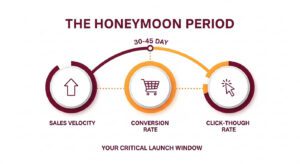
A well-planned launch is built to max out these signals from day one. A weak launch, on the other hand, tells Amazon your product isn’t relevant. Trust me, trying to recover from that initial stumbling is incredibly difficult and expensive.
Phase 1: Pre-Launch Preparation (30-60 Days Before)
Your pre-launch phase determines whether your product can compete profitably on Amazon. This 30-60 day window is where you validate demand, calculate realistic profit margins, and build the infrastructure needed for a successful launch.
1. Market and Product Research
Validate demand for your product before investing. Use tools like Helium 10, Jungle Scout, or Amazon brand analytics data to check search volumes and Best Seller Ranks. A BSR under 50,000 often indicates strong interest in your category.
Study competitor products carefully. Read their reviews to spot customer pain points and gaps you can fill. Look for recurring complaints or missing features that your product can address. Ensure your product is differentiated with better materials, unique features, bundling, or improvements that create a compelling USP (unique selling proposition).
2. Business Planning and Unit Economics
Calculate your unit economics carefully before launch:
- Cost of Goods (manufacturing + shipping)
- Amazon FBA fees (typically $4-8 per unit)
- Advertising budget for launch period
- Desired profit margin (aim for 30-40% after all fees)
Build a simple financial model showing different scenarios. Can you sustain 60% ACoS for 30 days if needed? What sales volume makes you profitable at 25% ACoS? Decide your pricing strategy: will you launch with discounts or set your final price from day one?
Imagine you’re selling a product for $29.99 on Amazon. Here’s how your costs break down per unit:
- Selling price:$29.99
- Manufacturing cost (COGS):$10.00
- Amazon FBA fees:$6.50
- Storage + shipping to Amazon:$1.50
- Total costs per unit:$18.00
- Gross profit (before ads):$11.99 per unit (40% margin)
This $11.99 is your war chest, the money you have available to spend on advertising while still making a profit. Understanding this number is important because it determines your entire launch strategy.
Scenario 1: The 60% ACoS Launch Strategy
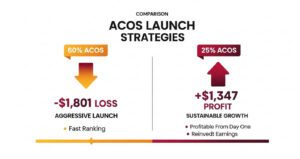
Many sellers wonder if they should go aggressive during launch by accepting a high ACoS, say 60% to gain initial sales velocity. But can you afford it?
Let’s say you’re targeting 10 sales per day for your first 30 days. Here’s what happens:
Revenue Calculation:
- Daily sales: 10 units
- Campaign duration: 30 days
- Total units sold:300 units
- Total revenue:300 units × $29.99 = $8,997
Advertising Costs:
- ACoS target: 60%
- Ad spend:$8,997 × 0.60 = $5,398
Product Costs:
- Cost per unit: $18.00
- Total product costs:300 units × $18.00 = $5,400
Bottom Line:
- Total revenue: $8,997
- Total ad spend: $5,398
- Total product costs: $5,400
- Net profit/loss:$8,997 – $5,398 – $5,400 = -$1,801 LOSS
- Loss per unit:$1,801 ÷ 300 = $6.01 per sale
Does this mean you shouldn’t do it? Not necessarily. If you have the budget and you’re treating this as a strategic investment to build rankings and reviews, it can work. But go in with your eyes open, you need at least $1,800 set aside that you’re willing to lose. This isn’t sustainable long-term; it’s a short-term investment in market positioning.
Scenario 2: Finding Your Profitable Sweet Spot at 25% ACoS
Now let’s look at a healthier scenario. Here’s how the math works at 25% ACoS:
Per-Unit Economics:
- Selling price: $29.99
- Ad cost per sale at 25% ACoS: $29.99 × 0.25 = $7.50
- Gross profit (before ads): $11.99
- Net profit per unit:$11.99 – $7.50 = $4.49 per sale
Here’s the good news: you’re profitable at any sales volume at this ACoS level.
If You Sell 10 Units Per Day:
- Monthly units: 10 × 30 = 300 units
- Monthly revenue: 300 × $29.99 = $8,997
- Monthly ad spend: $8,997 × 0.25 = $2,249
- Product costs: 300 × $18.00 = $5,400
- Monthly profit:$8,997 – $2,249 – $5,400 = $1,347
This is sustainable growth. You’re building your business while staying profitable, which means you can reinvest your earnings into more inventory and advertising without relying on external capital.
Scenario 3: To Discount or Not to Discount?
Your pricing strategy at launch sets the tone for your entire product lifecycle. You essentially have two paths:
Option A: The Discount Launch
Launch Price: $24.99 (17% discount)
- Selling price: $24.99
- Product costs: $18.00
- Gross profit: $24.99 – $18.00 = $6.99
- Break-even ACoS: $6.99 ÷ $24.99 = 32%
The advantage? You can get sales with high conversion rates as price-sensitive shoppers jump on the deal. Once you’ve built credibility with 50-100 reviews, you raise the price to $29.99 and enjoy better margins.
Option B: The Full-Price Launch
Launch Price: $29.99 (your target price from day one)
- Selling price: $29.99
- Product costs: $18.00
- Gross profit: $29.99 – $18.00 = $11.99
- Break-even ACoS: $11.99 ÷ $29.99 = 40%
Your break-even ACoS is a comfortable 40%, giving you more room to invest in advertising. This approach works best when your product has strong differentiation with unique features, superior quality, or compelling branding that justifies the price even without reviews.
So which should you choose? If you’re entering a crowded market with dozens of established competitors, the discount launch helps you gain traction quickly. But if your product stands out or you’re targeting a quality-conscious audience, maintaining full price protects your brand positioning and prevents you from training customers to wait for sales.
Quick Reference Cheat Sheet:
Your gross profit= Selling price – All costs (before ads)
Break-even ACoS = (Gross profit ÷ Selling price) × 100
Ad cost per sale = Selling price × (ACoS ÷ 100)
Net profit per sale = Gross profit – Ad cost per sale
Monthly profit = (Net profit per sale × Daily units × 30)
3. Inventory and Logistics Planning
Determine lead times for manufacturing, quality control, and shipping. Plan your timeline backward from your intended launch date. If you want to be live during Prime Day or Q4, order production early enough to account for customs or delays.
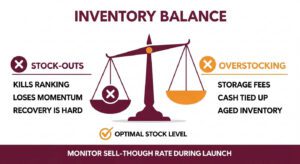
Enroll in FBA (Fulfillment by Amazon) to get the Prime badge, which significantly improves conversion rates. Make sure you have enough inventory buffer as running out of stock during launch kills momentum and can drop your ranking. Start with at least 500 units for competitive categories, 300 for lower-volume niches.
4. Keyword Research
Build a comprehensive keyword list before creating your listing. This research drives both your listing optimization and PPC strategy.
- Primary keywords (3-5 terms): High search volume (10,000+ monthly), direct product match, moderate competition. Example: “yoga mat” for fitness products.
- Secondary keywords (10-15 terms): Medium volume (1,000-10,000 monthly), more specific. Example: “extra thick yoga mat”, “non slip exercise mat”.
- Long-tail keywords (20-30 terms): Lower volume (100-1,000 monthly) but high conversion intent. Example: “extra large yoga mat for tall people”.
Use multiple sources for keyword research: Amazon Brand Analytics, Helium 10 Cerebro or Jungle Scout Keyword Scout, competitor ASIN reverse lookups.
5. Amazon Account Setup and Compliance
Create a Professional Seller Account in Seller Central ($39.99/month). Enroll your brand in Amazon Brand Registry, which requires a trademark and unlocks A+ Content, Brand Stores, Sponsored Brands advertising, and better support.
Check category restrictions. If your product is in a gated category (supplements, beauty, topicals), obtain approvals or lab tests early. For hazmat products (batteries, liquids, aerosols), secure approvals in advance. Review Amazon’s policies and terms of service to avoid suspensions.
6. Launch Timeline Creation
Write a detailed launch checklist covering every task: listing creation, PPC campaigns, promotions, external marketing, review sequences. Assign dates to each milestone.
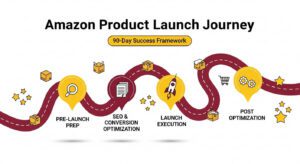
A typical 60–90-day launch plan checklist is below:
60 Days Before Launch Activities:
- Complete product and keyword research
- Calculate unit economics and pricing strategy
- Order inventory with shipping timeline
- Create Amazon Professional Seller account
- Enroll in Brand Registry if applicable
30 Days Before Launch Activities:
- Ship inventory to Amazon FBA
- Write and optimize listing (title, bullets, description, backend keywords)
- Create high-quality images and videos
- Design A+ Content
- Build PPC campaigns (draft mode – activate later)
- Enroll in Amazon Vine to get early reviews
Launch Week Activities:
- Verify inventory shows “Available” in Seller Central
- Activate all PPC campaigns simultaneously
- Enable coupons or promotions
- Send announcement to email list/social followers if applicable
Weeks 2-4 Activities:
- Monitor PPC daily, add negative keywords
- Request reviews for each order
- Track conversion rate, BSR, and keyword rankings
- Optimizing campaigns based on data
Months 2-3 Activities:
- Optimize listing based on customer feedback
- Scale profitable keywords, pause non-performers
- Target TACoS under 20%
- Plan inventory restocks
- Continue gathering reviews
7. Choosing Your Launch Strategy
When launching an Amazon product, you must choose between two approaches. A soft launch involves testing with a minimal advertising budget, allowing you to gather feedback and make improvements before scaling up. This approach reduces risk and lets you refine your listing, pricing, and product quietly.
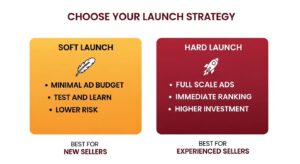
A hard launch means going all-in from day one with full-scale advertising and aggressive bidding on top keywords. This strategy aims for immediate ranking and sales momentum but requires higher PPC budget.
Your choice depends on your budget, risk tolerance, and product readiness. Soft launches suit new sellers or untested products, while hard launches work for experienced sellers with validated products.
Phase 2: Listing SEO & Conversion Optimization
Your listing content is the foundation of conversion. The best advertising strategy won’t help if your product page doesn’t convince shoppers to buy.
1. Product Title
Amazon rewards clear, keyword-rich titles. Use this format: Brand + Primary Keyword + Key Feature + Benefit + Size/Quantity
Example: “EcoBright Bamboo Toothbrush – Charcoal Bristles Soft Pack of 3 – Natural Whitening & Biodegradable Handle”
Keep under 200 characters. Front-load your top keyword in the first few words. Don’t stuff keywords excessively, but make sure your main target appears early. Capitalize the first letter of major words.
2. Bullet Points (Key Product Features)
Use 5 bullet points highlighting main benefits and features. Each should start with a bolded headline followed by explanatory text. Focus on what matters to buyers: benefits, uses, specifications.
Incorporate secondary and long-tail keywords naturally. For example:
- [WHITENING POWER] Activated charcoal bristles help remove surface stains and whiten teeth gently while being safe for daily use
- [ECO-FRIENDLY DESIGN] Made from 100% biodegradable bamboo that decomposes naturally, unlike plastic toothbrushes that take 500+ years to break down
- [SOFT BRISTLES] BPA-free nylon bristles are gentle on sensitive gums while providing effective cleaning power
3. Product Description
Expand on your product story with product description. Tell how your product solves a problem or was developed. Emphasize your USP and include any guarantees or care instructions.
Include additional keywords naturally (keep keyword density around 1-2%). Make it readable first, optimized second.
4. Images and Videos
Your images are the most important factor in click-through rate and conversion. Customers can’t touch or examine your product physically, so your images must do the selling. Amazon allows up to 9 images per listing and use all of them strategically
A/B Tested Main Images
Your product’s main image is one of the biggest factors in getting customers to click, which directly impacts your Amazon ranking in 2025.
Before you launch, you need to test a few different main images with PickFU to see what works best. After you launch, you should continue testing and stick with the image that gets the most clicks.
Your image should be high-quality and on a plain white background, taking up the whole frame. To make your product stand out, think about small details. Could a different angle or a slight reflection make it look better than the competition?

Engaging Infographics: Visually explain 3-5 key benefits. Use icons and minimal text to show dimensions, materials, or how it works. Don’t just list features; show them.
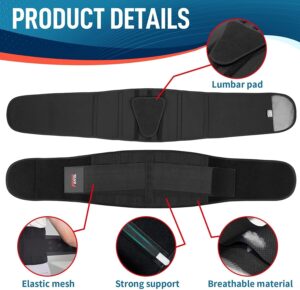
Relatable Lifestyle Photos: Show real people actually using and enjoying your product. This helps shoppers imagine it in their own lives, which is a powerful psychological trigger for buying.

Essential Product Video: A short, punchy 30-60 second video demonstrating the product in action can significantly lift conversion rates. It’s one of the best ways to show your product’s value quickly.
Include a 15-30 second video demonstrating usage if possible. Videos can boost conversion rates significantly. Write descriptive, keyword-rich alt text for all images.
5. A+ Content and Brand Store
If Brand Registered, use A+ Content (formerly Enhanced Brand Content) to add rich images, charts, and text blocks. A+ Content can boost conversions by telling your brand story and answering questions.
Build an Amazon Storefront if you have multiple products. This creates a mini-brand website on Amazon and helps organize launches under “New Arrivals.”
6. Category Selection and Browse Node Optimization
Choosing the right category affects your product’s visibility, BSR calculation, and eligibility for category-specific promotions. Amazon uses browse nodes (category paths) to organize products, and being in the wrong category means competing against irrelevant products or missing your target customers entirely.
How to Find the Right Category
Start by searching for your main keyword on Amazon and examining where top competitors are listed. Click on any top-selling competitor’s listing and scroll to the “Product Information” section. You’ll see their category path listed under “Best Sellers Rank”for example:
“Home & Kitchen > Kitchen & Dining > Coffee, Tea & Espresso > Coffee Makers > Drip Coffee Machines.”
Check 5-10 top competitors and note patterns. If most successful products cluster in a specific subcategory, that’s likely your best placement. Some products qualify for multiple categories so choose the one where you can realistically rank on page one based on competition levels.
Selecting Your Category in Seller Central
When creating your listing, Amazon suggests categories based on your product type and attributes. Navigate through the category tree carefully:
- Start with the broadest category (e.g., “Home & Kitchen”)
- Drill down through subcategories that match your product precisely
- Choose the most specific subcategory that accurately describes your product
- Verify your selection by checking the “Browse Node ID” matches successful competitors
Avoid the temptation to list in easier categories where you don’t belong. Amazon can reclassify your product or suppress your listing for category violations. If your ideal category is gated or restricted, complete the approval process before launch.
Some categories require approval, certifications, or testing documentation. Check category requirements early in your pre-launch and get ungated.
7. Listing Your Products Correctly
How you list products on Amazon affects inventory management, variation handling, and customer experience. The method you choose depends on your catalog size and product complexity.
Single Product Listings (1-2 SKUs)
For simple launches with one or two SKUs, manually create listings through Seller Central:
- Go to Inventory > Add a Product
- Search for your product to check if a listing already exists
- If no match, select “Create a new listing”
- Fill in all required fields: title, brand, manufacturer, product ID (UPC/EAN)
- Complete product details, images, description, and backend keywords
- Save and verify all information displays correctly
Manual listing gives you complete control and lets you review every field before going live.
Variation Listings (Multiple Colors/Sizes)
If your product has variations (different colors, sizes, patterns, scents), create a parent-child relationship:
- Parent ASIN: The main product that doesn’t have inventory (not buyable)
- Child ASINs: Individual variations that customers actually purchase
Set up variations through the “Variation Wizard” in Seller Central or use a flat file template. Group variations logically don’t combine unrelated products (like different product types) under one parent just to share reviews.
For larger catalogs or products with multiple variations, use Amazon’s flat file upload system:
- Download the category-specific inventory file template from Seller Central
- Fill in product data following Amazon’s formatting requirements exactly
- Include all required attributes: product IDs, categories, browse nodes, keywords
- Upload the file through Inventory > Add Products via Upload
- Check processing report for errors and correct any issues
Flat files are more efficient for large catalogs and ensure consistency across multiple listings. However, one formatting error can cause the entire upload to fail, so double-check your data before submitting.
Regardless of method always follow the Amazon guidelines. Here are some of the tips for listing products.
- Use unique UPC/EAN codes for each variation (GS1 Barcodes)
- Fill out all available product attributes in the backend as these improve searchability
- Choose the most accurate product type to unlock relevant attribute fields
- Never create duplicate listings for the same product (violates Amazon TOS)
8. Backend Search Terms
Fill all search term (generic keyword) slots in Seller Central (up to 500 bytes each). Include synonyms, alternate spellings, related terms, and phrases that didn’t fit in visible listings. Don’t repeat terms already in your title or bullets.
9. Early Reviews with Amazon Vine
Since June 2025, Amazon has allowed products to be enrolled in the Amazon Vine program before their official release, once the inventory is available. This program allows you to distribute free units to a selected group of trusted reviewers in exchange for their honest feedback.
These initial reviews are crucial for building social proof. Keep in mind that Vine reviewers are known for their honesty, so it is important to ensure your product is of high quality before submitting it to them. Below are the Amazon Vine reviews packages for sellers.
| Vine Reviews Plan | $0 Tier | $75 Tier | $200 Tier |
|---|---|---|---|
| Enrollment Fee | $0 | $75 | $200 |
| Number of Units per Parent ASIN | Up to 2 | 3-10 | 11-30 |
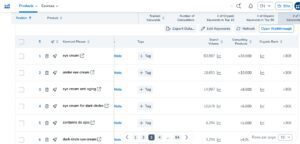
10. Setup Organic Ranking Tracking
Setup keyword rank tracking in Helium10 or Datarova keyword tracker. At later stage, this will show if your PPC campaigns are improving organic ranks. Monitoring also helps spot winning terms and catch ranking drops early for quick adjustments. The screenshot below show the keyword tracking with Helium 10.
Phase 3: Launch Strategy and Execution
Launch execution is about coordinating multiple moving parts simultaneously like PPC campaigns, promotions, review generation, inventory management, all while monitoring performance in real-time and making quick adjustments.
1. Setting Your Launch Date
Choose an official go-live date and work backward. Make sure inventory is in Amazon fulfillment centers at least one week before launch. Some sellers do a “quiet period” a few days prior, listing at high prices while inventory settles, then activating on launch day.
2. Promotions and Deals
Use Amazon promotions strategically during launch:
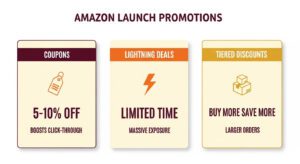
- Coupons (5-10% off) appear in search results and boost click-through rates. Even small discounts increase visibility and conversion.
- Lightning Deals or Deal of the Day expose your product to thousands of bargain hunters. Best when timed with Prime Day or holiday events. Requires Brand Registry and meeting deal criteria.
- Tiered discounts (“Buy 2, get 10% off”) encourage larger orders and improve algorithmic signals.
Don’t run deals or coupons permanently use them strategically for launch windows or events.
3. Amazon PPC Strategy for Launch
Amazon PPC is non-negotiable for modern launches. Here’s a structured approach (Sponsored Products) combining broad data collection with rapid optimization:
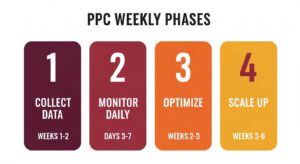
Week 1-2: Data Collection Phase
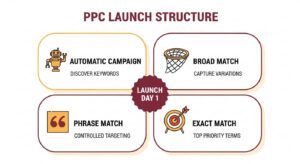
Launch four campaigns simultaneously from day one:
- Automatic Campaign: Create 4 different campaigns for close match, loose match, substitutes, complements. Let Amazon discover converting keywords and ASINs.
- Manual Broad Match: Include 20-30 researched keywords. Bids slightly higher than suggested to ensure visibility. Captures variations and long-tail opportunities.
- Manual Phrase Match – Same keywords as broad. Bids equal to suggested bids. More controlled targeting.
- Manual Exact Match – Your 5-10 top priority keywords. Aggressive bids 10% to 20% higher than suggested bids for guaranteed placement on those terms.
Expect high ACoS (60-100%) initially as you’re buying data and algorithmic signals, not immediate profitability.
Daily Monitoring (Days 3-7)
Check Search Term Reports daily. Identify irrelevant terms consuming budget and add them as negative keywords.
If a term gets 15+ clicks with zero sales, negate it from that campaign. Track which keywords are getting impressions, clicks, and sales. Note patterns.
Week 2-3: First Optimization
Perform comprehensive search term analysis. Keywords generating sales move to dedicated higher-budget campaigns. Non-converting terms with 20+ clicks get paused or negated.
Create campaign structure based on performance:
- High performers (keywords with 2+ sales, acceptable ACoS) → Increase bids 20-30%
- Moderate performers (1 sale or good CTR) → Maintain or slightly increase bids
- Poor performers (high clicks, no sales) → Reduce bids 40% or pause
Week 3-6: Scaling What Works
Build separate campaigns for your best-performing keywords with higher daily budgets. These proven winners get aggressive bids to maximize volume.
Continue auto and broad campaigns at reduced budgets for ongoing discovery. Add any new winners to your focused campaigns.
Target ACoS should drop from 60-100% to 40-50% by week 6 as organic ranking improves.
Sponsored Brands and Display
Once you have built traction with Sponsored Products, launch Sponsored Brands campaigns targeting your primary keywords. Headline search ads appear at top of results and capture high-intent traffic.
After week 2, add Sponsored Display campaigns for remarketing. Target shoppers who viewed your product or competitor products but didn’t purchase.
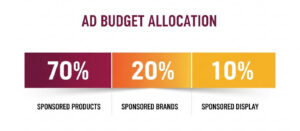
Budget allocation: 70% Sponsored Products, 20% Sponsored Brands, 10% Sponsored Display.
Negative Keyword Management
Add negative keywords aggressively to prevent wasted spend. Create a master negative list for obviously irrelevant terms: competitor brands (unless you target them), wrong product types, price-focused terms if you’re premium.
External Traffic
Amazon’s algorithm values external traffic. Drive audiences via social media ads, email blasts, influencer partnerships, or your website. Use Amazon Attribution to track how off-Amazon marketing contributes to clicks and sales.
Influencer partnerships or unboxing videos build social proof and buzz. Follow Amazon’s promotional guidelines, no incentivizing reviews or false claims.
Review Generation
Reviews are critical for conversion. Use only compliant methods:
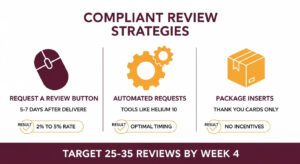
- Request a Review Button: Use Amazon’s built-in button in Seller Central for each order, 5-7 days after delivery. This raises review rates from ~2% to 4-5%.
- Automated Review Requests – Tools like FeedbackWhiz or Helium 10 Follow-Up can automatically request reviews at optimal timing.
- Package Inserts: Include simple thank-you card asking for honest feedback. Never offer compensation.
The goal is 25-35 reviews by week 3-4. Even this small amount significantly improves conversion and ranking.
Price and Buy Box
Ensure your price is competitive but profitable. Amazon favors listings that win the Buy Box. Using FBA helps with Buy Box eligibility through fast, reliable shipping.
During launch, you might temporarily lower margins via coupons or deals to win the Buy Box and increase conversion. Raise prices gradually as organic traffic improves.
Monitoring Launch Metrics
Track these daily from launch:
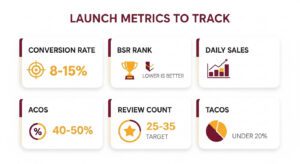
- Sessions (traffic to your listing)
- Units ordered
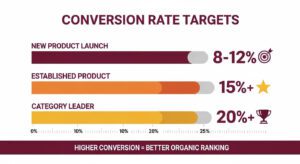
- Conversion rate (target 8-12% for new products, 15%+ when established)
- Best Seller Rank (lower is better)
- Keyword rankings for your top terms
- ACoS and total ad spend
Tools like Amazon Brand Analytics (Brand Registered sellers) or third-party software help you see keyword and ad performance in detail.
Phase 4: Post-Launch Optimization (Months 2-3+)
Your launch doesn’t end after 30 days. The post-launch phase is where you transition from aggressive growth tactics to sustainable profitability. This means systematically improving what works, cutting what doesn’t, and continuously refining based on real customer data.
1. Review and Feedback Management
Monitor new reviews and address legitimate complaints. If multiple reviewers mention the same issue, update your listing or product.
Never attempt to change reviews or retaliate against negative feedback. Do report reviews that violate Amazon guidelines (wrong product, competitor mentions, clearly fake).
2. Listing Refreshes
Based on learnings, tweak listing copy and visuals. If recurring questions appear in reviews, clarify in description or bullets. If an image isn’t performing, try different layouts.
Run Amazon’s Manage Your Experiments A/B tests on titles or images when unsure. Seasonal updates matter too; new holiday banners or event-specific content can re-energize interest.
3. Keyword and SEO Optimization
Use sales and search term data to refine keywords. Add high-performing search terms from PPC campaigns into backend search terms. Remove underperforming keywords from front-end copy.
Keep researching new relevant terms and testing them in ads or copy to broaden discoverability.
4. Advertising Optimization
Pause ads or keywords not converting. Reallocate budget to winners. If a keyword becomes highly relevant, increase bids. Try new match types or placements.
Experiment with Sponsored Brands videos or Sponsored Display retargeting for shoppers who viewed but didn’t buy.
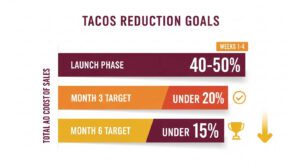
Watch your TACoS (Total Advertising Cost of Sales), the percentage of total sales spent on ads. TACoS should decrease as organic sales grow. Target under 20% by month 3, under 15% by month 6.
5. Inventory Planning
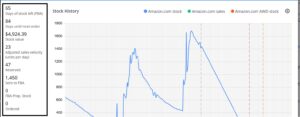
Keep close tabs on stock levels. Stock-outs are one of the fastest ways to lose rank momentum. Use Amazon’s inventory forecasts or third-party dashboards to predict reorders before running low.
If you see daily BSR improvements indicating sales velocity, ensure incoming inventory can sustain it.
Use tools like sellerboard to manage your inventory.
6. Performance Metrics
Track KPIs that matter:
- Daily sales velocity
- Conversion rate (above 15% is solid for most categories)
- BSR trends
- Keyword rankings for top terms
- Review count and rating
- Organic sales percentage
Monitor BSR daily. If it suddenly worsens, diagnose whether it’s supply issues, negative reviews, or stiff competition.
Seasonal Product Launches
Timing can make or break your launch. The same product with identical strategy can perform drastically different depending on when it hits the marketplace.
1. Major Sales Events (Prime Day, Q4)
Prime Day brings millions of shoppers to Amazon. Launching near Prime Day or Black Friday/Cyber Monday gives you massive audience but competition and ad costs spike. Prepare far in advance, optimize listings, and stock ample inventory.
If you have a sale ready, align it with these dates. Otherwise, launch earlier to build rank going into Q4.
2. Seasonal Demand
Some products sell only at certain times (patio items in spring, backpacks in late summer). Plan 3-4 months ahead of peak season so your listing is mature with reviews when buying intent rises.
Get holiday products live by September so reviews and rank are established by Thanksgiving.
Off-Season Launch
If launching in slow season, use lower ad bids. Your organic rank climb will be steadier. Even in off-season, niche demand exists and use keyword data to gauge base demand before deciding.
Final Thoughts
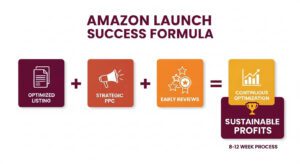
Launching an Amazon product is an 8-12 week process requiring planning, execution, and follow-through. Treat it as a project with research, timelines, and metrics to hit.
Focus on preparatory work first; account setup, listing optimization, review readiness so when you activate ads and promotions, everything converts efficiently. Amazon is a competitive, algorithm-driven marketplace where consistent sales, high conversion rates, and positive reviews move the needle.
Be patient through early months. Monitor conversion rates (aim for 8-12% for new products, 15%+ when established). Keep testing elements like titles, images, and prices. Reinvest learnings into optimizations.
Every product, category, and seller is different. Use these principles to craft a strategy fitting your unique situation. With diligence and data-driven adjustments, your Amazon product launch can become a stable revenue driver for the long haul.
Common Amazon Launch Questions
Even with the best-laid plans, launching a product on Amazon always comes with its fair share of head-scratchers. Let’s tackle a few of the most common questions sellers have.
How Much Should I Budget for an Amazon Product Launch?
This is the big one, and there’s no single magic number. But a solid rule of thumb is to have enough cash for 3-4 months of inventory cost, plus an advertising budget of at least 30-50% of your initial inventory’s retail value.
For example, if you place a $10,000 inventory order, you should be ready to spend between $3,000 to $5,000 on PPC in the first 60 days. Think of that initial ad spend as an investment in data and ranking, not as an expense you expect to be profitable on day one.
How Long Does the Amazon Honeymoon Period Last?
Amazon has never officially confirmed a specific timeline, but the consensus among veteran sellers is that the “honeymoon period” lasts anywhere from 30 to 45 days. This clock starts ticking the second your product goes live and is available for purchase.
What Is a Good ACoS for a New Product Launch?
During a launch, your ACoS (Advertising Cost of Sales) will be high. In fact, it should be high. It’s not uncommon to see ACoS figures between 70% to 120%, and sometimes even higher.
Once you see your product consistently ranking on page one for your most important keywords, then you can shift your focus. At that stage, you’ll start tweaking your campaigns to bring that ACoS down to a profitable level, which for most products is typically under 30-35%, depending on your margins.