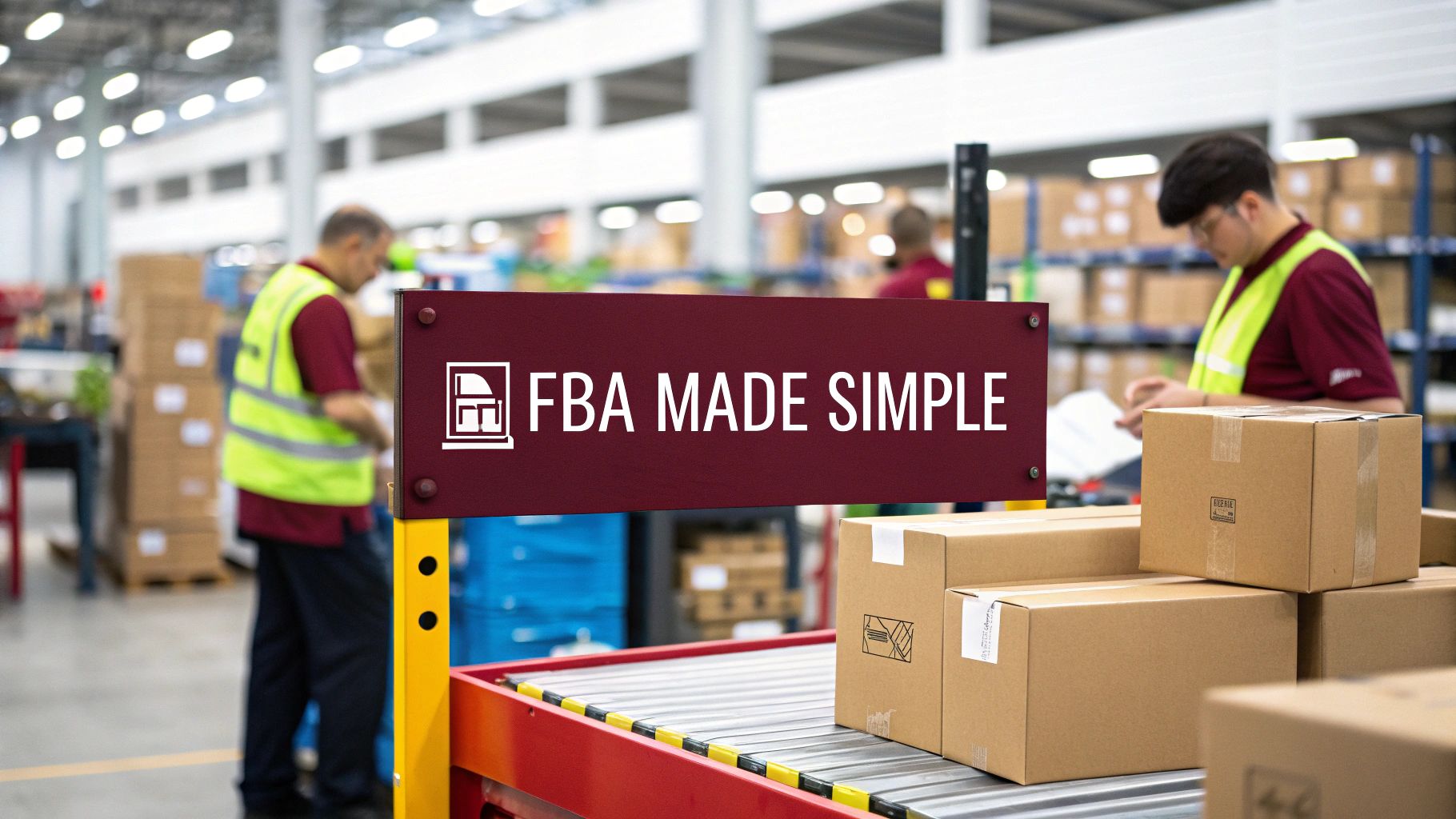
Amazon FBA is a service where Amazon stores your products in its fulfillment centers, and when a customer places an order, Amazon picks, packs, ships the product, handles customer service, and processes returns on your behalf.
Think of it this way: you find a product, send it to Amazon’s warehouse, and Amazon takes care of everything from that point forward. Your products also become eligible for Prime’s free two-day shipping, which puts them in front of over 200 million Prime members worldwide.
Amazon launched FBA in 2006. Since then, it has grown into the world’s largest third-party fulfillment network, used by the vast majority of independent sellers on the platform. Whether someone sells 50 units a month or 50,000, FBA gives them access to the same logistics infrastructure Amazon uses for its own products.
Here is a quick snapshot of how FBA works before we get into the details.
| Element | Detail |
|---|---|
| What it does | Amazon stores, ships, and services your products |
| Who can use it | Any registered Amazon seller (Individual or Professional account) |
| Prime eligibility | Automatic for all FBA products |
| Core fees | Referral fee + fulfillment fee + storage fee |
| Customer service | Amazon handles it for FBA orders |
| Returns | Amazon processes returns on your behalf |
| Seller payout | Every 14 days via direct bank deposit |
Amazon FBA Industry Figures and Growth
Understanding the scale of Amazon’s FBA operation helps explain why so many sellers rely on it. The figures below come from Amazon’s public filings, Marketplace Pulse, and Jungle Scout’s annual seller surveys.
| Figure | Detail | Source |
|---|---|---|
| Third-party seller share of Amazon sales | Over 60% of all units sold | Amazon Annual Report, 2023 |
| Active third-party sellers globally | Approximately 2 million | Marketplace Pulse |
| Sellers using FBA | Around 82% of all Amazon sellers | Jungle Scout, 2024 |
| Amazon Prime members worldwide | Over 200 million paid members | Amazon (2021 disclosure) |
| U.S. fulfillment centers | 110+ dedicated fulfillment centers | MWPVL International |
| Third-party seller services revenue | Over $140 billion in 2023 | Amazon Annual Report, 2023 |
| FBA launch year | 2006 | Amazon |
| Sellers profitable within first year | Approximately 63% | Jungle Scout, 2024 |
| Common monthly seller revenue | Between $1,000 and $25,000 | Jungle Scout, 2024 |
| Sellers who started with $1,000 or less | About 25% | Jungle Scout, 2024 |
Two things stand out from these numbers. First, FBA is not a niche add-on. It is the primary way products get fulfilled on Amazon. Second, the barrier to entry is lower than most people assume, with a quarter of sellers launching on less than $1,000.
How Amazon FBA Works: The Full Process
FBA follows a six-step cycle. Each step involves specific actions in Amazon’s Seller Central platform and physical logistics operations.
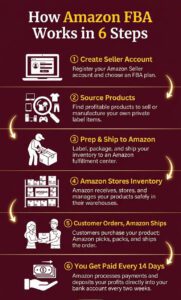
Step 1: Create an Amazon Seller Account
You start by registering at sellercentral.amazon.com. Amazon offers two seller account types, and the right choice depends on how many units you expect to sell each month.
Below is a side-by-side comparison of both account plans.
| Feature | Individual Plan | Professional Plan |
|---|---|---|
| Monthly subscription | $0 | $39.99/month |
| Per-item selling fee | $0.99 per unit sold | $0 |
| FBA access | Yes | Yes |
| Buy Box eligibility | No | Yes |
| Advertising (PPC) access | No | Yes |
| Bulk listing tools | No | Yes |
| Recommended for | Fewer than 40 units/month | More than 40 units/month |
Most sellers who plan to build a real FBA business choose the Professional plan. Without it, you cannot win the Buy Box or run Amazon PPC ads, both of which are essential for generating consistent sales.
Step 2: Source or Manufacture Products
Once your account is active, you need inventory. How you find products depends on the business model you choose (covered in detail later in this article). At this point, the goal is to secure a product that has proven demand on Amazon, healthy margins after all fees, and a manageable level of competition.
Step 3: Prepare and Ship Inventory to Amazon
Amazon has strict prep and labeling requirements for inbound inventory. Every unit must be scannable and properly packaged before it reaches a fulfillment center.
Here are the key preparation requirements every FBA seller must follow.
- Each unit needs an Amazon barcode (FNSKU) or an eligible manufacturer barcode (UPC/EAN)
- Fragile items must be individually bubble-wrapped
- Products with multiple pieces must be bagged or bundled as a single unit
- Expiration-dated items require visible dates printed on the outer packaging
- Sharp products need additional protective packaging
- All shipping boxes must meet Amazon’s weight limit of 50 lbs for standard items
Inside Seller Central, you create a shipping plan that tells Amazon what products you are sending, how many units per box, and the box dimensions. Amazon then assigns one or more fulfillment centers as your shipping destination.
Step 4: Amazon Receives and Stores Your Inventory
When your shipment arrives at the fulfillment center, Amazon’s warehouse team checks it in. They scan each unit, verify quantities against your shipping plan, and place products into designated bin locations inside the warehouse.
At this point, your inventory becomes available for purchase on Amazon. You can track real-time inventory levels, storage costs, and sell-through rates through Seller Central’s inventory dashboard.
Step 5: Customers Order and Amazon Fulfills
When a customer buys your product, the fulfillment center nearest to the customer picks the item from its bin, packs it in Amazon-branded packaging, and ships it. Prime-eligible orders typically arrive within one to two business days.
Amazon also manages everything that happens after the sale.
- Shipping and delivery tracking updates sent to the customer
- Customer service inquiries related to shipping, delivery, and product issues
- Return processing, including inspecting returned items and issuing refunds
- Replacement shipments when items arrive damaged or defective
Step 6: You Receive Payment
Amazon deposits your sales revenue into your bank account approximately every 14 days. Each disbursement reflects your total sales minus all applicable fees, including referral fees, FBA fulfillment fees, storage charges, and any refunds processed during that period.
Amazon FBA Fees: A Complete Breakdown
FBA is not a free service. Amazon charges multiple types of fees, and understanding each one is critical for calculating whether a product will be profitable before you invest in inventory.
Referral Fees
Every product sold on Amazon incurs a referral fee, which is a percentage of the item’s total sale price (including any shipping charges). This fee varies by product category.
Below is a breakdown of referral fee percentages for the most common product categories.
| Product Category | Referral Fee Percentage |
|---|---|
| Home & Kitchen, Toys, Sports, most categories | 15% |
| Clothing & Accessories | 17% |
| Jewelry (portion up to $250) | 20% |
| Consumer Electronics | 8% |
| Computers | 8% |
| Personal Computers | 6% |
| Automotive & Powersports | 12% |
| Grocery & Gourmet (items over $15) | 15% |
| Grocery & Gourmet (items $15 or less) | 8% |
| Books, Music, Video, DVD | 15% |
| Amazon Device Accessories | 45% |
Amazon applies a minimum referral fee of $0.30 per unit for most categories. You are charged either the category percentage or the minimum, whichever is greater.
FBA Fulfillment Fees
Amazon charges a per-unit fulfillment fee every time it picks, packs, and ships one of your products. This fee is determined by the product’s size tier and shipping weight.
The table below shows FBA fulfillment fees for standard-size items based on Amazon’s published 2025 rate card.
| Size Tier | Weight Range | Fulfillment Fee Per Unit |
|---|---|---|
| Small standard | 2 oz or less | $3.06 |
| Small standard | 6 to 8 oz | $3.33 |
| Small standard | 12 to 16 oz | $3.77 |
| Large standard | 4 oz or less | $3.49 |
| Large standard | 8 to 12 oz | $4.29 |
| Large standard | 1 to 1.5 lb | $5.33 |
| Large standard | 2 to 2.5 lb | $5.93 |
| Large standard | 3 lb and above | $6.73 + $0.32 per half-lb over 3 lb |
Oversize items have significantly higher fees, starting at approximately $9.73 per unit and increasing with weight. This is why experienced FBA sellers generally prefer small, lightweight products.
Monthly Inventory Storage Fees
Amazon charges a monthly fee for the warehouse space your inventory occupies. This fee is calculated per cubic foot and spikes dramatically during Q4, the peak holiday season from October through December.
Below is the monthly storage fee schedule for FBA.
| Time Period | Standard-Size | Oversize |
|---|---|---|
| January through September | $0.78 per cubic foot | $0.56 per cubic foot |
| October through December | $2.40 per cubic foot | $1.40 per cubic foot |
Storage fees are charged on the 7th to 15th of the month following the month the charges were incurred.
Additional FBA Fees
Beyond the three core fees above, Amazon has introduced several supplemental charges over the years. Not all of these will apply to every seller, but knowing they exist is important for accurate profit calculations.
- Aged inventory surcharge: Applies to units stored in fulfillment centers for more than 181 days. Charges range from $0.50 to $6.90 per cubic foot based on how long inventory has been sitting
- Removal and disposal fees: When you need Amazon to return unsold inventory to you or destroy it, fees begin at approximately $0.97 per standard-size unit
- Return processing fee: For categories where Amazon offers free customer returns (such as apparel), sellers are charged a return processing fee per returned unit
- Inbound placement service fee: Introduced in 2024, this fee applies if you elect to send all inventory to a single fulfillment center rather than splitting shipments across Amazon’s distributed network
- Low-inventory-level fee: Charged when your inventory levels are disproportionately low compared to your sales velocity, which Amazon considers operationally inefficient
What FBA Actually Costs?
Looking at fees individually does not show you the full picture. Running a realistic cost calculation on a sample product reveals how these fees combine and what margins you can realistically expect.
Imagine you sell a silicone kitchen utensil set priced at $24.99 on Amazon. The product weighs 10 oz, falls under “Home & Kitchen,” and qualifies as a large standard-size item. You source it from a manufacturer for $6.00 per unit, and your inbound shipping cost to Amazon’s warehouse is $1.50 per unit.
Below is the complete per-unit cost and profit breakdown.
| Line Item | Amount |
|---|---|
| Sale price | $24.99 |
| Referral fee (15% of sale price) | -$3.75 |
| FBA fulfillment fee (large standard, 8 to 12 oz) | -$4.29 |
| Monthly storage fee (estimated per unit) | -$0.10 |
| Total Amazon fees | -$8.14 |
| Revenue after Amazon fees | $16.85 |
| Product cost (landed from manufacturer) | -$6.00 |
| Inbound shipping to Amazon | -$1.50 |
| Net profit before advertising | $9.35 |
| Pre-ad profit margin | 37.4% |
If you spend $2.50 per unit on Amazon PPC advertising, your net profit drops to $6.85 per unit, which is still a 27.4% margin. This is a healthy margin for an FBA product.
Amazon FBA vs. FBM
FBM (Fulfillment by Merchant) is the alternative to FBA. With FBM, the seller stores, packs, and ships products directly to customers and handles customer service and returns.
The table below highlights the practical differences between the two fulfillment methods.
| Factor | FBA | FBM |
|---|---|---|
| Who fulfills orders | Amazon | The seller |
| Prime badge eligibility | Automatic | Only via Seller Fulfilled Prime (strict qualification) |
| Storage location | Amazon fulfillment centers | Seller’s own space or third-party warehouse |
| Customer service and returns | Amazon handles both | Seller handles both |
| Fulfillment fees | Amazon charges per-unit fees | No Amazon fulfillment fees |
| Storage fees | Monthly Amazon charges per cubic foot | Seller’s own warehousing costs |
| Buy Box competitiveness | FBA sellers are favored | FBM sellers have a disadvantage |
| Packaging and branding | Amazon-branded boxes | Full seller control |
| Scalability | Very high without seller infrastructure | Limited by seller’s own capacity |
| Best suited for | High-volume products, hands-off operations | Oversized/heavy items, low-margin products, sellers with existing logistics |
When FBA Is the Stronger Choice
FBA outperforms FBM in most standard selling scenarios. The Prime badge alone significantly increases conversion rates because Prime members tend to filter search results to show only Prime-eligible products. FBA sellers also receive preferential treatment in Buy Box rotation, which is where roughly 82% of Amazon purchases happen.
If your product is small to medium-sized, has healthy margins, and you want to focus on product development and marketing instead of packing boxes, FBA is typically the better path.
When FBM Makes More Sense
FBM can be the smarter option in specific situations.
- Products that are very heavy or oversized, where FBA fulfillment fees would consume your profit
- Slow-moving inventory that would accumulate aged inventory surcharges in Amazon’s warehouses
- Products with very low margins where every dollar in fees matters
- Sellers who already operate a warehouse or use a third-party logistics (3PL) provider
- Products that require custom packaging or a branded unboxing experience
Many established sellers use a hybrid approach: they fulfill their top sellers through FBA for the Prime badge and Buy Box advantage, while handling slower-moving or oversized items through FBM.
Amazon FBA Business Models Explained
Not every FBA seller operates the same way. There are four primary business models, each with different risk profiles, capital requirements, and potential returns.
Private Label
Private label means creating your own branded product, typically manufactured by a supplier (often found on platforms like Alibaba), and selling it under your own brand name on Amazon.
This is the most popular model among FBA sellers for several reasons.
- You own the brand and control the product listing entirely
- Profit margins typically range from 25% to 50%
- You can differentiate through design, quality, branding, and packaging
- Amazon Brand Registry unlocks additional tools like A+ Content and brand analytics
- The main drawback is higher upfront investment, usually $2,000 to $10,000 for product development, samples, initial inventory, and photography
Wholesale
Wholesale sellers buy existing branded products in bulk at discounted prices from authorized distributors or directly from manufacturers, then resell them on Amazon.
Key aspects of the wholesale model include the following.
- Faster time to market since products already have established demand and reviews
- Margins tend to be tighter, typically 10% to 20%
- Requires building relationships with brand owners and distributors
- You need authorization from brands to avoid intellectual property complaints
- Startup investment generally falls between $2,000 and $5,000
Retail Arbitrage
Retail arbitrage involves buying discounted or clearance products from physical retail stores (Walmart, Target, TJ Maxx, and similar) and reselling them at a higher price on Amazon.
- Lowest barrier to entry, with some sellers starting on a few hundred dollars
- Income is inconsistent because it depends on finding deals
- Time-intensive, requiring regular store visits and product scanning
- Harder to scale because supply is unpredictable
- Some brands have gated their listings, preventing arbitrage sellers from listing without approval
Online Arbitrage
Online arbitrage is the same concept as retail arbitrage, except you source discounted products from online retailers instead of brick-and-mortar stores.
- Can be done from anywhere with an internet connection
- Requires deal-finding tools and browser extensions to identify profitable opportunities
- Faces the same scaling limitations as retail arbitrage
- Competition is higher because online deals are accessible to all sellers simultaneously
Below is a comparison of all four FBA-compatible business models.
| Model | Typical Startup Cost | Profit Margins | Scalability | Time to First Sale |
|---|---|---|---|---|
| Private Label | $2,000 to $10,000 | 25% to 50% | High | 2 to 4 months |
| Wholesale | $2,000 to $5,000 | 10% to 20% | Medium to High | 2 to 6 weeks |
| Retail Arbitrage | $200 to $1,000 | 10% to 30% | Low | 1 to 2 weeks |
| Online Arbitrage | $500 to $2,000 | 10% to 25% | Low to Medium | 1 to 2 weeks |
How to Start Selling on Amazon FBA in 2026
If you have decided FBA is the right fulfillment method for you, this is the step-by-step sequence to follow from account creation to your first sale.
1. Register Your Seller Account
Head to sellercentral.amazon.com and begin the registration process. You will need the following documents and information ready.
- A valid government-issued photo ID (passport or driver’s license)
- A credit card with an international billing address
- Bank account details where Amazon will deposit your payouts
- A phone number for identity verification
- Tax information (SSN for individual U.S. sellers, EIN if operating as a business entity)
Amazon’s verification process typically takes 24 to 48 hours, though some accounts may require additional documentation or a video verification call.
2. Research and Select a Product
Product selection is the single most important decision in your FBA business. A poor product choice cannot be fixed by great marketing. Use research tools like Jungle Scout, Helium 10, or Amazon’s free Product Opportunity Explorer inside Seller Central to evaluate potential products.
The criteria most successful sellers apply when evaluating a product are listed below.
- Monthly search volume and estimated sales of at least 300 units per month
- Sale price between $15 and $50 (this range supports healthy margins after FBA fees)
- Lightweight and compact (keeps fulfillment and inbound shipping costs low)
- Not dominated by established brands with thousands of reviews
- Opportunity to improve or differentiate from existing listings
- No regulatory complexities (avoid categories like supplements, electronics, or hazmat-classified items unless you have relevant experience)
3. Source Your Product
For private label, most sellers use Alibaba to connect with manufacturers. Request samples from at least three to five suppliers to compare quality, pricing, and communication before placing a bulk order. Negotiate unit price, minimum order quantity (MOQ), and production lead time.
For wholesale, contact brand owners or authorized distributors directly. You will typically need a resale certificate and a business EIN to establish wholesale accounts.
4. Build Your Product Listing
Your Amazon listing is your storefront. It directly affects both your organic ranking and your conversion rate. A properly optimized listing includes the following elements.
- A keyword-rich product title that stays within Amazon’s character limits (typically 150 to 200 characters depending on category)
- Five bullet points focused on features, benefits, and use cases
- A detailed product description or A+ Content (available to brand-registered sellers)
- A minimum of seven high-quality images, including product-on-white photos, lifestyle images, and infographics showing features and dimensions
- Backend search terms entered in Seller Central (invisible to customers but used by Amazon’s search algorithm)
5. Create a Shipping Plan and Send Inventory
In Seller Central, create an inbound shipping plan specifying which products you are sending, how many units per box, and box dimensions and weight. Amazon will assign one or more fulfillment centers as your destination.
Every unit must be labeled with an FNSKU barcode. You can print and apply these labels yourself or pay Amazon a per-unit fee to label them at the fulfillment center.
For shipping, you can use Amazon’s partnered carriers (UPS or Amazon-partnered LTL for pallets) at discounted rates, or arrange your own freight, especially for international shipments coming from overseas manufacturers.
6. Launch Your Product
Once Amazon receives your inventory and your listing goes live, you need a launch strategy to generate initial sales velocity and reviews. The primary levers available to you are listed below.
- Amazon PPC advertising: Start with Sponsored Products campaigns targeting relevant keywords. Most sellers budget $500 to $2,000 for initial advertising during launch
- Coupons and promotions: Offering a visible coupon (such as 10% to 15% off) can increase click-through rate on search results
- Amazon Vine: Available to brand-registered sellers, this program sends free units to trusted reviewers in exchange for honest reviews
- External traffic: Social media, email marketing, or influencer partnerships can drive additional visitors to your listing
FBA Inventory Management
Inventory management directly impacts your profitability and your ability to keep selling. Amazon rewards sellers who maintain optimal stock levels and penalizes those who over-stock, under-stock, or let inventory sit too long.
Inventory Performance Index (IPI)
Amazon assigns every FBA seller an Inventory Performance Index score, which measures how efficiently you manage your FBA inventory. The score ranges from 0 to 1,000, and Amazon currently requires a minimum IPI of 400 to maintain full storage capacity.
The factors Amazon uses to calculate your IPI include the following.
- Excess inventory percentage: How much of your inventory Amazon considers overstocked relative to demand
- Sell-through rate: How quickly your inventory sells relative to how much you have in stock
- Stranded inventory: Units sitting in fulfillment centers that are not linked to an active listing (this can happen due to listing errors or suppressed ASINs)
- In-stock rate: Whether your best-selling products consistently have available inventory
If your IPI drops below 400, Amazon restricts your storage capacity, making it harder to send in new inventory.
FBA Storage Capacity Limits
Amazon assigns storage capacity to each seller based on IPI score, historical sales, and overall fulfillment center capacity. These limits are updated monthly and divided into four categories.
- Standard-size storage
- Oversize storage
- Apparel storage
- Footwear storage
You can view your current storage limits and utilization inside Seller Central under the Inventory Performance dashboard. Exceeding your limits means Amazon will block new inbound shipments until your inventory levels drop.
How to Avoid Aged Inventory Surcharges
The aged inventory surcharge is one of the most costly mistakes new sellers make. It applies to units that have been sitting in Amazon’s warehouses for more than 181 days. To keep this fee from eating into your profits, experienced sellers use several tactics.
- Create time-limited promotions or temporary price reductions to move slow sellers
- Set up removal orders to have inventory returned to you or disposed of before the 181-day mark
- Use the “Manage Excess Inventory” report in Seller Central to flag at-risk products early
- Avoid sending large initial shipments of unproven products. Start with smaller quantities to test demand
Amazon FBA Programs Worth Knowing About
Amazon offers several specialized programs that extend FBA’s capabilities or reduce costs for specific use cases.
FBA New Selection Program
This program provides incentives for sellers to add new products to FBA. Benefits include free monthly storage, free liquidations, and free return processing for qualifying new-to-FBA ASINs. Eligibility is automatic, and you can check qualifying products inside Seller Central.
Multi-Channel Fulfillment (MCF)
MCF allows you to use Amazon’s fulfillment network to ship orders from sales channels outside of Amazon. If you sell on Shopify, your own website, eBay, or any other platform, Amazon can pick, pack, and ship those orders using your FBA inventory.
This is a practical solution for sellers who want a single fulfillment backend across multiple sales channels without managing separate warehouse operations.
Subscribe and Save
This program lets customers set up recurring automatic deliveries of your product at a discounted price (typically 5% to 15% off). It is especially effective for consumable products like supplements, cleaning supplies, or personal care items.
The benefit for sellers is predictable, recurring revenue and improved customer lifetime value. You can enroll eligible FBA products through Seller Central.
Amazon Brand Registry
While not exclusive to FBA, Brand Registry is essential for private label sellers. It requires a registered trademark and unlocks several powerful tools.
- A+ Content (enhanced product descriptions with images, comparison charts, and rich formatting)
- Brand Analytics (search term data, demographics, and competitive insights)
- Automated brand protection against counterfeiters and listing hijackers
- Sponsored Brands and Sponsored Display ad formats
- Amazon Vine access for generating early reviews
FBA Grade and Resell
This program helps sellers recover value from customer returns. Amazon inspects returned items, grades their condition (like new, very good, good, acceptable), and relists them under the appropriate condition. Instead of writing off returned inventory as a total loss, sellers can recoup a portion of the revenue.
Advantages and Disadvantages of Amazon FBA
FBA offers powerful benefits, but it comes with trade-offs. Here is an honest assessment from both sides.
Advantages
The benefits of FBA go well beyond shipping convenience. These are the reasons the vast majority of Amazon sellers choose it.
- Automatic Prime eligibility: Your products display the Prime badge, giving you access to over 200 million paying Prime members who prioritize fast, free delivery
- Buy Box advantage: Amazon’s algorithm favors FBA sellers in Buy Box rotation, and the Buy Box accounts for roughly 82% of all Amazon purchases
- Fully outsourced fulfillment: You do not need to lease warehouse space, hire packing staff, or negotiate carrier contracts
- Scalability without infrastructure: Whether you sell 50 units or 5,000 units a day, Amazon’s network scales with your volume
- Customer trust: Products fulfilled by Amazon carry an implicit trust that self-fulfilled products often do not, which positively impacts conversion rates
- International reach: Programs like FBA Export and Remote Fulfillment with FBA let you sell across borders using your existing U.S. inventory
Disadvantages
FBA is not perfect, and sellers need to go in with eyes open about its limitations.
- Total fees can be substantial: Referral fees, fulfillment fees, storage fees, and newer charges like inbound placement fees can collectively consume 30% to 40% of your sale price
- No branding on packaging: Products ship in Amazon’s brown boxes, which eliminates any branded unboxing experience
- Storage limits can restrict growth: Newer sellers and those with lower IPI scores face tight capacity limits that can prevent them from stocking enough inventory
- Commingling risk: If you use manufacturer barcodes instead of Amazon’s FNSKU labels, your inventory can be mixed with units from other sellers, potentially creating quality control problems
- Platform dependency: Your entire business operates within Amazon’s ecosystem, subject to policy changes, fee increases, and algorithmic shifts that are outside your control
- Aged inventory penalties: Slow-selling inventory accumulates costly surcharges after 181 days in storage
Is Amazon FBA Worth It in 2026?
FBA remains one of the most practical ways to build an ecommerce business without managing logistics. The infrastructure Amazon provides, including warehousing across 110+ U.S. fulfillment centers, Prime shipping to over 200 million members, and integrated customer service, would cost millions of dollars to replicate independently.
However, FBA is more competitive and more expensive than it was five or even three years ago. Fee increases, additional charges like inbound placement and low-inventory-level fees, and tighter storage limits mean that casual sellers face a harder path to profitability. The sellers who thrive in 2026 are the ones who treat FBA like a real business: they run rigorous product research, calculate unit economics before investing, manage Amazon ads carefully, and monitor their inventory performance weekly.
If you are willing to learn the mechanics, do the math, and put in consistent effort, Amazon FBA remains one of the most powerful ecommerce fulfillment channels available to independent sellers.
Frequently Asked Questions
How much does it cost to start selling on Amazon FBA?
Most sellers invest between $1,000 and $5,000 to get started. This covers the Professional seller account ($39.99/month), initial inventory purchase, UPC barcodes, product photography, and shipping costs to Amazon’s warehouse. Private label sellers typically spend more upfront than arbitrage sellers because of product development and branding costs.
How do Amazon FBA sellers get paid?
Amazon deposits earnings directly into your registered bank account approximately every 14 days. The payout amount reflects total sales minus all Amazon fees, refunds, and charges incurred during that settlement period.
Is Amazon FBA still profitable?
Yes. According to Jungle Scout’s 2024 survey, approximately 63% of Amazon sellers reported being profitable. Profitability depends heavily on product selection, pricing strategy, fee awareness, and advertising efficiency. Sellers who run detailed cost calculations before sourcing products consistently perform better.
What types of products sell best on Amazon FBA?
The strongest FBA categories include Home & Kitchen, Beauty & Personal Care, Toys & Games, Health & Household, and Clothing & Accessories. Products that tend to perform best are lightweight (under 1 lb), priced between $15 and $50, solve a clear problem, and are not dominated by well-known brands.
How long until I make my first sale on Amazon FBA?
Most sellers make their first sale within one to four weeks after their listing goes live, depending on the product’s demand level and whether they are running PPC advertising. Reaching consistent, profitable sales typically takes three to six months.
What is the difference between FBA and dropshipping?
With FBA, you buy inventory upfront, send it to Amazon’s warehouse, and Amazon ships it to customers when orders come in. With dropshipping, you never hold inventory. A third-party supplier ships directly to the buyer. FBA provides faster delivery (Prime-eligible), higher customer trust, and more control over product quality compared to dropshipping.
Can I sell internationally with Amazon FBA?
Yes. Amazon offers several programs for international selling. FBA Export automatically makes eligible U.S. listings available to international buyers. Remote Fulfillment with FBA uses your U.S. inventory to fulfill orders in Canada, Mexico, and Brazil. For dedicated international expansion, Amazon operates separate marketplaces with their own FBA programs in the UK, Germany, France, Italy, Spain, Japan, Australia, India, the UAE, and several other countries.
What happens to products that customers return through FBA?
Amazon receives the returned product, inspects it, and determines whether it is sellable. If the item is still in new condition, Amazon returns it to your sellable inventory. If it is damaged or used, Amazon classifies it as unfulfillable, and you can choose to have it returned to you, disposed of, or enrolled in the FBA Grade and Resell program.
Do I need a business license to sell on Amazon FBA?
Amazon does not require a business license to create a seller account. You can register as an individual. However, many sellers form an LLC or similar business entity for liability protection and tax purposes. Certain product categories and states may have their own licensing or permit requirements.