
Best Practices for Writing Amazon Product Titles
Amazon cut your title to 75 characters and added a new Item Highlights field. Here’s the exact structure, character budget, and real examples to get both fields right under the new 2026 policy.

For as long as most of us have been selling on Amazon, the product title has been the single most valuable piece of text in a listing. It carried your brand, your main keyword, your size, your color, your use cases, and usually a few extra phrases you squeezed in because there was still space left over. Two hundred characters gave you room to be greedy, and almost everyone was.
That era ended in the summer of 2026. Amazon now limits product titles to 75 characters, including spaces, in every category except media, and introduced a second field called Item Highlights that gives you another 125 characters underneath. Your total budget is unchanged at 200 characters — it’s just split into two fields that behave very differently from each other.
Not Sure If Your Titles Are Already Non-Compliant?
Amazon’s AI has been rewriting titles that break the new rules since July 27, 2026. We’ll check your live titles against the new policy and flag every listing at risk before Amazon rewrites it for you.
What Actually Changed in Your Listing
Before this update, you worked with a single title field that allowed up to 200 characters. Most sellers filled that field to the edge, packing in every keyword variation they could justify.
Today you’re working with two fields instead of one. The first is called Item Name in Seller Central — it’s what shoppers understand as the product title. The second is called Item Highlights, and it appears directly beneath the title in lighter text. Here’s how they compare:
| Field | Item Name | Item Highlights |
|---|---|---|
| Character limit | 75, including spaces | 125, including spaces |
| Where it appears | The bold line in search results and at the top of your detail page | Directly beneath the title, in lighter text |
| Searchable | Yes | Yes |
| Applies to | Every category except media | Every category except media |
Four Facts You Need to Know
1. The limit is 75 characters, including spaces. This applies to every category except media (books, music, video).
2. Both fields are searchable. Amazon said this directly: Item Name and Item Highlights are both inputs for search, and one isn’t prioritized over the other. A keyword in Item Highlights still counts.
3. If you don’t fix your titles, Amazon will. Since July 27, Amazon’s AI has been rewriting titles that are too long. This rolls out through the rest of 2026.
4. Brand Registry sellers get 14 days to review Amazon’s AI-rewritten titles. Everyone else gets no review at all — and if you don’t review the AI titles, Amazon’s version goes live anyway.
This Does Not Hurt Your SEO
When the announcement landed, the reaction across seller communities was close to panic, and the fear was always the same one. If a title carries your keywords, and Amazon just deleted 125 characters of title, then surely you’re about to lose 60 percent of your keyword coverage and the rankings that came with it.
Amazon’s position on the question is direct. Search and discoverability are unchanged. Item Name and Item Highlights are both inputs for search, and neither one is prioritized over the other. Two fields, equal weight, same total budget.
Your 200-character keyword budget is intact — it’s just split across two fields instead of one. Your organic rank still depends on the sales and conversion rate your listing generates, not on which field a keyword happens to sit in.
What the New Title Looks Like on Product Pages
Unlike the old title, which read as one continuous string, the new title now shows up in two visible parts on the product page:
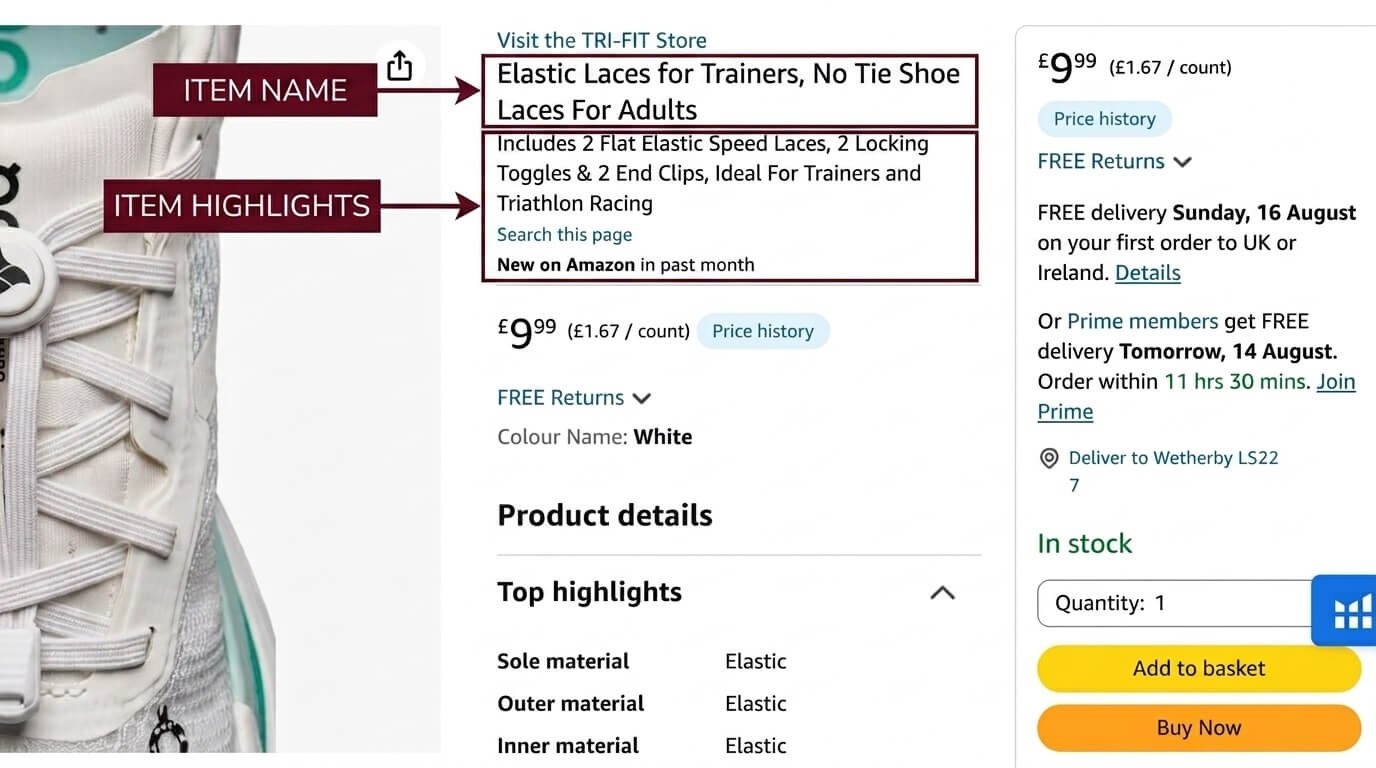
Item Name and Item Highlights as they appear on a live Amazon product page.
Earlier, sellers wrote one long title packing the product name, pack details, materials, and keywords together into a single string, something like:
“Elastic Laces for Trainers, No Tie Shoe Laces For Adults, Includes 2 Flat Elastic Speed Laces, 2 Locking Toggles & 2 End Clips, Ideal For Trainers and Triathlon Racing”
Amazon has now split that single string into two separate fields on the listing, and your title has to be written for both.
How to Write Your 75-Character Item Name
The structure Amazon recommends hasn’t changed — it’s simply been compressed into far less space:
Brand + Product Type + Most Important Attribute
Work through the following four steps, in order.
Step 1: Lock In Your Three Non-Negotiables
Three elements go into the title before you consider anything else:
- Your brand name, at the very beginning. Keep the brand in Item Name — it also anchors the start of your product URL.
- Your product type, containing your main keyword. Top 2 keywords, including the main keyword customers search on Amazon.
- Your single most important varying attribute. The size, color, quantity, or position that separates this child ASIN from its siblings.
Step 2: Budget Your Characters Before You Write a Word
Decide in advance roughly how many characters each element gets, then write to those constraints.
| Element | Characters to Allocate | Example |
|---|---|---|
| Brand name | 6 – 14 | Hydrova |
| Part or model number | 0 – 10 | FL-4207 |
| Product type + main keyword | 15 – 28 | Insulated Water Bottle |
| Primary attribute | 6 – 12 | 32 oz |
| One additional differentiator | 6 – 14 | Leakproof |
| Commas & spaces | 8 – 12 | Easy to forget, and they count |
Part and model numbers matter enormously in some categories and not at all in others. In automotive, electronics, and industrial supply, shoppers search the part number directly, which makes it a search keyword. In apparel or home goods, a model number is usually meaningless to the buyer and shouldn’t consume title space.
Step 3: Write for 60 Characters, Treat the Last 15 as a Bonus
How many characters actually display on screen varies by device and display settings. Build your title so that everything a shopper needs to identify the product appears within roughly the first 60 characters, and treat characters 61 through 75 as useful but expendable. If your title only makes sense when read all the way to the end, it won’t make sense on a smaller phone.
Step 4: Run the Compliance Check Before You Save
Some of the requirements Amazon introduced in early 2025 are still fully in force. Avoid these in your title:
- No special characters — !, $, ?, _, {, }, ^, ¬, or ¦ — unless they’re part of your registered brand name
- No word more than twice, excluding articles, prepositions, and conjunctions
- No promotional or subjective claims such as Best Seller, Free Shipping, Sale, or Money-Back Guarantee
- No price or condition information
- No all-capitals and no period at the end
- Numerals, not words. Write “2,” not “two”
- Capitalize the first letter of each word, except conjunctions (and, or, for), articles (the, a, an), and prepositions of fewer than five letters (in, on, with, over)
Writing 75-Character Titles Across a Full Catalog Is Slow
We rewrite Item Name and Item Highlights across your entire catalog, category by category, so every SKU hits the character budget and stays keyword-complete.
How to Write Amazon Item Highlights
Item Highlights should quickly explain what the product offers and why it’s useful. Each highlight should focus on one important feature, explain its benefit, and include a specific detail where possible.
Feature + Benefit + Specific Detail
- Feature: Double-wall insulation
- Benefit: Keeps drinks cold
- Detail: Up to 24 hours
1. Start With a Useful Feature
Start with an important feature of your product — the material, design, function, size, or another important part of the product.
| Instead Of | Write This Instead |
|---|---|
| “Durable” | “18/8 stainless steel construction for everyday use.” |
| “Easy to Use” | “Easy-open lid lets you drink with one hand.” |
| “Large Capacity” | “32-ounce capacity holds plenty of water for work, travel, and workouts.” |
2. Explain What the Feature Does
Don’t stop at the feature. Tell shoppers what it does or how it helps them.
| Instead Of | Write This Instead |
|---|---|
| “Leakproof Lid” | “Leakproof lid helps prevent spills and leaks.” |
| “Double-Wall Insulation” | “Double-wall insulation keeps drinks cold for up to 24 hours.” |
| “Non-Slip Handle” | “Non-slip handle provides a secure grip while carrying.” |
3. Add a Specific Detail
Specific details make your highlights more useful. Use numbers, measurements, sizes, quantities, materials, or other facts about the product.
| Instead Of | Write This Instead |
|---|---|
| “Large Size” | “32-ounce capacity holds enough water for daily use.” |
| “Long-Lasting Battery” | “Battery provides up to 12 hours of use on a single charge.” |
| “Multiple Sizes” | “Available in 3 sizes: 16, 24, and 32 ounces.” |
4. Replace Vague Words With Facts
Words like “premium,” “high quality,” and “great” don’t tell shoppers much. Give them actual information instead.
| Instead Of | Write This Instead |
|---|---|
| “Premium Quality” | “Made from 18/8 stainless steel with a durable finish.” |
| “Great for Travel” | “Compact design fits easily in most cup holders and bags.” |
| “High Performance” | “20W motor blends smoothies, shakes, and sauces.” |
5. Keep the Wording Simple
Your highlights should be easy to understand. Don’t use complicated words when simple words can explain the same thing.
| Instead Of | Write This Instead |
|---|---|
| “Ergonomically engineered closure mechanism” | “Easy-open lid lets you drink with one hand.” |
| “Advanced liquid containment system” | “Leakproof lid helps prevent spills.” |
Title & Item Highlight Rules for Auto Parts
Auto parts need clear information about the part, its fitment, and its specifications. The title should identify the part and include the most important information for that particular type of part. Item Highlights should provide the additional fitment details, features, and specifications shoppers need.
1. Use This Title Structure for Most Parts
Brand + Part Number + Product Type + Position + Key Specification
This puts the important product information first without filling the title with unnecessary words.
2. Keep Position in the Title
If the part has a specific position, include it in the title. Use terms such as:
- Front
- Rear
- Driver Side
- Passenger Side
This makes it immediately clear which version of the part the shopper is looking at.
3. Use Item Highlights for Additional Fitment Information
When a part has important fitment details that don’t belong in the title, use Item Highlights to provide them.
| Field | Example |
|---|---|
| Title | Axlera Wheel Hub Bearing Assembly, Front, 5-Lug, ABS Sensor |
| Item Highlights |
|
The highlights should give shoppers useful information without repeating the title word for word.
4. Use Item Highlights for Features and Specifications
Item Highlights are also the right place for important product details such as material, size, performance, included parts, and other specifications.
| Field | Example |
|---|---|
| Title | Ferrolume FL-4207 Engine Oil Filter, Spin-On, 2-Pack |
| Item Highlights |
|
5. Include the Details That Help Identify the Correct Part
For automotive products, shoppers often need more than just the part name. Use the available space to provide details such as:
- Vehicle make and model when relevant
- Engine size when relevant
- Front or rear position
- Driver or passenger side
- Part number
- Size or measurement
- Material
- Quantity
- Important specifications
| Field | Example |
|---|---|
| Title | Grypline Mirror Assembly, Replacement for Honda Civic, Driver Side |
| Item Highlights |
|
This is an example where the make and model can appear in the title because the part is for a single make and model.
6. Be Careful With OEM Brand Names
If you sell an aftermarket part that references an OEM brand, make the relationship clear. Use “Compatible With [Brand]” or “Replacement For [Brand]“:
Don’t use an OEM brand name by itself in a way that makes your product appear to be made by that brand — the listing will be suppressed.
7. Avoid Unnecessary Information in the Title
Don’t fill the title with information that makes it harder to understand. Avoid:
- Long vehicle fitment lists on parts that fit many vehicles
- Year ranges
- Long engine lists
- Words such as “Premium,” “Professional,” or “High Quality”
- Your seller name unless it is also the brand
- An OEM part number without “Compatible With” or “Replacement For” when referring to an OEM brand
Instead, use the title space for the information that helps shoppers identify the part.
Auto Parts Title + Item Highlight Examples
Six category examples, from parts that fit a single vehicle to parts that fit thousands.
Brake Pads
- Copper-free ceramic compound provides consistent braking.
- Chamfered and slotted design helps reduce noise and vibration.
- Designed for front axle applications.
- Includes required hardware and shims.
Why: this part fits many vehicles, so the title is better used for the part type and important product details rather than a long fitment list.
Oil Filter
- Synthetic filter media helps provide efficient oil filtration.
- Silicone anti-drainback valve helps prevent oil from draining back when the engine is off.
- 20-micron filtration filters particles down to 20 microns.
- Designed for up to 10,000 miles of service.
- Includes the required gasket.
Why: the part number is important here because shoppers often use it to find a replacement filter.
Mirror Assembly
- Fits specified Honda Civic applications.
- Designed for the driver side of the vehicle.
- Power adjustment allows electronic mirror positioning.
- Heated glass helps clear moisture and frost.
- Includes gasket and hardware.
Why: the make and model can appear in the title because the part is for a single make and model.
Wheel Hub
- Fits specified vehicle applications for this wheel hub.
- Designed for front-wheel applications.
- 5-lug configuration fits the specified wheel application.
- Integrated ABS sensor provides wheel speed information.
- Pre-greased sealed bearing provides smooth operation.
Why: specifications such as 5-lug and ABS sensor are more useful in the title than a long vehicle list when the part fits many vehicles.
Tire Inflator
- 150 PSI maximum pressure provides strong inflation performance.
- Digital gauge shows tire pressure on the built-in display.
- 26-inch hose provides additional working length.
- 10-foot 12V cord provides extra reach around the vehicle.
- Includes a carry case and 3 inflation nozzles.
Why: this is a universal product with no vehicle fitment to include, so the title and highlights focus purely on the specifications shoppers need.
LED Headlight Bulbs
- H11 socket size fits the specified application.
- 6000K color temperature produces a white light appearance.
- 12,000-lumen output provides bright light.
- CANbus-ready driver is designed for vehicles with CANbus systems.
- Aluminum heat sink with fan helps manage heat during use.
Why: the bulb socket size is more important than a long vehicle list, because shoppers often search by socket size.
The Simple Rule
Title: Identify the part and include the most important information for that part.
Item Highlights: Give shoppers the additional fitment details, features, and specifications they need.
Don’t write Item Highlights as “FEATURE: Explanation.” Write them as simple sentences that shoppers can understand immediately.
Frequently Asked Questions
How long can an Amazon product title be in 2026?
Titles are limited to 75 characters, including spaces, in every category except media. Item Highlights adds up to 125 characters, giving you a total budget of 200 characters across the two fields.
Will a shorter title hurt my search ranking?
No. Search and discoverability are unchanged, because Item Name and Item Highlights are both search inputs and neither is prioritized over the other. Your 200-character keyword budget is intact — just split across two fields.
Where should my brand name go?
In the title, at the beginning. Amazon recommends keeping the brand name in Item Name specifically, and it also anchors the start of your product URL.
Can I undo a title that Amazon’s system wrote for me?
Yes. Both fields remain editable at any time, even after an automatic change goes live. The real cost isn’t the text — it’s the sales you lose between the rewrite happening and you noticing it, which is why reviewing proactively beats reacting.
Do keywords in Item Highlights count for SEO?
Yes, the field is indexed and searchable, with the same weight as the title. What it doesn’t do is feed your product URL, your Google link text, your Sponsored Products headline, or your packing slips, so it’s not a like-for-like replacement for title space.
How do I update thousands of listings efficiently?
Use the Category Listings Report, which arrives pre-populated with your existing data and now includes an Item Highlights column next to Item Name. Edit both fields in the spreadsheet and upload through the List Your Products tool. Listings usually update within eight hours.
Two fields, same total budget, and Amazon rewriting anything that doesn’t comply on its own. The sellers who update proactively keep control of their own copy. The ones who wait get Amazon’s version instead.
Want Every Listing Checked Against the New Title Policy?
We’ll audit your Item Name and Item Highlights across your full catalog, flag anything Amazon’s AI is likely to rewrite, and hand you compliant, keyword-complete titles for every SKU. Free, no commitment.