
How to Advertise on Amazon in 2026
Sponsored Products setup, targeting, bidding, advertising costs, and the new Amazon Ads Agent, video and Full-Funnel Campaigns.

What this guide covers
- Compare Sponsored Products, Sponsored Brands, display ads, and the new Full-Funnel Campaigns and DVA+ offering.
- Set budgets and bids using product contribution margin, not an arbitrary target ACoS or CPC.
- Follow campaign creation steps, understand 2026 Ads Agent features and beta limitations, then use reports to improve performance.
How Does Amazon Advertising Work in 2026?
Amazon advertising allows sellers and brands to promote their products through paid ads in Amazon search results, product detail pages, and, depending on the ad type, third-party websites and apps.
The most widely used option is Sponsored Products, which operates on a cost-per-click (CPC) model. Sellers select the ASINs they want to advertise, choose automatic or manual targeting, set bids, and allocate a campaign budget.
When a customer searches for a relevant product, Amazon determines which ads are eligible to appear based on targeting, bids, and other auction factors. Sponsored Products advertisers pay when someone clicks their ad, not simply when it appears. The actual CPC may differ from the bid entered in the campaign. Amazon also offers Sponsored Brands, display advertising, and video ads, which can serve different objectives. Not every Amazon ad uses CPC billing; eligible formats can instead use cost-per-thousand-viewable-impressions (vCPM) pricing.
What’s New in Amazon Advertising in 2026?
On September 29, 2026, Amazon introduced Amazon Ads Agent, the name of its unified advertising platform bringing sponsored ads, Display, Video and Audio (DVA+), and the new Full-Funnel Campaigns into one environment.
Amazon Ads Agent also introduces AI-assisted campaign planning, management, and analysis. However, certain conversational and automated features remain in beta and are not available to every advertiser.
Despite these changes, profitable advertising still depends on relevant targeting, appropriate bids, controlled advertising costs, and careful measurement of attributed sales. Before creating a campaign, sellers should understand which Amazon ad types suit their products and objectives.
Which Amazon Advertising Campaign Type Should You Choose?
Amazon offers several advertising options. Some focus on customers actively shopping for products, while others help brands reach new audiences through display, online video, and streaming TV.
In 2026, Amazon Ads Agent brings together three main campaign categories: Sponsored Ads, Display, Video and Audio (DVA+), and Full-Funnel Campaigns. The options within these categories have different targeting controls, eligibility requirements, creative formats, and pricing arrangements.
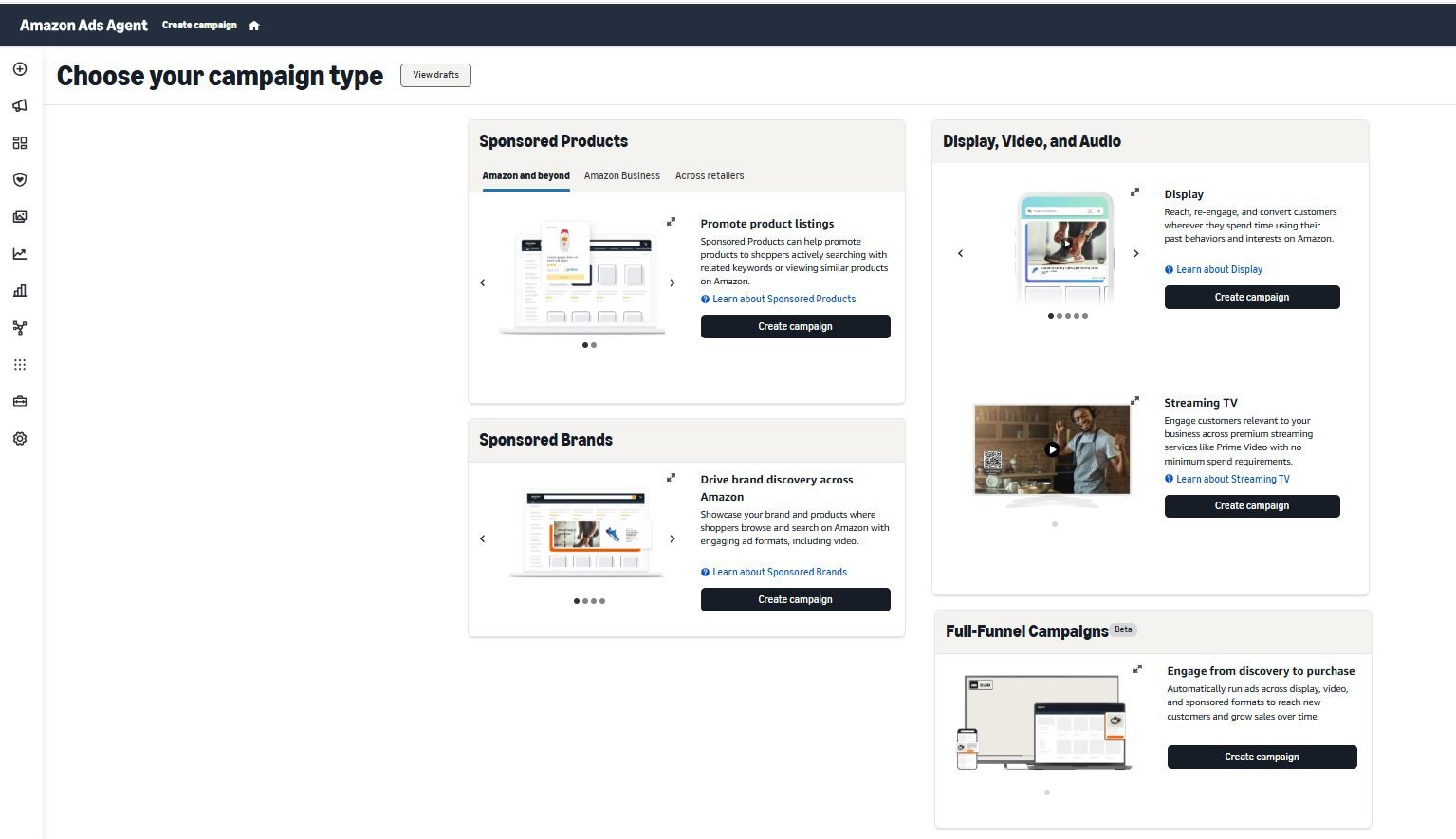
| Advertising option | How it works | Best suited for |
|---|---|---|
| Sponsored Products | Individual ASIN ads using automatic, keyword, or product targeting; standard ads use CPC pricing. Eligible accounts can add product-feature video. | Product launches, relevant customer searches, and direct-response sales. |
| Sponsored Brands | Branded collections, video, and branded shopping experiences; applicable CPC or vCPM pricing. | Brand awareness, multiple-product promotion, and new-to-brand shoppers. |
| Display ads | Product/contextual and audience targeting across eligible Amazon and external placements; CPC or vCPM options. | Product targeting, reaching relevant audiences, and remarketing. |
| DVA+ | Coordinated display, video, and emerging audio formats with AI-supported campaign management and advanced controls for eligible advertisers. | Brands using advertising beyond Amazon shopping search. |
| Full-Funnel Campaigns | A coordinated campaign and budget across sponsored ads, display, online video, and streaming TV. | Brands with broader customer-acquisition and total-sales objectives. Published minimum: $100/day in the US beta. |
Which Advertising Option Should You Start With?
For sellers advertising an individual product for the first time, Sponsored Products is generally the most practical starting point. It offers relevant search and product targeting, bid control, and attributed sales reporting. Eligible advertisers can also use Sponsored Products video as an additional format inside these campaigns.
Sponsored Brands becomes relevant when a brand wants to promote its broader catalog through collections, video, or its Brand Store. Display advertising can extend reach to eligible audiences or re-engage shoppers who considered related products.
Full-Funnel Campaigns became available in US open beta in September 2026; DVA+ has a more restricted phased rollout. Neither should be assumed available to every advertiser. A brand with 50 established products may have good reasons to combine multiple formats, while a seller launching one ASIN may be better served by concentrating its initial budget on Sponsored Products.
Choose based on the advertised products, campaign objectives, account eligibility, and available budget, rather than because a new ad format has been announced.
Compare Sponsored Products and Sponsored Brands before dividing your budget between the two.
What Do You Need Before Advertising on Amazon?
Before creating an Amazon advertising campaign, sellers need an eligible account and products that meet Amazon’s advertising requirements. The product must also be ready to convert paid visits into purchases; even relevant ads can generate unnecessary costs when the offer is uncompetitive.
Amazon Advertising Eligibility Requirements
For sellers using Sponsored Products in the US, review these requirements:
- Professional selling account: An active eligible account in good standing, with a valid payment method.
- Eligible products: Products in supported categories that comply with Amazon’s advertising and product policies.
- Featured Offer eligibility: The advertised offer must meet the applicable Featured Offer requirements; eligibility does not guarantee selection.
- Available inventory: Advertised products must be in stock and available for purchase in the relevant marketplace.
Sponsored Brands generally requires Brand Registry enrollment for sellers. Brand Registry is not required to run standard Sponsored Products campaigns. Requirements can differ for other advertiser types and marketplaces.
Prepare Your Product Listing Before Launching Ads
Check the product’s main image, title, key features, price, customer ratings, and detail page. Compare the offer with products appearing for your intended keywords. For example, a significantly more expensive water bottle with fewer reviews may receive clicks but fewer orders than a comparable competitor.
Also verify that inventory can support expected sales. Before spending on advertising, sellers should have a competitive offer, sufficient stock, and an understanding of the product’s contribution margin.
How Much Does Amazon Advertising Cost?
Amazon advertising costs depend on campaign type, target competition, bids, audience and placement settings, and campaign budgets. There is no universal cost per click for every category. Standard Sponsored Products ads use cost-per-click (CPC) pricing: advertisers pay for clicks rather than impressions. Other eligible Sponsored Brands and display formats can use CPC or vCPM.
Calculate Break-Even ACoS Before Setting Bids
Before deciding how much to spend, calculate the amount of advertising cost your product can support. Consider this hypothetical FBA product, which we’ll use throughout the guide:
| Product financials | Amount |
|---|---|
| Selling price | $30.00 |
| Landed product cost | $10.00 |
| Amazon referral, fulfillment, and other variable costs | $11.00 |
| Contribution per unit before advertising | $9.00 |
At 30% ACoS, advertising consumes the $9 contribution from each advertised unit, assuming one $30 unit per attributed order. To retain $3 per unit after advertising, the seller can spend at most $6 per attributed order, equivalent to a 20% target ACoS.
These values are examples, not universal target ACoS recommendations. Actual calculations must reflect all relevant variable costs, expected returns, and applicable accounting assumptions.
Calculate a Starting CPC from Expected Purchase Rate
Suppose the product has a target advertising cost of $6 per order and the seller expects a 10% advertising purchase rate:
At a $0.60 average CPC, 100 clicks cost $60. If those clicks generate 10 attributed orders worth $300, ACoS is 20%, ROAS is 5.0, and advertising costs $6 per attributed order. The modeled contribution after advertising is $3 per order, before any expenses excluded from the example.
The $0.60 figure is an estimated average CPC that fits the financial target, not a guaranteed actual CPC or a required keyword bid. Bid strategy and adjustments can change the maximum auction bid, while actual conversion performance remains uncertain.
Set a Daily Budget You Can Test Responsibly
Budget determines how much advertising may be spent, but not whether that spending produces profitable sales. A $20 average daily budget corresponds to $600 over a 30-day month if the budget stays unchanged. Under applicable Amazon-sponsored-ads budget settings, an eligible campaign may spend above its average daily budget on certain days, while using underspend from other days; accounts may offer 25% or 100% daily budget increase settings. Amazon explains daily-budget averaging in its advertising guidance.
Choose a budget based on expected CPC, the number of clicks needed to learn from results, and the amount the business can afford to test. A higher budget does not correct poor targeting or low conversion rates.
How to Find Keywords and Products to Target in Amazon Ads
Targeting determines which customer searches and product contexts your Sponsored Products ads may be eligible to appear against. A large keyword search volume is not a reason to advertise if shoppers using that search are unlikely to buy the product.
Find Amazon PPC Keywords with Helium 10
Begin keyword research in Helium 10 Cerebro (Plus Magnet). In the 2026 interface, seed-keyword discovery and competitor reverse-ASIN research are available within the same tool. For our 32 oz insulated stainless steel water bottle, start with insulated water bottle to find related customer searches, then research several directly competing ASINs to identify additional relevant keywords.
Use the Find Suggestions workflow for seed-keyword ideas and the reverse-ASIN lookup to analyze competitors’ keyword presence. Review estimated search volume, keyword relevance, search-volume trends, and competing products. Apply filters to remove unrelated sizes, materials, and features your product does not offer. Shortlist high-relevance keywords for testing before choosing match types and bids in Sponsored Products.
| Example keyword | Likely search intent |
|---|---|
| insulated water bottle | Broad product-category search |
| 32 oz insulated water bottle | Specific capacity and function |
| stainless steel water bottle 32 oz | Material and capacity |
| insulated water bottle with straw | Feature-specific search; use only if the product includes a straw |
Export the shortlist from Cerebro, then compare it with Amazon Ads suggested keywords, relevant competing listings, and your historical Search Term Reports, where available. Helium 10’s search-volume figures are estimates; they do not predict your CPC, purchase rate, or ACoS. Eligible Brand Registry sellers can also use Brand Analytics, including Search Query Performance, for additional market context. Select PPC targets for relevance first, then test their performance in campaigns.
Automatic Targeting vs. Manual Targeting
Automatic targeting uses four groups: close match and loose match for search-related opportunities, plus substitutes and complements for product-related opportunities. Advertisers can use different bids for these groups.
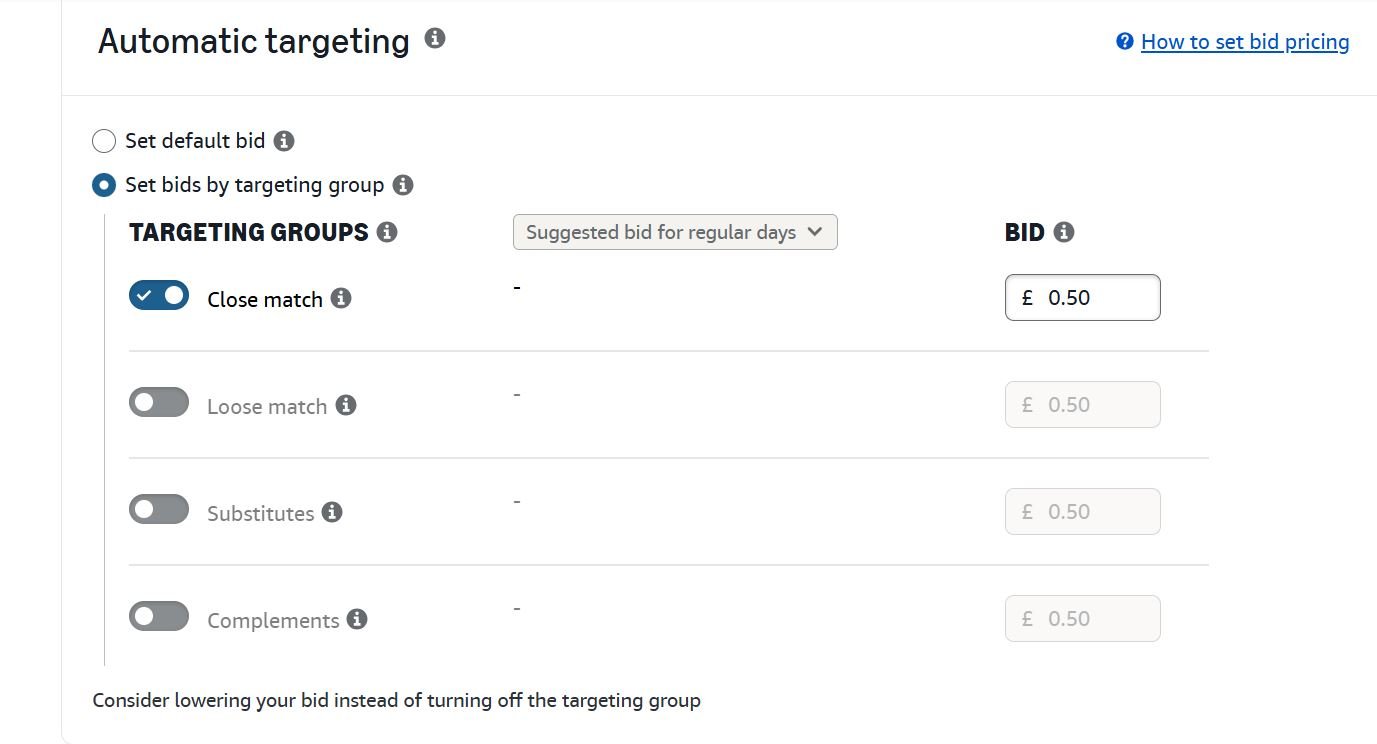
With manual targeting, advertisers choose keywords or products. Amazon’s three keyword match types are:
| Match type | What it controls |
|---|---|
| Broad | Can include related terms, synonyms, and variations beyond the original phrase. |
| Phrase | Searches containing keyword terms in the specified order, with supported close variations. |
| Exact | Searches closely matching the keyword, including supported close variations; the narrowest of these three match types. |
Exact match provides narrower matching, not a guaranteed higher purchase rate. Customer intent, the competing offers, and the product detail page remain important.
Use Product Targeting to Reach Relevant ASINs
Manual product targeting can select specific ASINs or product categories. Depending on available controls, category targeting can be refined by brand, price range, or customer reviews. For our water bottle, a suitable target might be a competing bottle with similar capacity and features.
Compare price, reviews, product specifications, and the competing offer before using an ASIN target. A listing that is much stronger than yours may generate clicks without an acceptable purchase rate.
Use Search Term Reports to Refine Targets
A targeted keyword is not identical to the customer’s actual search term. A broad-match water-bottle keyword may generate clicks from many related searches. Use the Search Term Report to see which terms generated clicks, spend, and attributed sales, then decide which searches warrant tighter manual targeting or negative keywords.
Don’t automatically convert every converting search into exact match or add it as a negative in the original campaign. Assess the purpose of each campaign, data volume, and existing performance first. Amazon also includes contextual search terms for certain non-search placements, and search-term-report impressions need not equal total Campaign Manager impressions.
Amazon PPC Bidding Strategies, Placements, and Budget Controls
Amazon uses an advertising auction to decide which eligible Sponsored Products ads can appear for a shopping opportunity. Your bid is an important factor, alongside relevance and other auction signals. The bid entered for a target is not necessarily the highest auction bid Amazon can use: bidding strategies, placement adjustments, and applicable audience or video adjustments can change it.
Sponsored Products Bidding Strategies
| Strategy | How it works |
|---|---|
| Dynamic bids – down only | Amazon can reduce bids by up to 100% for opportunities less likely to convert; this strategy does not raise bids dynamically. |
| Dynamic bids – up and down | Amazon can increase or decrease bids by up to 100%, depending on predicted purchase likelihood. |
| Fixed bids | Uses the entered bid without dynamic-bidding changes; applicable positive adjustments can still apply. |
| Rule-based bidding | For eligible campaigns, Amazon changes base bids using optimization goals and an ROAS guardrail. |
With dynamic bids – up and down, Amazon may increase or decrease the bid by up to 100% across placements according to predicted purchase likelihood. Positive placement, audience, or video bid adjustments can also affect the eligible auction bid where applicable. Review the combined adjustments before increasing your base bids.
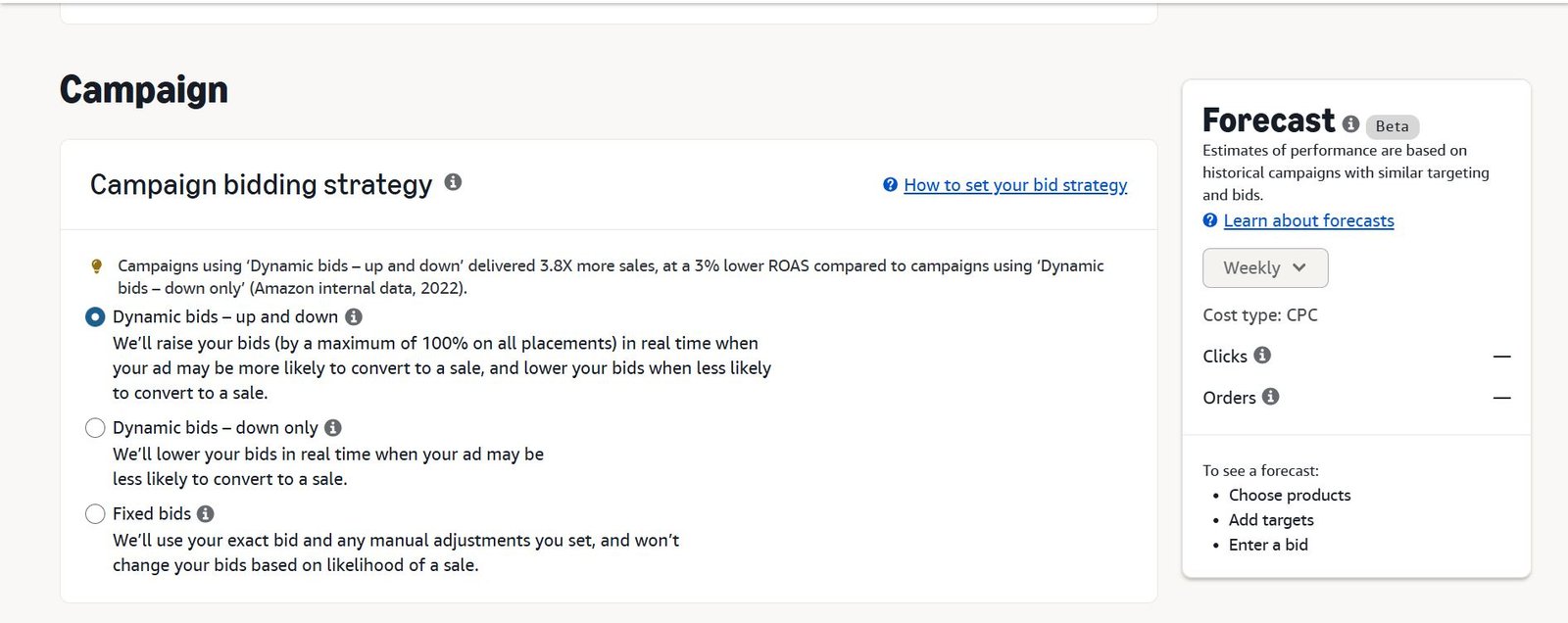
Down-only can be a more controlled initial choice for new campaigns, but it does not guarantee profitability when bids or positive adjustments are too high. Up-and-down may suit campaigns with established conversion performance. Rule-based bidding has eligibility and data requirements; a ROAS guardrail isn’t a promise of a specific return every day.
How Placement Adjustments Affect Bids
Sponsored Products supports bid adjustments for top of search (first page), rest of search, and product pages, with Amazon Business placement controls also available in supported circumstances. Positive adjustments of up to 900% are available for the main placement groups.
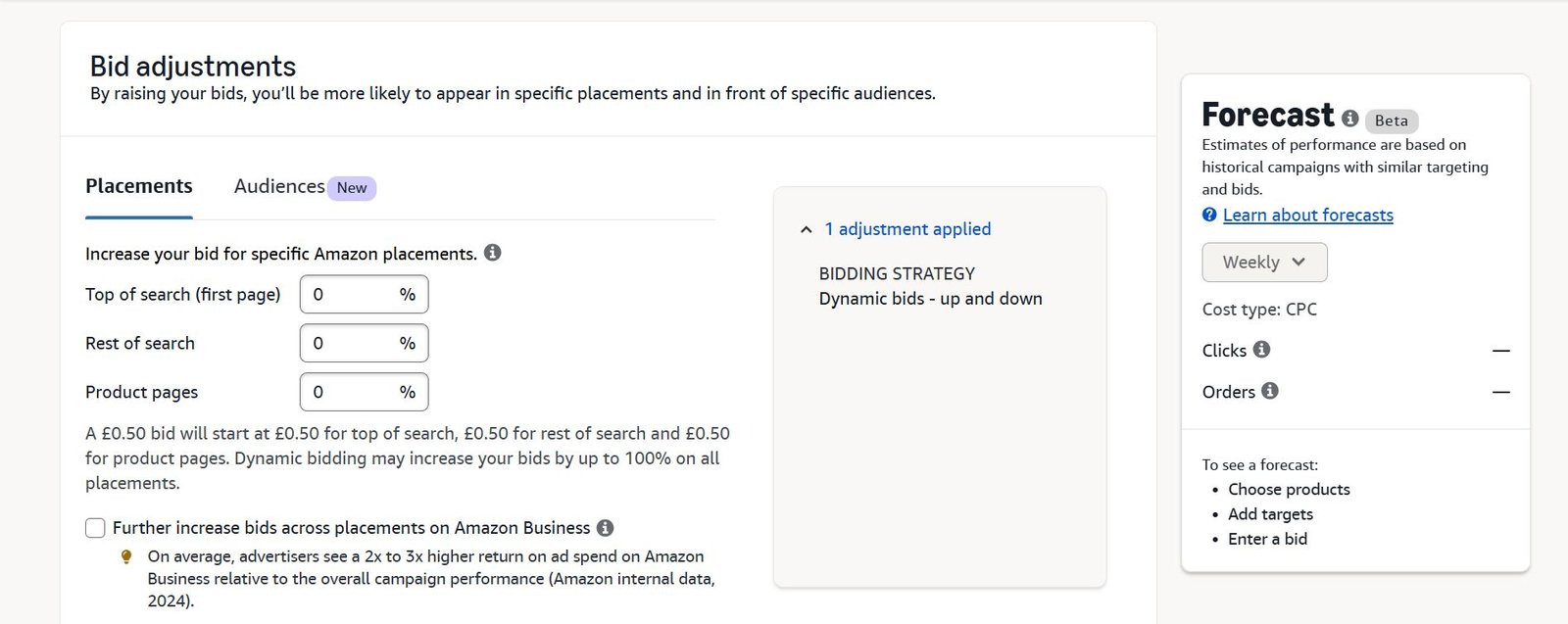
Consider our water-bottle target with a $0.60 base bid, a 50% top-of-search increase, and dynamic bids – up and down:
| Illustrative bid calculation | Amount |
|---|---|
| Entered target bid | $0.60 |
| After 50% top-of-search increase | $0.90 |
| After a further maximum 100% dynamic increase | $1.80 |
$1.80 is the illustrative maximum adjusted auction bid, not the CPC necessarily charged. This calculation excludes any audience or video adjustments. With fixed bidding, the same 50% placement adjustment would create a $0.90 eligible bid instead. A higher top-of-search purchase rate alone does not prove that higher placement bids will be more profitable.
Audience and Video Bid Adjustments
Amazon also supports eligible audience adjustments, including supported custom Amazon Marketing Cloud audiences, and Sponsored Products video bid adjustments. If shoppers qualify for multiple selected audiences, the highest applicable audience adjustment is used rather than stacking every matched audience increase. Audience, video, and placement adjustments may still compound where applicable. Review the total effective bid implications before applying substantial increases.
Daily Budgets and Budget Rules
Daily budgets are averaged over a calendar month, rather than functioning as an identical spending cap every day. Under the current applicable rules, a $20 average daily budget may allow spending up to $40 on an eligible high-traffic day when the 100% daily increase setting is selected and sufficient unused budget exists. Eligible advertisers can also use scheduled or performance-based budget rules.
Increasing the daily budget won’t improve weak conversion or irrelevant targeting. Review whether a campaign is budget-limited, whether additional impressions would be valuable, and whether recent advertising costs remain inside the product’s financial limits.
How to Create Your First Sponsored Products Campaign
Once you’ve selected targets, confirmed product eligibility, and established your financial limits, create your first Sponsored Products campaign. Sign in to Seller Central, open Advertising → Campaign Manager, and choose Create campaign → Sponsored Products. Depending on the account, similar creation tools are available through Amazon Ads Agent’s Sponsored Ads area.
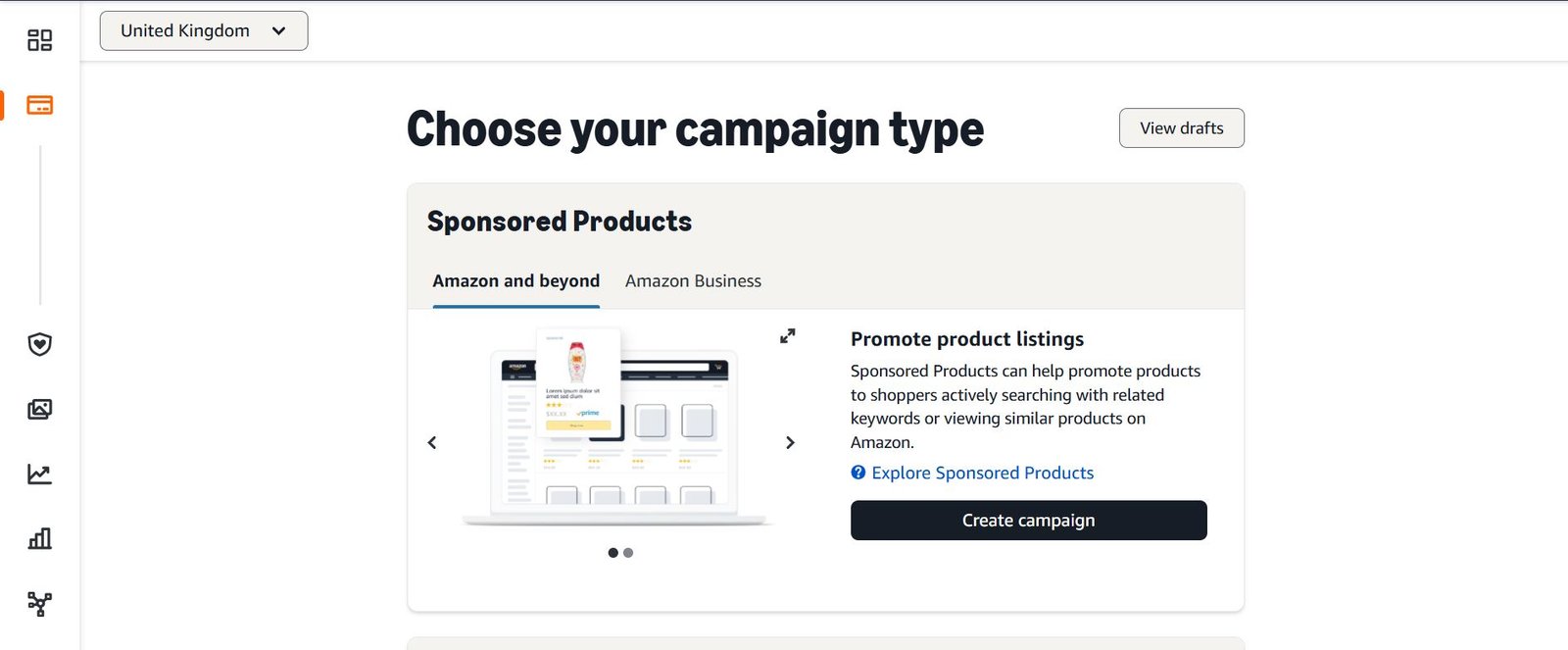
Configure Your Campaign Settings
Select the ASIN you want to advertise, such as the 32 oz water bottle used in this guide. Use a recognizable campaign name, for example, SP | 32oz Water Bottle | Auto, then set its start date, optional end date, daily budget, and ad group.
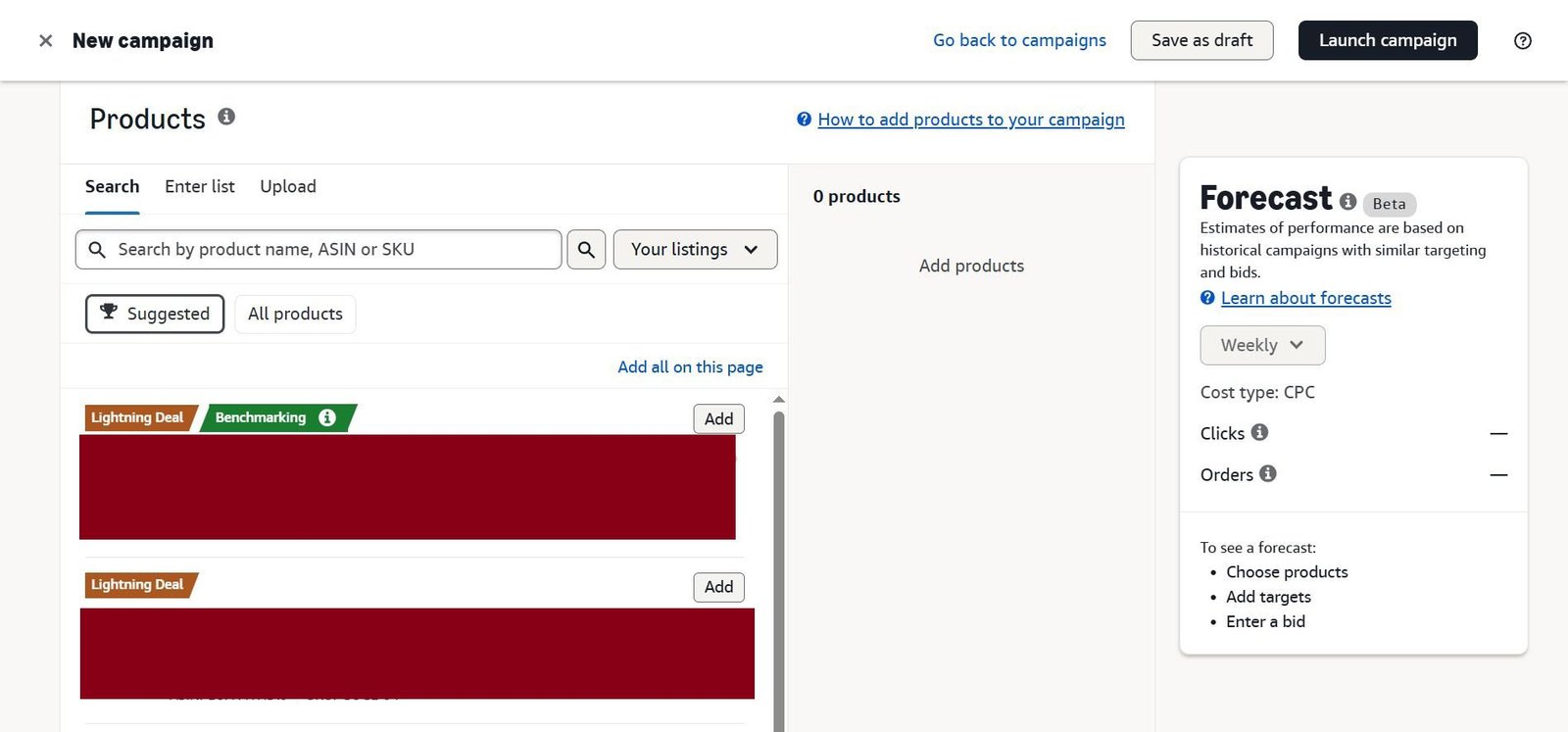
Products with substantially different shopping intent or contribution margins shouldn’t automatically share the same ad group. Keep naming and campaign organization understandable so performance can be reviewed accurately.
Choose Automatic or Manual Targeting
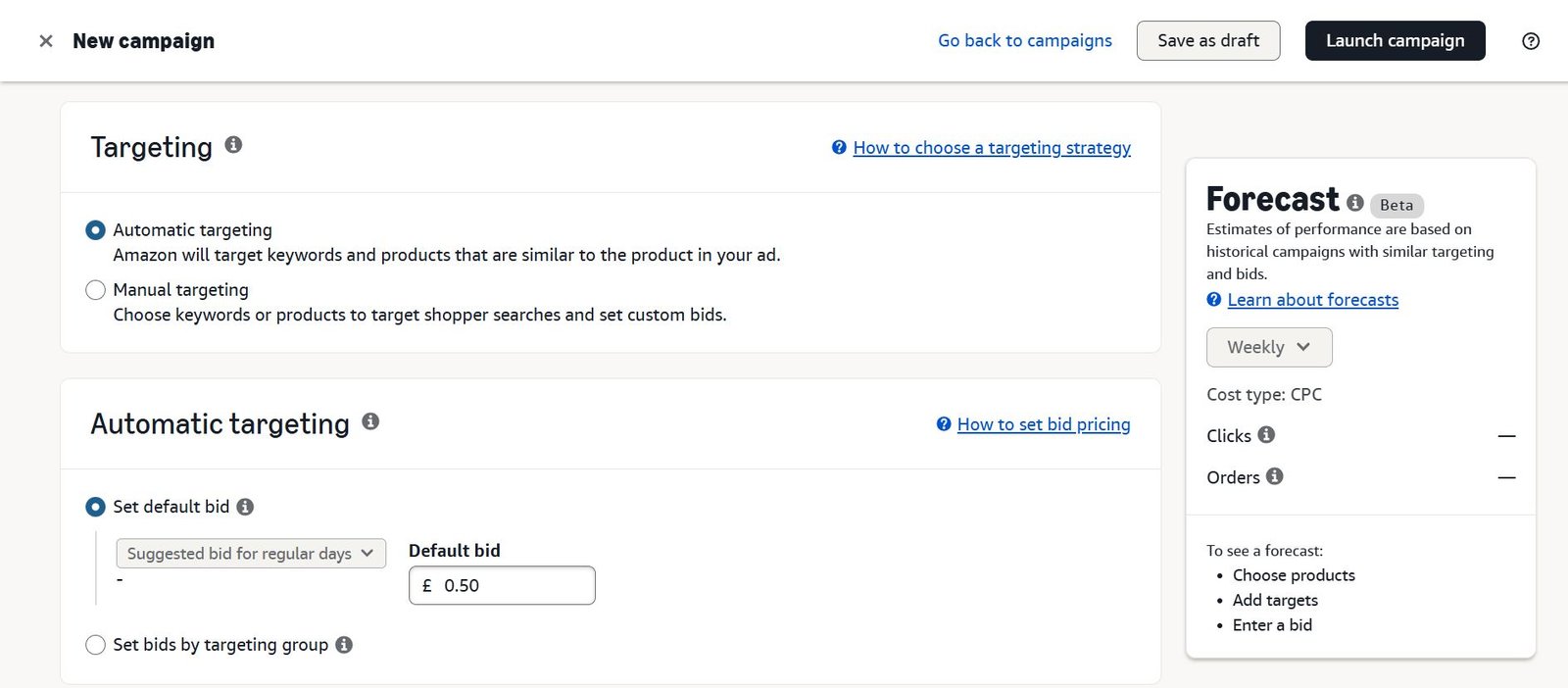
An automatic campaign can discover relevant customer search and product-page opportunities. A manual campaign provides selected keyword and product targeting controls. These are different targeting selections, so the example below uses separate campaigns:
| Example campaign | Targeting | Illustrative daily budget |
|---|---|---|
| SP – Water Bottle – Auto | Automatic: close match, loose match, substitutes, complements | $12 |
| SP – Water Bottle – Manual | Relevant keywords using exact and phrase match | $8 |
| Combined planned average budget | Two campaigns | $20 |
These are illustrative allocations, not a universal setup recommendation. In the automatic campaign, set a default bid or bids by targeting group. In the manual campaign, select terms such as 32 oz insulated water bottle, assign the appropriate match types, and set their bids. Use manual product targeting separately when targeting particular ASINs or categories.
Amazon doesn’t allow switching an existing Sponsored Products campaign between automatic and manual targeting; create another campaign for the alternative approach.
Enter Bids and Select a Bidding Strategy
Amazon offers suggested bids during campaign setup. Treat these as auction guidance, not proof that a keyword will be profitable. From Section 4, our model supports an estimated $0.60 average CPC at an assumed 10% purchase rate. Starting bids can be informed by this estimate and market competitiveness, but actual CPC and purchases may differ.

For a controlled test, dynamic bids – down only with no positive placement adjustments is one reasonable option. The earlier bidding section explains when other controls might be appropriate.
Review and Launch
Before selecting Launch campaign, confirm the marketplace, ASINs, daily budgets, targeting method, match types, negative targets, bidding strategy, and optional adjustments. Standard Sponsored Products uses listing assets automatically; eligible Sponsored Products video is added separately.
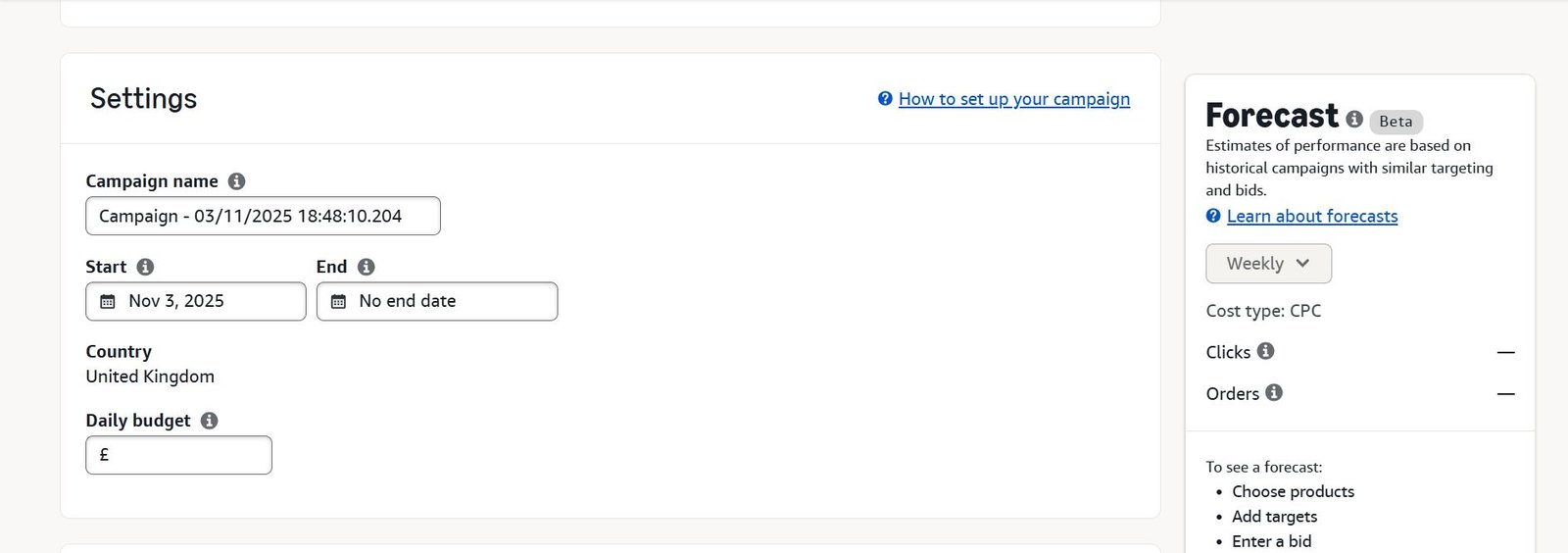
Once active, verify impressions and review clicks, spend, and attributed orders as sufficient data accumulates. Make immediate corrections to obvious setup or eligibility problems, but avoid repeated unsupported bid changes based on one or two days of results.
Using Sponsored Brands, Video Ads, and AI-Powered Product Collections
Sponsored Products primarily promotes individual product listings, while Sponsored Brands allows eligible advertisers to promote their brand and products through collections, video, and branded shopping experiences. In 2026, Amazon expanded these options with AI-powered Sponsored Brands collections, interactive Sponsored Products videos, and conversational ad prompts.
Sponsored Brands Collections
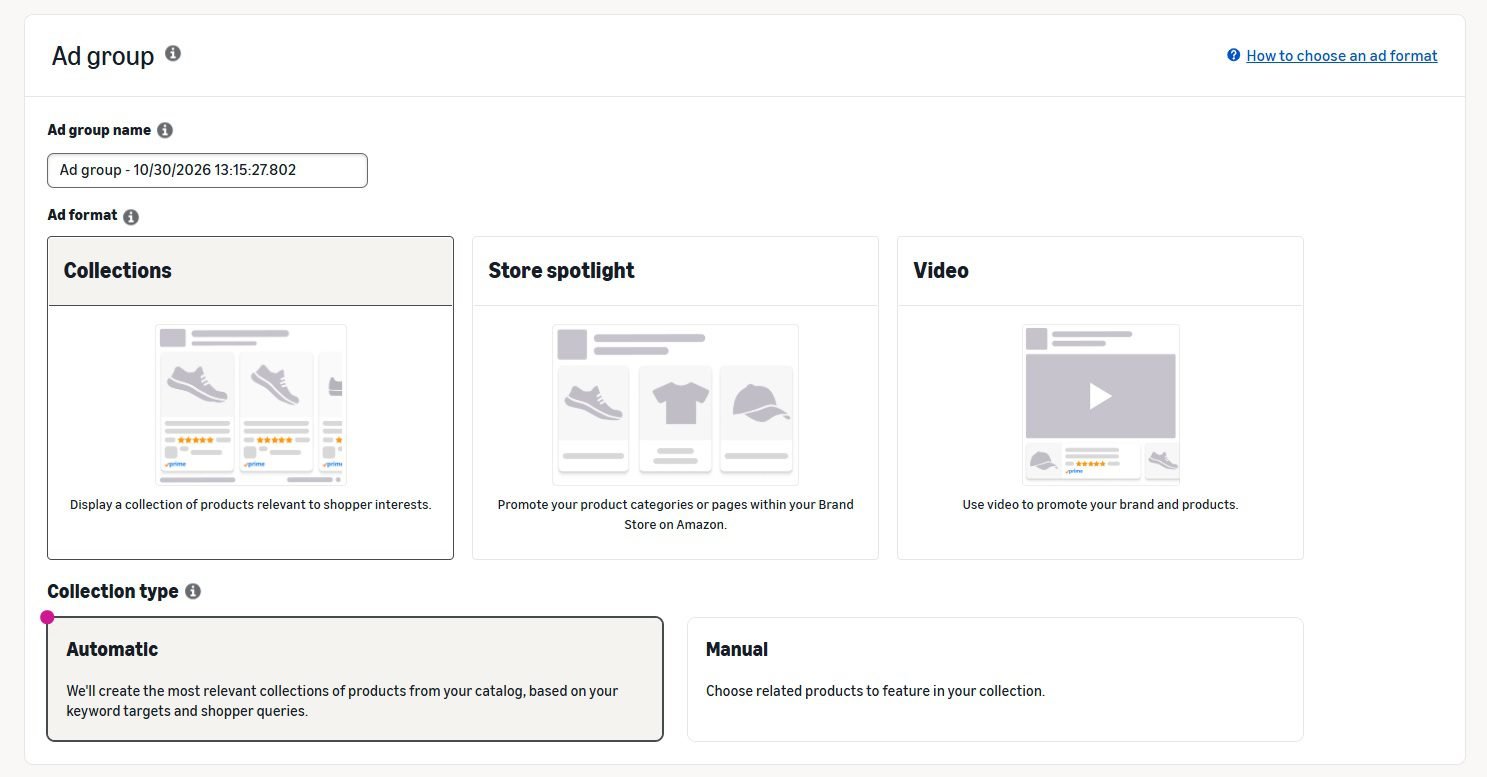
Sponsored Brands campaign creation offers three ad group formats: Collections, Store Spotlight, and Video. Open Campaign Manager → Create campaign → Sponsored Brands, enter the campaign settings, and choose the format under Ad group.
| Ad group format | Products and landing page | Available targeting |
|---|---|---|
| Collections | Automatic: Amazon selects 3–10 related products. Manual: You select 3–10 products. Product clicks lead to detail pages; branded elements lead to an eligible branded experience or Store page. | Automatic: Keywords. Manual: Keywords or products. |
| Store Spotlight | Select the Brand Store pages or subpages you want to feature; shoppers can visit the selected Store destinations. | Keywords or products. |
| Video | Upload a video and direct shoppers to a Brand Store or an eligible product detail page, depending on the campaign goal. | Keywords or products. |
After selecting the format, choose the applicable targeting method, enter bids, complete the creative, and submit the ad for review. The targeting methods and available landing pages depend on the selected format and campaign goal. Amazon’s Sponsored Brands collections guide explains automatic and manual selection.
Sponsored Products Video vs. Sponsored Brands Video
Amazon supports video within both campaign types, but the creative and landing-page experience differ.
| Feature | Sponsored Products video | Sponsored Brands video |
|---|---|---|
| Main objective | Demonstrate features of one ASIN | Introduce a product or brand through video |
| Creative format | 1–5 feature videos, at least 7 seconds each | One video, 6–45 seconds |
| Landing page | Advertised detail page | Eligible product detail page or Brand Store experience, based on format |
| Campaign setup | Added within a Sponsored Products ad group | Selected during Sponsored Brands campaign creation |
| Targeting | Existing Sponsored Products targeting | Applicable Sponsored Brands keyword or product targeting |
How to create Sponsored Products video ads: Open a new or existing Sponsored Products campaign, select the ad group, then go to Ads → Video → Add video. Upload up to five feature videos for the ASIN, add feature names and descriptions, and submit for review. Existing campaign targeting and budget apply, while eligible video-specific bid adjustments can be configured separately. Amazon’s Sponsored Products video guide provides current technical requirements.
How to create Sponsored Brands video ads: Open Campaign Manager → Create campaign → Sponsored Brands, choose the applicable objective and Video ad format, select the advertised product and eligible destination, upload the video, and configure targeting and bids before submitting for approval. Sponsored Brands offers CPC or vCPM depending on campaign goal and format.
AI-Powered Advertising Creatives and Conversational Prompts
Amazon’s Creative Agent and Video Generator help create advertising assets from product information using AI-assisted workflows. Review generated visuals and claims for product accuracy and advertising-policy compliance before submitting them.
Sponsored Products prompts and Sponsored Brands prompts became generally available to eligible US advertisers in March 2026. They surface contextual product information and can open shopping conversations. Existing eligible campaigns are automatically enrolled; reporting and pause controls are available, without creating a separate prompt campaign.
Amazon has announced Branded Conversations for January 2027, extending Sponsored Brands prompts into more detailed brand-informed interactions. This is an upcoming feature, not a generally available October 2026 capability.
Choose additional ad formats based on product suitability, creative requirements, available budget, and measurable objectives, rather than on the assumption that video or AI creative automatically improves results.
Amazon Display Advertising and the New DVA+ Campaigns
Amazon display advertising allows brands to reach relevant audiences beyond shopping search results, including placements across Amazon properties and eligible third-party websites and apps. In 2026, Amazon incorporated Sponsored Display into its broader display ads offering within Amazon Ads Agent. Existing Sponsored Display campaigns continue running as new campaign creation moves to the updated experience.
How Amazon Display Advertising Works
Unlike Sponsored Products keyword targeting, display advertising uses contextual and audience targeting. Advertisers can promote products alongside relevant ASINs, reach eligible shopper groups, or re-engage customers based on supported shopping behaviors.
For example, a water-bottle brand could target competing water bottles through contextual product targeting or reach eligible audiences that previously considered related products.
- CPC: Pay when someone clicks the ad.
- vCPM: Pay per 1,000 viewable impressions.
The available pricing and optimization approach depend on campaign objectives and account access.
How to Create an Amazon Display Ads Campaign
Sign in to Amazon Ads and choose Create campaign → Display in the available campaign experience. Display may appear under Display, Video and Audio depending on the account.
- Set campaign details: Enter the campaign name, dates, and daily budget.
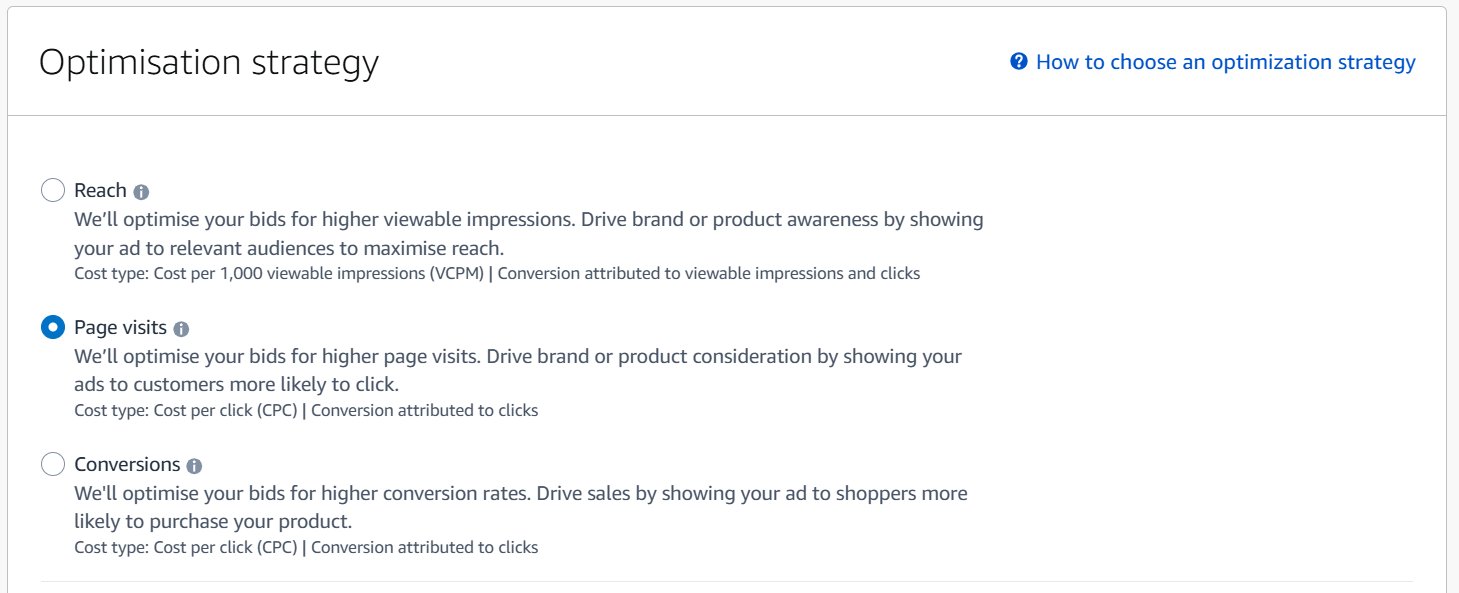
- Choose optimization: Select the available objective for conversions, page visits, or viewable impressions and its supported bid settings.
- Select advertised products: Add the eligible ASINs.
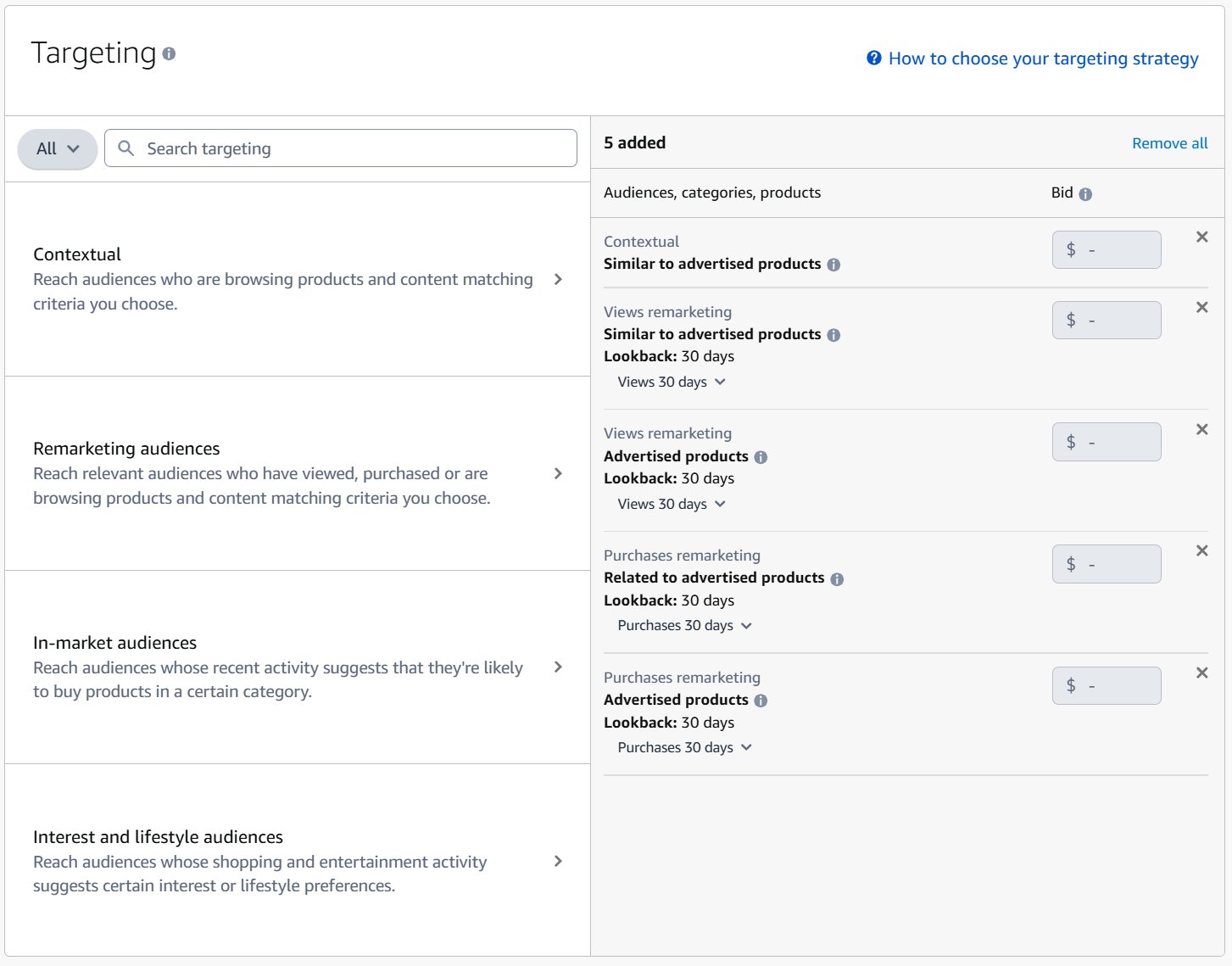
- Choose targeting: Select contextual targeting for relevant products or categories, or audience targeting for eligible customer segments.
- Choose ad format and creative: Select an eligible image or video format, confirm the destination, and review the creative.
- Review and launch: Confirm the objective, bids, targeting, budget, advertised products, and creative.
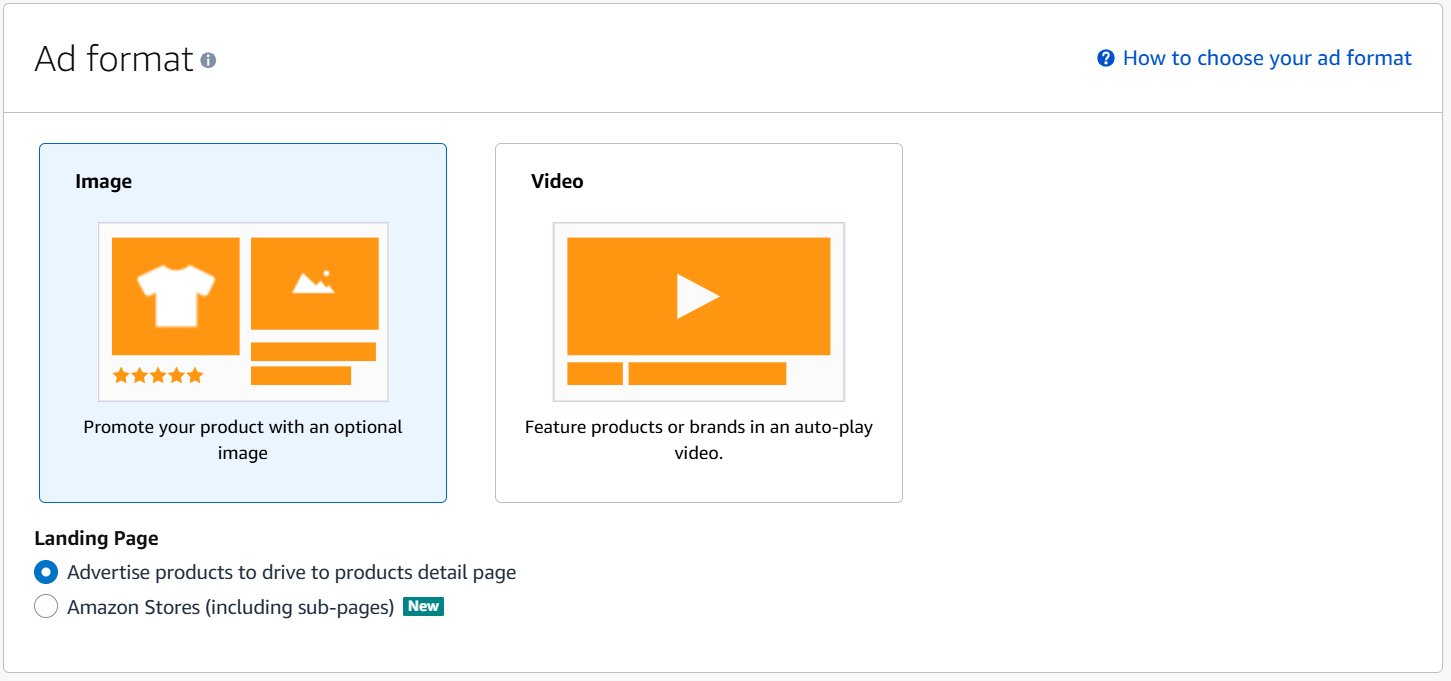
Available controls vary by campaign experience, marketplace, and account eligibility. The screenshots illustrate the relevant settings; your campaign builder may present them in a different order.
What Is Amazon DVA+?
Introduced on September 29, 2026, DVA+ (Display, Video, and Audio) is Amazon’s newer unified buying and optimization experience for eligible display, online video, streaming TV, and audio advertising.
Eligible advertisers can choose an objective, select the brand or products, review available AI-generated assets, and set a campaign budget. Amazon uses Brand+ and Performance+ capabilities to assist with targeting, bidding, delivery, and optimization. More experienced advertisers may use DVA+ advanced settings for manual audiences, remarketing, publisher selection, frequency management, and programmatic controls.
Creating DVA+: When available, use Amazon Ads Agent to create a Display, Video and Audio campaign, choose the applicable DVA+ experience, enter its objective and promoted products, review creatives, and set budget and dates. Advanced settings require the appropriate access.
Availability: Amazon’s October 2026 announcement describes DVA+ as an extended US closed beta, with open beta expected in late October and wider international rollout planned afterward. Access must be confirmed in the advertiser’s account. Closed-beta payment is invoice-only. Read Amazon’s DVA+ launch status.
DVA+ differs from Full-Funnel Campaigns: DVA+ focuses on display, video, and audio, while Full-Funnel Campaigns also coordinates sponsored ads. For a seller focused on customers actively searching for one product, Sponsored Products may remain a better initial priority.
Amazon Full-Funnel Campaigns and How the New AI-Powered Campaign Type Works
On September 29, 2026, Amazon introduced Full-Funnel Campaigns, a new AI-powered campaign type coordinating sponsored ads, display, online video, and streaming TV through one campaign budget.

Instead of separately managing advertising across the customer journey, eligible advertisers provide strategic inputs and Amazon’s AI selects formats, audiences, and budget allocations. Full-Funnel Campaigns launched in US open beta in September 2026; sellers should confirm eligibility and account access.
How Full-Funnel Campaigns Work
| Customer journey | Illustrative advertising role |
|---|---|
| Awareness | Streaming TV or online video introduces a brand or product to relevant audiences. |
| Consideration | Display and video can reach audiences considering related products. |
| Purchase | Sponsored ads reach shoppers during product discovery and buying decisions. |
These are illustrative roles, not three fixed campaign stages with predetermined spending. Amazon’s AI uses available signals to coordinate ad formats and adapt delivery toward the campaign’s stated objective.
How to Create a Full-Funnel Campaign
Eligible advertisers can open Campaign Manager → Create campaign → Full-Funnel Campaigns. Amazon may prepopulate recommendations using available brand and shopping data. Review the following inputs:
- Advertised products: Choose the brand and eligible ASINs.
- Budget and dates: Set the campaign’s total available investment and timing. Amazon specifies a minimum daily budget of $100 for Full-Funnel Campaigns in its October 13, 2026 setup guidance. This minimum applies to this campaign type, not standard Sponsored Products.
- Optional ROAS threshold: Supply an optimization objective when appropriate.
- Creative assets: Review and approve AI-generated images or video where required.
Budget requirement: A Full-Funnel Campaign must have at least a $100 daily budget under Amazon’s published US beta rules. At that level, a 30-day campaign has a $3,000 planned average budget if it spends its full allocation; actual spending can be lower. Check current availability and required settings in your account.

Once launched, Amazon coordinates eligible format selection, audience delivery, budget allocation, and optimization. The actual available settings depend on the beta experience.
Measure Full-Funnel Campaign Results Carefully
Alongside impressions, clicks, attributed sales, and ROAS, these campaigns provide new-to-brand measurements and Long-Term Sales (LTS). Long-Term Sales includes actual immediate attributed sales plus an estimate of future sales value associated with new-to-brand customer interactions during the following 12 months.
Long-Term Sales is not revenue already received. Do not treat modeled future customer value as realized cash or immediate profit. Amazon has published favorable results from early beta advertisers, but those internal comparisons are not guaranteed outcomes for any given account.
Full-Funnel Campaigns or Traditional Sponsored Products?
A new seller with one ASIN and a limited testing budget may benefit from the detailed keyword, bid, and placement controls of independently managed Sponsored Products campaigns. An established brand with multiple products and sufficient budget may find a coordinated full-funnel approach useful for reaching new customers across formats.
Can you run only one Full-Funnel Campaign? Amazon describes a Full-Funnel Campaign as one coordinated campaign spanning several advertising formats. That does not establish a published limit of one Full-Funnel Campaign per advertiser or brand. Amazon’s current public setup documentation does not specify a universal one-campaign maximum; advertisers should check the limits shown in their own account rather than assuming such a restriction.
Amazon allows Full-Funnel Campaigns to run alongside existing campaigns; adopting the new type does not require replacing Sponsored Products. Evaluate total advertising investment, attributable results, new-to-brand performance, and product-level profitability before reallocating a major share of the budget.
How to Use Amazon Ads Agent and AI-Powered Campaign Recommendations
In September 2026, Amazon announced Amazon Ads Agent, the unified, agentic-AI-powered platform bringing Sponsored Ads, DVA+, and Full-Funnel Campaigns into one advertising environment. Its developing conversational experience can help eligible advertisers plan campaigns, review performance, and evaluate recommended changes using natural language.
Amazon Ads Agent is the platform; conversational campaign-management capabilities have a phased rollout. As of October 2026, some enhanced conversational functions are available only to closed-beta advertisers. Amazon’s feature announcement explains the current scope.
What Can Amazon Ads Agent Do?
| Capability | Practical use |
|---|---|
| Media planning | Estimate audience reach and review cross-format budget allocation suggestions. |
| AI-assisted targeting | Evaluate suggested keywords, product categories, and audiences. |
| Campaign recommendations | Review proposed bid, budget, and targeting changes for supported campaigns. |
| Performance analysis | Ask questions about trends, campaign changes, benchmarks, and available reporting. |
| Campaign management | Review and approve supported actions, subject to available beta functionality. |
For example, an advertiser with access might ask which Sponsored Products campaigns have experienced a declining ROAS, which targets account for the greatest increase in spend, or whether a proposed bid change fits the campaign’s goals. The tool’s exact abilities depend on account access and supported workflows.
AI-Powered Campaign Intelligence
Amazon announced AI-powered campaign intelligence in September 2026, including an intelligence dashboard with explanations and recommendations about targeting, bids, and budget performance. US availability was announced during October. Advertisers can review, modify, apply, or skip recommendations in the supported experience.
Suppose Amazon recommends raising bids for our hypothetical water-bottle campaign to capture additional impressions. The seller should still compare actual CPC, purchase rate, ACoS, and the $6 target advertising cost per attributed order. Additional impressions are not necessarily incremental profitable orders.
Upcoming Auto-Optimization and Creative Tools
Amazon has announced automated Sponsored Products targeting optimization for January 2027. Intended capabilities include finding new keyword and product targets and changing poor-performing targets. This should not be described as a generally available October 2026 setting.
Amazon’s Creative Agent is a separate creative-development capability for eligible image and video workflows. AI-assisted creative production doesn’t remove the advertiser’s responsibility to verify claims, comply with advertising policies, and manage investment decisions. Use AI recommendations as evidence to evaluate, not as automatic proof that a change will improve profit.
How to Measure Amazon Advertising Performance
Advertising performance must be evaluated using both Amazon Ads reporting and the product’s actual financial economics. Campaign Manager provides high-level metrics, while more detailed advertising reports help evaluate search terms, targets, placements, and promoted ASINs.
Key Amazon Advertising Metrics
| Metric | Meaning |
|---|---|
| Impressions | Number of ad impressions served. |
| CTR | Clicks ÷ impressions. |
| CPC | Advertising spend ÷ clicks. |
| Purchase Rate | Reported attributed purchases ÷ ad clicks, using applicable report definitions. |
| ACoS | Advertising spend ÷ attributed advertising sales. |
| ROAS | Attributed advertising sales ÷ advertising spend. |
| TACoS | Advertising spend ÷ total sales across the comparable scope and period. |
In applicable Amazon Ads reports, Purchase Rate is the rate of ad-attributed purchases relative to ad clicks for the selected reporting scope. Confirm which purchases and clicks a report includes before using its figures for bidding decisions.
For our hypothetical water bottle, 10,000 impressions, 100 clicks, $60 spend, and 10 attributed $30 orders yield a 1% CTR, $0.60 CPC, 10% purchase rate, 20% ACoS, and 5.0 ROAS, assuming one unit per attributed order. Under the earlier cost assumptions, that implies about $3 contribution after advertising per attributed order.
If total Amazon sales for the comparable period were $600, TACoS would be 10% ($60 ÷ $600). TACoS evaluates spend against total sales but doesn’t, by itself, show which sales advertising caused.
Which Advertising Reports Should You Use?
| Report | Optimization question |
|---|---|
| Search Term Report | Which reported customer searches or targeting contexts generated clicks, spend, and attributed sales? |
| Targeting Report | Which keywords, automatic targeting groups, and product targets meet your performance targets? |
| Placement Report | How does performance differ across top of search, rest of search, and product pages? |
| Advertised Product Report | Which promoted ASINs receive advertising spend and attributed outcomes? |
| Purchased Product Report | Which products were purchased after eligible attributed ad interactions? |
The Search Term Report includes terms associated with at least one ad click; its impressions may not equal total Campaign Manager impressions. This is a reporting-scope difference, not necessarily a data error.
Attribution, Reporting Delays, and Incremental Sales
Amazon reports ad-attributed sales, which shouldn’t be interpreted automatically as sales that would never have happened without advertising. Current Sponsored Products documentation specifies a seven-day click attribution window for sellers, with different windows for vendors and other advertiser types. Other ad products can follow different click/view attribution methodologies.
Sponsored ads attributed sales can take up to 48 hours to populate, so yesterday’s data may still be incomplete. Avoid comparing different ad formats as if their attribution, conversion counts, and reporting windows are identical.
Use 2026 Category Benchmarks Appropriately
Amazon expanded category peer Benchmarks reporting in 2026. Eligible advertisers can compare metrics such as CPC, CTR, and applicable new-to-brand measures with category peer groups. These provide context, not a replacement for individual product contribution calculations.
Full-Funnel Campaigns may report new-to-brand activity and modeled Long-Term Sales. Keep modeled future value separate from realized advertising sales when evaluating near-term profitability.
How to Improve Amazon Ads After Launching Your Campaigns
Amazon PPC optimization means adjusting targets, bids, placements, and budgets using campaign data and product economics. A structured Amazon PPC audit can help identify the most important issues before making changes. The objective isn’t simply the lowest ACoS: it’s to find where additional advertising can generate orders at an acceptable cost.
New campaigns need time to produce useful data and allow attribution to populate. Correct clearly irrelevant targeting or serious setup problems immediately, but don’t make repeated changes solely because a campaign had one slow day.
Diagnose the Problem Before Changing Settings
| Observed result | What to investigate |
|---|---|
| Few or no impressions | Eligibility, available inventory, targeting relevance, bids, and budget status. |
| Impressions but low CTR | Main image, title, price, shopping context, and competing offers. |
| Clicks but few attributed orders | Search intent, price, ratings, listing experience, purchase rate, and attribution delay. |
| High ACoS | CPC, purchase rate, low-performing searches, and advertised ASIN economics. |
| Good ACoS but limited volume | Search demand, eligible impression share, bid competitiveness, and budget constraints. |
Optimize Search Terms and Negative Targeting
Compare two hypothetical customer searches for our water bottle:
| Search term | Clicks | Spend | Orders | Sales | ACoS |
|---|---|---|---|---|---|
| 32 oz insulated water bottle | 50 | $30 | 5 | $150 | 20% |
| stainless steel drinking bottle | 40 | $32 | 1 | $30 | 106.7% |
The first term meets the 20% target ACoS and might merit separate exact-match management if more precise bid control is valuable. The second has a 2.5% purchase rate and an $0.80 average CPC. At the target $6 advertising cost per order, a 2.5% purchase rate would support only about $0.15 average CPC. Reducing the bid could help, but only if sufficient eligible traffic remains and the search actually fits the product.
For irrelevant searches, use negative exact or negative phrase, taking supported close variations into account. Negative targeting can be set at eligible campaign or ad group levels. Don’t exclude every search with no order after an arbitrary number of clicks; consider relevance, spend, expected conversion, and data volume.
Adjust Bids, Placements, and Budgets with Evidence
For a profitable target, a measured bid increase can test whether additional opportunities produce profitable orders. Follow changes in actual CPC, ACoS, and total contribution afterward. For weak targets, consider lowering bids, improving match precision, or removing irrelevant queries.
Use the Placement Report before increasing top-of-search, rest-of-search, or product-page adjustments. A placement with stronger purchase rate may still be less profitable if the required CPC is substantially higher. Likewise, a campaign running out of budget deserves more investment only when the incremental spending case makes financial sense.
Run a Weekly Advertising Review
Each week, compare campaign, ad group, target, search term, placement, and advertised-ASIN performance against the product’s contribution margin and target ACoS. Look for useful targets with constrained delivery, costly targets with insufficient sales, listing changes, and inventory-related performance issues.
Allow reporting time for attributed sales, document significant changes with their dates and rationale, and avoid modifying too many related variables at once. This makes performance comparisons more meaningful and prevents decisions based on isolated metrics.
Strong Amazon PPC management is a repeated process of forming a hypothesis, checking the relevant report, making a controlled change, and measuring the financial outcome.
Frequently Asked Questions About Advertising on Amazon
How much money do you need to start advertising on Amazon?
Sponsored Products has no upfront advertising fee, and advertisers select their bids and daily budgets. An amount adequate for meaningful testing depends on expected CPC, product purchase rate, and available capital. A very small budget may produce too few clicks to assess performance.
Can you advertise on Amazon without Brand Registry?
Yes. Eligible professional sellers can use Sponsored Products without Brand Registry. Sponsored Brands generally requires eligible Brand Registry enrollment for sellers, alongside the relevant advertising eligibility conditions.
Which Amazon advertising campaign is best for beginners?
Sponsored Products is generally a practical starting point because it promotes individual listings with automatic, keyword, and product targeting and provides attributed-sales reports. The best choice still depends on the seller’s objectives and products.
Can small sellers use Full-Funnel Campaigns?
Eligible US advertisers can use Full-Funnel Campaigns in the open beta, subject to access and setup requirements. Amazon’s published minimum is $100 per day. The offering coordinates multiple ad formats within one campaign; Amazon has not published a universal limit allowing only one such campaign per brand. Confirm the controls and eligibility in your Amazon Ads account.
Is Amazon Ads Agent available to every advertiser?
Amazon announced the unified Ads Agent platform in September 2026, but enhanced conversational management and related AI functions have phased beta eligibility. Check the available controls in your marketplace and account.
How long does it take for Amazon PPC campaigns to become profitable?
There is no reliable universal timeline. Profitability depends on product contribution margin, CPC, purchase rate, competitive conditions, attribution timing, and campaign decisions. Use sufficient data and product-specific break-even calculations rather than promising a fixed number of days.