
Amazon Platinum Keywords Are Gone: What Keyword to Use Instead?
Amazon Platinum Keywords are defunct. Use the backend fields that actually support discovery, indexing, and Amazon PPC targeting today.

Amazon Platinum Keywords are a legacy backend field on Amazon Seller Central. Originally exclusive to top-tier Platinum Sellers, the field is now defunct and ignored by Amazon’s current search algorithm. It never impacted organic ranking or indexing. Amazon retired the Platinum Merchant program in 2016 but left the field in Seller Central and flat file templates where it remains visible but completely non-functional. The backend fields that actually drive indexing today are Item Type Keyword for browse node placement, Target Audience Keyword for personalization filters, and Generic Keyword (Backend Search Terms) for search indexing, and PPC broad targeting.
Make Your Amazon PPC Targeting Work Harder
Find the listing and keyword gaps limiting your Amazon PPC campaigns.
Backend Keywords Options After Platinum Keywords
There are three backend keyword fields after Platinum Keywords. Each has a distinct role in discovery and conversion.
- Item Type Keyword: Controls browse node placement and category bestseller list eligibility
- Target Audience Keyword: Feeds personalization filters like Gift Finder and Amazon Business
- Generic Keyword (Backend Search Terms): The only backend field that expands search indexing
Item Type Keyword
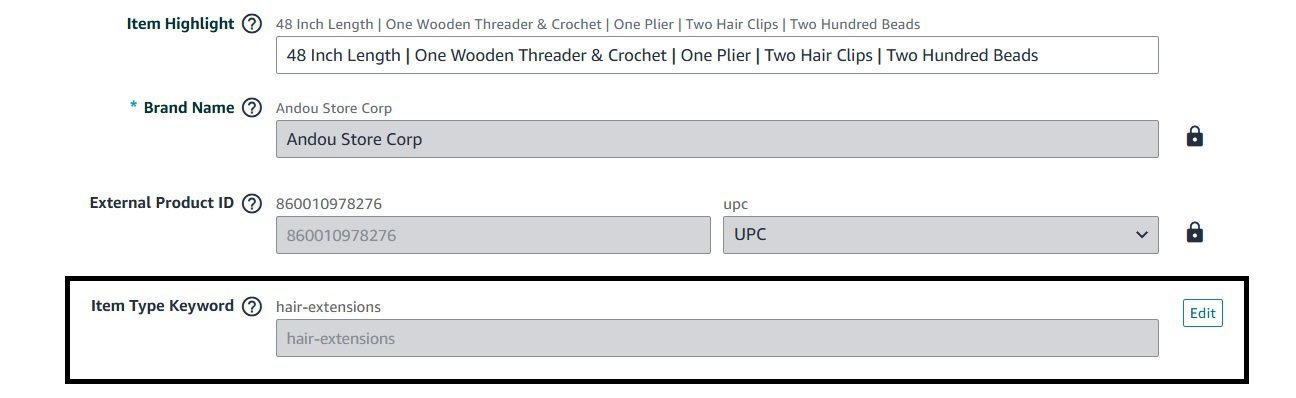
Item Type Keywords are not search keywords. They are category classifiers. The value you select tells Amazon which browse node owns your listing. That single choice controls:
- Which bestseller list you compete on
- Which refinement filters appear on your detail page
- Your competitor set for Best Seller Rank
- Eligibility for category programs like Subscribe and Save and Amazon Business pricing
Choosing the Right Value
Download the category-specific flat file from “Add Products via Upload”. For product like hair extensions, the path should be “Beauty > Hair Care > Hair Extensions and Wigs > Hair Extensions”. Open the Valid Values tab. Every accepted Item Type Keyword for that browse node is listed there. Pick the one that matches your product construction like clip-in, tape-in, sew-in, halo, or wig.
How to Fix Wrong Item Type Keyword Selection
The field locks after creation. You cannot change it yourself if you selected the wrong item type keyword. Open a Seller Support case with the ASIN, the current value, and the correct value from the Valid Values sheet. Most cases resolve in 24 to 48 hours.
Products spanning two categories, a hair topper that functions as both wig and partial extension, must pick one primary use case. Amazon does not assign dual browse nodes through Item Type Keywords. A second browse node request through Brand Registry support is possible but approval is inconsistent.
Target Audience Keyword
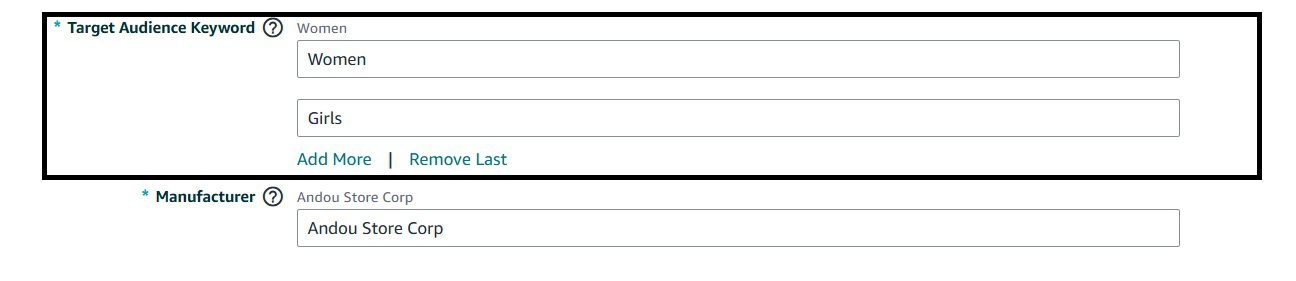
Target Audience accepts free-text values describing the intended user. It does not control browse placement. It feeds personalization systems, Gift Finder, Amazon Business, and the “For You” recommendations on mobile.
Values That Work in Most Categories
- Men, Women, Unisex
- Adults, Seniors, Youth, Children, Infants
- Professionals, Students, Athletes, Expecting Mothers
- Left-handed, Plus-size, Petite, Tall
Target Audience does not move organic rank or indexing directly. It controls filtered visibility. When a shopper applies the “Women” filter in Clothing or “Seniors” in Health, matching listings surface. Missing the field means invisibility in those filtered views.
The field has no controlled vocabulary validation. You can type anything. But Amazon’s personalization engine only recognizes a standard set. “Ladies who love long hair” does nothing. Use the demographic terms Amazon’s filters actually use.
Generic Keyword (Backend Search Terms)
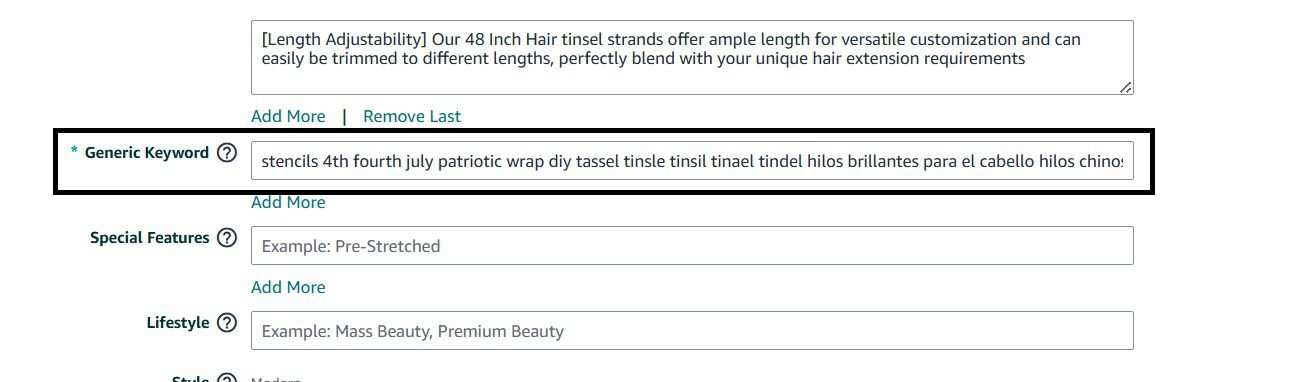
This is the field sellers mean by “backend keywords.” In Seller Central it sits under the “Product Details” tab labeled Search Terms. In flat files it is generic_keywords or backend search terms. Amazon indexes every term here for search matching. It is the only backend field that directly expands the keyword set your listing is eligible to appear for.
Byte Limit
The standard limit for North America and Europe is 249 bytes. Japan allows 500 bytes. India allows 200 bytes. Most Amazon product categories in the US have a 500-byte limit for backend search terms. This limit came from a category rollout that began in early 2024 and was never applied consistently across all categories.
Bytes vs Characters
One ASCII character equals one byte. Special characters consume more:
- ü = 2 bytes
- ñ = 2 bytes
- ™ = 3 bytes
- 😀 = 4 bytes (emoji are not indexed)
Formatting Rules
- Separate terms with spaces only. No commas, pipes, semicolons, or line breaks. Each punctuation mark wastes a byte.
- No stop words: and, or, the, for, with, a, an, in, on, of. Amazon ignores them.
- No plural or singular duplication: hair extension covers hair extensions through stemming.
- No brand names, yours or competitors. Policy violation and wasted bytes.
- No ASINs, UPCs, or model numbers.
- No subjective claims: best, top, premium, amazing.
What to Include
Since Platinum Keywords are dead, use Search Terms for:
- Synonyms and regional variants: clip in hair extensions, clip-in hair extensions, clipin hair extensions
- Misspellings with search volume: extentions, extentions hair, clips in hair extentions (verify volume in Search Query Performance or Helium 10)
- Foreign language terms: extensiones de cabello (Spanish), extensions cheveux (French) for US bilingual traffic
- Material and attribute terms not in frontend — remy human hair, double drawn, silicone backed, 18 inch, 20 inch
This keyword logic is specific to Amazon’s retail search index. If you also publish under KDP, note that Kindle’s indexing runs on a completely separate system with its own field limits and matching rules, so a general-purpose KDP keyword research tool is a better starting point for book listings than anything covered here.
Backend Field Options to Use After Platinum Keywords
| Field | Indexed for Search | Controls Browse Node | Feeds Personalization | Byte Limit (US) |
|---|---|---|---|---|
| Generic Keyword (Backend Search Terms) | Yes | No | Indirectly | 249 bytes |
| Item Type Keyword | No | Yes | No | Fixed values only |
| Target Audience Keyword | No | No | Yes | Free text (standard terms only) |
| Platinum Keywords | No | No | No | N/A (dead) |
How Generic Keywords (Backend Search Terms) Impact PPC Targeting
Automatic and broad match campaigns pull candidate keywords from listing content: title, bullets, description, and Generic Keywords (Backend Search Terms). A well-structured Generic Keywords field expands the automatic targeting universe. If Generic Keywords includes hair extensions for thin hair, automatic targeting can serve your ad for that query even if the phrase never appears in frontend copy.
Generic Keywords optimization is also a PPC efficiency lever, not just SEO task.
Generic Keywords do not override weak frontend relevance. If title and bullets lack clip in hair extensions, stuffing it in Generic Keywords will not rank page one for that term. Generic Keywords expand eligibility; frontend content drives ranking Juice.
Flat File Workflow To Change Item Type Keyword
The flat file workflow may or may not change the Item Type Keyword (category). If the update does not take effect, you will have to go to Seller Support to manually request the change.
For catalogs over 50 SKUs, editing in Seller Central one by one is impractical. Use the category-specific flat file:
- Inventory > Add Products via Upload > Download an Inventory File
- Select your category (example: Beauty > Hair Care > Hair Extensions and Wigs > Hair Extensions)
- Choose Advanced template type for all attribute groups
- Open the Valid Values tab as it shows every accepted Item Type Keyword, Target Audience value, and Subject Matter code
- Fill generic_keywords, target_audience, item_type_keyword, subject_matter, intended_use for each SKU
- Validate byte counts in Excel: =LENB(cell) for byte length
- Upload via Add Products via Upload > Check My File > Submit
This guarantees valid Item Type Keywords and byte compliance. It also creates an auditable submission record.
Frequently Asked Questions
Do Amazon Platinum Keywords still work in 2026?
No. Amazon retired the Platinum Merchant program in 2016. The field remains visible in Seller Central and flat file templates but the indexing algorithm ignores it completely. Entering keywords there has zero impact on ranking or discoverability.
What replaced Platinum Keywords?
There was no direct replacement field. Amazon leveled the playing field by making the standard Search Terms field the primary backend keyword tool for all sellers. The five active backend fields today are Item Type Keyword, Target Audience Keyword, Generic Keyword (Backend Search Terms), Subject Matter, and Intended Use.
What is the byte limit for Search Terms in the US marketplace?
249 bytes. Japan allows 500 bytes. India allows 200 bytes. The 500-byte figure cited in some guides came from a limited category rollout in early 2024 that was never standardized across the US marketplace.
What happens if I exceed the byte limit?
If you exceed the limit, Amazon will give an error and you will not be able to save the listing until your generic keywords limit is 500-bytes.
Should I use commas to separate keywords?
No. Use single spaces only. Commas, pipes, semicolons, and other punctuation consume bytes without adding indexing value. Amazon treats single spaces as the keyword separator.
Can I repeat keywords from my title and bullets in Search Terms?
No. Amazon already indexes your title, bullets, and description. Repeating those words wastes limited byte space without adding any ranking benefit.
Should I include misspellings in Search Terms?
Only if they have real search volume. Check Search Query Performance or Helium 10 for actual misspelling volume. Amazon’s fuzzy-match technology now catches many obvious typos automatically. Prioritize synonyms and use-case terms first.
Do backend keywords affect PPC campaigns?
Indirectly. Automatic and broad match campaigns pull candidate keywords from listing content including Search Terms. A well-structured Search Terms field expands the automatic targeting universe. Keywords that drive paid conversions should also be in your backend for organic reach.
Can I change the Item Type Keyword after the listing is live?
Not yourself. The field locks after creation. You must open a Seller Support case with the ASIN, current value, and correct value from the Valid Values sheet. Include a screenshot of the flat file tab. Most cases resolve in 24 to 48 hours.
What if my product fits two categories?
You must pick one primary use case for Item Type Keyword. Amazon does not assign dual browse nodes through this field. You can request a second browse node through Brand Registry support but approval is inconsistent.
Need an Amazon PPC Growth Plan?
Discuss the PPC actions that can improve efficiency and scale.